



Yolov4环境搭建
这里的环境与yolov3大致相同,差别主要在pre-train weights和conv连接
Cloning and Building Darknet
clone darknet from AlexeyAB’s famous repository,
git clone https://github.com/AlexeyAB/darknet
adjust the Makefile to enable OPENCV and GPU for darknet
cd darknet
sed -i 's/OPENCV=0/OPENCV=1/' Makefile
sed -i 's/GPU=0/GPU=1/' Makefile
sed -i 's/CUDNN=0/CUDNN=1/' Makefile
sed -i 's/CUDNN_HALF=0/CUDNN_HALF=1/' Makefile
build darknet
make
Pre-trained yolov4 weights
YOLOv4 has been trained already on the coco dataset which has 80 classes that it can predict.
wget https://github.com/AlexeyAB/darknet/releases/download/darknet_yolo_v3_optimal/yolov4.weights
Test env Enabled
./darknet detector test cfg/coco.data cfg/yolov4.cfg yolov4.weights data/person.jpg
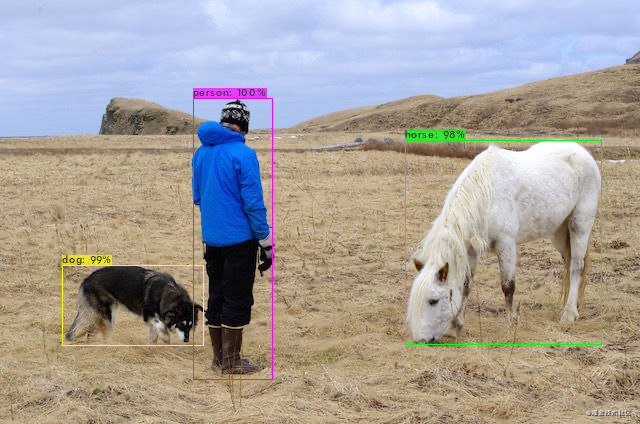
Multiple Images at Once
-
make a
.txtfile which has the paths to several images want to be detected at oncedata/person.jpg data/horses.jpg data/giraffe.jpg data/dog.jpg -
save result to
.jsonfile./darknet detector test cfg/coco.data cfg/yolov3.cfg yolov3.weights -ext_output -dont_show -out result.json < list.txt[{ "frame_id": 1, "filename": "data/person.jpg", "objects": [{ "class_id": 17, "name": "horse", "relative_coordinates": { "center_x": 0.783550, "center_y": 0.566949, "width": 0.335207, "height": 0.486880 }, "confidence": 0.997604 }, { "class_id": 16, "name": "dog", "relative_coordinates": { "center_x": 0.206590, "center_y": 0.722102, "width": 0.229715, "height": 0.210134 }, "confidence": 0.994348 }, { "class_id": 0, "name": "person", "relative_coordinates": { "center_x": 0.364771, "center_y": 0.558493, "width": 0.134738, "height": 0.669826 }, "confidence": 0.999949 } ] }, //... ]
Yolo command line flags
-
-thresh: add a threshold for confidences on the detections, only detections with a confidence level above the threshold will be returned -
-dont_show: not have the image outputted after running darknet -
-ext_output: output bounding box coordinatesdog: 99% (left_x: 59 top_y: 262 width: 147 height: 89) person: 100% (left_x: 190 top_y: 95 width: 86 height: 284) horse: 100% (left_x: 394 top_y: 137 width: 215 height: 206)
Yolov4训练自定义数据集
大致方法与yolov3相同,但昨天的训练更多的使用比较成熟的解决方案,对具体步骤还不是完全明白掌握,因此决定今天再次详细的从头进行学习
- Labeled Custom Dataset
- Custom .cfg file
- obj.data and obj.names files
- train.txt file (test.txt is optional here as well)
Gathering and Labeling a Custom Dataset
Using Google’s Open Images Dataset
由于实验室的任务针对特定几种玩具,且在扩展性上没有太强硬的要求。因此谷歌的开源数据集仅做学习使用,还是采用自己标注数据集的方法进行数据集的构建
Manually Labeling Images with labelImg(Annotation Tool)
至此已经准备好用于train和valid的数据集了
Configuring Files for Training
cfg file
edit the yolov4.cfg to fit the needs based on the object detector
-
bash=64&subdivisions=16:网上比较推荐的参数这里受限于服务器容量 将subdivisions设为32,但是速度仍然很慢
-
classes=4in the three YOLO layers -
filters=(classes + 5) * 3: three convolutional layers before the YOLO layers -
width=416&height=416: any multiple of 32, 416 is standard- improve results by making value larger like 608 but will slow down training
-
max_batches=(# of classes) * 2000: but no less than 6000 -
steps=(80% of max_batches), (90% of max_batches) -
random=1: if run into memory issues or find the training taking a super long time, change three yolo layers from 1 to 0 to speed up training but slightly reduce accurancy of model
obj.names
one class name per line in the same order as dataset generation step
NOTE: don’t have spaces in class name, use _ for replacement
sheep
giraffe
cloud
snow
obj.data
classes= 4
train  = data/train.txt
valid  = data/test.txt
names = data/obj.names
backup = backup
backup: where save the weights to of the model throughout training
train.txt and test.txt
hold the reletive paths to all the training images and valididation images, it contain one line for each training image path or validation image path
Train Custom Object Detector
Download pre-trained weights for the convolutional layers. By using these weights it helps custom object detector to be way more accurate and not have to train as long.
wget https://github.com/AlexeyAB/darknet/releases/download/darknet_yolo_v3_optimal/yolov4.conv.137
train
./darknet detector train ../../data/obj.data cfg/yolov4_custom.cfg yolov4.conv.137 -dont_show
Checking the mAP of the Model
mAP: mean average precision
./darknet detector map ../../data/obj.data cfg/yolov4_custom.cfg backup/yolov4_custom_last.weights
the highest mAP, the most accurate is





 扫一扫
扫一扫


 4万+
4万+

 被折叠的 条评论
为什么被折叠?
被折叠的 条评论
为什么被折叠?
 到【灌水乐园】发言





