Redis保护模式配置引起的问题

DENIED Redis is running in protected mode because protected mode is enabled, no bind address was ... 将文件位置切换为redis文件夹下的src中。进入redis数据库。 阅读详情

新项目搭建了个新的测试服务器,但是项目发布上去以后Redis一直不好用,查看日志后发现在getResource时报错:

redis.clients.jedis.exceptions.JedisDataException:
DENIED Redis is running in protected mode because protected mode is enabled, no bind address was specified,
no authentication password is requested to clients.
In this mode connections are only accepted from the loopback interface.
If you want to connect from external computers to Redis you may adopt one of the following solutions:

  1. Just disable protected mode sending the command 'CONFIG SET protected-mode no' from the loopback interface by connecting to Redis from the same host the server is running,
    however MAKE SURE Redis is not publicly accessible from internet if you do so.
    Use CONFIG REWRITE to make this change permanent.

  2. Alternatively you can just disable the protected mode by editing the Redis configuration file,
    and setting the protected mode option to 'no', and then restarting the server.

  3. If you started the server manually just for testing, restart it with the '--protected-mode no' option.

  4. Setup a bind address or an authentication password.

NOTE: You only need to do one of the above things in order for the server to start accepting connections from the outside.

在将redis集成在项目中时,如果是新安装在linux服务器的服务端,第一次使用往往会报JedisDataException:DENIED Redis is running in protected mode because protected mode is enabled, no bind address was specified异常。其实使用RedisTemplate连接远程Redis服务器的时候,Redis默认状态下是一守护状态下安装运行的,所以如果不是本地连接,就会报这个错误,而错误的提醒也很明显。redis的保护模式已经激活。没有绑定特定的连接ip地址,没有授权密码,
在这种情况下,连接只能是本地连接。
而想要从外部连接,则可以采取以下几种方式:

1):redis服务器运行时,在本地连接,并且运行命令:CONFIG SET protected-mode no.但是如果你要这样做,
你要确保Redis不要公开在互联网上,使用命令CONFIG REWRITE来使文件来永久的改变

2):第二种方式,你可以编辑Redis的配置文件,将protected mode选项的值改成no,并重新启动redis服务

3):如果你启动Redis只是为了测试使用,你可以重启Redis服务,加上--protected-mode no参数

4):设置绑定特定的ip地址或者给一个身份密码
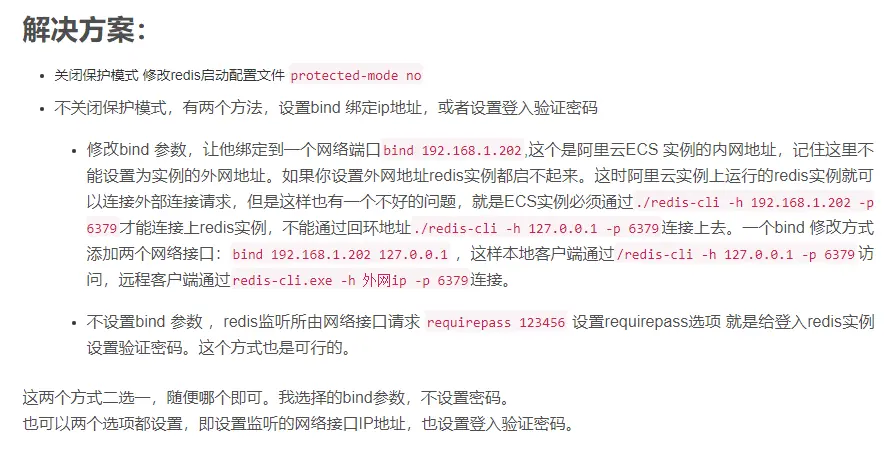
以上的选项,使用其中一种就可以使用了,目前采用的是==第四种==方式的绑定本地的内网IP,只能将服务器的==内网IP==绑定到redis.conf下面,在阿里云上绑定了外网IP后无效。

配置文件:redis.conf

#bind 192.168.1.100 10.0.0.1
#bind 127.0.0.1 ::1

#protected-mode yes

#requirepass foobared
Caused by: redis.clients.jedis.exceptions.JedisDataException: DENIED Redis is running in protected mode because protected mode is enabled, no bind address was specified, no authentication password is requested to clients. In this mode connections are only accepted from the loopback interface. If you want to connect from external computers to Redis you may adopt one of the following solutions: 1) Just disable protected mode sending the command 'CONFIG SET protected-mode no' from the loopback interface by connecting to Redis from the same host the server is running, however MAKE SURE Redis is not publicly accessible from internet if you do so. Use CONFIG REWRITE to make this change permanent. 2) Alternatively you can just disable the protected mode by editing the Redis configuration file, and setting the protected mode option to 'no', and then restarting the server. 3) If you started the server manually just for testing, restart it with the '--protected-mode no' option. 4) Setup a bind address or an authentication password. NOTE: You only need to do one of the above things in order for the server to start accepting connections from the outside.
redis.clients.jedis.exceptions.JedisConnectionException: Could not get a resource from the pool

推荐的是使用第四种方式的给一个身份密码方式:

# vim ./redis.conf 

#Require clients to issue AUTH <PASSWORD> before processing any other 
#commands. This might be useful in environments in which you do not trust #others with access to the host running redis-server. 
#
#This should stay commented out for backward compatibility and because most 
#people do not need auth (e.g. they run their own servers). 
#
#Warning: since Redis is pretty fast an outside user can try up to 
#150k passwords per second against a good box. This means that you should #use a very strong password otherwise it will be very easy to break. 
# 
#requirepass foobared requirepass 123456789
$ auth 123456789
OK
$ set key:01 val123456
OK
$ get key:01
"val123456"
13087175-bcb11fc8db743ea5.png
解决方案.png
两节锂电池主动均衡设计实战:MP2642+PIC32MZ方案详解 锂电池串联应用中,单体电压不一致是导致容量衰减、寿命缩短和热失控风险的核心问题。其本质源于内阻差异、自放电率离散及温度响应非同步等物理特性,需通过主动均衡技术实现能量再分配而非简单泄放。相比被动均衡的低效与发热缺陷,基于双向DC-DC架构的主动均衡芯片(如MP2642GR-Z)可将高电压电池能量高效转移至低电压电池,实测均衡效率达89%,显著提升系统SOH与可用容量。该方案特别适用于对可靠性要求严苛的UPS、便携医疗电源及小型光储系统,强调硬件协同、温补校准与量产工艺鲁棒性。 阅读详情

相关推荐

ping不通6379端口,redis修改配置启动未生效

-DENIED Redis is running in protected mode because protected mode is enabled, no bind address was specified, no authentication password is requested to clients. In this mode connections are only acce...

hans的博客 4672

Redis is running in protected mode

这是redis在安装后,如果非本机访问的话,会报的一个错误,这个错误还是比较长的: Redis is running in protected mode because protected mode is enabled, no bind address was specified, no authentication password is requested to clients. In ...

做你想做的人,没有时间的限制,只要愿意,什么时候都可以start。 3539

OPCUA二(通过OPCUA服务器访问CPU)

摘要:本文介绍了使用UaExpert软件连接西门子PLC的OPC UA配置方法,包括IP地址设置(默认端口4840)、安全认证和证书信任流程。详细说明了数据访问操作,如变量拖拽监控和属性解读(NodeId、Value、状态码等)。特别强调连接仿真Advance7时需先启动实例。最后预告下章将讲解通过KerServer访问CPU。文章涵盖配置步骤、常见问题处理及实用技巧,适合工业自动化开发者参考。

欢迎来到RaymondLeigh的知识共享基地 1339

Redis is running in protected mode because protected mode is enabled 问题处理

Redis is running in protected mode because protected mode is enabled, no bind address was specified, no authentication password is requested to clients 连接redis报错,根据错误信息,redis运行在受保护模式,需要修改redis配置

weixin_43989637的博客 2275

Android PMS——概述(一)

PMS(Package Manager Service)是 Android 操作系统的一个重要组件,它负责管理应用程序的包信息以及与应用程序的安装、卸载、权限控制等相关功能,确保应用程序的安全性和稳定性。 Android PMS 负责维护一个应用程序包的清单信息,该清单是一个 XML 文件,包含应用程序的各种元数据,例如应用程序的包名、版本号、权限要求、组件信息等。PMS通过访问该清单文件来获取应用程序的信息。 此外,Android PMS 还负责应用程序的安装和卸载。在安装应用

小旭的专栏 1668

从 SAP GUI 到 API 自动化,为什么 SAP 团队必须把 API 拉到路线图中央

摘要: SAP项目正从传统手工操作转向API驱动,以应对业务敏捷性需求。API不仅是技术接口,更是核心业务能力的标准化封装,助力自动化、低代码、AI集成和系统升级。通过SAP Business Accelerator Hub等工具,企业可复用标准API替代定制开发,减少技术债。API还赋能自动化平台、实时集成和AI Agent执行,确保安全治理与审计追踪。未来,API将成为企业系统与AI交互的核心桥梁,缺乏API将迫使业务依赖脆弱的UI自动化方案。

2007 年 ~ 2025 年,深耕 SAP 技术 18 年 302

DENIED Redis is running in protected mode because protected mode is enabled, no bind address was spe

(error) DENIED Redis is running in protected mode because protected mode is enabled Redis protected-mode 是3.2 之后加入的新特性,在Redis.conf的注释中,我们可以了解到,他的具体作用和启用条件 链接redis 时只...

weixin_33800593的博客 1087

RT-Thread必考面试题及参考答案

RT-Thread的设备驱动模型遵循层次化的结构,设计简洁且易于扩展。它主要由设备注册、设备操作和设备控制三部分组成。设备驱动模型允许开发者为不同的硬件设备编写驱动程序,这些驱动程序可以被RT-Thread内核统一管理和调度。在RT-Thread中,设备被抽象成一系列标准的接口,包括打开、关闭、读取、写入、控制等操作,这些操作封装在结构体中。设备驱动程序需要实现这些接口,然后通过调用函数注册设备,使其对系统可见。这种模型不仅简化了驱动开发,还提高了代码的可移植性和可维护性。

大模型大数据攻城狮的专栏 1823

linux虚拟机redis连接报错

今天测试了一下在本机(win10系统)远程连接 centos下的redis,结果报了以下错误: -DENIED Redis is running in protected mode because protected mode is enabled, no bind address was specified, no authentication password is requested to clients. In this mode connections are only accepted fro

ZhaFi人 3033

CAN轴控制流【6041,6040】

【代码】CAN轴控制流【6041,6040】

cfqq1989的博客 1783

Python 爬虫 + 数据分析:社会调查数据抓取与结果可视化分析

在当今数字化时代,数据已成为推动社会发展的关键资源之一。无论是市场调研、学术研究还是政策制定,社会调查数据都扮演着至关重要的角色。通过 Python 爬虫技术,我们可以高效地获取这些数据,并结合数据分析与可视化工具,深入挖掘数据背后的价值。本文将通过一个完整的实战项目,带你掌握如何使用 Python 爬虫抓取社会调查数据,并进行可视化分析。

yansideyucsdn的博客 126

linux redis 关闭保护模式,允许外网访问配置。

当你在liunx下 安装好redis以后,如果需要外网访问,需要关闭保护模式否则连接失败: DENIED Redis is running in protected mode because protected mode is enabled, no bind address was specified, no authentication password is requested to clients. In this mode connections are only accepted from th

u010797364的博客 2015

PCL 模型滤波器【2025最新版】

根据给定的模型系数在点云中提取对应于模型的点云数据。博客长期更新,本文最新更新时间为:2025年6月17日。

点云侠的博客 4384

redis 报错 Redis protected-mode 配置文件没有真正启动

(error) DENIED Redis is running in protected mode because protected mode is enabled Redis protected-mode 是3.2 之后加入的新特性,在Redis.conf的注释中,我们可以了解到,他的具体作用和启用条件 链接redis 时只能通过本地localhost (127.0.0.1)这个来链接,而不能用

Agly_Charlie的博客 7万+

YOLO26剪枝 lamp剪枝测试精度仅掉0.7个点,速度提高11.8fps!

针对没有如何去选择剪枝的内容LAMP是层自适应幅度调整剪枝,无需任何参数,通过算法内部自己计算每个层的重要程度进行剪枝。基于权重重要程度和该层权重大小关系,权重越大表明该层越重要的思想进行优化。这个跟我前面说的非结构化全局剪枝是一个解法(MP),也就是lamp是在我前面那个非结构化剪枝的基础上进行优化的。但是这个逐层进行非结构剪枝目前还没有一个清晰的概念,确定每个层要剪枝多少。LAMP得分是一个平方权重大小,由层中所有“幸存权重”的总和归一化。

m0_64661770的博客 673

文档:亲测可用解决vnc灰屏,黑屏,鼠标大黑叉情况

主要解决vnc-viewer灰屏,黑屏,鼠标大黑叉等现象,详细见文档。

学习随笔——虚拟机安装redis出现的小问题解决

一、前言 之前使用redis都是在本机安装,本机使用。这次在虚拟机安装redis并连接成功,踩了一些之前没踩过的坑,特此记录一下。 二、redis的保护模式 报错信息 Redis is running in protected mode because protected mode is enabled, no bind address was specified, no authentication password is requested to clients. In this mode connec

TIANQIcode 547

jre9下载 jdk9

(Java SE Runtime Environment 9.0) 9.0u175 官方最新版 【x86|x64】

redis保护模式的报错

1.首先得保证redis实在gcc环境下运行的 2.如果发现命令行中只能打印出大写在符号,那么长安【A】就好,或者shift+[A]试试 3.mini安装Linux发现连不了网,要在配置文件中启动网关,并且设置自动分配IP地址,如果手动配置IP地址的话开门,可能还是连不上 4.java连接Redis出现错误, --------(错误原因:1>Linux防火墙默认是开启的 2>Redis默认是保护模式(绑定到127.0.0.1)) 解决方法: 关闭防火墙同时关闭Redis的保护模式 按照java的

sudsahdua的博客 884

win10 跳过U8环境检测的IE WebControls.rar

win10 安装u8的时候 提示IE WebControls 不通过,这个工具可以欺骗u8的检查。 跳过U8环境检测的IE WebControls。提示导入失败后,重新检测通过。

复分析 阿尔福斯(Ahlfors) 第三版答案 英文

答案分为十章,有部分习题没有答案,全英文复分析阿尔福斯(Ahlfors) 第三版答案

redis 关闭保护模式

1.错误代码没有贴,如果出现记得添加gcc包 image.png 2.如果发现命令行中只能打印出大写在符号,那么长安【A】就好,或者shift+[A]试试 3.mini安装Linux发现连不了网,要在配置文件中启动网关,并且设置自动分配IP地址,如果手动配置IP地址的话开门,可能还是连不上 4.java连接Redis出现错误, --------(错误原因:1>Linux防火墙默...

TonyWu的博客 1万+

redis关闭保护模式

2)Redis默认不是以守护进程的方式运行,可以通过该配置项修改,使用yes启用守护进程,设置为no。所以如果第一次使用没有设置管理员,就会出现报错,关闭保护模式即可。默认redis需要设置管理员账号密码,开启了保护模式。修改redis的守护进程为no ,不启用。修改redis的保护模式为no,不启用。redis开启了保护模式。3. 启动加载配置文件。

xiaoyunchang2的博客 419

redis之禁用保护模式以及修改监听IP

今天在安装filebeat的时候,出现了关于redis报错的问题,所以来总结一下: 报错信息是: (error) DENIED Redis is running in protected mode because protected mode is enabled, no bind address was specified, no authentication passwor...

weixin_34344403的博客 704

关于 Unable to connect to Redis; nested exception is org.springframework.data.redis.connection.PoolEx

错误原因是因为开启了保护模式,在配置文件redis.conf中找到daemonize=yes,改为daemonize=no即可。进入这个目录下的文件:vi /etc/systemd/system/redis.service。删掉后别忘了systemctl daemon-reload一下再开启redis。在这时候我输入systemctl start redis又出现一个问题。删除Type=forking即可解决问题。

weixin_61997710的博客 1433

踩坑日记:项目中Redis报错错误“500”:Redis is running in protected mode because protected mode is enabled

昨天晚上项目的job突然报警,执行失败,然后检查了项目中的数据是没有问题的,查看了日志,报下面的错误,然后所有的接口都报Redis错误“500”。 DENIED Redis is runninginprotected mode because protected mode is enabled, no bind address was specified, <br>no authentication password is requested to clients. In this mod..

好学而不勤问非真好学者 2857

Linux安装redis,redis无法连接问题总结

虚拟机(centos7)安装redis 请移步:https://blog.youkuaiyun.com/ITxiaofeixiang/article/details/111390055 问题描述 Resolved [redis.clients.jedis.exceptions.JedisConnectionException: Could not get a resource from the pool] springboot项目集成redis测试,出现连接超时问题等。 前提 host和port设置都没问题。 虚拟机

ITxiaofeixiang的博客 1869

处理python连接redis出现的问题

问题如下:redis.exceptions.ResponseError: DENIED Redis is running in protected mode 代码如下: 原因:redis运行在受保护模式,需要redis命令行下作设置:config set protected-mode no 解决办法: 需要再redis的客户端命令行下 redis-cli ...

qq_35981694的博客 1211
上一篇: Java8 接口的默认方法和静态方法
下一篇: ArrayList源码解析
小许子是逗星人
博客等级 码龄11年 2粉丝 24原创
评论
成就一亿技术人!
拼手气红包6.0元
还能输入1000个字符
 
 条评论被折叠 查看
添加红包

请填写红包祝福语或标题

个

红包个数最小为10个

元

红包金额最低5元

当前余额3.43元 前往充值 >
需支付:10.00元
成就一亿技术人!
领取后你会自动成为博主和红包主的粉丝 规则
hope_wisdom
发出的红包
实付元
使用余额支付
点击重新获取
扫码支付
钱包余额 0

抵扣说明:

1.余额是钱包充值的虚拟货币,按照1:1的比例进行支付金额的抵扣。
2.余额无法直接购买下载,可以购买VIP、付费专栏及课程。

余额充值