


 本文介绍了在C#中使用ObservableCollection时如何进行动态排序。由于ObservableCollection本身不带排序功能,文章提供了三种排序方法:1) 使用OrderByDescending进行排序;2) 自定义Sort扩展方法,需实现IComparable接口;3) 利用List的Sort方法,转换后再赋值给ObservableCollection。每种方法都配合具体代码示例进行了详细说明。
WPF中对ListBox、ListView、TreeView等实现数据双向绑定经常会用到ObservableCollection<T> 类。
ObservableCollection<T> 类 表示一个动态数据集合,它是实现了INotifyPropertyChanged 接口的数据集合,在添加项、移除项或刷新整个列表时,此集合将提供通知。如果要实现集合中的某字段或属性发生改变时通知UI刷新界面,我们需要为这些字段或属性实现INotifyPropertyChanged接口,此接口公开CollectionChanged事件,只要基础集合发生更改,都能引发该事件。ObservableCollection<T> 类 的使用可以参考博客:https://www.cnblogs.com/santian/p/4366832.html,这里不做过多讲解。
ObservableCollection没有自带的sort排序功能,而实际使用时我们经常需要对数据集合进行排序后再显示,比如按照ID从小到大排序,或者按照禁用状态排序(可用的排在前面)等等。下面新建一个控制台应用程序SortDemo:
1、新建商品类Goods
//商品类
public class Goods
{
    public int Order { get; set; }
    public string Name { get; set; }
    public bool IsSoldOut { get; set; }
}
2、第一种排序方式
ocGoods = new ObservableCollection<Goods>(ocGoods.OrderByDescending(item => item.IsSoldOut));
程序代码:
static void Main(string[] args)
{
    ObservableCollection<Goods> ocGoods = new ObservableCollection<Goods>();
    ocGoods.Add(new Goods() { Order = 1, Name = "钢笔", IsSoldOut = true });
    ocGoods.Add(new Goods() { Order = 2, Name = "羽毛球", IsSoldOut = false });
    ocGoods.Add(new Goods() { Order = 3, Name = "毛巾", IsSoldOut = false });
    ocGoods.Add(new Goods() { Order = 4, Name = "零食", IsSoldOut = true });

    //按照IsSoldOut降序排列,即true在前面
    ocGoods = new ObservableCollection<Goods>(ocGoods.OrderByDescending(item => item.IsSoldOut));
    foreach (Goods item in ocGoods)
    {
        Console.WriteLine("Order:{0}  Name:{1}  IsSoldOut:{2}", item.Order, item.Name, item.IsSoldOut.ToString());
    }
    Console.ReadLine();
}
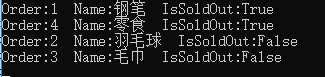
结果:
2、第二种排序方式
自己写一个Sort扩展方法:
public static class ObservableExtension
{
    public static void Sort<T>(this ObservableCollection<T> collection) where T : IComparable<T>
    {
        List<T> sortedList = collection.OrderByDescending(x => x).ToList();//这里用降序
        for (int i = 0; i < sortedList.Count(); i++)
        {
            collection.Move(collection.IndexOf(sortedList[i]), i);
        }
    }
}
调用的时候报错:

原来是Goods类没有实现IComparable<Goods>接口,修改Goods类:
//商品类
public class Goods : IComparable<Goods>
{
    public int Order { get; set; }
    public string Name { get; set; }
    public bool IsSoldOut { get; set; }

    public int CompareTo(Goods other)
    {
        return this.IsSoldOut.CompareTo(other.IsSoldOut);
    }
}
程序代码:
namespace SortDemo
{
    class Program
    {
        static void Main(string[] args)
        {
            ObservableCollection<Goods> ocGoods = new ObservableCollection<Goods>();
            ocGoods.Add(new Goods() { Order = 1, Name = "钢笔", IsSoldOut = true });
            ocGoods.Add(new Goods() { Order = 2, Name = "羽毛球", IsSoldOut = false });
            ocGoods.Add(new Goods() { Order = 3, Name = "毛巾", IsSoldOut = false });
            ocGoods.Add(new Goods() { Order = 4, Name = "零食", IsSoldOut = true });

            ocGoods.Sort<Goods>();//第二种方法

            foreach (Goods item in ocGoods)
            {
                Console.WriteLine("Order:{0}  Name:{1}  IsSoldOut:{2}", item.Order, item.Name, item.IsSoldOut.ToString());
            }
            Console.ReadLine();
        }
    }

    //商品类
    public class Goods : IComparable<Goods>
    {
        public int Order { get; set; }
        public string Name { get; set; }
        public bool IsSoldOut { get; set; }

        public int CompareTo(Goods other)
        {
            return this.IsSoldOut.CompareTo(other.IsSoldOut);
        }
    }

    public static class ObservableExtension
    {
        public static void Sort<T>(this ObservableCollection<T> collection) where T : IComparable<T>
        {
            List<T> sortedList = collection.OrderByDescending(x => x).ToList();//这里用降序
            for (int i = 0; i < sortedList.Count(); i++)
            {
                collection.Move(collection.IndexOf(sortedList[i]), i);
            }
        }
    }
}
3、第三种排序方式
第二种方式的实质是使用List的特性,那么如果直接用List的Sort排序特性,则不用单独再实现IComparable接口。这里的思路是建一个List<Goods>列表,Sort后赋值给ObservableCollection<Goods>,代码:
static void Main(string[] args)
{
    List<Goods> goodsList = new List<Goods>();
    goodsList.Add(new Goods() { Order = 1, Name = "钢笔", IsSoldOut = true });
    goodsList.Add(new Goods() { Order = 2, Name = "羽毛球", IsSoldOut = false });
    goodsList.Add(new Goods() { Order = 3, Name = "毛巾", IsSoldOut = false });
    goodsList.Add(new Goods() { Order = 4, Name = "零食", IsSoldOut = true });
    goodsList.Sort(delegate (Goods b1, Goods b2) { return Comparer<bool>.Default.Compare(b2.IsSoldOut, b1.IsSoldOut); });

    ObservableCollection<Goods> ocGoods = new ObservableCollection<Goods>(goodsList);
    foreach (Goods item in ocGoods)
    {
        Console.WriteLine("Order:{0}  Name:{1}  IsSoldOut:{2}", item.Order, item.Name, item.IsSoldOut.ToString());
    }
    Console.ReadLine();
}





 扫一扫
扫一扫


 4644
4644

 被折叠的 条评论
为什么被折叠?
被折叠的 条评论
为什么被折叠?
 到【灌水乐园】发言





