



作者介绍:简历上没有一个精通的运维工程师。请点击上方的蓝色《运维小路》关注我,下面的思维导图也是预计更新的内容和当前进度(不定时更新)。
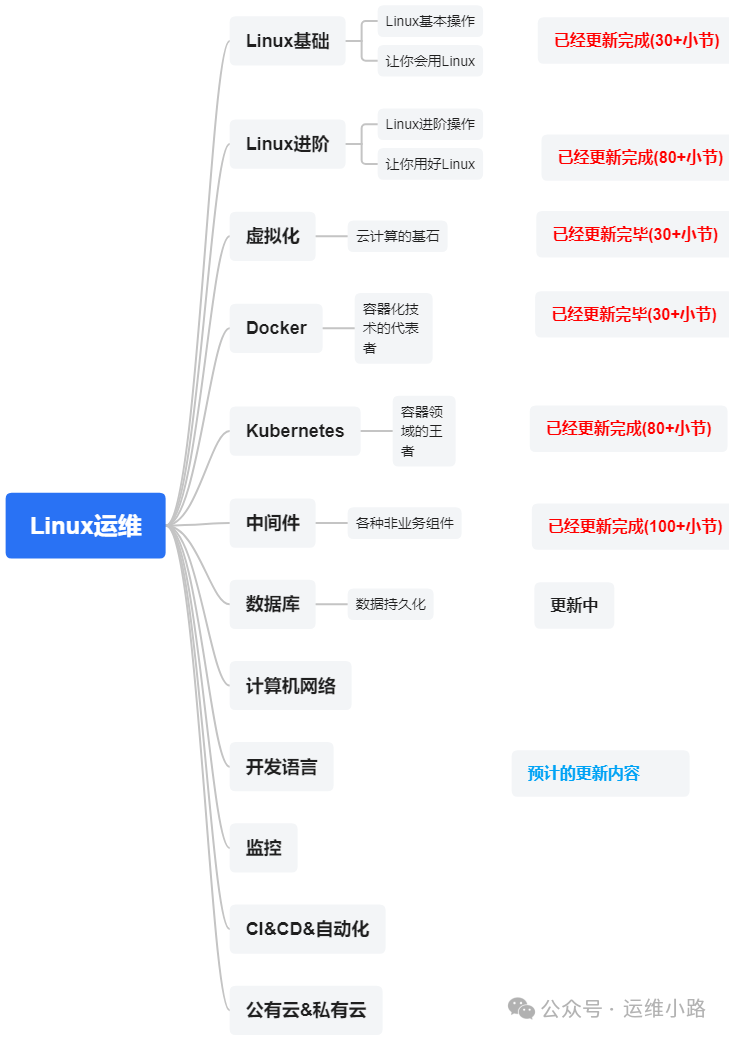
数据库是一个系统(应用)最重要的资产之一,所以我们的数据库将从以下几个数据库来进行介绍。
MySQL(本章节)
PostgreSQL
MongoDB
Redis
Etcd
虽然主从模式解决了数据高可用的问题,但是这个主从模式当主宕机以后是需要手工介入处理,今天这个小节我们就通过MHA来来MYSQL的高可用。实际上各大云厂商都是通过类似的方式实现云数据的高可用,只是实现的方式略有不一样。
一、MHA 是什么?
MHA 是一款在 MySQL 高可用环境下是一个非常重要的工具,它的核心功能是实现 MySQL 主从复制架构中的主库自动故障转移 以及 从库提升。
它的目标是:在 10-30 秒内完成数据库的自动故障切换,并最大程度地保证数据的一致性,避免业务受到长时间中断。
二、部署
1.架构
| IP | 角色 | 备注 |
| 192.168.31.180 | MHA管理组件 | |
| 192.168.31.181 | 原主 | |
| 192.168.31.182 | 原从 | 新主 |
1.配置免密
这里要求的是MHA管理组件连接所有服务器都实现免密,具体细节可以参考历史文章:Linux-ssh。
# 生成密钥(如果已有可跳过)
ssh-keygen -t rsa -P '' -f ~/.ssh/id_rsa

# 拷贝公钥到所有节点
ssh-copy-id root@192.168.31.180
ssh-copy-id root@192.168.31.181
ssh-copy-id root@192.168.31.182

# 测试连接
ssh root@192.168.31.181 "hostname; date"
ssh root@192.168.31.182 "hostname; date"
2.所有节点安装 MHA组件
所有节点安装 MHA Node,192.168.31.180安装MHA Manager组件。
yum -y install epel-release
# 安装依赖
yum install -y perl-DBD-MySQL perl-Config-Tiny perl-Log-Dispatch perl-Parallel-ForkManager perl-Time-HiRes

# 下载并安装 MHA Node
wget https://github.com/yoshinorim/mha4mysql-node/releases/download/v0.58/mha4mysql-node-0.58-0.el7.centos.noarch.rpm
rpm -ivh mha4mysql-node-0.58-0.el7.centos.noarch.rpm


# 安装 MHA Manager
wget https://github.com/yoshinorim/mha4mysql-manager/releases/download/v0.58/mha4mysql-manager-0.58-0.el7.centos.noarch.rpm
rpm -ivh mha4mysql-manager-0.58-0.el7.centos.noarch.rpm
3.创建MHA用户
如果主从配置合理,这些信息会自动同步到从库,如果没有配置则需要手动在从库也做同样的配置,这里的核心就是给MHA管理组件添加对应的权限,让他可以把从库提升到主库。
-- 验证用户权限
SHOW GRANTS FOR 'mha'@'192.168.31.%';Query OK, 0 rows affected (0.03 sec)

mysql> GRANT ALL PRIVILEGES ON *.* TO 'mha'@'192.168.31.%';
Query OK, 0 rows affected (0.02 sec)

mysql> GRANT REPLICATION CLIENT ON *.* TO 'mha'@'192.168.31.%';
Query OK, 0 rows affected (0.09 sec)

mysql> FLUSH PRIVILEGES;
Query OK, 0 rows affected (0.03 sec)

mysql>
mysql> -- 验证用户权限
mysql> SHOW GRANTS FOR 'mha'@'192.168.31.%';
+-----------------------------------------------------+
| Grants for mha@192.168.31.%                         |
+-----------------------------------------------------+
| GRANT ALL PRIVILEGES ON *.* TO 'mha'@'192.168.31.%' |
+-----------------------------------------------------+
1 row in set (0.00 sec)

mysql>
4.配置MHA(180操作)
mkdir -p /etc/mha
mkdir -p /var/log/mha/app1
[root@localhost ~]# cat /etc/mha/app1.cnf
[server default]
# MySQL 连接配置
user=mha
password=Mha_123!
manager_workdir=/var/log/mha/app1
manager_log=/var/log/mha/app1/manager.log
remote_workdir=/var/log/mha/app1
# SSH 配置
ssh_user=root
# 复制配置(使用已有的复制用户)
repl_user=repl
repl_password=A2ecure_password
# 监控配置
ping_interval=3
ping_type=SELECT
# 二进制日志目录(根据实际配置调整)
master_binlog_dir=/data/mysql-binlogs
# 故障转移配置
master_ip_failover_script=/etc/mha/scripts/master_ip_failover
master_ip_online_change_script=/etc/mha/scripts/master_ip_online_change
report_script=/etc/mha/scripts/send_report
# 故障转移条件
candidate_master=1
check_repl_delay=0
shutdown_script=""
[server1]
hostname=192.168.31.181
port=3306
master_binlog_dir=/data/mysql-binlogs
candidate_master=1
[server2]
hostname=192.168.31.182
port=3306
master_binlog_dir=/data/mysql-binlogs
candidate_master=15.创建检查脚本(180操作)
mkdir -p /etc/mha/scripts

# 创建故障转移脚本
cat > /etc/mha/scripts/master_ip_failover << 'EOF'
#!/usr/bin/env perl

use strict;
use warnings FATAL => 'all';

my $command = $ARGV[0];
print "MHA Failover: $command\n";

# 这里可以添加VIP切换逻辑
# system("/sbin/ip addr add 192.168.31.100/24 dev eth0");

exit(0);
EOF

# 创建报告脚本
cat > /etc/mha/scripts/send_report << 'EOF'
#!/bin/bash
echo "$(date): MHA Alert: $@" >> /var/log/mha/app1/alert.log
# 可以添加邮件/短信报警逻辑
EOF

chmod +x /etc/mha/scripts/master_ip_failover
chmod +x /etc/mha/scripts/send_report6.检查ssh(180操作)
[root@localhost ~]# masterha_check_ssh --conf=/etc/mha/app1.cnf
Fri Sep 26 00:12:44 2025 - [warning] Global configuration file /etc/masterha_default.cnf not found. Skipping.
Fri Sep 26 00:12:44 2025 - [info] Reading application default configuration from /etc/mha/app1.cnf..
Fri Sep 26 00:12:44 2025 - [info] Reading server configuration from /etc/mha/app1.cnf..
Fri Sep 26 00:12:44 2025 - [info] Starting SSH connection tests..
Fri Sep 26 00:12:44 2025 - [debug]
Fri Sep 26 00:12:44 2025 - [debug]  Connecting via SSH from root@192.168.31.181(192.168.31.181:22) to root@192.168.31.182(192.168.31.182:22)..
Fri Sep 26 00:12:44 2025 - [debug]   ok.
Fri Sep 26 00:12:45 2025 - [debug]
Fri Sep 26 00:12:44 2025 - [debug]  Connecting via SSH from root@192.168.31.182(192.168.31.182:22) to root@192.168.31.181(192.168.31.181:22)..
Fri Sep 26 00:12:45 2025 - [debug]   ok.
Fri Sep 26 00:12:45 2025 - [info] All SSH connection tests passed successfully.7.检查主从状态(180操作)
[root@localhost ~]# masterha_check_repl --conf=/etc/mha/app1.cnf
Fri Sep 26 00:24:09 2025 - [warning] Global configuration file /etc/masterha_default.cnf not found. Skipping.
Fri Sep 26 00:24:09 2025 - [info] Reading application default configuration from /etc/mha/app1.cnf..
Fri Sep 26 00:24:09 2025 - [info] Reading server configuration from /etc/mha/app1.cnf..
Fri Sep 26 00:24:09 2025 - [info] MHA::MasterMonitor version 0.58.
Fri Sep 26 00:24:10 2025 - [info] GTID failover mode = 0
Fri Sep 26 00:24:10 2025 - [info] Dead Servers:
Fri Sep 26 00:24:10 2025 - [info] Alive Servers:
Fri Sep 26 00:24:10 2025 - [info]   192.168.31.181(192.168.31.181:3306)
Fri Sep 26 00:24:10 2025 - [info]   192.168.31.182(192.168.31.182:3306)
Fri Sep 26 00:24:10 2025 - [info] Alive Slaves:
Fri Sep 26 00:24:10 2025 - [info]   192.168.31.182(192.168.31.182:3306)  Version=5.7.44-log (oldest major version between slaves) log-bin:enabled
Fri Sep 26 00:24:10 2025 - [info]     Replicating from 192.168.31.181(192.168.31.181:3306)
Fri Sep 26 00:24:10 2025 - [info]     Primary candidate for the new Master (candidate_master is set)
Fri Sep 26 00:24:10 2025 - [info] Current Alive Master: 192.168.31.181(192.168.31.181:3306)
Fri Sep 26 00:24:10 2025 - [info] Checking slave configurations..
Fri Sep 26 00:24:10 2025 - [warning]  relay_log_purge=0 is not set on slave 192.168.31.182(192.168.31.182:3306).
Fri Sep 26 00:24:10 2025 - [info] Checking replication filtering settings..
Fri Sep 26 00:24:10 2025 - [info]  binlog_do_db= , binlog_ignore_db=
Fri Sep 26 00:24:10 2025 - [info]  Replication filtering check ok.
Fri Sep 26 00:24:10 2025 - [info] GTID (with auto-pos) is not supported
Fri Sep 26 00:24:10 2025 - [info] Starting SSH connection tests..
Fri Sep 26 00:24:11 2025 - [info] All SSH connection tests passed successfully.
Fri Sep 26 00:24:11 2025 - [info] Checking MHA Node version..
Fri Sep 26 00:24:11 2025 - [info]  Version check ok.
Fri Sep 26 00:24:11 2025 - [info] Checking SSH publickey authentication settings on the current master..
Fri Sep 26 00:24:12 2025 - [info] HealthCheck: SSH to 192.168.31.181 is reachable.
Fri Sep 26 00:24:12 2025 - [info] Master MHA Node version is 0.58.
Fri Sep 26 00:24:12 2025 - [info] Checking recovery script configurations on 192.168.31.181(192.168.31.181:3306)..
Fri Sep 26 00:24:12 2025 - [info]   Executing command: save_binary_logs --command=test --start_pos=4 --binlog_dir=/data/mysql-binlogs --output_file=/var/log/mha/app1/save_binary_logs_test --manager_version=0.58 --start_file=mysql-bin.000006
Fri Sep 26 00:24:12 2025 - [info]   Connecting to root@192.168.31.181(192.168.31.181:22)..
  Creating /var/log/mha/app1 if not exists.. Creating directory /var/log/mha/app1.. done.
   ok.
  Checking output directory is accessible or not..
   ok.
  Binlog found at /data/mysql-binlogs, up to mysql-bin.000006
Fri Sep 26 00:24:12 2025 - [info] Binlog setting check done.
Fri Sep 26 00:24:12 2025 - [info] Checking SSH publickey authentication and checking recovery script configurations on all alive slave servers..
Fri Sep 26 00:24:12 2025 - [info]   Executing command : apply_diff_relay_logs --command=test --slave_user='mha' --slave_host=192.168.31.182 --slave_ip=192.168.31.182 --slave_port=3306 --workdir=/var/log/mha/app1 --target_version=5.7.44-log --manager_version=0.58 --relay_log_info=/var/lib/mysql/relay-log.info  --relay_dir=/var/lib/mysql/  --slave_pass=xxx
Fri Sep 26 00:24:12 2025 - [info]   Connecting to root@192.168.31.182(192.168.31.182:22)..
Creating directory /var/log/mha/app1.. done.
  Checking slave recovery environment settings..
    Opening /var/lib/mysql/relay-log.info ... ok.
    Relay log found at /data/mysql-relaylogs, up to mysql-relay-bin.000002
    Temporary relay log file is /data/mysql-relaylogs/mysql-relay-bin.000002
    Checking if super_read_only is defined and turned on.. not present or turned off, ignoring.
    Testing mysql connection and privileges..
mysql: [Warning] Using a password on the command line interface can be insecure.
 done.
    Testing mysqlbinlog output.. done.
    Cleaning up test file(s).. done.
Fri Sep 26 00:24:13 2025 - [info] Slaves settings check done.
Fri Sep 26 00:24:13 2025 - [info]
192.168.31.181(192.168.31.181:3306) (current master)
 +--192.168.31.182(192.168.31.182:3306)

Fri Sep 26 00:24:13 2025 - [info] Checking replication health on 192.168.31.182..
Fri Sep 26 00:24:13 2025 - [info]  ok.
Fri Sep 26 00:24:13 2025 - [info] Checking master_ip_failover_script status:
Fri Sep 26 00:24:13 2025 - [info]   /etc/mha/scripts/master_ip_failover --command=status --ssh_user=root --orig_master_host=192.168.31.181 --orig_master_ip=192.168.31.181 --orig_master_port=3306
MHA Failover: --command=status
Fri Sep 26 00:24:13 2025 - [info]  OK.
Fri Sep 26 00:24:13 2025 - [warning] shutdown_script is not defined.
Fri Sep 26 00:24:13 2025 - [info] Got exit code 0 (Not master dead).

MySQL Replication Health is OK.
8.启动MHA
masterha_manager --conf=/etc/mha/app1.cnf9.停止主节点,观察切换
tail -f /var/log/mha/app1/manager.log

#中间部分内容省略
----- Failover Report -----

app1: MySQL Master failover 192.168.31.181(192.168.31.181:3306) to 192.168.31.182(192.168.31.182:3306) succeeded

Master 192.168.31.181(192.168.31.181:3306) is down!

Check MHA Manager logs at localhost.localdomain:/var/log/mha/app1/manager.log for details.

Started automated(non-interactive) failover.
Invalidated master IP address on 192.168.31.181(192.168.31.181:3306)
The latest slave 192.168.31.182(192.168.31.182:3306) has all relay logs for recovery.
Selected 192.168.31.182(192.168.31.182:3306) as a new master.
192.168.31.182(192.168.31.182:3306): OK: Applying all logs succeeded.
192.168.31.182(192.168.31.182:3306): OK: Activated master IP address.
Generating relay diff files from the latest slave succeeded.
192.168.31.182(192.168.31.182:3306): Resetting slave info succeeded.
Master failover to 192.168.31.182(192.168.31.182:3306) completed successfully.
Fri Sep 26 00:26:51 2025 - [info] Sending mail..
10.检查源从节点
查看主从状态,已经没有内容;并且原来的从节点是只读的,现在也可以进行写操作。
mysql> SHOW MASTER STATUS;
+------------------+----------+--------------+------------------+-------------------+
| File             | Position | Binlog_Do_DB | Binlog_Ignore_DB | Executed_Gtid_Set |
+------------------+----------+--------------+------------------+-------------------+
| mysql-bin.000001 |     1179 |              |                  |                   |
+------------------+----------+--------------+------------------+-------------------+
1 row in set (0.00 sec)

mysql> SHOW SLAVE STATUS\G
Empty set (0.00 sec)
mysql> create database abcd;
Query OK, 1 row affected (0.02 sec)

mysql>
到这里我们通过MHA已经完成了MYSQL的主从切换,实际的真实环境还需要经过多次测试,并且还需要确保通过vip来连接数据库,vip也要有能力跟随故障切换。当然这样类似的软件还有很多。
运维小路





 扫一扫
扫一扫


 3255
3255

 被折叠的 条评论
为什么被折叠?
被折叠的 条评论
为什么被折叠?
 到【灌水乐园】发言





