


 本文介绍了如何在Android7.1及以上版本中创建和管理快捷方式。通过静态定义XML文件如shortcuts.xml来设置快捷菜单,或者使用动态注册在运行时添加快捷方式。文中提供了基于Compose的示例代码,包括创建shortcuts.xml,解析strings.xml,以及在manifest.xml中注册快捷方式。此外,还展示了如何使用Kotlin动态注册快捷方式,并提供了一个添加快捷方式到桌面的函数。
简述
以下代码均基于 compose 编写
Android7.1 开始加入了长按应用弹出快捷菜单
可以通过 shortcut 自定义该弹出菜单,比如我们接下来要实现的功能如下图所示(运行于纯正的 android10 系统上)
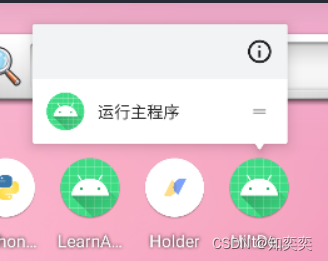
弹出菜单可以目前存在两种可选定义形式:
- 静态定义:直接写死在 xml 文件,只有 APP 更新重装才可以更新弹出菜单
- 动态定义:顾名思义
静态定义
shortcuts.xml
新建文件 res/xml/shortcuts.xml
shortcuts 表示当前快捷菜单,里面有多少个 shortcut 标签,就存在多少个快捷按钮
而事实上,一次性在快捷菜单内最多只能显示四个按钮!
这是一些相关属性定义的解释:
android:enabled是否激活android:icon快捷按钮左侧对应图标android:shortcutId该按钮的 IDandroid:shortcutShortLabel快捷按钮文本
<?xml version ="1.0" encoding="utf-8"?>
<shortcuts xmlns:android="http://schemas.android.com/apk/res/android">
<!-- 定义一个快捷按钮 -->
<shortcut
android:enabled="true"
android:icon="@mipmap/ic_launcher"
android:shortcutId="sc1"
android:shortcutShortLabel="@string/shortcut_title"
android:shortcutLongLabel="@string/shortcut_long_msg"
android:shortcutDisabledMessage="@string/shortcut_disable_msg"
>
<!-- action表示点击按钮后执行的动作 -->
<!-- targetClass为目标activity的类文件(直接指向compose默认唯一的activity) -->
<!-- targetPackage目标类文件所在包 -->
<intent
android:action="android.intent.action.VIEW"
android:targetClass="com.zhiyiyi.hiltdemo.MainActivity"
android:targetPackage="com.zhiyiyi.hiltdemo"/>
<categories android:name="android.shortcut.conversation" />
<capability-binding 最低0.47元/天 解锁文章






 扫一扫
扫一扫


 4460
4460

 被折叠的 条评论
为什么被折叠?
被折叠的 条评论
为什么被折叠?
 到【灌水乐园】发言





