


强烈推荐
https://blog.youkuaiyun.com/weixin_41705780/article/details/79273666
总体架构
Spark工程下的模块
- spark core, spark 内核
- spark streaming, spark流计算(基于batch方式)
- spark sql
- MLlib, 机器学习lib库
- GraphX, 图计算
- R, 与R语言结合
- Python,与Python语言结合,PySpark。基于PY4J
- external 与Kakfa,Flume等模块的整合
- resource-managers 对Yarn mesos等的支持
- 其他(文档,实例,实例数据,工具,启动脚本,打包,授权协议)
本系列文章将只涉及spark core的2.3.2版本。
Spark的单机运行
如果不能单机运行,我们对其原理理解将只能从阅读源代码获取。没有办法进行DEBUG。这对我们深入的理解和重构源代码都是非常不利的。
SparkContext
runJob和
class SparkContext(config: SparkConf) extends Logging {
  /**
   * Run a function on a given set of partitions in an RDD and pass the results to the given
   * handler function. This is the main entry point for all actions in Spark.
   *
   * @param rdd target RDD to run tasks on
   * @param func a function to run on each partition of the RDD
   * @param partitions set of partitions to run on; some jobs may not want to compute on all
   * partitions of the target RDD, e.g. for operations like `first()`
   * @param resultHandler callback to pass each result to
   */
  def runJob[T, U: ClassTag](
      rdd: RDD[T],
      func: (TaskContext, Iterator[T]) => U,
      partitions: Seq[Int],
      resultHandler: (Int, U) => Unit): Unit = {
    if (stopped.get()) {
      throw new IllegalStateException("SparkContext has been shutdown")
    }
    val callSite = getCallSite
    val cleanedFunc = clean(func)
    logInfo("Starting job: " + callSite.shortForm)
    if (conf.getBoolean("spark.logLineage", false)) {
      logInfo("RDD's recursive dependencies:\n" + rdd.toDebugString)
    }
    dagScheduler.runJob(rdd, cleanedFunc, partitions, callSite, resultHandler, localProperties.get)
    progressBar.foreach(_.finishAll())
    rdd.doCheckpoint()
  }

 /**
   * Submit a job for execution and return a FutureJob holding the result.
   *
   * @param rdd target RDD to run tasks on
   * @param processPartition a function to run on each partition of the RDD
   * @param partitions set of partitions to run on; some jobs may not want to compute on all
   * partitions of the target RDD, e.g. for operations like `first()`
   * @param resultHandler callback to pass each result to
   * @param resultFunc function to be executed when the result is ready
   */
  def submitJob[T, U, R](
      rdd: RDD[T],
      processPartition: Iterator[T] => U,
      partitions: Seq[Int],
      resultHandler: (Int, U) => Unit,
      resultFunc: => R): SimpleFutureAction[R] =
  {
    assertNotStopped()
    val cleanF = clean(processPartition)
    val callSite = getCallSite
    val waiter = dagScheduler.submitJob(
      rdd,
      (context: TaskContext, iter: Iterator[T]) => cleanF(iter),
      partitions,
      callSite,
      resultHandler,
      localProperties.get)
    new SimpleFutureAction(waiter, resultFunc)
  }
DAGScheduler
在这些RDD.Action操作中(如count,collect)会自动触发runJob提交作业,不需要用户显式的提交作业。
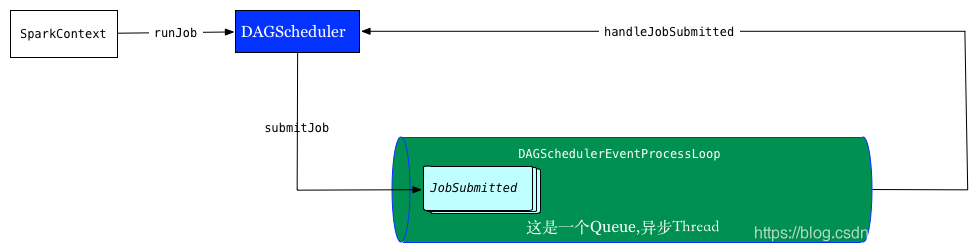
作业调度的两个主要入口是submitJob和runJob,两者的区别在于前者返回一个Jobwaiter对象,可以用在异步调用中,用来判断作业完成或者取消作业,runJob在内部调用submitJob,等待waiter对象完成,保持阻塞直到作业完成(或失败)。
  /**
   * Run an action job on the given RDD and pass all the results to the resultHandler function as
   * they arrive.
   *
   * @param rdd target RDD to run tasks on
   * @param func a function to run on each partition of the RDD
   * @param partitions set of partitions to run on; some jobs may not want to compute on all
   *   partitions of the target RDD, e.g. for operations like first()
   * @param callSite where in the user program this job was called
   * @param resultHandler callback to pass each result to
   * @param properties scheduler properties to attach to this job, e.g. fair scheduler pool name
   *
   * @note Throws `Exception` when the job fails
   */
  def runJob[T, U](
      rdd: RDD[T],
      func: (TaskContext, Iterator[T]) => U,
      partitions: Seq[Int],
      callSite: CallSite,
      resultHandler: (Int, U) => Unit,
      properties: Properties): Unit = {
    val start = System.nanoTime
    val waiter = submitJob(rdd, func, partitions, callSite, resultHandler, properties)
    ThreadUtils.awaitReady(waiter.completionFuture, Duration.Inf)
    waiter.completionFuture.value.get match {
      case scala.util.Success(_) =>
        logInfo("Job %d finished: %s, took %f s".format
          (waiter.jobId, callSite.shortForm, (System.nanoTime - start) / 1e9))
      case scala.util.Failure(exception) =>
        logInfo("Job %d failed: %s, took %f s".format
          (waiter.jobId, callSite.shortForm, (System.nanoTime - start) / 1e9))
        // SPARK-8644: Include user stack trace in exceptions coming from DAGScheduler.
        val callerStackTrace = Thread.currentThread().getStackTrace.tail
        exception.setStackTrace(exception.getStackTrace ++ callerStackTrace)
        throw exception
    }
  }


  /**
   * Submit an action job to the scheduler.
   *
   * @param rdd target RDD to run tasks on
   * @param func a function to run on each partition of the RDD
   * @param partitions set of partitions to run on; some jobs may not want to compute on all
   *   partitions of the target RDD, e.g. for operations like first()
   * @param callSite where in the user program this job was called
   * @param resultHandler callback to pass each result to
   * @param properties scheduler properties to attach to this job, e.g. fair scheduler pool name
   *
   * @return a JobWaiter object that can be used to block until the job finishes executing
   *         or can be used to cancel the job.
   *
   * @throws IllegalArgumentException when partitions ids are illegal
   */
  def submitJob[T, U](
      rdd: RDD[T],
      func: (TaskContext, Iterator[T]) => U,
      partitions: Seq[Int],
      callSite: CallSite,
      resultHandler: (Int, U) => Unit,
      properties: Properties): JobWaiter[U] = {
    // Check to make sure we are not launching a task on a partition that does not exist.
    val maxPartitions = rdd.partitions.length
    partitions.find(p => p >= maxPartitions || p < 0).foreach { p =>
      throw new IllegalArgumentException(
        "Attempting to access a non-existent partition: " + p + ". " +
          "Total number of partitions: " + maxPartitions)
    }

    val jobId = nextJobId.getAndIncrement()
    if (partitions.size == 0) {
      // Return immediately if the job is running 0 tasks
      return new JobWaiter[U](this, jobId, 0, resultHandler)
    }

    assert(partitions.size > 0)
    val func2 = func.asInstanceOf[(TaskContext, Iterator[_]) => _]
    val waiter = new JobWaiter(this, jobId, partitions.size, resultHandler)
    //实际上是将JOB put进一个LinkedBlockingDeque。另一个线程负责将JOB取出。另一个线程将执行下面的方法
    eventProcessLoop.post(JobSubmitted(
      jobId, rdd, func2, partitions.toArray, callSite, waiter,
      SerializationUtils.clone(properties)))
    waiter
  }

  //接收的上面JOB的事件
  private def doOnReceive(event: DAGSchedulerEvent): Unit = event match {
    case JobSubmitted(jobId, rdd, func, partitions, callSite, listener, properties) =>
      dagScheduler.handleJobSubmitted(jobId, rdd, func, partitions, callSite, listener, properties)

    case MapStageSubmitted(jobId, dependency, callSite, listener, properties) =>
      dagScheduler.handleMapStageSubmitted(jobId, dependency, callSite, listener, properties)

    case StageCancelled(stageId, reason) =>
      dagScheduler.handleStageCancellation(stageId, reason)

    case JobCancelled(jobId, reason) =>
      dagScheduler.handleJobCancellation(jobId, reason)

    case JobGroupCancelled(groupId) =>
      dagScheduler.handleJobGroupCancelled(groupId)

    case AllJobsCancelled =>
      dagScheduler.doCancelAllJobs()

    case ExecutorAdded(execId, host) =>
      dagScheduler.handleExecutorAdded(execId, host)

    case ExecutorLost(execId, reason) =>
      val workerLost = reason match {
        case SlaveLost(_, true) => true
        case _ => false
      }
      dagScheduler.handleExecutorLost(execId, workerLost)

    case WorkerRemoved(workerId, host, message) =>
      dagScheduler.handleWorkerRemoved(workerId, host, message)

    case BeginEvent(task, taskInfo) =>
      dagScheduler.handleBeginEvent(task, taskInfo)

    case SpeculativeTaskSubmitted(task) =>
      dagScheduler.handleSpeculativeTaskSubmitted(task)

    case GettingResultEvent(taskInfo) =>
      dagScheduler.handleGetTaskResult(taskInfo)

    case completion: CompletionEvent =>
      dagScheduler.handleTaskCompletion(completion)

    case TaskSetFailed(taskSet, reason, exception) =>
      dagScheduler.handleTaskSetFailed(taskSet, reason, exception)

    case ResubmitFailedStages =>
      dagScheduler.resubmitFailedStages()
  }
LiveListenerBus
在SparkContext中, 首先会创建LiveListenerBus实例,这个类主要功能如下:
- 保存有消息队列,负责消息的缓存
- 保存有注册过的listener,负责消息的分发
这是一个简单的监听器模型。
TaskScheduler
TaskScheduler是抽象类,目前Spark仅提供了TaskSchedulerImpl一种实现;其初始化是在SparkContext中
private[spark] class TaskSchedulerImpl(
    val sc: SparkContext,
    val maxTaskFailures: Int,
    isLocal: Boolean = false)
  extends TaskScheduler with Logging
TaskScheduler实际是SchedulerBackend(比如一种实现为YarnClientSchedulerBackend)的代理,本身处理一些通用逻辑,如不同Job间的调度顺序,将运行缓慢的task在空闲节点上重新提交(speculation)等
  override def submitTasks(taskSet: TaskSet) {
    val tasks = taskSet.tasks
    logInfo("Adding task set " + taskSet.id + " with " + tasks.length + " tasks")
    this.synchronized {
      val manager = createTaskSetManager(taskSet, maxTaskFailures)
      val stage = taskSet.stageId
      val stageTaskSets =
        taskSetsByStageIdAndAttempt.getOrElseUpdate(stage, new HashMap[Int, TaskSetManager])
      stageTaskSets(taskSet.stageAttemptId) = manager
      val conflictingTaskSet = stageTaskSets.exists { case (_, ts) =>
        ts.taskSet != taskSet && !ts.isZombie
      }
      if (conflictingTaskSet) {
        throw new IllegalStateException(s"more than one active taskSet for stage $stage:" +
          s" ${stageTaskSets.toSeq.map{_._2.taskSet.id}.mkString(",")}")
      }
      schedulableBuilder.addTaskSetManager(manager, manager.taskSet.properties)

      if (!isLocal && !hasReceivedTask) {
        starvationTimer.scheduleAtFixedRate(new TimerTask() {
          override def run() {
            if (!hasLaunchedTask) {
              logWarning("Initial job has not accepted any resources; " +
                "check your cluster UI to ensure that workers are registered " +
                "and have sufficient resources")
            } else {
              this.cancel()
            }
          }
        }, STARVATION_TIMEOUT_MS, STARVATION_TIMEOUT_MS)
      }
      hasReceivedTask = true
    }
    backend.reviveOffers()
  }
RDD
abstract class RDD[T: ClassTag](
    @transient private var _sc: SparkContext,
    @transient private var deps: Seq[Dependency[_]]
  ) extends Serializable with Logging {

  def map[U: ClassTag](f: T => U): RDD[U] = withScope {
    val cleanF = sc.clean(f)
    new MapPartitionsRDD[U, T](this, (context, pid, iter) => iter.map(cleanF))
  }
  def reduce(f: (T, T) => T): T = withScope {
    val cleanF = sc.clean(f)
    val reducePartition: Iterator[T] => Option[T] = iter => {
      if (iter.hasNext) {
        Some(iter.reduceLeft(cleanF))
      } else {
        None
      }
    }
    var jobResult: Option[T] = None
    val mergeResult = (index: Int, taskResult: Option[T]) => {
      if (taskResult.isDefined) {
        jobResult = jobResult match {
          case Some(value) => Some(f(value, taskResult.get))
          case None => taskResult
        }
      }
    }
    sc.runJob(this, reducePartition, mergeResult)
    // Get the final result out of our Option, or throw an exception if the RDD was empty
    jobResult.getOrElse(throw new UnsupportedOperationException("empty collection"))
  }
RDD的checkpoint机制
  /**
   * Mark this RDD for checkpointing. It will be saved to a file inside the checkpoint
   * directory set with `SparkContext#setCheckpointDir` and all references to its parent
   * RDDs will be removed. This function must be called before any job has been
   * executed on this RDD. It is strongly recommended that this RDD is persisted in
   * memory, otherwise saving it on a file will require recomputation.
   */
  def checkpoint(): Unit = RDDCheckpointData.synchronized {
    // NOTE: we use a global lock here due to complexities downstream with ensuring
    // children RDD partitions point to the correct parent partitions. In the future
    // we should revisit this consideration.
    if (context.checkpointDir.isEmpty) {
      throw new SparkException("Checkpoint directory has not been set in the SparkContext")
    } else if (checkpointData.isEmpty) {
      checkpointData = Some(new ReliableRDDCheckpointData(this))
    }
  }
checkpoint 的使用方式如下
val data = sc.textFile("/tmp/spark/1.data").cache() // 注意要cache
sc.setCheckpointDir("/tmp/spark/checkpoint")
data.checkpoint
data.count
使用很简单, 就是设置一下 checkpoint 目录,然后再rdd上调用 checkpoint 方法, action 的时候就对数据进行了 checkpoint当checkpoint为当前RDD设置检查点的时候,该函数将会创建一个二进制的文件,并存储到checkpoint目录中,该目录是用SparkContext.setCheckpointDir()设置的。在checkpoint的过程中,该RDD的所有依赖于父RDD中的信息将全部被移出。对RDD进行checkpoint操作并不会马上被执行,必须执行Action操作才能触发。当需要checkpoint的数据的时候,通过ReliableCheckpointRDD的readCheckpointFile方法来从file路径里面读出已经Checkpoint的数据。
Executor
- 在Worker Actor中,每次LaunchExecutor会创建一个CoarseGrainedExecutorBackend进程,一个Executor对应一个CoarseGrainedExecutorBackend
- 针对同一个App,每个Worker里只能有一个针对该App的Executor存在,切记。如果想让整个App的Executor变多,设置SPARK_WORKER_INSTANCES,让每个节点(机器上)的Worker变多。APP之间不公用Executor。
- Executor的资源分配有2种策略:
- SpreadOut :一种以round-robin方式遍历集群所有可用Worker,分配Worker资源,来启动创建Executor的策略,好处是尽可能的将cores分配到各个节点,最大化负载均衡和高并行。
- 非SpreadOut:会尽可能的根据每个Worker的剩余资源来启动Executor,这样启动的Executor可能只在集群的一小部分机器的Worker上。这样做对node较少的集群还可以,集群规模大了,Executor的并行度和机器负载均衡就不能够保证了。
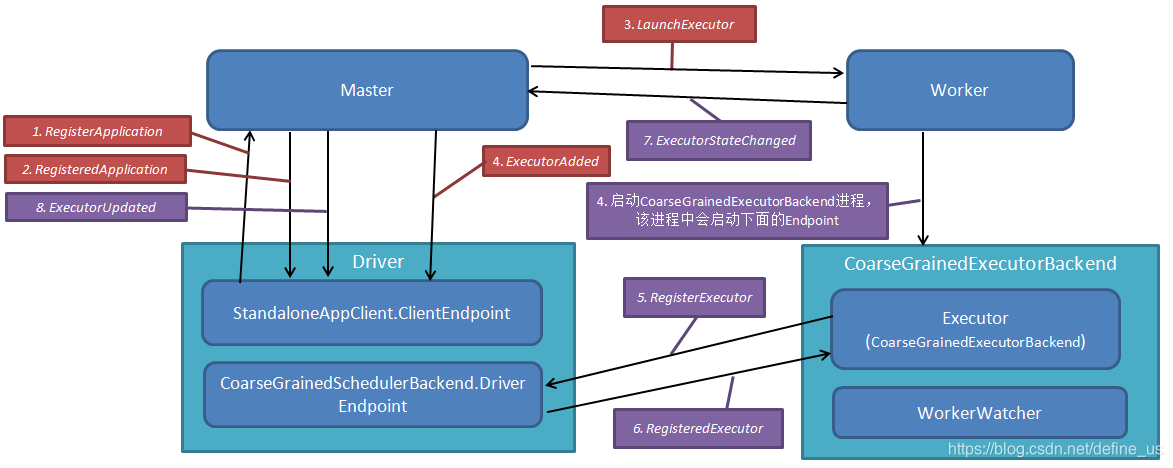
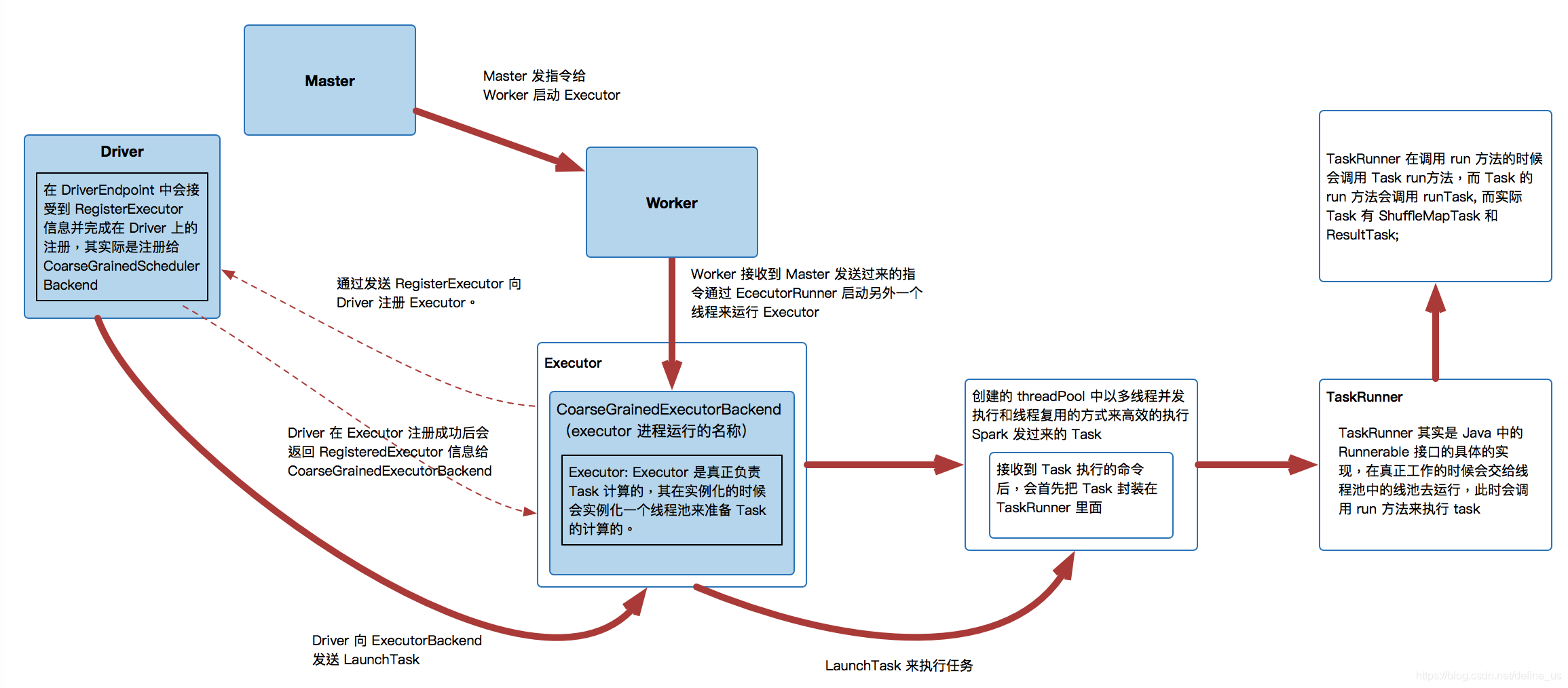
Streaming
https://blog.youkuaiyun.com/define_us/article/details/83109337
JavaStreamingContext
http://spark.apache.org/docs/0.8.1/api/streaming/org/apache/spark/streaming/api/java/JavaStreamingContext.html
定义上下文后,您必须执行以下操作:
- 通过创建输入DStreams定义输入源
- 通过对DStreams应用转换操作(transformation)和输出操作(output)来定义流计算
- 可以使用streamingContext.start()方法接收和处理数据
- 可以使用streamingContext.awaitTermination()方法等待流计算完成(手动或由于任何错误),来防止应用退出
- 可以使用streamingContext.stop()手动停止处理。
class JavaStreamingContext(val ssc: StreamingContext) extends Closeable {
  /**
   * Start the execution of the streams.
   */
  def start(): Unit = {
    ssc.start()
  }

 402


 扫一扫


 被折叠的 条评论
为什么被折叠?
 到【灌水乐园】发言


