


 本文介绍了如何在Ubuntu上安装和运行ASP.NET应用程序的开发环境,包括使用Mono和XSP来支持ASP.NET 1.0和2.0。通过安装mono-xsp, mono-xsp-base及相关示例,开发者可以启动XSP服务器来运行和测试自己的ASP.NET应用。"
133944979,10889562,Android Studio连接SQLite数据库指南,"['Android开发', '数据库', 'Android Studio']
本文介绍了如何在Ubuntu上安装和运行ASP.NET应用程序的开发环境,包括使用Mono和XSP来支持ASP.NET 1.0和2.0。通过安装mono-xsp, mono-xsp-base及相关示例,开发者可以启动XSP服务器来运行和测试自己的ASP.NET应用。"
133944979,10889562,Android Studio连接SQLite数据库指南,"['Android开发', '数据库', 'Android Studio']
The ASP.NET development environment on Ubuntu Linux is called XSP. This is a simple webserver written in C# that can be used for either ASP.NET 1.0 or 2.0 applications. You can install both environments side by side if need be.
Ubuntu Linux上的ASP.NET开发环境称为XSP。 这是一个用C#编写的简单Web服务器,可用于ASP.NET 1.0或2.0应用程序。 如果需要,您可以并排安装两个环境。
Requirements:
要求:
Mono development environment.
Mono开发环境。
ASP.NET 1.0
ASP.NET 1.0
sudo apt-get install mono-xsp mono-xsp-base
须藤apt-get install mono-xsp mono-xsp-base
sudo apt-get install asp.net-examples
sudo apt-get install asp.net-examples
This will install the development environment along with some sample applications. To run the sample applications, you will launch the XSP process and point it at the samples. You’d simply modify the path to run an application that you’ve created.
这将安装开发环境以及一些示例应用程序。 要运行示例应用程序,您将启动XSP流程并将其指向示例。 您只需修改路径即可运行您创建的应用程序。
> xsp –root /usr/share/asp.net-demos/
> xsp –root /usr/share/asp.net-demos/
Listening on port: 8080 (non-secure) Listening on address: 0.0.0.0 Root directory: /usr/share/asp.net-demos Hit Return to stop the server.
侦听端口:8080(非安全)侦听地址:0.0.0.0根目录:/usr/share/asp.net-demos单击Return停止服务器。
ASP.NET 2.0
ASP.NET 2.0
sudo apt-get install mono-xsp2 mono-xsp2-base
sudo apt-get install mono-xsp2 mono-xsp2-base
sudo apt-get install asp.net2-examples
sudo apt-get install asp.net2-examples
This will install the development environment along with some sample applications. To run the sample applications, you will launch the XSP process and point it at the samples. You’d simply modify the path to run an application that you’ve created.
这将安装开发环境以及一些示例应用程序。 要运行示例应用程序,您将启动XSP流程并将其指向示例。 您只需修改路径即可运行您创建的应用程序。
> xsp2 –root /usr/share/asp.net2-demos/
> xsp2 –root /usr/share/asp.net2-demos/
Listening on port: 8080 (non-secure) Listening on address: 0.0.0.0 Root directory: /usr/share/asp.net-demos Hit Return to stop the server.
侦听端口:8080(非安全)侦听地址:0.0.0.0根目录:/usr/share/asp.net-demos单击Return停止服务器。
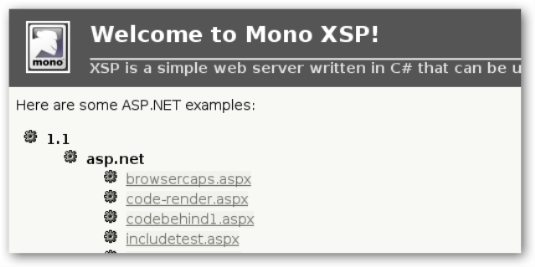
At this point, you’d want to navigate in your browser to http://localhost:8080/ and you should see a page similar to this:
此时,您需要在浏览器中导航到http:// localhost:8080 /,并且应该看到类似于以下页面:
翻译自: https://www.howtogeek.com/howto/ubuntu/run-aspnet-applications-on-ubuntu-for-developers/





 扫一扫
扫一扫


 678
678

 被折叠的 条评论
为什么被折叠?
被折叠的 条评论
为什么被折叠?
 到【灌水乐园】发言





