


 Windows 10的2018年4月更新引入了核心隔离和内存完整性,利用虚拟化技术保护操作系统免受篡改。核心隔离默认在满足特定硬件条件的设备上启用,而内存完整性需要手动开启,它增强了代码完整性检查,防止恶意软件篡改系统进程。这两个特性可能与虚拟机软件冲突,导致兼容性问题。

内存隔离

Windows 10’s April 2018 Update brings “Core Isolation” and “Memory Integrity” security features to everyone. These use virtualization-based security to protect your core operating system processes from tampering, but Memory Protection is off by default for people who upgrade.
Windows 10的2018年4月更新为所有人带来了“核心隔离”和“内存完整性”安全功能。 它们使用基于虚拟化的安全性来保护您的核心操作系统进程免遭篡改,但是默认情况下,升级人员的内存保护处于关闭状态。
什么是核心隔离? (What is Core Isolation?)
In the original release of Windows 10, virtualization-based security (VBS) features were only available on Enterprise editions of Windows 10 as part of “Device Guard.” With the April 2018 Update, Core Isolation brings some virtualization-based security features to all editions of Windows 10.
在Windows 10的原始版本中, 基于虚拟化的安全性 (VBS)功能仅在Windows 10企业版中作为“ Device Guard”的一部分提供。 通过2018年4月更新,核心隔离为Windows 10的所有版本带来了一些基于虚拟化的安全功能。
Some Core Isolation features are enabled by default on Windows 10 PCs that meet certain hardware and firmware requirements, including having a 64-bit CPU and TPM 2.0 chip. It also requires your PC supports the Intel VT-x or AMD-V virtualization technology, and that it’s enabled in your PC’s UEFI settings.
在满足特定硬件和固件要求的 Windows 10 PC上,默认情况下会启用某些核心隔离功能,包括具有64位CPU和TPM 2.0芯片 。 它还要求您的PC支持Intel VT-x或AMD-V虚拟化技术,并且已在PC的UEFI设置中启用了该技术。
When these features are enabled, Windows uses hardware virtualization features to create a secure area of system memory that’s isolated from the normal operating system. Windows can run system processes and security software in this secure area. This protects important operating system processes from being tampered with by anything running outside the secure area.
启用这些功能后,Windows将使用硬件虚拟化功能来创建与正常操作系统隔离的系统内存的安全区域。 Windows可以在此安全区域中运行系统进程和安全软件。 这样可以防止重要的操作系统进程受到安全区域外部运行的任何内容的篡改。
Even if malware is running on your PC and knows an exploit that should allow it to crack these Windows processes, the virtualization-based security is an additional layer of protection that will isolate them from attack.
即使您的PC上正在运行恶意软件,并且知道应该允许它破解这些Windows进程的漏洞利用,基于虚拟化的安全性也是附加的保护层,可以使它们免受攻击。
什么是内存完整性? (What Is Memory Integrity?)
The feature known as “Memory Integrity” in Windows 10’s interface is also known as “Hypervisor protected Code Integrity” (HVCI) in Microsoft’s documentation.
Windows 10界面中称为“内存完整性”的功能在Microsoft文档中也称为“ Hypervisor保护的代码完整性”(HVCI)。
Memory Integrity is disabled by default on PCs that upgraded to the April 2018 Update, but you can enable it. It will be enabled by default on new installations of Windows 10 going forward.
在升级到2018年4月更新的PC上,默认情况下禁用内存完整性,但您可以启用它。 默认情况下,以后将在Windows 10的新安装中启用该功能。
This feature is a subset of Core Isolation. Windows normally requires digital signatures for device drivers and other code that runs in low-level Windows kernel mode. This ensures they haven’t been tampered with by malware. When “Memory Integrity” is enabled, the “code integrity service” in Windows runs inside the hypervisor-protected container created by Core Isolation. This should make it nearly impossible for malware to tamper with the code integrity checks and gain access to the Windows kernel.
此功能是核心隔离的子集。 Windows通常要求设备驱动程序和在低级Windows内核模式下运行的其他代码具有数字签名 。 这确保了它们不会被恶意软件篡改。 启用“内存完整性”后,Windows中的“代码完整性服务”将在由Core Isolation创建的受管理程序保护的容器中运行。 这应该使恶意软件几乎不可能篡改代码完整性检查并获得对Windows内核的访问权限。
虚拟机问题 (Virtual Machine Problems)
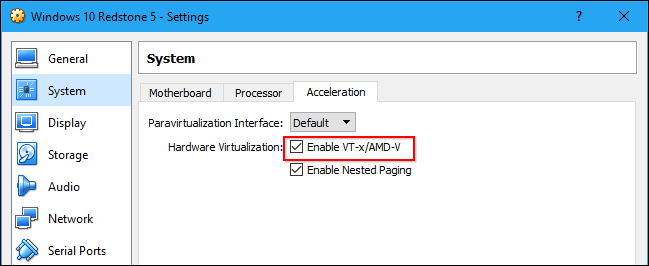
As Memory Integrity uses the system’s virtualization hardware, it’s incompatible with virtual machine programs like VirtualBox or VMware. Only one application can use this hardware at a time.
由于Memory Integrity使用系统的虚拟化硬件,因此与VirtualBox或VMware等虚拟机程序不兼容。 一次只有一个应用程序可以使用此硬件。
You may see a message saying Intel VT-X or AMD-V is not enabled or available if you install a virtual machine program on a system with Memory Integrity enabled. In VirtualBox, you may see the error message “Raw-mode is unavailable courtesy of Hyper-V” while Memory Protection is enabled.
如果在启用了内存完整性的系统上安装虚拟机程序,则可能会看到一条消息,说明未启用或不支持Intel VT-X或AMD-V。 在VirtualBox中,启用内存保护后,您可能会看到错误消息“原始模式不适用于Hyper-V”。
Either way, if you encounter a problem with your virtual machine software, you must disable Memory Integrity to use it.
无论哪种方式,如果您的虚拟机软件遇到问题,都必须禁用“内存完整性”才能使用它。
为什么默认情况下禁用它? (Why Is It Disabled By Default?)
The main Core Isolation feature shouldn’t cause any problems. It’s enabled on all Windows 10 PCs that can support it, and there’s no interface for disabling it.
主要的核心隔离功能不应引起任何问题。 在所有支持该功能的Windows 10 PC上都启用了此功能,并且没有用于禁用它的界面。
However, Memory Integrity protection can cause problems with some device drivers or other low-level Windows applications, which is why it’s disabled by default on upgrades. Microsoft is still pushing developers and device manufacturers to make their drivers and software compatible, which is why it’s enabled by default on new PCs and new installations of Windows 10.
但是,内存完整性保护会导致某些设备驱动程序或其他低级Windows应用程序出现问题,这就是为什么默认情况下在升级时将其禁用的原因。 微软仍在推动开发人员和设备制造商使其驱动程序和软件兼容,这就是为什么默认情况下在新PC和Windows 10的新安装上启用它的原因。
If one of the drivers your PC requires to boot is incompatible with Memory Protection, Windows 10 will silently turn Memory Protection off to ensure your PC can boot and work properly. So, if you try enabling it and reboot only to find it’s still disabled, that’s why.
如果您的PC需要引导的驱动程序之一与内存保护不兼容,则Windows 10会以静默方式关闭内存保护,以确保您的PC可以引导并正常工作。 因此,如果您尝试启用它并仅重新启动以发现它仍然被禁用,这就是原因。
If you encounter problems with other devices or malfunctioning software after enabling Memory Protection, Microsoft recommends checking for updates with the specific application or driver. If no updates are available, turn off Memory Protection.
如果在启用内存保护后遇到其他设备或软件故障的问题,Microsoft建议检查特定应用程序或驱动程序的更新。 如果没有可用的更新,请关闭“内存保护”。
As we mentioned above, Memory Integrity will also be incompatible with some applications that require exclusive access to the system’s virtualization hardware, such as virtual machine programs. Other tools, including some debuggers, also require exclusive access to this hardware and won’t work with Memory Integrity enabled.
如上所述,“内存完整性”也将与某些需要独占访问系统虚拟化硬件的应用程序(例如虚拟机程序)不兼容。 其他工具(包括某些调试器)也需要对此硬件具有独占访问权,并且在启用内存完整性的情况下无法使用。
如何启用核心隔离内存完整性 (How to Enable Core Isolation Memory Integrity)
You can see whether your PC has Core Isolation features enabled and toggle Memory Protection on or off from the Windows Defender Security Center application. (This tool will be renamed “Windows Security” as part of the October 2018 Update.)
您可以查看您的PC是否启用了核心隔离功能,并可以从Windows Defender安全中心应用程序打开或关闭“内存保护”。 (此工具将作为2018年10月更新的一部分重命名为“ Windows安全性”。)
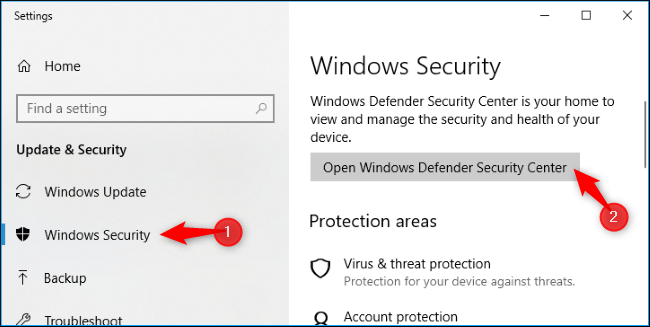
To open it, search for “Windows Defender Security Center” in your Start menu or head to Settings > Update & Security > Windows Security > Open Windows Defender Security Center.
要打开它,请在“开始”菜单中搜索“ Windows Defender安全中心”,或转到“设置”>“更新和安全性”>“ Windows安全性”>“打开Windows Defender安全中心”。
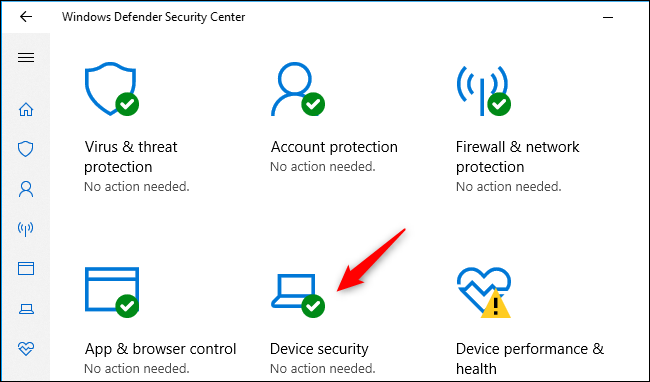
Click the “Device Security” icon in the Security Center.
单击安全中心中的“设备安全性”图标。
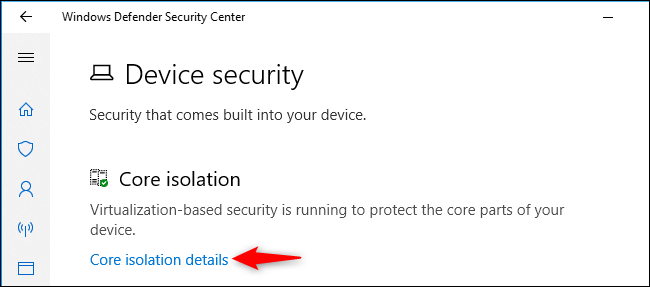
If Core Isolation is enabled on your PC’s hardware, you’ll see the message “Virtualization-based security is running to protect the core parts of your device” here.
如果在PC的硬件上启用了核心隔离,则将在此处看到消息“正在运行基于虚拟化的安全性以保护设备的核心部分”。
To enable (or disable) Memory Protection, click the “Core Isolation Details” link.
要启用(或禁用)内存保护,请单击“ Core Isolation Details”链接。
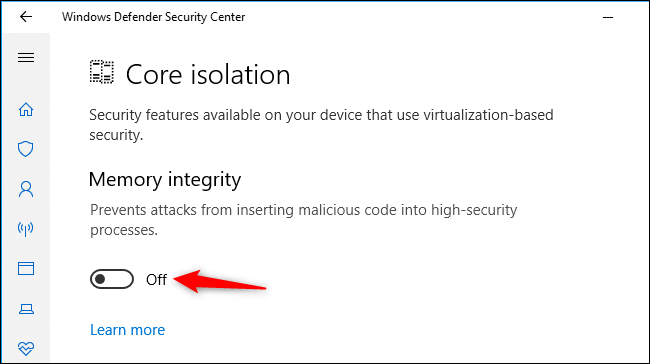
This screen shows you whether Memory Integrity is enabled or not. That’s the only option here for now.
该屏幕显示是否启用了内存完整性。 这是目前唯一的选择。
To enable Memory Integrity, flip the switch to “On.” If you encounter application or device problems and need to disable Memory Integrity, return here and flip the switch to “Off.”
要启用内存完整性,请将开关拨到“开”。 如果遇到应用程序或设备问题,并且需要禁用“内存完整性”,请返回此处并将开关拨至“关”。
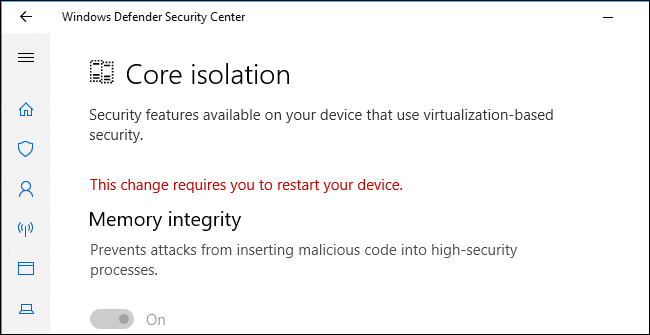
You’ll be prompted to restart your computer, and the change will only take effect once you have.
系统将提示您重新启动计算机,并且更改仅在您生效后才生效。
更多Windows Defender漏洞利用防护功能 (More Windows Defender Exploit Guard Features)
Core Isolation and Memory Integrity are some of the many new security features Microsoft has added as part of Windows Defender Exploit Guard. This is a collection of features designed to secure Windows against attack.
核心隔离和内存完整性是Microsoft作为Windows Defender Exploit Guard的一部分添加的许多新安全功能中的一些。 这是旨在保护Windows免受攻击的功能的集合。
Exploit protection, which protects your operating system and applications from many types of exploits, is enabled by default. This replaces Microsoft’s old EMET tool, and includes anti-exploit features we previously recommended installing Malware Anti-Exploit for. All Windows 10 users now have exploit protection.
默认情况下启用了漏洞利用保护功能 ,可以保护操作系统和应用程序免受多种类型的漏洞利用。 它取代了Microsoft的旧EMET工具 ,并包含了我们先前建议为其安装恶意软件反利用功能的反利用功能。 现在,所有Windows 10用户都具有漏洞利用保护功能。
There’s also Controlled Folder Access, which protects your files from ransomware. It’s not enabled by default because it requires some configuration. If you enable this feature, you’ll have to allow applications access before they can access files in your personal file folders.
还有“ 受控文件夹访问” ,可保护您的文件免遭勒索软件的侵害。 默认情况下未启用它,因为它需要一些配置。 如果启用此功能,则必须先允许应用程序访问,然后才能访问您个人文件夹中的文件。
Going forward, Memory Integrity will be enabled by default on all new PCs, providing additional protection against attacks. Only advanced users who use virtual machine software and other tools that require access to the system virtualization hardware will have to disable it.
展望未来,默认情况下,将在所有新PC上启用Memory Integrity,以提供针对攻击的额外保护。 只有使用需要访问系统虚拟化硬件的虚拟机软件和其他工具的高级用户才必须禁用它。
翻译自: https://www.howtogeek.com/357757/what-are-core-isolation-and-memory-integrity-in-windows-10/
内存隔离





 扫一扫
扫一扫


 1030
1030

 被折叠的 条评论
为什么被折叠?
被折叠的 条评论
为什么被折叠?
 到【灌水乐园】发言





