



作者: 还是大剑师兰特 ,曾为美国某知名大学计算机专业研究生,现为国内GIS领域高级前端工程师,优快云知名博主,深耕openlayers、leaflet、mapbox、cesium,canvas,echarts等技术开发,欢迎加微信(gis-dajianshi),一起交流。
048个示例
一、示例效果图
二、示例简介
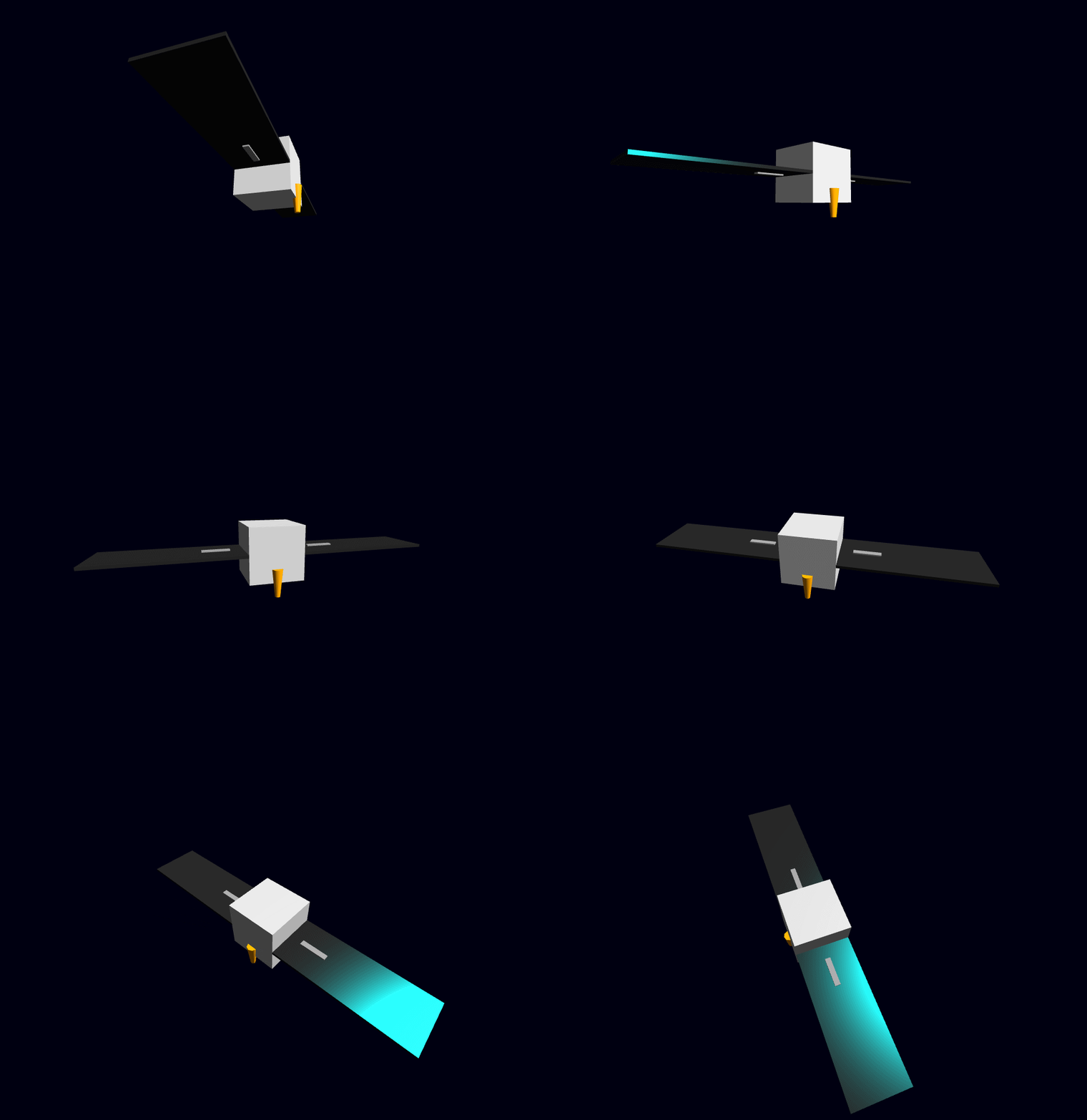
本示例是vue+threeJS项目,实现了一个具有主体、太阳能板、连接臂和天线的卫星模型。示例包含初始化Three.js场景、相机和渲染器,添加光源,创建卫星组件及动画效果。文章还强调了在组件销毁时清理资源的注意事项,防止内存泄漏。代码可直接复制到Vue项目中运行,适合学习3D建模和WebGL技术。
三、配置说明
1)查看基础设置:https://dajianshi.blog.youkuaiyun.com/article/details/141936765
2)将示例源代码,粘贴到src/views/Home.vue中,npm run serve 运行即可。
四、示例源代码(共 170行)
/*
* @Author: 大剑师兰特(xiaozhuanlan),还是大剑师兰特(优快云)
* @此源代码版权归大剑师兰特所有,可供学习或商业项目中借鉴,未经授权,不得重复地发表到博客、论坛,问答,git等公共空间或网站中。
* @Email: 2909222303@qq.com
* @First published in xiaozhuanlan
* @Second published in 优快云
* @First published time: 2025-11-25
*/

<template>
  <div ref="container" class="satellite-container"></div>
</template>

<script>
import * as THREE from 'three';

export default {
  name: 'Satellite3D',
  data() {
    return {
      scene: null,
      camera: null,
      renderer: null,
      satellite: null,
      directionalLight: null,
      animationFrameId: null, // 用于保存 requestAnimationFrame 的 ID,以便清理
    };
  },
  mounted() {
    this.initThree();
    this.animate();
    window.addEventListener('resize', this.onWindowResize, false);
  },
  beforeDestroy() {
    // 组件销毁前清理 Three.js 资源,避免内存泄漏
    window.removeEventListener('resize', this.onWindowResize, false);
    if (this.animationFrameId) {
      cancelAnimationFrame(this.animationFrameId);
    }
    if (this.renderer) {
      this.renderer.dispose(); // 释放 WebGL 资源
      this.renderer.domElement = null;
    }
    this.scene = null;
    this.camera = null;
    this.renderer = null;
    this.satellite = null;
  },
  methods: {
    initThree() {
      // 获取容器 DOM 元素
      const container = this.$refs.container;
      const width = container.clientWidth;
      const height = container.clientHeight;

      // 场景 (Scene)
      this.scene = new THREE.Scene();
      this.scene.background = new THREE.Color(0x000011); // 深空背景

      // 摄像机 (Camera)
      this.camera = new THREE.PerspectiveCamera(75, width / height, 0.1, 1000);
      this.camera.position.z = 5;

      // 渲染器 (Renderer)
      this.renderer = new THREE.WebGLRenderer({ antialias: true });
      this.renderer.setSize(width, height);
      container.appendChild(this.renderer.domElement);

      // 添加灯光
      this.addLights();

      // 创建卫星对象
      this.satellite = this.createSatellite();
      this.scene.add(this.satellite);

    },

    addLights() {
      // 环境光
      const ambientLight = new THREE.AmbientLight(0x404040, 5);
      this.scene.add(ambientLight);

      // 定向光
      this.directionalLight = new THREE.DirectionalLight(0xffffff, 5);
      this.directionalLight.position.set(5, 5, 5).normalize();
      this.scene.add(this.directionalLight);
    },

    createSatellite() {
      const satelliteGroup = new THREE.Group();

      // 1. 卫星主体 (Central Body) - 方块
      const bodyGeometry = new THREE.BoxGeometry(1, 1, 1);
      const bodyMaterial = new THREE.MeshPhongMaterial({ color: 0xcccccc, specular: 0x333333, shininess: 30 });
      const body = new THREE.Mesh(bodyGeometry, bodyMaterial);
      satelliteGroup.add(body);

      // 2. 太阳能板 (Solar Panel) - 长方体
      const panelGeometry = new THREE.BoxGeometry(2.5, 0.05, 1);
      const panelMaterial = new THREE.MeshPhongMaterial({ color: 0x222222, specular: 0x00ffff, shininess: 100 });

      const panelLeft = new THREE.Mesh(panelGeometry, panelMaterial);
      panelLeft.position.x = -1.75;
      satelliteGroup.add(panelLeft);

      const panelRight = new THREE.Mesh(panelGeometry, panelMaterial);
      panelRight.position.x = 1.75;
      satelliteGroup.add(panelRight);

      // 3. 连接臂 (Boom)
      const boomGeometry = new THREE.BoxGeometry(0.5, 0.1, 0.1);
      const boomMaterial = new THREE.MeshPhongMaterial({ color: 0x999999 });

      const boomLeft = new THREE.Mesh(boomGeometry, boomMaterial);
      boomLeft.position.x = -1;
      satelliteGroup.add(boomLeft);

      const boomRight = new THREE.Mesh(boomGeometry, boomMaterial);
      boomRight.position.x = 1;
      satelliteGroup.add(boomRight);

      // 4. 天线 (Antenna)
      const antennaGeometry = new THREE.CylinderGeometry(0.05, 0.1, 0.5, 8);
      const antennaMaterial = new THREE.MeshPhongMaterial({ color: 0xffa500 });
      const antenna = new THREE.Mesh(antennaGeometry, antennaMaterial);
      antenna.position.y = 0.5;
      antenna.position.z = 0.5;
      satelliteGroup.add(antenna);

      return satelliteGroup;
    },

    animate() {
      this.animationFrameId = requestAnimationFrame(this.animate);

      if (this.satellite) {
        // 卫星持续旋转
        this.satellite.rotation.x += 0.005;
        this.satellite.rotation.y += 0.008;
      }

      // (如果使用了 OrbitControls,需要更新它)
      // if (controls) controls.update();

      if (this.renderer && this.scene && this.camera) {
        this.renderer.render(this.scene, this.camera);
      }
    },

    onWindowResize() {
      const container = this.$refs.container;
      if (!container || !this.camera || !this.renderer) return;

      const width = container.clientWidth;
      const height = container.clientHeight;

      this.camera.aspect = width / height;
      this.camera.updateProjectionMatrix();
      this.renderer.setSize(width, height);
    },
  },
};
</script>

<style scoped>
.satellite-container {
  width: 100%;
  height: 700px; /* 或者您希望的高度 */
  background-color: #000; /* 确保背景色和 Three.js 场景一致 */
  display: flex; /* 让 canvas 居中 */
  justify-content: center;
  align-items: center;
}
/* Three.js 的 canvas 元素默认是 inline-block,
   需要设置其 display 为 block 避免底部空白 */
.satellite-container canvas {
  display: block;
}
</style>
五、相关文章参考
https://dajianshi.blog.youkuaiyun.com/article/details/142059217






 扫一扫
扫一扫


 751
751

 被折叠的 条评论
为什么被折叠?
被折叠的 条评论
为什么被折叠?
 到【灌水乐园】发言





