



这一章主要是为Ruby增加健康值
1.为Ruby增加健康状态 Add a Health Stat to Ruby
public class RubyController : MonoBehaviour
{
    public int maxHealth = 5;
    int currentHealth;

    Rigidbody2D rigidbody2d;
    float horizontal;
    float vertical;

    // Start is called before the first frame update
    void Start()
    {
        rigidbody2d = GetComponent<Rigidbody2D>();

        currentHealth = maxHealth;
    }

    // Update is called once per frame
    void Update()
    {
        horizontal = Input.GetAxis("Horizontal");
        vertical = Input.GetAxis("Vertical");
    }

    void FixedUpdate()
    {
        Vector2 position = rigidbody2d.position;
        position.x = position.x + 3.0f* horizontal * Time.deltaTime;
        position.y = position.y + 3.0f * vertical * Time.deltaTime;

        rigidbody2d.MovePosition(position);
    }

    void ChangeHealth(int amount)
    {
        currentHealth = Mathf.Clamp(currentHealth + amount, 0, maxHealth);
        Debug.Log(currentHealth + "/" + maxHealth);
    }

}
在上面建立了两个新的变量,maxHealth 和currentHealth 。在开始方法中,给了currentHealth 满值。
ChangeHealth方法为修改Ruby的健康值。Clamp方法,保证了健康值在0到maxHealth 之间。最后一行为将健康值显示在控制台上。
2.Create New Variables
3.在开始时设置满状态 Set Full Health at Game Start
4.添加一个函数来修改健康值 Add a Function to Change Health
void ChangeHealth(int amount)
{
   currentHealth = Mathf.Clamp(currentHealth + amount, 0, maxHealth);
   Debug.Log(currentHealth + "/" + maxHealth);
}
上面的Clamp函数表示currentHealth + amount的值在0到 maxHealth之间。
5.Check Your Changes in Unity Editor

在Ruby Controller脚本中,可以看到maxHealth 已显示在Unity Editor中,因为它是公共变量,可以在外边修改它的值。
6.Exercise: Expose Another Variable
7.什么是触发器What is a Trigger?
触发器是一种特殊类型的碰撞体。它不会阻碍运动。但物理系统仍检查角色是否会与它们发生碰撞。当你的角色进入触发器时,它会向你发送一条消息,这样你就可以处理这个事件了。
8.Create a Collectible Health GameObject
在工程窗口中,Assets > Art > Sprites > VFX,找到CollectibleHealth。在场景中导入它。写上正确的PPU 的值。对这个新的游戏对象增加Box Collider 2D,并调整下大小和位置。
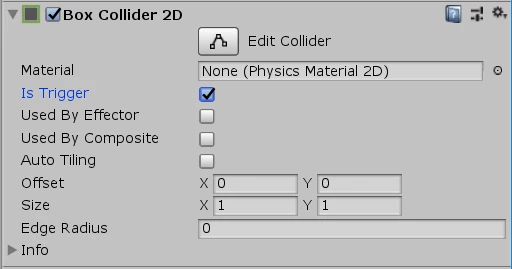
在视图中,找到Box Collider 2D ,将Is Trigger勾选上。
9.增加新的脚本Create a Collectible Script
增加新的脚本名为HealthCollectible,并将这个脚本放到游戏对象中。双击打开这个脚本。
public class HealthCollectible : MonoBehaviour
{
void OnTriggerEnter2D(Collider2D other)
   {
       Debug.Log("Object that entered the trigger : " + other);
   }
}
点运行时,让Ruby走动,看Ruby是否引发触发器。
10.Give Ruby Health
11.Review Your Code
12.Adjust the RubyController Script
13.Check Whether Ruby Needs Health
14.Define a Property in RubyController
私有属性在外部的访问,get ,set的用法。
15.Use the Property in HealthCollectible
16.Check Your Scripts
完整的脚本为:
using System.Collections;
using System.Collections.Generic;
using UnityEngine;

public class HealthCollectible : MonoBehaviour
{
    void OnTriggerEnter2D(Collider2D other)
    {
        RubyController controller = other.GetComponent<RubyController>();

        if (controller != null)
        {
            if(controller.health  < controller.maxHealth)
            {
                controller.ChangeHealth(1);
                Destroy(gameObject);
            }
        }
    }
}
public class RubyController : MonoBehaviour
{
    public float speed = 3.0f;

    public int maxHealth = 5;

    public int health { get { return currentHealth; }}
    int currentHealth;

    Rigidbody2D rigidbody2d;
    float horizontal;
    float vertical;

    // Start is called before the first frame update
    void Start()
    {
        rigidbody2d = GetComponent<Rigidbody2D>();
        currentHealth = maxHealth;
    }

    // Update is called once per frame
    void Update()
    {
        horizontal = Input.GetAxis("Horizontal");
        vertical = Input.GetAxis("Vertical");
    }

    void FixedUpdate()
    {
        Vector2 position = rigidbody2d.position;
        position.x = position.x + speed * horizontal * Time.deltaTime;
        position.y = position.y + speed * vertical * Time.deltaTime;

        rigidbody2d.MovePosition(position);
    }

    public void ChangeHealth(int amount)
    {
        currentHealth = Mathf.Clamp(currentHealth + amount, 0, maxHealth);
        Debug.Log(currentHealth + "/" + maxHealth);
    }
}





 扫一扫
扫一扫


 36万+
36万+


 到【灌水乐园】发言



