



 本文介绍了如何在Android平台上创建一个简单的TCP客户端,涵盖了连接、断开、发送和接收数据的基本操作。首先,创建了一个Android项目,并设置了相应的布局文件。接着,在dimens.xml中进行了配置,以提升应用的专业感。然后,主程序实现了TCP通信的核心功能。最后,别忘了在AndroidManifest.xml中添加必要的网络访问权限。
连接,断开,发送,接收--简单功能
1、创建项目

2、 布局文件

(1)
<?xml version="1.0" encoding="utf-8"?>
<LinearLayout
    xmlns:android="http://schemas.android.com/apk/res/android"
    xmlns:tools="http://schemas.android.com/tools"
    android:layout_width="match_parent"
    android:layout_height="match_parent"
    android:orientation="vertical"
    android:paddingBottom="@dimen/activity_vertical_margin"
    android:paddingLeft="@dimen/activity_horizontal_margin"
    android:paddingRight="@dimen/activity_horizontal_margin"
    android:paddingTop="@dimen/activity_vertical_margin"
    tools:context=".MainActivity"
    >

    <LinearLayout
        android:layout_width="match_parent"
        android:layout_height="wrap_content"
        android:gravity="center_vertical"
        android:orientation="horizontal"
        >

        <EditText
            android:id="@+id/ed_client_ip"
            android:layout_width="0dp"
            android:layout_height="wrap_content"
            android:layout_weight="2"
            android:hint="IP"
            android:text="127.0.0.1"
            android:textSize="14sp"
            />

        <EditText
            android:id="@+id/ed_client_port"
            android:layout_width="0dp"
            android:layout_height="wrap_content"
            android:layout_weight="1"
            android:hint="端口"
            android:text="8801"
            android:textSize="14sp"
            />

        <Button
            android:id="@+id/btn_start_client"
            android:layout_width="wrap_content"
            android:layout_height="35dp"
            android:layout_margin="0dp"
            android:padding="0dp"
            android:text="连接服务"
            android:textSize="14sp"
            android:onClick="connectServer"
            />
    </LinearLayout>


    <LinearLayout
        android:layout_width="match_parent"
        android:layout_height="wrap_content"
        android:gravity="center_vertical"
        android:orientation="horizontal"
        >

        <EditText
            android:id="@+id/ed_client_send_message"
            android:layout_width="0dp"
            android:layout_height="wrap_content"
            android:layout_weight="1"
            android:hint="发送的消息"
            android:text="from client"
            android:textSize="14sp"
            />

        <Button
            android:id="@+id/btn_client_send"
            android:layout_width="wrap_content"
            android:layout_height="35dp"
            android:layout_margin="0dp"
            android:padding="0dp"
            android:text="发送消息"
            android:textSize="14sp"
            android:onClick="SendMsgToServer"
            />
    </LinearLayout>

    <RelativeLayout
        android:layout_width="match_parent"
        android:layout_height="wrap_content"
        >

        <TextView
            android:layout_width="match_parent"
            android:layout_height="wrap_content"
            android:layout_alignParentLeft="true"
            android:layout_centerVertical="true"
            android:text="客户端日志:"
            android:textSize="14sp"
            />

        <Button
            android:id="@+id/btn_client_clear_message"
            android:layout_width="wrap_content"
            android:layout_height="35dp"
            android:layout_alignParentRight="true"
            android:layout_centerVertical="true"
            android:layout_margin="0dp"
            android:padding="0dp"
            android:text="清除日志"
            android:textSize="14sp"
            android:onClick="clearLog"
            />
    </RelativeLayout>

    <ListView
        android:id="@+id/lv_client_msg"
        android:layout_width="match_parent"
        android:layout_height="wrap_content"
        />
</LinearLayout>
(2)
<?xml version="1.0" encoding="utf-8"?>

<TextView
    android:id="@+id/item_log"
    xmlns:android="http://schemas.android.com/apk/res/android"
    android:layout_width="match_parent"
    android:layout_height="match_parent"
    android:text="Item Log goes here"
    android:textSize="12sp"
    />
(3)dimens.xml,看起来专业点
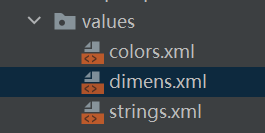
<resources>
    <!-- Default screen margins, per the Android Design guidelines. -->
    <dimen name="activity_horizontal_margin">16dp</dimen>
    <dimen name="activity_vertical_margin">16dp</dimen>
</resources>
3、主程序
package com.example.chentcpclient;

import androidx.appcompat.app.AppCompatActivity;

import android.net.wifi.WifiInfo;
import android.net.wifi.WifiManager;
import android.os.Bundle;
import android.os.Looper;
import android.os.StrictMode;
import android.util.Log;
import android.view.View;
import android.widget.ArrayAdapter;
import android.widget.Button;
import android.widget.EditText;
import android.widget.ListView;

import java.io.BufferedReader;
import java.io.BufferedWriter;
import java.io.IOException;
import java.io.InputStreamReader;
import java.io.OutputStreamWriter;
import java.io.PrintWriter;
import java.net.InetAddress;
import java.net.Socket;
import java.text.SimpleDateFormat;
import java.util.ArrayList;
import java.util.Date;
import java.util.List;
import java.util.Locale;

public class MainActivity extends AppCompatActivity {
    private static final String TAG = "chenTcp";

    EditText mEdClientIp;
    EditText mEdClientPort;
    EditText mEdClientSendMessage;
    ListView mLvClientMsg;

    private String mClientIp;
    private int mClientPort;
    private Socket mClientSocket;
    private BufferedReader mClientIn;
    private PrintWriter mClientOut;
    private String mClientSendMessage;
    Button btn_start_client;

    private List<String> mClientMessageList;
    private ArrayAdapter<String> mClientMessageAdapter;

    private boolean connectFlag = false;  //是否已连接的标记,如果已连接就不新创建连接
    private ClientSocketThread mClientSocketThread;

    @Override
    protected void onCreate(Bundle savedInstanceState) {
        super.onCreate(savedInstanceState);
        setContentView(R.layout.activity_main);
        //android.os.NetworkOnMainThreadException
        //简单暴力,强制使用,代码修改简单(但是非常不推荐)
        if (android.os.Build.VERSION.SDK_INT > 9) {
            StrictMode.ThreadPolicy policy = new StrictMode.ThreadPolicy.Builder().permitAll().build();
            StrictMode.setThreadPolicy(policy);
        }

        initView();
        initData();
    }
    private void initView() {
        mEdClientIp = findViewById(R.id.ed_client_ip);
        mEdClientPort = findViewById(R.id.ed_client_port);
        mEdClientSendMessage = findViewById(R.id.ed_client_send_message);
        mLvClientMsg = findViewById(R.id.lv_client_msg);

        btn_start_client = findViewById(R.id.btn_start_client);
    }
    private void initData() {
        String serverIp = getLocalIpAddress();
        Log.e(TAG, "initData serverIp=" + serverIp);
        mEdClientIp.setText(serverIp);
        mClientMessageList = new ArrayList<>();
        mClientMessageAdapter = new ArrayAdapter<>(this, R.layout.item_log, R.id.item_log, mClientMessageList);
        mLvClientMsg.setAdapter(mClientMessageAdapter);
    }
    private void getClientPort() {
        mClientPort = Integer.parseInt(mEdClientPort.getText().toString().trim());
    }

    private void getClientIp() {
        mClientIp = mEdClientIp.getText().toString().trim();
    }

    private void getClientSendMessage() {
        mClientSendMessage = mEdClientSendMessage.getText().toString().trim();
    }
    @Override
    public void onBackPressed() {
        super.onBackPressed();
        // 杀死该应用进程
        android.os.Process.killProcess(android.os.Process.myPid());
        System.exit(0);
    }

    class ClientSocketThread extends Thread {
        ClientReceiverRunnable runnable;
        @Override
        public void run() {
            try {
                mClientSocket = new Socket(mClientIp, mClientPort);
                mClientIn = new BufferedReader(new InputStreamReader(mClientSocket.getInputStream()));
                mClientOut = new PrintWriter(new BufferedWriter(new OutputStreamWriter(mClientSocket.getOutputStream())), true);
                //ClientReceiverRunnable runnable = new ClientReceiverRunnable(mClientSocket);
                runnable = new ClientReceiverRunnable(mClientSocket);
                new Thread(runnable).start();
            } catch (IOException e) {
                Log.e(TAG, "IOException" + e.toString());

                String log = getTime()
                        + " 服务器没有开启";
                logClient(log);
                e.printStackTrace();
            }
        }
    }

    class ClientReceiverRunnable implements Runnable {

        private InetAddress mInetAddress;
        private InetAddress mLocalAddress;
        private Socket socket;
        boolean isContinue = true;
        public ClientReceiverRunnable(Socket socket) {
            this.socket = socket;
            mInetAddress = socket.getInetAddress();//服务端地址
            mLocalAddress = socket.getLocalAddress();//客户端地址
        }
        public void stopRun()
        {
            if (socket != null) {
                try {
                    socket.close();
                    mClientIn.close();
                    mClientOut.close();
                    socket = null;
                    mClientIn = null;
                    mClientSocket = null;
                } catch (IOException e) {
                    e.printStackTrace();
                }
            }
            isContinue = false;
            setBtnConnectNameReal(2);
        }

        @Override
        public void run() {
//            boolean isContinue = true;
            char cb[]= new char[2000];   //暂时设定最大接收2000byte
            int iReceiveCount=0;
            showLogStatus(1,mInetAddress,mLocalAddress,null);
            setBtnConnectName(1);
            while (isContinue) {
                try {
                    if (socket != null && !socket.isClosed() && socket.isConnected() && !socket.isInputShutdown()) {
                        String clientReceiverMessage;
                        //服务器断开连接时,读取的内容为null,这与发送消息为“”不同
//                        if ((clientReceiverMessage = mClientIn.readLine()) != null) {
                        iReceiveCount=mClientIn.read(cb);
                        if(iReceiveCount>0){
                            char showCb[] = new char[iReceiveCount];
                            //public static void arraycopy(Object src, int srcPos, Object dest, int destPos, int length)
                            System.arraycopy(cb, 0, showCb, 0, iReceiveCount);
                            clientReceiverMessage = String.valueOf(showCb);

                            //客户端收到消息:+ clientReceiverMessage;
                            showLogStatus(6,mInetAddress,mLocalAddress,clientReceiverMessage);
                        } else {
                            isContinue = false;
                            //服务器断开连接";
                            showLogStatus(2,mInetAddress,mLocalAddress,null);
                            setBtnConnectName(2);
                        }
                    }
                } catch (Exception e) {
                    isContinue = false;
                    e.printStackTrace();
                    //客户端连接超时";
                    showLogStatus(4,mInetAddress,mLocalAddress,null);
                    setBtnConnectName(2);
                }
            }
            try {
                //客户端关闭连接
                showLogStatus(5,mInetAddress,mLocalAddress,null);
                setBtnConnectName(2);
                if (socket != null) {
                    socket.close();
                }
                if (mClientIn != null) {
                    mClientIn.close();
                }
                if (mClientOut != null) {
                    mClientOut.close();
                }
            } catch (IOException e) {
                e.printStackTrace();
            }
        }
    }

    private void clientSendMessage() {
        if (mClientSendMessage == null || mClientSendMessage.length() == 0) {
            String log = getTime()
                    + " 请输入内容";
            logClient(log);
            return;
        }
        if (mClientSocket != null && mClientSocket.isConnected() && !mClientSocket.isOutputShutdown()) {
            //客户端发送消息:+ mClientSendMessage;
            showLogStatus(6,mClientSocket.getInetAddress(),mClientSocket.getLocalAddress(),mClientSendMessage);
            mClientOut.println(mClientSendMessage);
        } else {
            //客户端已经断开连接
            showLogStatus(3,mClientSocket.getInetAddress(),mClientSocket.getLocalAddress(),null);
        }
    }


    private void logClient(final String log) {
        if (!isCurrentlyOnMainThread()) {
            runOnUiThread(new Runnable() {
                @Override
                public void run() {
                    logClientReal(log);
                }
            });
        } else {
            logClientReal(log);
        }
    }

    private void logClientReal(final String log) {
        Log.d(TAG, log);
        mClientMessageList.add(0, log);
        mClientMessageAdapter.notifyDataSetChanged();
    }

    //连接服务器后设置btnConnect的名字提醒已连接获断开
    private void setBtnConnectName(final int iType) {
        if (!isCurrentlyOnMainThread()) {
            runOnUiThread(new Runnable() {
                @Override
                public void run() {
                    setBtnConnectNameReal(iType);
                }
            });
        } else {
            setBtnConnectNameReal(iType);
        }
    }

    private void setBtnConnectNameReal(final int iType) {
        Log.d(TAG, String.valueOf(iType));
        if(iType==1)
        {
            btn_start_client.setText("断开连接");
        }
        else if(iType==2){
            btn_start_client.setText("连接服务");
        }
    }

    //用于显示log的状态
    private void showLogStatus(int iType, InetAddress mInetAddress, InetAddress mLocalAddress,String strContent)
    {
        String log = getTime() + " 服务端地址:" + mInetAddress + " 客户端地址:" + mLocalAddress;

        switch (iType)
        {
            case 1:  //(1)连接了服务器
                log = log  + " 客户端已连接";
                connectFlag = true;
                break;
            case 2:
                log = log + " 服务器断开连接";
                connectFlag = false;
                break;
            case 3:
                log = log + " 客户端已经断开连接";
                connectFlag = false;
                break;
            case 4:
                log = log + " 客户端连接超时";
                connectFlag = false;
                break;
            case 5:
                log = log + " 客户端关闭连接";
                connectFlag = false;
                break;
            case 6:
                log = log + " 客户端收到消息:" + strContent;
                break;
            default:
                break;
        }
        logClient(log);
    }
    /**
     * 判断当前线程是否在主线程
     */
    private boolean isCurrentlyOnMainThread() {
        return Looper.myLooper() == Looper.getMainLooper();
    }

    /**
     * 获取当前时间
     */
    private String getTime() {
        SimpleDateFormat format = new SimpleDateFormat("HH:mm:ss.SSS", Locale.CHINA);
        return format.format(new Date());
    }

    /**
     * 获取WIFI下ip地址
     */
    private String getLocalIpAddress() {
        WifiManager wifiManager = (WifiManager) getApplicationContext().getSystemService(WIFI_SERVICE);
        WifiInfo wifiInfo = wifiManager.getConnectionInfo();
        // 获取32位整型IP地址
        int ipAddress = wifiInfo.getIpAddress();

        //返回整型地址转换成“*.*.*.*”地址
        return String.format("%d.%d.%d.%d",
                (ipAddress & 0xff), (ipAddress >> 8 & 0xff),
                (ipAddress >> 16 & 0xff), (ipAddress >> 24 & 0xff));
    }


    public void connectServer(View view) {
        if( (connectFlag==false) && (btn_start_client.getText().equals("连接服务")) ){
            getClientIp();
            getClientPort();
            if (mClientSocketThread == null) {
                mClientSocketThread = new ClientSocketThread();
                mClientSocketThread.start();
            }
            //new ClientSocketThread().start();
        }
        else if( (connectFlag==true) &&(btn_start_client.getText().equals("断开连接")) ){

            mClientSocketThread.runnable.stopRun();
            connectFlag =false;
            showLogStatus(5,null,null,null);
            mClientSocketThread = null;
        }
    }

    public void SendMsgToServer(View view) {
        if (connectFlag==true) {
            getClientSendMessage();
            clientSendMessage();
        }
    }
    public void clearLog(View view) {
        mClientMessageList.clear();
        mClientMessageAdapter.notifyDataSetChanged();
    }
}
4、注意权限
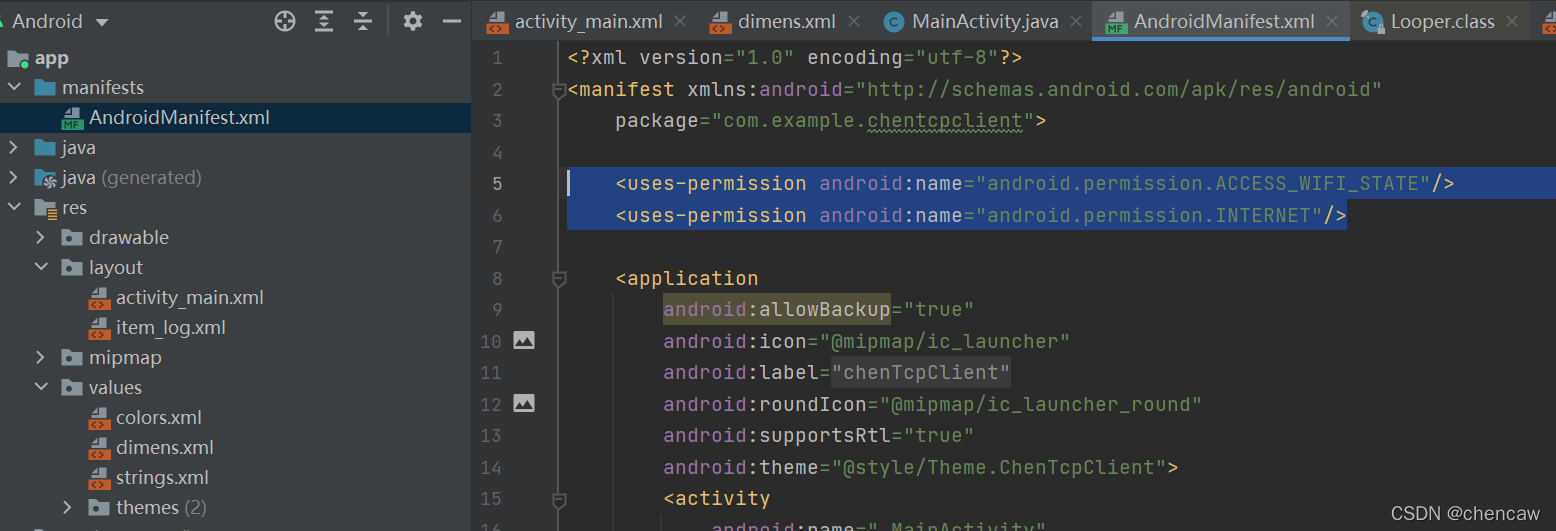
    <uses-permission android:name="android.permission.ACCESS_WIFI_STATE"/>
    <uses-permission android:name="android.permission.INTERNET"/>





 扫一扫
扫一扫


 6369
6369

 被折叠的 条评论
为什么被折叠?
被折叠的 条评论
为什么被折叠?
 到【灌水乐园】发言





