


因项目需求需要对人像进行男、女、老、少人脸属性分类,与单标签多类不同(一张图一个标签,有多个类别),多标签分类(一个图有多个标签如:男的老人、女的青年人等)的标注应该如何实现?参考https://blog.youkuaiyun.com/LEO_Angel01/article/details/116103164,采用onehot标签编码实现数据的多标签标注。
1.数据准备与标注
思路:
1)通过yolov8人脸检测模型对自研图像进行人脸区域截取
2)通过公开的人脸属性分类模型对截取的图像进行粗分类,然后通过人工方式进行筛选。也可以直接通过人工方式进行筛选。
3)将分类好的自研图像与公开的数据集进行合并,增强模型泛化能力。
分类好的图像存储如下图所示,以下文件存储在output文件夹底下,在不同文件夹中存储了不同属性的人脸图像

label.csv生成,根据文件夹的名称提取图像的标签,与图像进行关联
import os
import csv

output_folder = r"E:\chen\FaceAttributes\data\output"
csv_file = "label.csv"

# 写入CSV文件头部
with open(csv_file, mode='w', newline='') as file:
    writer = csv.writer(file)
    writer.writerow(["file", "age", "gender"])

# 遍历output文件夹中的子文件夹
for folder_name in os.listdir(output_folder):
    folder_path = os.path.join(output_folder, folder_name)

    # 确保是文件夹而非文件
    if os.path.isdir(folder_path):
        # 解析文件夹名,提取年龄、性别和种族信息
        parts = folder_name.split('_')
        age = parts[0]
        gender = parts[1]
        # race = parts[2]

        # 获取文件夹内的图片文件列表
        image_files = [f for f in os.listdir(folder_path) if f.lower().endswith(('.png', '.jpg', '.jpeg', '.gif', '.bmp'))]

        # 遍历图片文件列表,构建完整路径并将信息写入CSV文件
        for image_file in image_files:
            image_path = os.path.join(folder_name, image_file)
            with open(csv_file, mode='a', newline='') as file:
                writer = csv.writer(file)
                writer.writerow([image_path, age, gender])

print("Label information has been extracted and written to", csv_file)
将生成的标签文件label.csv进行onehot编码转换

2.mobilenetv2模型改造
训练集与验证集划分
import pandas as pd
from sklearn.model_selection import train_test_split

# 读取原始数据
df = pd.read_csv('onehot_labels.csv')

# 划分训练集和验证集
train_df, val_df = train_test_split(df, test_size=0.1, random_state=42)

# 保存训练集和验证集到csv文件
train_df.to_csv('train.csv', index=False)
val_df.to_csv('val.csv', index=False)
train.py
首先调用mobilenet_v2函数加载预训练的MobileNetV2模型,并保存在mobilenet_v2_model中。然后定义了模型的特征提取部分self.features,全局平均池化层self.avgpool和分类器self.classifier。特征提取部分使用了MobileNetV2的特征提取层,全局平均池化层用于将特征图转换为一维向量,分类器使用了一个包含Dropout、线性层和Sigmoid激活函数的序列。
import torch
import torch.nn as nn
import torch.optim as optim
from torch.utils.data import Dataset, DataLoader
from torchvision import transforms
from torchvision.models import mobilenet_v2
from PIL import Image
import pandas as pd

# 定义包含数据增强的变换
transform = transforms.Compose([
    transforms.RandomResizedCrop(224),
    transforms.RandomHorizontalFlip(),
    transforms.ColorJitter(brightness=0.2, contrast=0.2, saturation=0.2, hue=0.2),
    transforms.RandomRotation(degrees=20),
    transforms.ToTensor(),
])

# 修改CustomDataset类以包含新的变换
class CustomDataset(Dataset):
    def __init__(self, csv_file, root_dir, transform=None):
        self.labels = pd.read_csv(csv_file)
        self.root_dir = root_dir
        self.transform = transform

    def __len__(self):
        return len(self.labels)

    def __getitem__(self, idx):
        img_name = self.labels.iloc[idx, 0]
        img_path = f"{self.root_dir}/{img_name}"
        image = Image.open(img_path).convert("RGB")
        labels = torch.tensor(self.labels.iloc[idx, 1:].tolist(), dtype=torch.float32)

        if self.transform:
            image = self.transform(image)

        return image, labels

# Create datasets and dataloaders
if __name__ == '__main__':
    age_labels = ['child', 'young', 'old']
    gender_labels = ['Female', 'Male']
    #race_labels = ['Black', 'East Asian', 'Indian', 'Latino_Hispanic', 'Middle Eastern', 'Southeast Asian', 'White']

    train_dataset = CustomDataset(csv_file="train.csv", root_dir="data/output", transform=transform)
    val_dataset = CustomDataset(csv_file="val.csv", root_dir="data/output", transform=transform)

    train_loader = DataLoader(train_dataset, batch_size=64, shuffle=True, num_workers=4)
    val_loader = DataLoader(val_dataset, batch_size=64, shuffle=False, num_workers=4)

    # Define MobileNetV2 model
    class MultiLabelMobileNetV2(nn.Module):
        def __init__(self, num_classes):
            super(MultiLabelMobileNetV2, self).__init__()
            mobilenet_v2_model = mobilenet_v2(pretrained=True)
            self.features = mobilenet_v2_model.features
            self.avgpool = nn.AdaptiveAvgPool2d(1)
            self.classifier = nn.Sequential(
                nn.Dropout(0.2),
                nn.Linear(1280, num_classes),
                nn.Sigmoid()
            )

        def forward(self, x):
            x = self.features(x)
            x = self.avgpool(x)
            x = x.view(x.size(0), -1)
            x = self.classifier(x)
            return x

    # Instantiate the model and move it to GPU if available
    # device = torch.device("cuda" if torch.cuda.is_available() else "cpu")
    device = torch.device("cuda")
    #model = MultiLabelMobileNetV2(num_classes=len(age_labels + gender_labels + race_labels))
    model = MultiLabelMobileNetV2(num_classes=len(age_labels + gender_labels))
    model = model.to(device)

    # Define loss function and optimizer
    criterion = nn.BCELoss()
    optimizer = optim.Adam(model.parameters(), lr=0.001)

    # 设置训练日志的输出间隔
    log_interval = 100

    num_epochs = 100
    for epoch in range(num_epochs):
        model.train()
        total_correct = 0
        total_samples = 0

        for i, (images, labels) in enumerate(train_loader):
            images, labels = images.to(device), labels.to(device)
            optimizer.zero_grad()
            outputs = model(images)
            loss = criterion(outputs, labels)
            loss.backward()
            optimizer.step()

            # 计算训练准确度
            predictions = (outputs > 0.5).float()
            total_correct += (predictions == labels).sum().item()
            total_samples += labels.numel()

            # 打印训练信息
            if i % log_interval == 0:
                train_accuracy = total_correct / total_samples
                print(
                    f"Epoch {epoch + 1}/{num_epochs}, Batch {i}/{len(train_loader)}, Loss: {loss.item():.4f}, Train Acc: {train_accuracy:.4f}")

        # Validation
        model.eval()
        with torch.no_grad():
            val_loss = 0.0
            total_correct = 0
            total_samples = 0

            for images, labels in val_loader:
                images, labels = images.to(device), labels.to(device)
                outputs = model(images)
                val_loss += criterion(outputs, labels).item()

                # Calculate validation accuracy
                predictions = (outputs > 0.5).float()
                total_correct += (predictions == labels).sum().item()
                total_samples += labels.numel()

            val_accuracy = total_correct / total_samples

        print(f"Epoch {epoch+1}/{num_epochs}, Loss: {loss.item():.4f}, Train Acc: {train_accuracy:.4f}, Val Loss: {val_loss/len(val_loader):.4f}, Val Acc: {val_accuracy:.4f}")

    # Save the trained model if needed
    torch.save(model.state_dict(), "new_fiarface_mobilenetv2.pth")
相对比单标签分类,不同之处在于输出层使用了nn.Sigmoid()作为激活函数,而不是单标签分类常用的nn.CrossEntropyLoss()和nn.Softmax()。另外,损失函数也使用了nn.BCELoss(),即二元交叉熵损失函数,用于多标签分类任务。
3.结果预测
pth2onnx.py,pth模型转onnx模型
import torch
import torch.onnx
from torchvision.models import mobilenet_v2

# Define the MobileNetV2 model
class MultiLabelMobileNetV2(torch.nn.Module):
    def __init__(self, num_classes):
        super(MultiLabelMobileNetV2, self).__init__()
        mobilenet_v2_model = mobilenet_v2(pretrained=True)
        self.features = mobilenet_v2_model.features
        self.avgpool = torch.nn.AdaptiveAvgPool2d(1)
        self.classifier = torch.nn.Sequential(
            torch.nn.Dropout(0.2),
            torch.nn.Linear(1280, num_classes),
            torch.nn.Sigmoid()
        )

    def forward(self, x):
        x = self.features(x)
        x = self.avgpool(x)
        x = x.view(x.size(0), -1)
        x = self.classifier(x)
        return x

# Load the trained model
model = MultiLabelMobileNetV2(num_classes=5)
model.load_state_dict(torch.load("new_fiarface_mobilenetv2.pth"))
model.eval()

# Input example (dummy input)
dummy_input = torch.randn(1, 3, 224, 224)

# Export the model to ONNX
onnx_path = "new_fiarface_mobilenetv2.onnx"
torch.onnx.export(model, dummy_input, onnx_path, verbose=True, input_names=['input'], output_names=['output'])

print(f"Model exported to {onnx_path}")
predict_classify.py,使用onnx模型对图像进行预测,并根据预测结果进行图片分类
import cv2
import argparse
import numpy as np
from torchvision import datasets, models, transforms
import torch.nn.functional as F
import onnx
import onnxruntime
import time
from tqdm import tqdm
import os
import shutil

def get_all_path(path_src, suffix):
    Pathway = []
    for r, ds, fs in os.walk(path_src):
        for fn in fs:
            if os.path.splitext(fn)[1] in suffix:
                # print(fs)
                # break
                fname = os.path.join(r, fn)
                # dst_namr = os.path.join(r, fn)
                Pathway.append(fname)
    return Pathway

def softmax(a):
    c = np.max(a)
    exp_a = np.exp(a - c) # 溢出对策
    sum_exp_a = np.sum(exp_a)
    y = exp_a / sum_exp_a
    return y

def switch_case_gender(value):
    switcher = {
        0: "Female",
        1: "Male",}
    return switcher.get(value, 'wrong value')


def switch_case_age(value):
    switcher = {
        0: "child",
        1: "young",
        2: "old",

    }
    return switcher.get(value, 'wrong value')

def main():
    output_folder = "output/"

    for i in range(3):
        for gender in ["Male", "Female"]:
            folder_name = os.path.join(output_folder, f"{switch_case_age(i)}_{gender}/")
            if not os.path.exists(folder_name):
                os.makedirs(folder_name)

    trans = transforms.Compose([
        transforms.ToPILImage(),
        transforms.Resize((224, 224)),
        transforms.ToTensor(),
        transforms.Normalize(
            mean=[0.485, 0.456, 0.406], std=[0.229, 0.224, 0.225])
    ])

    onnx_model = onnx.load("child_young_old_mobilenetv2.onnx")
    onnx.checker.check_model(onnx_model)
    ort_session = onnxruntime.InferenceSession('child_young_old_mobilenetv2.onnx', providers=['CPUExecutionProvider'])  # 'TensorrtExecutionProvider', 'CUDAExecutionProvider', 'CPUExecutionProvider'
    folder_path = r"E:\chen\FaceAttributes\data\child/"
    save_image_folder = "image_result/"
    suffix = ['.jpg', '.png', '.jpeg', '']
    pathway = get_all_path(folder_path, suffix)
    # start_time = time.time()
    for i, img_path in tqdm(enumerate(pathway)):  ###tqdm添加进度提示信息
        if int(i) >= 0:
            original = cv2.imread(img_path)
            image = np.copy(original)
            print('image.shape',image.shape)
            # image_width = image.shape[1]
            # image_height = image.shape[0]
            img = cv2.cvtColor(image, cv2.COLOR_BGR2RGB)
            img = img.astype(np.uint8)

            input = trans(img)
            input = input.unsqueeze(0)
            input = input.numpy()

            ort_inputs = {ort_session.get_inputs()[0].name:input}
            ort_outs = ort_session.run(None, ort_inputs)
            # print('ort_outs',ort_outs)
            ort_out = ort_outs[0]
            print('ort_out', ort_out)
            gender_outputs = ort_out[0][3:5]
            age_outputs = ort_out[0][0:3]

            gender_score = softmax(gender_outputs)
            age_score = softmax(age_outputs)

            gender_pred = np.argmax(gender_score)
            age_pred = np.argmax(age_score)
            # 图片上显示结果
            gender_result = switch_case_gender(gender_pred)
            age_result = switch_case_age(age_pred)
            cv2.putText(image, gender_result, (1, 28), cv2.FONT_HERSHEY_SIMPLEX, 0.8, (255, 255, 0), 2)
            cv2.putText(image, age_result, (1, 56), cv2.FONT_HERSHEY_SIMPLEX, 0.8, (255, 255, 0), 2)
            # cv2.imwrite('onnx_result_image.png', image)
            cv2.imwrite(save_image_folder + img_path.split('/')[-1].replace('.jpg', '(1).png').replace('.JPG', '.png'), image)

            # 获取预测的性别和年龄
            gender_pred = np.argmax(gender_score)
            age_pred = np.argmax(age_score)

            # 根据预测将图片组织到相应的文件夹中
            gender_result = switch_case_gender(gender_pred)
            age_result = switch_case_age(age_pred)

            output_folder_path = os.path.join(output_folder, f"{age_result}_{gender_result}/")

            # 将图片移动到相应的文件夹中
            shutil.copy(img_path, output_folder_path)

if __name__ == '__main__':
    main()
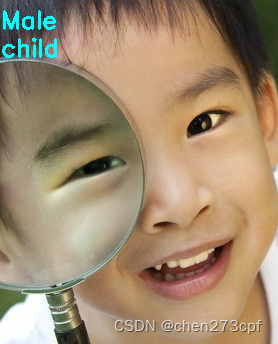
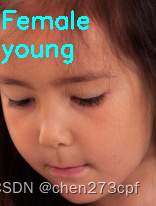
预测结果展示





 扫一扫
扫一扫


 499
499


 到【灌水乐园】发言



