



 本文详细介绍了如何使用KNN回归算法对鸢尾花数据集进行预测,并比较了考虑权重与不考虑权重两种情况下的预测效果。通过数据预处理、模型构建、预测及结果对比,展示了KNN回归算法的具体应用过程。
1.导入鸢尾花数据集
import numpy as np
import pandas as pd

data=pd.read_csv("data/iris.csv")
data.head()
| SepalLength | SepalWidth | PetalLength | PetalWidth | Name | |
|---|---|---|---|---|---|
| 0 | 5.1 | 3.5 | 1.4 | 0.2 | Iris-setosa |
| 1 | 4.9 | 3.0 | 1.4 | 0.2 | Iris-setosa |
| 2 | 4.7 | 3.2 | 1.3 | 0.2 | Iris-setosa |
| 3 | 4.6 | 3.1 | 1.5 | 0.2 | Iris-setosa |
| 4 | 5.0 | 3.6 | 1.4 | 0.2 | Iris-setosa |
#删除不需要的"Name"列,回归不需要。通过前三个特征预测第四个特征的值
data.drop("Name",axis=1,inplace=True)
#删除重复记录
data.drop_duplicates(inplace=True)
data
| SepalLength | SepalWidth | PetalLength | PetalWidth | |
|---|---|---|---|---|
| 0 | 5.1 | 3.5 | 1.4 | 0.2 |
| 1 | 4.9 | 3.0 | 1.4 | 0.2 |
| 2 | 4.7 | 3.2 | 1.3 | 0.2 |
| 3 | 4.6 | 3.1 | 1.5 | 0.2 |
| 4 | 5.0 | 3.6 | 1.4 | 0.2 |
| ... | ... | ... | ... | ... |
| 145 | 6.7 | 3.0 | 5.2 | 2.3 |
| 146 | 6.3 | 2.5 | 5.0 | 1.9 |
| 147 | 6.5 | 3.0 | 5.2 | 2.0 |
| 148 | 6.2 | 3.4 | 5.4 | 2.3 |
| 149 | 5.9 | 3.0 | 5.1 | 1.8 |
147 rows × 4 columns
2. KNN回归算法
class KNN:
    """该算法用于回归预测,用数据集的前三个特征属性,寻找最近的K个邻居,
    然后再根据k个邻居的第四个特征属性,去预测当前样本的第四个特征属性"""

    def __init__(self,k):
        self.k=k

    def fit(self,X,y):
        self.X=np.asarray(X)
        self.y=np.asarray(y)

    def predict(self,X):
        X=np.asarray(X)
        result=[]
        for x in X:
            #计算与训练集中每个X的距离
            dis=np.sqrt(np.sum((x-self.X)**2,axis=1))
            #取前k个
            index=dis.argsort()
            index=index[:self.k]
            #计算前k个的值,取均值返回到结果列表中
            result.append(np.mean(self.y[index]))

        return np.array(result)

    def predict2(self,X):#考虑权重:权重=(1/每个邻居的距离)/所有的距离倒数之和
        X=np.asarray(X)
        result=[]
        for x in X:
            #计算与训练集中每个X的距离
            dis=np.sqrt(np.sum((x-self.X)**2,axis=1))
            #取前k个
            index=dis.argsort()
            index=index[:self.k]
            #计算所有邻居节点的距离倒数之和。注意:加上0.0001是为了防止距离为0使得分母为0
            s=np.sum(1/(dis[index]+0.0001))
            #求权重:每个距离的倒数/倒数之和
            weight=(1/(dis[index]+0.0001))/s
            #使用邻居节点的标签值*权重,然后进行累加求和,得到预测值
            result.append(np.sum(self.y[index]*weight))

        return np.array(result)
2.划分数据集
t=data.sample(len(data),random_state=0)#乱序
train_X=t.iloc[:120,:-1]
train_y=t.iloc[:120,-1]
test_X=t.iloc[120:,:-1]
test_y=t.iloc[120:,-1]
3.进行回归预测
3.1 不考虑权重
my_knn=KNN(k=3)
my_knn.fit(train_X,train_y)
result=my_knn.predict(test_X)
display(result)#预测值
display(test_y.values)#真实值
display(np.mean((result-test_y)**2))#回归的结果不可能与test_y完全相同,只能要求误差尽可能小
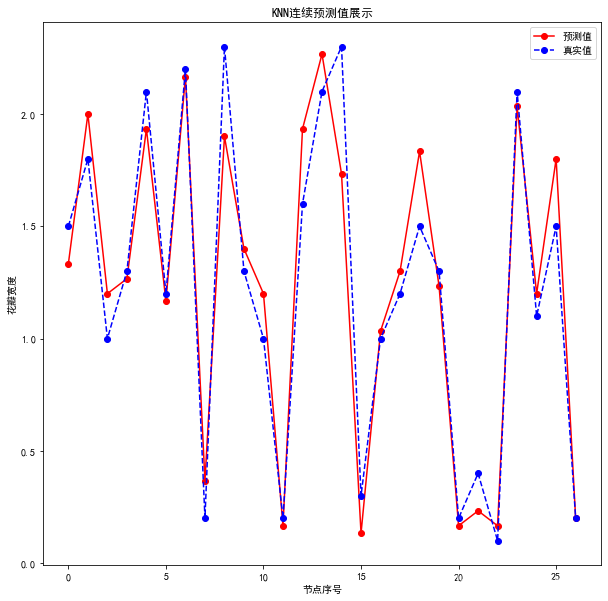
array([1.33333333, 2.        , 1.2       , 1.26666667, 1.93333333,
       1.16666667, 2.16666667, 0.36666667, 1.9       , 1.4       ,
       1.2       , 0.16666667, 1.93333333, 2.26666667, 1.73333333,
       0.13333333, 1.03333333, 1.3       , 1.83333333, 1.23333333,
       0.16666667, 0.23333333, 0.16666667, 2.03333333, 1.2       ,
       1.8       , 0.2       ])


array([1.5, 1.8, 1. , 1.3, 2.1, 1.2, 2.2, 0.2, 2.3, 1.3, 1. , 0.2, 1.6,
       2.1, 2.3, 0.3, 1. , 1.2, 1.5, 1.3, 0.2, 0.4, 0.1, 2.1, 1.1, 1.5,
       0.2])


0.04185185185185184
3.2 考虑权重
result2=my_knn.predict2(test_X)
display(result2)
#display(np.mean(np.sum((result2-test_y)**2)))
display(np.mean((result2-test_y)**2))
array([1.35411173, 2.04020727, 1.15531765, 1.26330876, 2.19955462,
       1.16336693, 2.12370204, 0.36951382, 1.88750469, 1.38359898,
       1.20796563, 0.17166806, 1.97685198, 2.23577547, 1.6763481 ,
       0.13818127, 1.02220342, 1.3       , 1.85549477, 1.23015335,
       0.1729635 , 0.24376544, 0.17100754, 2.01553729, 1.18787412,
       1.82282618, 0.2       ])


0.04585326018974709
4.可视化展示
import matplotlib as mpl
import matplotlib.pyplot as plt
mpl.rcParams["font.family"]="SimHei"#显示字体为黑体
mpl.rcParams["axes.unicode_minus"]=False

plt.figure(figsize=(10,10))
#绘制预测值
plt.plot(result,"ro-",label="预测值")
#绘制真实值
plt.plot(test_y.values,"bo--",label="真实值")
plt.title("KNN连续预测值展示")
plt.xlabel("节点序号")
plt.ylabel("花瓣宽度")
plt.legend()
#plt.show()
<matplotlib.legend.Legend at 0x1f58afd25c8>





 扫一扫
扫一扫


 17万+
17万+

 被折叠的 条评论
为什么被折叠?
被折叠的 条评论
为什么被折叠?
 到【灌水乐园】发言





