



处理时间序列数据
import pandas as pd
import matplotlib.pyplot as plt
air_quality=pd.read_csv("data/air_quality_no2_long.csv")
air_quality=air_quality.rename(columns={"date.utc":"datetime"})
air_quality
| city | country | datetime | location | parameter | value | unit | |
|---|---|---|---|---|---|---|---|
| 0 | Paris | FR | 2019-06-21 00:00:00+00:00 | FR04014 | no2 | 20.0 | µg/m³ |
| 1 | Paris | FR | 2019-06-20 23:00:00+00:00 | FR04014 | no2 | 21.8 | µg/m³ |
| 2 | Paris | FR | 2019-06-20 22:00:00+00:00 | FR04014 | no2 | 26.5 | µg/m³ |
| 3 | Paris | FR | 2019-06-20 21:00:00+00:00 | FR04014 | no2 | 24.9 | µg/m³ |
| 4 | Paris | FR | 2019-06-20 20:00:00+00:00 | FR04014 | no2 | 21.4 | µg/m³ |
| ... | ... | ... | ... | ... | ... | ... | ... |
| 2063 | London | GB | 2019-05-07 06:00:00+00:00 | London Westminster | no2 | 26.0 | µg/m³ |
| 2064 | London | GB | 2019-05-07 04:00:00+00:00 | London Westminster | no2 | 16.0 | µg/m³ |
| 2065 | London | GB | 2019-05-07 03:00:00+00:00 | London Westminster | no2 | 19.0 | µg/m³ |
| 2066 | London | GB | 2019-05-07 02:00:00+00:00 | London Westminster | no2 | 19.0 | µg/m³ |
| 2067 | London | GB | 2019-05-07 01:00:00+00:00 | London Westminster | no2 | 23.0 | µg/m³ |
2068 rows × 7 columns
1. 使用pandas的datetime属性
- pd.to_datetime()将字符串转换为datetime(即)对象
- pandas.read_csv()和pandas.read_json() 可以使用读取数据时的日期 parse_dates参数改为时间戳
#将列datetime中的日期作为日期时间对象而不是纯文本
air_quality["datetime"]=pd.to_datetime(air_quality["datetime"])
air_quality["datetime"]
0      2019-06-21 00:00:00+00:00
1      2019-06-20 23:00:00+00:00
2      2019-06-20 22:00:00+00:00
3      2019-06-20 21:00:00+00:00
4      2019-06-20 20:00:00+00:00
                  ...
2063   2019-05-07 06:00:00+00:00
2064   2019-05-07 04:00:00+00:00
2065   2019-05-07 03:00:00+00:00
2066   2019-05-07 02:00:00+00:00
2067   2019-05-07 01:00:00+00:00
Name: datetime, Length: 2068, dtype: datetime64[ns, UTC]
pd.read_csv("data/air_quality_no2_long.csv", parse_dates=["date.utc"])
| city | country | date.utc | location | parameter | value | unit | |
|---|---|---|---|---|---|---|---|
| 0 | Paris | FR | 2019-06-21 00:00:00+00:00 | FR04014 | no2 | 20.0 | µg/m³ |
| 1 | Paris | FR | 2019-06-20 23:00:00+00:00 | FR04014 | no2 | 21.8 | µg/m³ |
| 2 | Paris | FR | 2019-06-20 22:00:00+00:00 | FR04014 | no2 | 26.5 | µg/m³ |
| 3 | Paris | FR | 2019-06-20 21:00:00+00:00 | FR04014 | no2 | 24.9 | µg/m³ |
| 4 | Paris | FR | 2019-06-20 20:00:00+00:00 | FR04014 | no2 | 21.4 | µg/m³ |
| ... | ... | ... | ... | ... | ... | ... | ... |
| 2063 | London | GB | 2019-05-07 06:00:00+00:00 | London Westminster | no2 | 26.0 | µg/m³ |
| 2064 | London | GB | 2019-05-07 04:00:00+00:00 | London Westminster | no2 | 16.0 | µg/m³ |
| 2065 | London | GB | 2019-05-07 03:00:00+00:00 | London Westminster | no2 | 19.0 | µg/m³ |
| 2066 | London | GB | 2019-05-07 02:00:00+00:00 | London Westminster | no2 | 19.0 | µg/m³ |
| 2067 | London | GB | 2019-05-07 01:00:00+00:00 | London Westminster | no2 | 23.0 | µg/m³ |
2068 rows × 7 columns
2.Timestamp:
- 使用pandas.Timestamp日期时间可以使我们计算日期信息并使它们具有可比性
- 可以使用它来获取时间序列的长度,结果是一个pandas.Timedelta对象,类似于datetime.timedelta 标准Python库中的对象,并定义了持续时间。
- Timestamp对象有许多与时间相关的属性。例如在month,year,weekofyear,quarter,…所有这些特性都是由可访问dt.存取。
#时间序列数据集的开始和结束日期
air_quality["datetime"].min(),air_quality["datetime"].max()
(Timestamp('2019-05-07 01:00:00+0000', tz='UTC'),
 Timestamp('2019-06-21 00:00:00+0000', tz='UTC'))
air_quality["datetime"].max()-air_quality["datetime"].min()
Timedelta('44 days 23:00:00')
#在DataFrame的列中添加一个只包含测量月份的新列
air_quality["month"]=air_quality["datetime"].dt.month
air_quality.head()
| city | country | datetime | location | parameter | value | unit | month | |
|---|---|---|---|---|---|---|---|---|
| 0 | Paris | FR | 2019-06-21 00:00:00+00:00 | FR04014 | no2 | 20.0 | µg/m³ | 6 |
| 1 | Paris | FR | 2019-06-20 23:00:00+00:00 | FR04014 | no2 | 21.8 | µg/m³ | 6 |
| 2 | Paris | FR | 2019-06-20 22:00:00+00:00 | FR04014 | no2 | 26.5 | µg/m³ | 6 |
| 3 | Paris | FR | 2019-06-20 21:00:00+00:00 | FR04014 | no2 | 24.9 | µg/m³ | 6 |
| 4 | Paris | FR | 2019-06-20 20:00:00+00:00 | FR04014 | no2 | 21.4 | µg/m³ | 6 |
#每个测量位置一周中每一天NO2的浓度平均值
air_quality.groupby([air_quality["datetime"].dt.weekday,"location"])["value"].mean()
datetime  location
0         BETR801               27.875000
          FR04014               24.856250
          London Westminster    23.969697
1         BETR801               22.214286
          FR04014               30.999359
          London Westminster    24.885714
2         BETR801               21.125000
          FR04014               29.165753
          London Westminster    23.460432
3         BETR801               27.500000
          FR04014               28.600690
          London Westminster    24.780142
4         BETR801               28.400000
          FR04014               31.617986
          London Westminster    26.446809
5         BETR801               33.500000
          FR04014               25.266154
          London Westminster    24.977612
6         BETR801               21.896552
          FR04014               23.274306
          London Westminster    24.859155
Name: value, dtype: float64
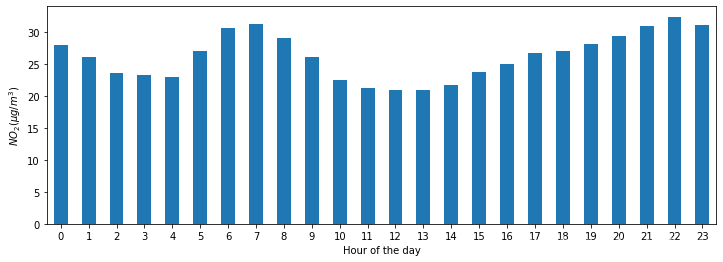
#no2一天中每个小时的平均值是多少
fig,axs=plt.subplots(figsize=(12,4))
air_quality.groupby(air_quality["datetime"].dt.hour)['value'].mean().plot(kind='bar',rot=0,ax=axs)
plt.xlabel("Hour of the day")
plt.ylabel("$NO_2 (µg/m^3)$")
Text(0, 0.5, '$NO_2 (µg/m^3)$')
-
matplotlib 中设置图形大小的语句如下:
fig = plt.figure(figsize=(a, b), dpi=dpi)
其中: figsize 设置图形的大小,a 为图形的宽, b 为图形的高,单位为英寸dpi 为设置图形每英寸的点数,则此时图形的像素为:
px, py = adpi, bdpi # pixels -
**ax :子图(axes, 也可以理解成坐标轴) 要在其上进行绘制的matplotlib subplot对象。如果没有设置,则使用当前matplotlib subplot.其中,变量和函数通过改变figure和axes中的元素(例如:title,label,点和线等等)一起描述figure和axes,也就是在画布上绘图。
————————————————
版权声明:本文为优快云博主「杨树1026」的原创文章,遵循CC 4.0 BY-SA版权协议,转载请附上原文出处链接及本声明。
原文链接:https://blog.youkuaiyun.com/u012155582/article/details/100132543
3. 日期时间为索引: pivot()
- 通过旋转数据,日期时间信息成为表的索引。通常,通过该set_index功能可以将列设置为索引
- 使用日期时间索引(即DatetimeIndex)可提供强大的功能。例如,我们不需要dt访问器来获取时间序列属性,可以直接在索引上使用这些属性
no_2 = air_quality.pivot(index="datetime", columns="location", values="value")
no_2.head()
| location | BETR801 | FR04014 | London Westminster |
|---|---|---|---|
| datetime | |||
| 2019-05-07 01:00:00+00:00 | 50.5 | 25.0 | 23.0 |
| 2019-05-07 02:00:00+00:00 | 45.0 | 27.7 | 19.0 |
| 2019-05-07 03:00:00+00:00 | NaN | 50.4 | 19.0 |
| 2019-05-07 04:00:00+00:00 | NaN | 61.9 | 16.0 |
| 2019-05-07 05:00:00+00:00 | NaN | 72.4 | NaN |
no_2.index.year,no_2.index.weekday
(Int64Index([2019, 2019, 2019, 2019, 2019, 2019, 2019, 2019, 2019, 2019,
             ...
             2019, 2019, 2019, 2019, 2019, 2019, 2019, 2019, 2019, 2019],
            dtype='int64', name='datetime', length=1033),
 Int64Index([1, 1, 1, 1, 1, 1, 1, 1, 1, 1,
             ...
             3, 3, 3, 3, 3, 3, 3, 3, 3, 4],
            dtype='int64', name='datetime', length=1033))
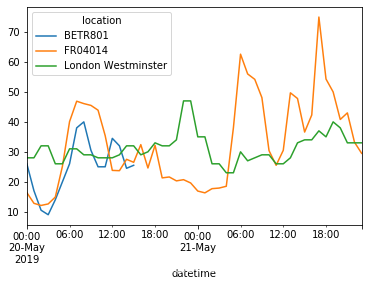
#创建一个图像绘制 NO2 从5月20日到5月21日末在不同站点中的值
no_2["2019-05-20":"2019-05-21"].plot()
<matplotlib.axes._subplots.AxesSubplot at 0x216ed87de48>
4.将时间序列重采样到另一个频率
1.具有日期时间索引的时间序列数据的一种非常强大的将resample()方法,是时间序列转换为另一个频率(例如,将第二数据转换为5分钟数据)。
-
该resample()方法类似于groupby操作:它提供了一个基于时间的分组,通过使用一个字符串(例如M, 5H,…),其限定所述目标频率
-
它需要聚合函数,例如mean,max,…
-
定义后,时间序列的频率由freq属性提供
monthly_max = no_2.resample("M").max()
monthly_max
| location | BETR801 | FR04014 | London Westminster |
|---|---|---|---|
| datetime | |||
| 2019-05-31 00:00:00+00:00 | 74.5 | 97.0 | 97.0 |
| 2019-06-30 00:00:00+00:00 | 52.5 | 84.7 | 52.0 |
monthly_max.index.freq
<MonthEnd>
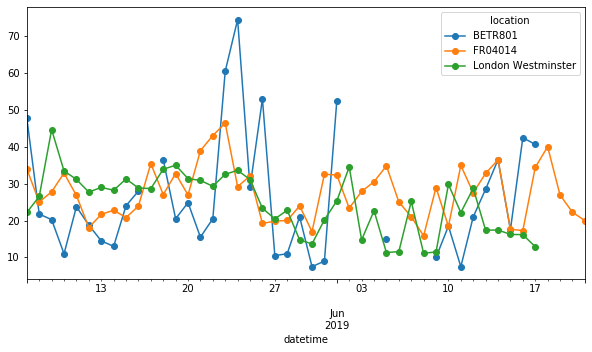
#绘制每日每个站点no2浓度的中位数
no_2.resample("D").mean().plot(style="-o",figsize=(10,5))
<matplotlib.axes._subplots.AxesSubplot at 0x216ee4d54c8>
小结:
-
有效的日期字符串可以使用to_datetime函数或作为read函数的一部分转换为datetime对象 。
-
pandas中的Datetime对象使用dt访问器,支持计算,逻辑运算以及方便的与日期相关的属性dt。
-
一个DatetimeIndex包含这些日期相关的属性和支持方便的切片。
-
Resample 是更改时间序列频率的强大方法。
处理文字数据
import pandas as pd
titanic=pd.read_csv("data/titanic.csv")
titanic.head()
| PassengerId | Survived | Pclass | Name | Sex | Age | SibSp | Parch | Ticket | Fare | Cabin | Embarked | |
|---|---|---|---|---|---|---|---|---|---|---|---|---|
| 0 | 1 | 0 | 3 | Braund, Mr. Owen Harris | male | 22.0 | 1 | 0 | A/5 21171 | 7.2500 | NaN | S |
| 1 | 2 | 1 | 1 | Cumings, Mrs. John Bradley (Florence Briggs Th... | female | 38.0 | 1 | 0 | PC 17599 | 71.2833 | C85 | C |
| 2 | 3 | 1 | 3 | Heikkinen, Miss. Laina | female | 26.0 | 0 | 0 | STON/O2. 3101282 | 7.9250 | NaN | S |
| 3 | 4 | 1 | 1 | Futrelle, Mrs. Jacques Heath (Lily May Peel) | female | 35.0 | 1 | 0 | 113803 | 53.1000 | C123 | S |
| 4 | 5 | 0 | 3 | Allen, Mr. William Henry | male | 35.0 | 0 | 0 | 373450 | 8.0500 | NaN | S |
1. Series.str.lower()
- 使所有名称字符小写
titanic["Name"].str.lower()
0                                braund, mr. owen harris
1      cumings, mrs. john bradley (florence briggs th...
2                                 heikkinen, miss. laina
3           futrelle, mrs. jacques heath (lily may peel)
4                               allen, mr. william henry
                             ...
886                                montvila, rev. juozas
887                         graham, miss. margaret edith
888             johnston, miss. catherine helen "carrie"
889                                behr, mr. karl howell
890                                  dooley, mr. patrick
Name: Name, Length: 891, dtype: object
2. Series.str.split()
- 通过提取Name列中逗号前的部分来创建一个包含“乘客”姓氏的新列。
使用该Series.str.split()方法,将每个值作为2个元素的列表返回。第一个元素是逗号前面的部分,第二个元素是逗号后面的部分。 - 因为我们只对代表姓氏的第一部分(元素0)感兴趣,所以我们可以再次使用str访问器并申请Series.str.get()提取相关部分。
titanic["Name"].str.split(",")
0                             [Braund,  Mr. Owen Harris]
1      [Cumings,  Mrs. John Bradley (Florence Briggs ...
2                              [Heikkinen,  Miss. Laina]
3        [Futrelle,  Mrs. Jacques Heath (Lily May Peel)]
4                            [Allen,  Mr. William Henry]
                             ...
886                             [Montvila,  Rev. Juozas]
887                      [Graham,  Miss. Margaret Edith]
888          [Johnston,  Miss. Catherine Helen "Carrie"]
889                             [Behr,  Mr. Karl Howell]
890                               [Dooley,  Mr. Patrick]
Name: Name, Length: 891, dtype: object
titanic["Surname"]=titanic["Name"].str.split(",").str.get(0)
titanic["Surname"]
0         Braund
1        Cumings
2      Heikkinen
3       Futrelle
4          Allen
         ...
886     Montvila
887       Graham
888     Johnston
889         Behr
890       Dooley
Name: Surname, Length: 891, dtype: object
3. Series.str.contains()
- Series.str.contains()检查列中的每个值,Name如果字符串包含单词Countess,则返回每个值True(Countess是名称的一部分)False(Countess不是名称的一部分)的 返回值。
- 此输出可用于使用数据教程的子设置中引入的条件(布尔)索引来子选择数据。由于《泰坦尼克号》上只有1位伯爵夫人,因此我们只得到了一行。
- 注意:由于Series.str.contains()and Series.str.extract()方法可以接受正则表达式,因此支持对字符串进行更强大的提取 。
#提取有关泰坦尼克号船上伯爵夫人的乘客数据。
titanic["Name"].str.contains("Countess")
0      False
1      False
2      False
3      False
4      False
       ...
886    False
887    False
888    False
889    False
890    False
Name: Name, Length: 891, dtype: bool
titanic[titanic["Name"].str.contains("Countess")]
| PassengerId | Survived | Pclass | Name | Sex | Age | SibSp | Parch | Ticket | Fare | Cabin | Embarked | Surname | |
|---|---|---|---|---|---|---|---|---|---|---|---|---|---|
| 759 | 760 | 1 | 1 | Rothes, the Countess. of (Lucy Noel Martha Dye... | female | 33.0 | 0 | 0 | 110152 | 86.5 | B77 | S | Rothes |
4.Series.str.len():
- 获取字符串长度
idmax():
- 返回最大值的索引
- 它不是字符串方法,并且应用于整数,因此不使用 str
#哪个乘客名字最长
titanic["Name"].str.len().idxmax()#1.获得名字最长的索引
titanic.loc[titanic["Name"].str.len().idxmax(),"Name"]
#基于行(307)和列(Name)的索引名称,我们可以使用loc运算符进行选择
'Penasco y Castellana, Mrs. Victor de Satode (Maria Josefa Perez de Soto y Vallejo)'
5.replace():
- 尽管replace()不是字符串方法,但它提供了使用映射或词汇表转换某些值的便捷方法。它需要dictionary定义一个映射。{from : to}
#在“Sex”列中,将“male”值替换为“ M”,并将所有“female”值替换为“ F”
titanic["Sex_short"]= titanic["Sex"].replace({"male":"M","female":"F"})
titanic["Sex_short"]
0      M
1      F
2      F
3      F
4      M
      ..
886    M
887    F
888    F
889    M
890    M
Name: Sex_short, Length: 891, dtype: object
# 还有一种replace()方法可以替换特定的字符集。但是,当具有多个值的映射时,它将变为:
titanic["Sex_short"] = titanic["Sex"].str.replace("female", "F")
titanic["Sex_short"] = titanic["Sex_short"].str.replace("male", "M")
titanic["Sex_short"]
0      M
1      F
2      F
3      F
4      M
      ..
886    M
887    F
888    F
889    M
890    M
Name: Sex_short, Length: 891, dtype: object
小结:
-
使用str访问器可以使用字符串方法。
-
字符串方法明智地使用元素,并且可以用于条件索引。
-
该replace方法是根据给定字典转换值的便捷方法。





 扫一扫
扫一扫


 1131
1131

 被折叠的 条评论
为什么被折叠?
被折叠的 条评论
为什么被折叠?
 到【灌水乐园】发言





