


一、实验要求
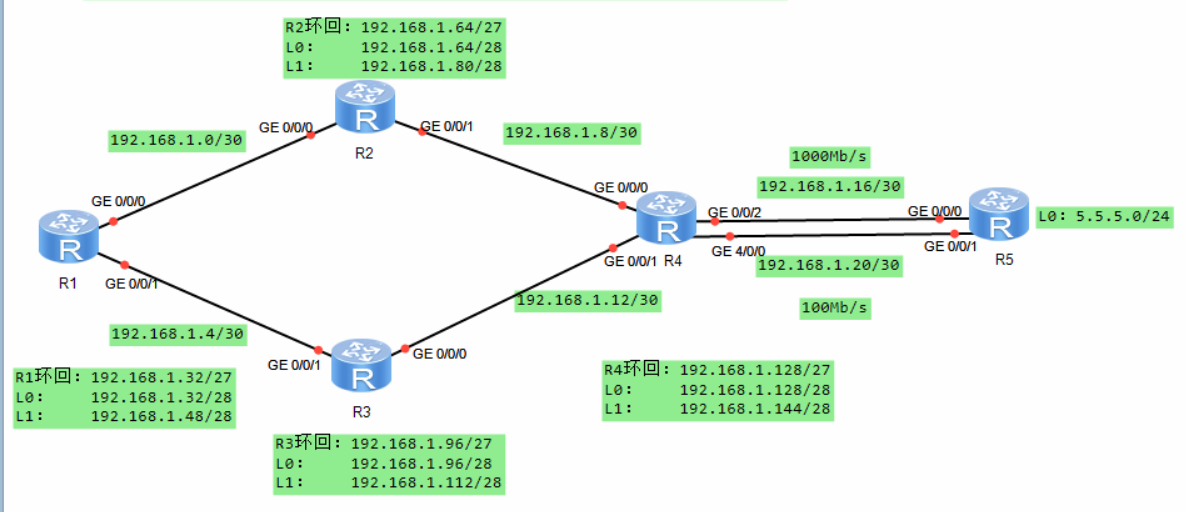
1.除了R5的环回地址固定5.5.5.0/24,其他网段基于192.168.1.0/24进行合理划分;
2.R1-R4每个路由器存在两个环回接口,模拟PC,地址也在192.168.1.0/24网络内;
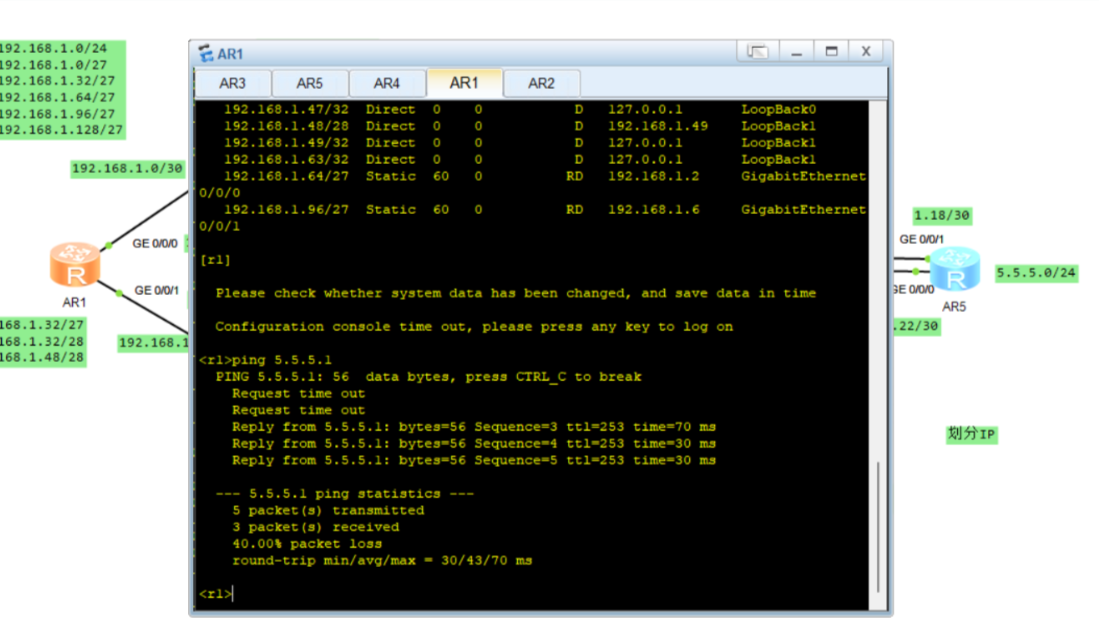
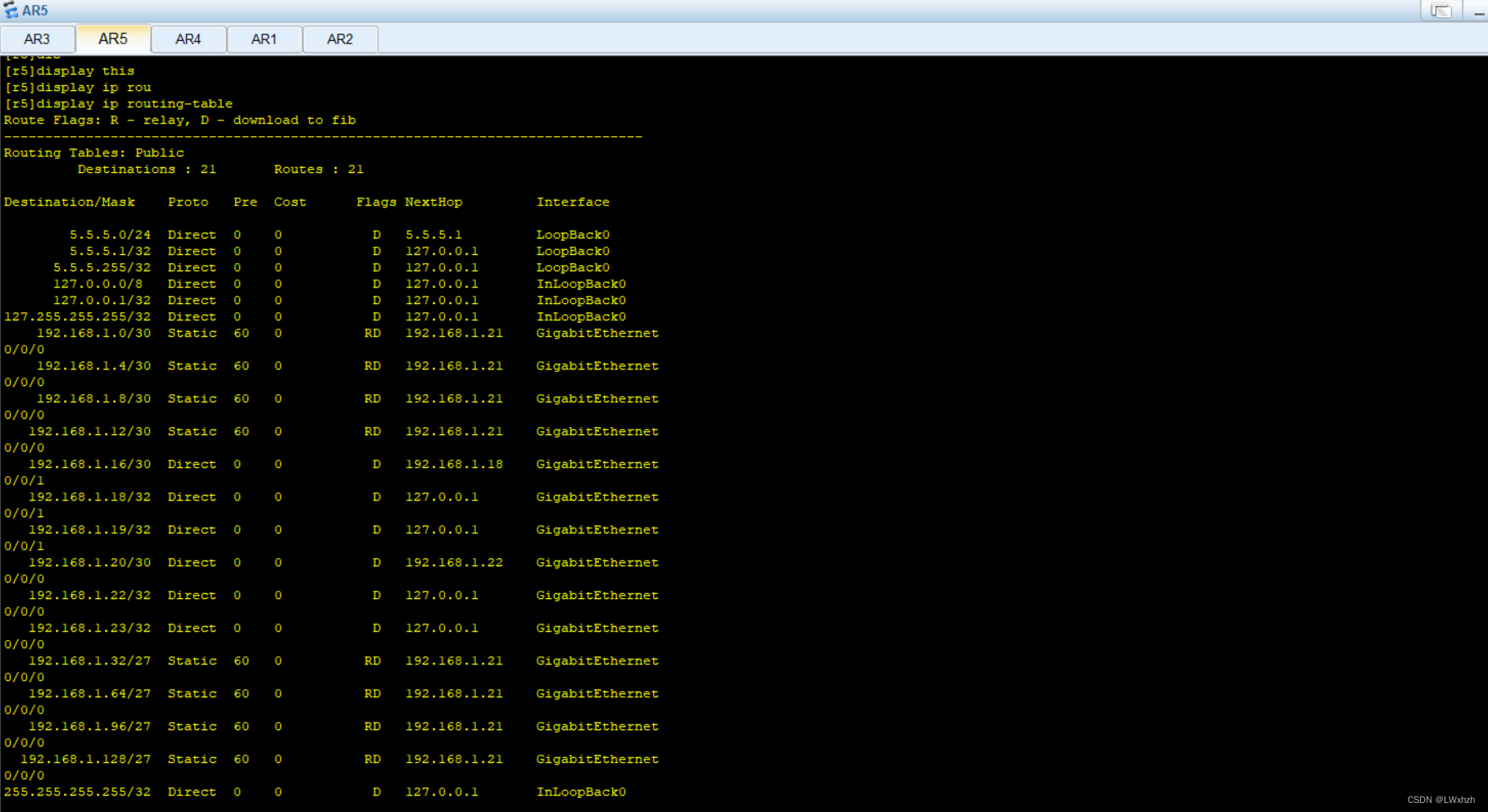
3.R1-R4不能直接编写到达5.5.5.0/24的静态路由,但依然可以访问;
4.全网可达,尽量减少每台路由器路由条目数量,避免环路;
5.R4与R5间,正常1000M链路通信,故障时自动改为100M;
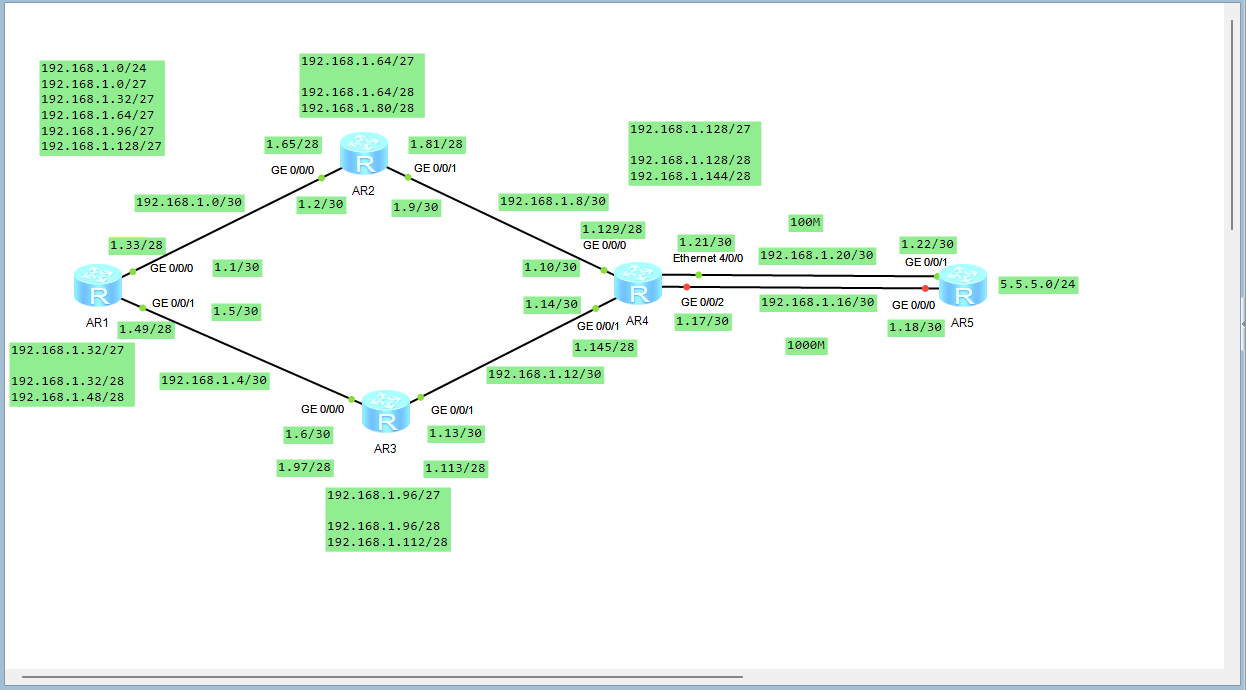
二、实验拓扑图
三、实验仪器
eNSP
四、实验步骤
1、地址划分
192.168.1.0/24划分5个网段
(1)192.168.1.0000 0000----192.168.1.0/27----骨干链路
192.168.1.0000 0000–192.168.1.0/30—255.255.255.252
192.168.1.0000 0100–192.168.1.4/30
192.168.1.0000 1000–192.168.1.8/30
192.168.1.0000 1100–192.168.1.12/30
192.168.1.0001 0000–192.168.1.16/30
192.168.1.0001 0100–192.168.1.20/30
(2)192.168.1.0010 0000----192.168.1.32/27----R1环回
192.168.1.0010 0000—192.168.1.32/28
192.168.1.0011 0000—192.168.1.48/28
(3)192.168.1.0100 0000----192.168.1.64/27—R2环回
192.168.1.0100 0000—192.168.1.64/28
192.168.1.0101 0000—192.168.1.80/28
(4)192.168.1.0110 0000----192.168.1.96/2
7–R3环回
192.168.1.0110 0000—192.168.1.96/28
192.168.1.0111 0000–192.168.1.112/28
(5)192.168.1.1000 0000----192.168.1.12827–R4环回
192.168.1.1000 0000—192.168.1.128/28
192.168.1.1001 0000–192.168.1.144/28
2.配置IP
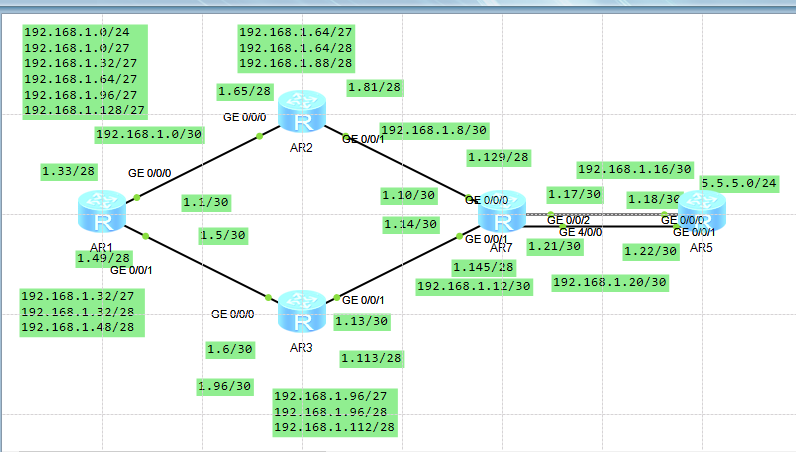
3.配置r1~r5设备的环辉
r1:
<Huawei>sys
Enter system view, return user view with Ctrl+Z.
[Huawei]sysname r1
[r1]interface lo0
[r1-LoopBack0]ip address 192.168.1.33 28
[r1-LoopBack0]q
[r1]int lo1
[r1-LoopBack1]ip address 192.168.1.49 28
[r1-LoopBack1]q
[r1]display ip interface brief
*down: administratively down
^down: standby
(l): loopback
(s): spoofing
The number of interface that is UP in Physical is 5
The number of interface that is DOWN in Physical is 1
The number of interface that is UP in Protocol is 3
The number of interface that is DOWN in Protocol is 3

Interface                         IP Address/Mask      Physical   Protocol
GigabitEthernet0/0/0              unassigned           up         down
GigabitEthernet0/0/1              unassigned           up         down
GigabitEthernet0/0/2              unassigned           down       down
LoopBack0                         192.168.1.33/28      up         up(s)
LoopBack1                         192.168.1.49/28      up         up(s)
NULL0                             unassigned           up         up(s)
r2:
<Huawei>sys
Enter system view, return user view with Ctrl+Z.
[Huawei]sysname r2
[r2]int lo0
[r2-LoopBack0]ip address 192.168.1.65 28
[r2-LoopBack0]int lo1
[r2-LoopBack1]ip address 192.168.1.81 28
[r2-LoopBack1]q
[r2]display ip interface  brief
*down: administratively down
^down: standby
(l): loopback
(s): spoofing
The number of interface that is UP in Physical is 5
The number of interface that is DOWN in Physical is 1
The number of interface that is UP in Protocol is 3
The number of interface that is DOWN in Protocol is 3

Interface                         IP Address/Mask      Physical   Protocol
GigabitEthernet0/0/0              unassigned           up         down
GigabitEthernet0/0/1              unassigned           up         down
GigabitEthernet0/0/2              unassigned           down       down
LoopBack0                         192.168.1.65/28      up         up(s)
LoopBack1                         192.168.1.81/28      up         up(s)
NULL0                             unassigned           up         up(s)
r3:
<Huawei>sys
Enter system view, return user view with Ctrl+Z.
[Huawei]sysname r3
[r3]int lo1
[r3-LoopBack1]ip address 192.168.1.113 28
[r3-LoopBack1]q
[r3]int lo0
[r3-LoopBack0]ip address 192.168.1.97 28
[r3-LoopBack0]q
[r3]display ip interface brief
*down: administratively down
^down: standby
(l): loopback
(s): spoofing
The number of interface that is UP in Physical is 5
The number of interface that is DOWN in Physical is 1
The number of interface that is UP in Protocol is 3
The number of interface that is DOWN in Protocol is 3

Interface                         IP Address/Mask      Physical   Protocol
GigabitEthernet0/0/0              unassigned           up         down
GigabitEthernet0/0/1              unassigned           up         down
GigabitEthernet0/0/2              unassigned           down       down
LoopBack0                         192.168.1.97/28      up         up(s)
LoopBack1                         192.168.1.113/28     up         up(s)
NULL0                             unassigned           up         up(s)
r4:
<Huawei>sys
Enter system view, return user view with Ctrl+Z.
[Huawei]sysname r4
[r4]int lo0
[r4-LoopBack0]ip address 192.168.1.129 28
[r4-LoopBack0]q
[r4]int lo1
[r4-LoopBack1]ip address 192.168.1.145 28
[r4-LoopBack1]q
[r4]display ip interface brief
*down: administratively down
^down: standby
(l): loopback
(s): spoofing
The number of interface that is UP in Physical is 8
The number of interface that is DOWN in Physical is 1
The number of interface that is UP in Protocol is 4
The number of interface that is DOWN in Protocol is 5

Interface                         IP Address/Mask      Physical   Protocol
Ethernet4/0/0                     unassigned           up         down
Ethernet4/0/1                     unassigned           down       down
GigabitEthernet0/0/0              unassigned           up         down
GigabitEthernet0/0/1              unassigned           up         down
GigabitEthernet0/0/2              unassigned           up         down
LoopBack0                         192.168.1.129/28     up         up(s)
LoopBack1                         192.168.1.145/28     up         up(s)
LoopBack2                         unassigned           up         up(s)
NULL0                             unassigned           up         up(s)
r5:
<Huawei>sys
Enter system view, return user view with Ctrl+Z.
[Huawei]sysname r5
[r5]int lo0
[r5-LoopBack0]ip add 5.5.5.5 24
[r5-LoopBack0]q
[r5]display ip interface brief
*down: administratively down
^down: standby
(l): loopback
(s): spoofing
The number of interface that is UP in Physical is 4
The number of interface that is DOWN in Physical is 1
The number of interface that is UP in Protocol is 2
The number of interface that is DOWN in Protocol is 3

Interface                         IP Address/Mask      Physical   Protocol
GigabitEthernet0/0/0              unassigned           up         down
GigabitEthernet0/0/1              unassigned           up         down
GigabitEthernet0/0/2              unassigned           down       down
LoopBack0                         5.5.5.5/24           up         up(s)
NULL0                             unassigned           up         up(s)
4.配置骨干
r1:
[r1]int g0/0/0
[r1-GigabitEthernet0/0/0]ip address 192.168.1.1 30
Jul 11 2025 14:37:31-08:00 r1 %%01IFNET/4/LINK_STATE(l)[0]:The line protocol IP
on the interface GigabitEthernet0/0/0 has entered the UP state.
[r1-GigabitEthernet0/0/0]int g0/0/1
[r1-GigabitEthernet0/0/1]ip address 192.168.1.5 30
Jul 11 2025 14:38:17-08:00 r1 %%01IFNET/4/LINK_STATE(l)[1]:The line protocol IP
on the interface GigabitEthernet0/0/1 has entered the UP state.
[r1]ping 192.168.1.2
  PING 192.168.1.2: 56  data bytes, press CTRL_C to break
    Reply from 192.168.1.2: bytes=56 Sequence=1 ttl=255 time=110 ms
    Reply from 192.168.1.2: bytes=56 Sequence=2 ttl=255 time=20 ms
    Reply from 192.168.1.2: bytes=56 Sequence=3 ttl=255 time=20 ms
    Reply from 192.168.1.2: bytes=56 Sequence=4 ttl=255 time=20 ms
    Reply from 192.168.1.2: bytes=56 Sequence=5 ttl=255 time=30 ms

  --- 192.168.1.2 ping statistics ---
    5 packet(s) transmitted
    5 packet(s) received
    0.00% packet loss
    round-trip min/avg/max = 20/40/110 ms
r2:
[r2]int g0/0/0
[r2-GigabitEthernet0/0/0]ip address 192.168.1.2 30
Jul 11 2025 14:39:02-08:00 r2 %%01IFNET/4/LINK_STATE(l)[0]:The line protocol IP
on the interface GigabitEthernet0/0/0 has entered the UP state.
[r2-GigabitEthernet0/0/0]int g0/0/1
[r2-GigabitEthernet0/0/1]ip address 192.168.1.9 30
[r2-GigabitEthernet0/0/1]
Jul 11 2025 14:39:33-08:00 r2 %%01IFNET/4/LINK_STATE(l)[1]:The line protocol IP
on the interface GigabitEthernet0/0/1 has entered the UP state.
r3:
[r3]int g0/0/0
[r3-GigabitEthernet0/0/0]ip address 192.168.1.6 30
Jul 11 2025 14:40:22-08:00 r3 %%01IFNET/4/LINK_STATE(l)[0]:The line protocol IP
on the interface GigabitEthernet0/0/0 has entered the UP state.
[r3-GigabitEthernet0/0/0]int g0/0/1
[r3-GigabitEthernet0/0/1]ip address 192.168.1.13 30
[r3-GigabitEthernet0/0/1]
Jul 11 2025 14:40:49-08:00 r3 %%01IFNET/4/LINK_STATE(l)[1]:The line protocol IP
on the interface GigabitEthernet0/0/1 has entered the UP state.
[r3]display ip interface brief
*down: administratively down
^down: standby
(l): loopback
(s): spoofing
The number of interface that is UP in Physical is 5
The number of interface that is DOWN in Physical is 1
The number of interface that is UP in Protocol is 5
The number of interface that is DOWN in Protocol is 1

Interface                         IP Address/Mask      Physical   Protocol
GigabitEthernet0/0/0              192.168.1.6/30       up         up
GigabitEthernet0/0/1              192.168.1.13/30      up         up
GigabitEthernet0/0/2              unassigned           down       down
LoopBack0                         192.168.1.97/28      up         up(s)
LoopBack1                         192.168.1.113/28     up         up(s)
NULL0                             unassigned           up         up(s)
r4:
[r4]int g0/0/0
[r4-GigabitEthernet0/0/0]ip address 192.168.1.10 30
Jul 11 2025 14:41:59-08:00 r4 %%01IFNET/4/LINK_STATE(l)[0]:The line protocol IP
on the interface GigabitEthernet0/0/0 has entered the UP state.
[r4-GigabitEthernet0/0/0]int g0/0/1
[r4-GigabitEthernet0/0/1]ip address 192.168.1.14 30
[r4-GigabitEthernet0/0/1]
Jul 11 2025 14:42:22-08:00 r4 %%01IFNET/4/LINK_STATE(l)[1]:The line protocol IP
on the interface GigabitEthernet0/0/1 has entered the UP state.
[r4-GigabitEthernet0/0/1]int g0/0/2
[r4-GigabitEthernet0/0/2]ip address 192.168.1.17 30
[r4-GigabitEthernet0/0/2]
Jul 11 2025 14:42:47-08:00 r4 %%01IFNET/4/LINK_STATE(l)[2]:The line protocol IP
on the interface GigabitEthernet0/0/2 has entered the UP state.
[r4-GigabitEthernet0/0/2]int e4/0/0
[r4-Ethernet4/0/0]ip address 192.168.1.21 30
[r4-Ethernet4/0/0]
Jul 11 2025 14:43:27-08:00 r4 %%01IFNET/4/LINK_STATE(l)[3]:The line protocol IP
on the interface Ethernet4/0/0 has entered the UP state.
[r4-Ethernet4/0/0]q
[r4]ping 192.168.1.9
  PING 192.168.1.9: 56  data bytes, press CTRL_C to break
    Reply from 192.168.1.9: bytes=56 Sequence=1 ttl=255 time=80 ms
    Reply from 192.168.1.9: bytes=56 Sequence=2 ttl=255 time=10 ms
    Reply from 192.168.1.9: bytes=56 Sequence=3 ttl=255 time=20 ms
    Reply from 192.168.1.9: bytes=56 Sequence=4 ttl=255 time=20 ms
    Reply from 192.168.1.9: bytes=56 Sequence=5 ttl=255 time=40 ms

  --- 192.168.1.9 ping statistics ---
    5 packet(s) transmitted
    5 packet(s) received
    0.00% packet loss
    round-trip min/avg/max = 10/34/80 ms
[r4]ping 192.168.1.22
  PING 192.168.1.22: 56  data bytes, press CTRL_C to break
    Reply from 192.168.1.22: bytes=56 Sequence=1 ttl=255 time=60 ms
    Reply from 192.168.1.22: bytes=56 Sequence=2 ttl=255 time=20 ms
    Reply from 192.168.1.22: bytes=56 Sequence=3 ttl=255 time=20 ms
    Reply from 192.168.1.22: bytes=56 Sequence=4 ttl=255 time=10 ms
    Reply from 192.168.1.22: bytes=56 Sequence=5 ttl=255 time=30 ms

  --- 192.168.1.22 ping statistics ---
    5 packet(s) transmitted
    5 packet(s) received
    0.00% packet loss
    round-trip min/avg/max = 10/28/60 ms
r5:
[r5]int g0/0/0
[r5-GigabitEthernet0/0/0]ip add
[r5-GigabitEthernet0/0/0]ip address 192.168.1.18 30
Jul 11 2025 14:44:15-08:00 r5 %%01IFNET/4/LINK_STATE(l)[0]:The line protocol IP
on the interface GigabitEthernet0/0/0 has entered the UP state.
[r5-GigabitEthernet0/0/0]int g0/0/1
[r5-GigabitEthernet0/0/1]ip add
[r5-GigabitEthernet0/0/1]ip address 192.168.1.22 30
[r5-GigabitEthernet0/0/1]
Jul 11 2025 14:44:35-08:00 r5 %%01IFNET/4/LINK_STATE(l)[1]:The line protocol IP
on the interface GigabitEthernet0/0/1 has entered the UP state.
5.关闭r4的Enthernet 4/0/0接口
[r4]int e4/0/0
[r4-Ethernet4/0/0]shutdown
Jul 11 2025 15:32:08-08:00 r4 %%01IFPDT/4/IF_STATE(l)[0]:Interface Ethernet4/0/0
 has turned into DOWN state.
[r4-Ethernet4/0/0]
6.配置静态路由
r1:
[r1]ip route-static 192.168.1.64 27 192.168.1.2
[r1]ip route-static 192.168.1.8 30 192.168.1.2
[r1]ip route-static 192.168.1.128 27 192.168.1.2
[r1]ip route-static 192.168.1.128 27 192.168.1.6
[r1]ip route-static 192.168.1.16 30 192.168.1.2
[r1]ip route-static 192.168.1.16 30 192.168.1.6
[r1]ip route-static 192.168.1.12 30 192.168.1.6
[r1]ip route-static 192.168.1.96 27 192.168.1.6
r2:
[r2]ip route-static 192.168.1.128 27 192.168.1.10
[r2]ip route-static 192.168.1.16 30 192.168.1.10
[r2]ip route-static 192.168.1.12 30 192.168.1.10
[r2]ip route-static 192.168.1.96 27 192.168.1.10
[r2]ip route-static 192.168.1.96 27 192.168.1.1
[r2]ip route-static 192.168.1.4 30 192.168.1.1
[r2]ip route-static 192.168.1.32 27 192.168.1.1
r3:
[r3]ip route-static 192.168.1.32 27 192.168.1.5
[r3]ip route-static 192.168.1.0 30 192.168.1.5
[r3]ip route-static 192.168.1.64 27 192.168.1.5
[r3]ip route-static 192.168.1.64 27 192.168.1.14
[r3]ip route-static 192.168.1.8 30 192.168.1.14
[r3]ip route-static 192.168.1.128 27 192.168.1.14
[r3]ip route-static 192.168.1.16 30 192.168.1.14
r4:
[r4]ip route-static 192.168.1.96 27 192.168.1.13
[r4]ip route-static 192.168.1.4 30 192.168.1.13
[r4]ip route-static 192.168.1.32 27 192.168.1.13
[r4]ip route-static 192.168.1.32 27 192.168.1.9
[r4]ip route-static 192.168.1.0 30 192.168.1.9
[r4]ip route-static 192.168.1.64 27 192.168.1.9
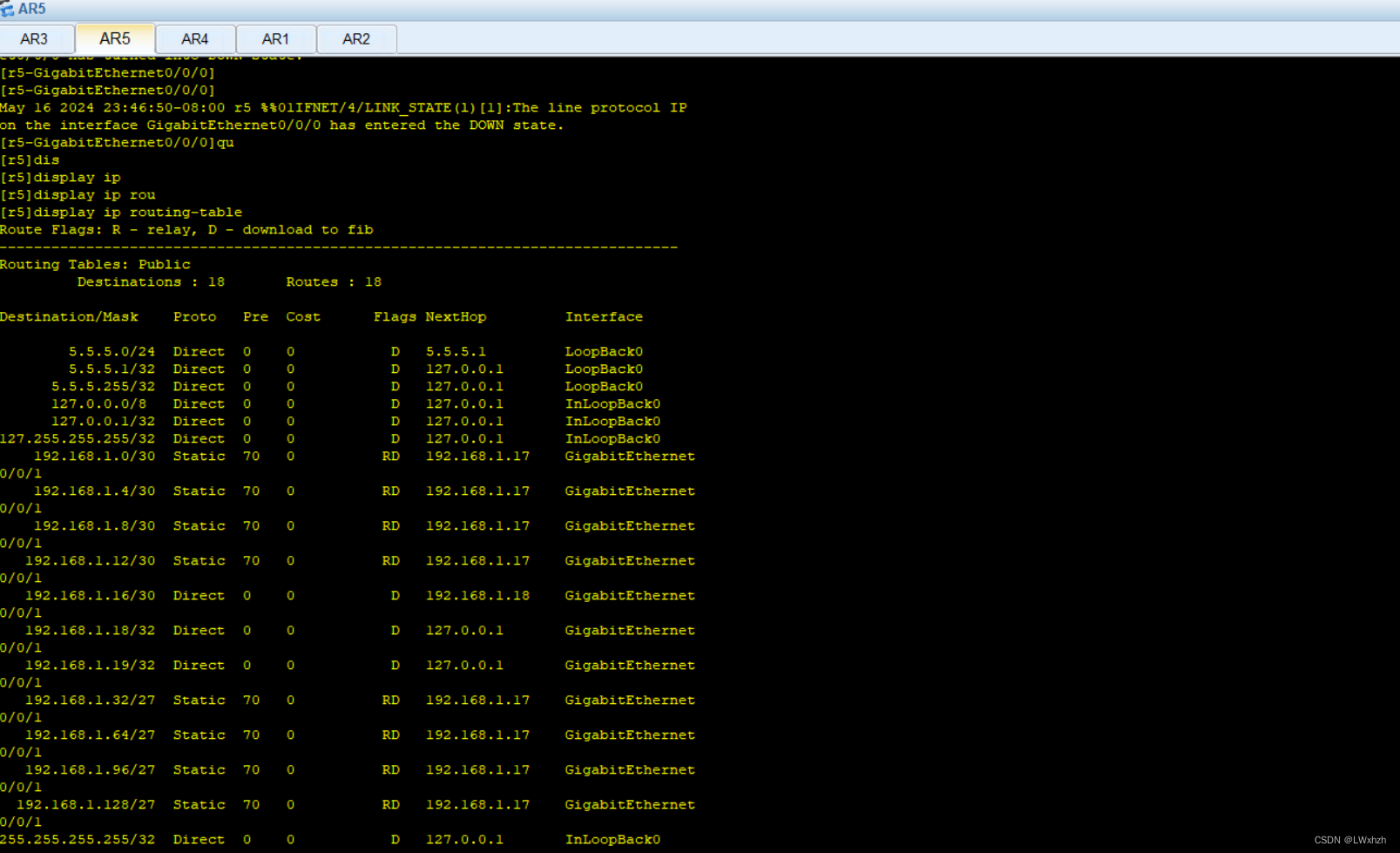
r5:
[r5]ip route-static 192.168.1.32 27 192.168.1.17
[r5]ip route-static 192.168.1.64 27 192.168.1.17
[r5]ip route-static 192.168.1.96 27 192.168.1.17
[r5]ip route-static 192.168.1.128 27 192.168.1.17
[r5]ip route-static 192.168.1.0 30 192.168.1.17
[r5]ip route-static 192.168.1.4 30 192.168.1.17
[r5]ip route-static 192.168.1.8 30 192.168.1.17
[r5]ip route-static 192.168.1.12 30 192.168.1.17
7.配置缺省路由
r4:
[r4]ip route-static 0.0.0.0 0.0.0.0 192.168.1.18
r2:
[r2]ip route-static 0.0.0.0 0.0.0.0 192.168.1.10
r3:
[r3]ip route-static 0.0.0.0 0.0.0.0 192.168.1.14
r1:
[r1]ip route-static 0.0.0.0 0.0.0.0 192.168.1.2
[r1]ip route-static 0.0.0.0 0.0.0.0 192.168.1.6
8.汇总网段,做空接口
[r1]ip route-static 192.168.1.32 27 NULL 0
[r2]ip route-static 192.168.1.64 27 NULL 0
[r3]ip route-static 192.168.1.96 27 NULL 0
[r4]ip route-static 192.168.1.128 27 NULL 0
9.配置百兆接口
[r4]interface e4/0/0
[r4-Ethernet4/0/0]undo shutdown
10.修改r4中优先级样式
[r4]ip route-static 0.0.0.0 0.0.0.0 192.168.1.22 preference 61
五、进行测试





 扫一扫
扫一扫


 1016
1016

 被折叠的 条评论
为什么被折叠?
被折叠的 条评论
为什么被折叠?
 到【灌水乐园】发言





