



tk_yun_music.py
# -*- coding: utf-8 -*-
""" 搜索云音乐 """
import os
import json
import time
import tkinter as tk
#from tkinter import *
from tkinter import messagebox
from urllib import request, parse
import webbrowser as web

global x

def search():
    """ 搜索云音乐 """
    if not entry.get():
        messagebox.showinfo("温馨提示","搜索内容不能为空")
        return
    name = parse.quote(entry.get())
    print(name)
	# http://s.music.163.com/search/get/?type=1&s=%E7%88%B1&limit=9
    url = "http://s.music.163.com/search/get/?type=1&s=%s&limit=9"
    data = request.urlopen(url %name).read()
    js = json.loads(data)
    global x
    x = []
    listbox.delete(0, tk.END)
    for i in js['result']['songs']:
        listbox.insert(tk.END, '%s (%s)'%(i['name'],i['artists'][0]['name']))
        x.append(i['page'])
    file1 = "music.json"
    with open(file1, 'w') as fp:
        #fp.write(data) # TypeError: write() argument must be str, not bytes
        fp.write(json.dumps(js, sort_keys=True, indent=2)) # json pretty print

def play(self):
    index = listbox.curselection()
    var1.set(u"正在访问: "+ listbox.get(index,last=None))
    url = x[index[0]]
    print(url)
    web.open(url, new=0, autoraise=True)
    time.sleep(3)

# main()
root = tk.Tk()
root.title("搜索云音乐")
#root.geometry("640x480")
root.resizable(width=True, height=False)
# 输入框布局
frame1 = tk.Frame(root, width=50, height=30)
frame1.pack(side="top")
entry = tk.Entry(frame1, width=40)
entry.pack(side="left")
button = tk.Button(frame1, text="搜索云音乐", command=search)
button.pack(side="left", padx=5, pady=2)
# 退出按钮
quit_btn = tk.Button(frame1, text="退出", fg="red", command=root.quit)
quit_btn.pack(side="right", padx=5, pady=2)
# 显示栏
var1 = tk.StringVar()
label = tk.Label(root,textvariable=var1,fg="purple", font="Song 12")
label.pack()
# 列表框
listbox = tk.Listbox(root, width=50, font="Song 12", bg='yellow')
listbox.bind('<Double-Button-1>', play)
listbox.pack(side="bottom", fill='both', expand=True)

root.mainloop()
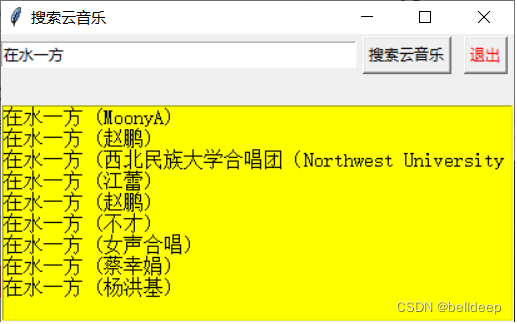
运行 tk_yun_music.py





 扫一扫
扫一扫


 4533
4533

 被折叠的 条评论
为什么被折叠?
被折叠的 条评论
为什么被折叠?
 到【灌水乐园】发言





