



新的一年 终于结束了期末考试,也要开始加油了
好的,感觉之前学的全忘了,好的,也要开始加油了
之前学的latex 放在这里吧 省得以后忘了。。。。
附上观看视频的教程链接
视频教程
哪能记住那么多,等要用的时候再来找吧,熟能生巧。。。。
文章目录
1.开头
%texdoc 查看帮助文档
\documentclass[10pt]{article}%book  ,report ,letter

\bibliographystyle{plain}
\title{my first document}
\author{zjf}
\date{\today}


\usepackage{ctex}%处理中文
\usepackage{xltxtra}

\usepackage{texnames}
\usepackage{mflogo}

%实现多行公式需要导入的包
\usepackage{amsmath}
\usepackage{amssymb}

\usepackage{graphicx}%实现插图
%语法: includegraphics[<选项>]{<文件名>}
\graphicspath{{figures/},{pics/}}%图片在当前的figures下目录,也可以添加其他路径,注意要用大括号添加分组

%定义新的命令 格式与文字分离
\newcommand{\myfont}{\textbf{\textsf{Fancy text}}}
2.部分东西
	\maketitle %输出标题信息
	hello world

	%空行 换行
	Let $f(x)$ be defined by the formula
	$f(x) = 3x^2 + x - 1$.% $包围为数学模式 打印数学公式,以外文本模式
	$$f(x) = 3x^2 + x - 1$$ %$$ 表示行间公式
	which is a polynomial of degree 2
	\begin{equation}%产生带序号的行间公式
		content...
	\end{equation}

    \textrm{Roman Family}%字体族设置

     \rmfamily Roman Family

     %字体大小
     {\tiny hello}%{}限制范围
     {\scriptsize hello}\\
     {\footnotesize hello}\\
     {\small hello}\\
     {\normalsize hello}\\
     {\large hello}\\
     {\LARGE hello}\\
     {\huge hello}\\
     {\Huge hello}\\

     %中文字号设置命令
     \zihao{-0}你好\\
     \zihao{5} 你好\\

     \myfont

     \tableofcontents %产生目录 !!!
3.引言
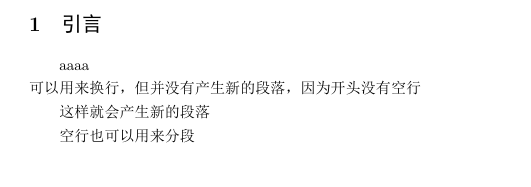
    \section{引言}
     aaaa
     \\可以用来换行,但并没有产生新的段落,因为开头没有空行 \par 这样就会产生新的段落

     空行也可以用来分段
结果如图
4.空白符号 即空格hhhhh
   \section{空白符号}
     %英文中多个空格会被视为一个空格,中文中空格将被忽略
     aaa   bbbb ccccc

     中文中的    空格添 加

     %1em(当前字体中M的宽度)
     a\quad b

     a\qquad b %2em

     a\,b a\thinspace b%1/6em

     a\enspace b %0.5em

     a\ b %空格

     a~b %硬空格,不能分割的空格???

     a\hspace{35pt}b

     a\hphantom{xyz}b%占位宽度

     a\hfill b%产生弹性长度的空白
5.控制符
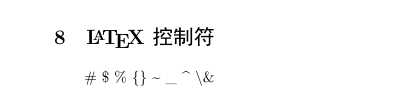
  \section{\LaTeX 控制符}
     \# \$ \% \{\} \~{} \_{} \^{} \textbackslash \&
6.排版字符 不知道用不用得到hhhh 应该有的可以用到
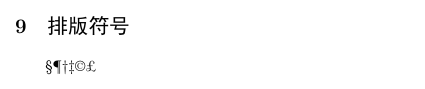
     \section{排版符号}
     \S \P \dag \ddag \copyright \pounds
7.这个有用吗hhhh TEX标志符号
     \section{\TeX 标志符号}
     \TeX{}  \LaTeX{} \LaTeXe{}
     %xltxtra宏包提供
     \XeLaTeX

     %texname宏包宏包提供
     \AmSTeX{} \AmS-\LaTeX{}
     \BibTeX{} \LuaTeX{}

     %mflog宏包提供
     \METAFONT{} \MF{} \MP{}
8.引号
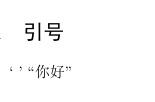
   \section{引号}
     ` ' ``你好"
9.连字符
\section{连字符}
     - -- ---

10. 非英文字符 应该会用的到
     \section{非英文字符}
     \oe \OE \ae \AE \AA \aa \o \O \L \l \ss \SS !`
11. 重音符号
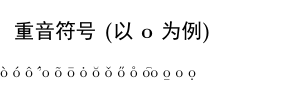
\section{重音符号(以o为例)}
     \`o \'o \^o \''o \~o \=o \.o \u{o} \v{o} \H{o} \r{o} \t{oo} \b{o} \c{o} \d{o}
12.插入图片表格 + 浮动体环境
  \section{\LaTeX{} 中的插图}
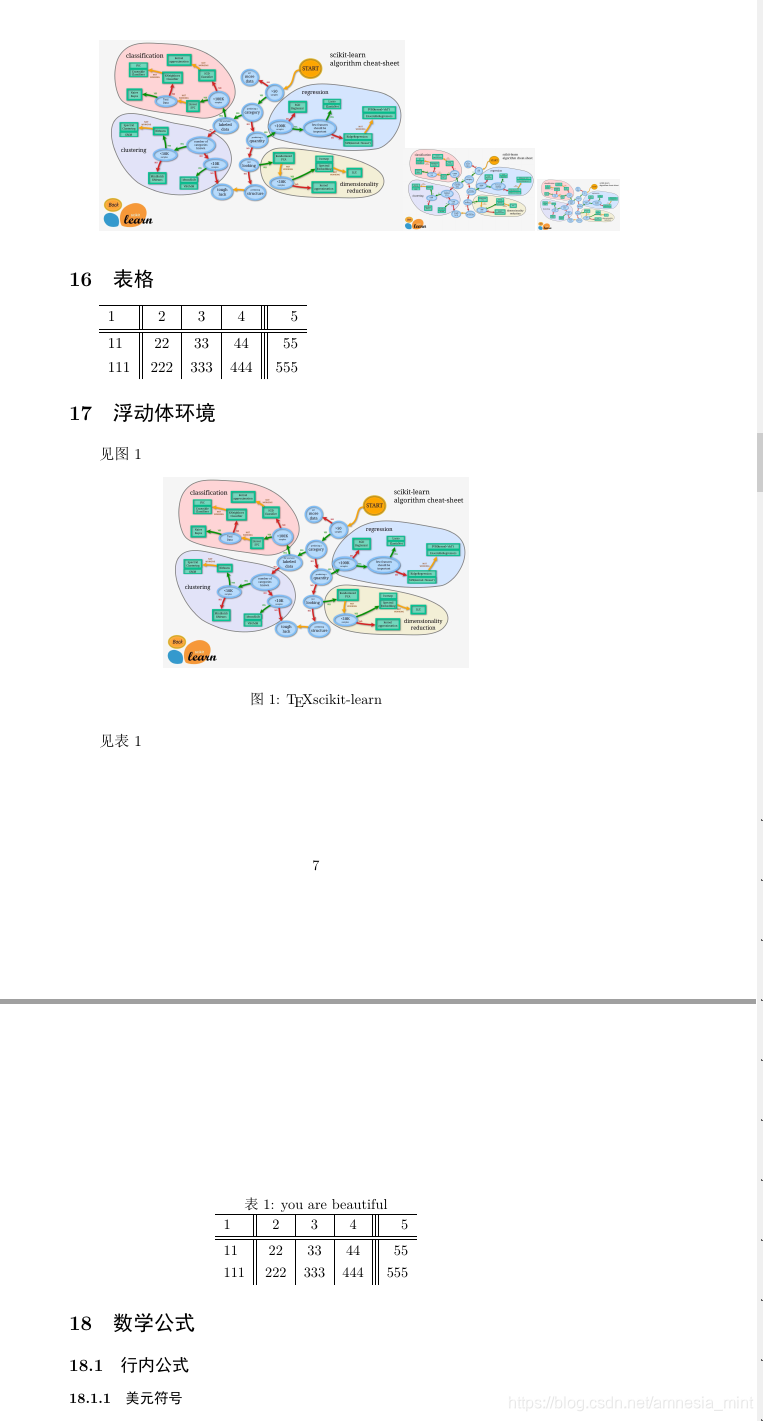
     \includegraphics{1}%没有后缀。。,后缀加不加都可以·

     \includegraphics[scale=0.1]{1}%实现图像缩放
     \includegraphics[height=2cm]{1}
     \includegraphics[width=2cm]{1}

     \section{表格}
     \begin{tabular}{l || c | c | c ||| r }%对齐方式 用|符号产生表格竖线 p指定宽度的列 超过宽度自动换行
     	\hline %产生表格横线
     	1&2&3&4&5\\
     	\hline \hline %产生双横线
     	11&22&33&44&55\\
     	111&222&333&444&555
     \end{tabular}
     \section{浮动体环境}
     见图\ref{fig-lion}%进行引用 注意交叉引用
     \begin{figure}[htbp]%允许各个位置
     	\centering
     	\includegraphics[scale=0.1]{1}
     	\caption{\TeX scikit-learn} \label{fig-lion}%插图标题 自动编号 设置标签
     \end{figure}
%标题控制(caption bicaption)
%并排与子图表(subcaption、subfig、floatrow等宏包)
%绕排(picinpar、 wrapfig等宏包)


 见表\ref{tab-bea}
 \begin{table}[h]
 	\centering
 	\caption{you are beautiful}\label{tab-bea}%定义标题
 	\begin{tabular}{l || c | c | c ||| r }%对齐方式 用|符号产生表格竖线 p指定宽度的列 超过宽度自动换行
 		\hline %产生表格横线
 		1&2&3&4&5\\
 		\hline \hline %产生双横线
 		11&22&33&44&55\\
 		111&222&333&444&555
 	\end{tabular}

 \end{table}
13. 数学公式
\section{数学公式}
\subsection{行内公式}
\subsubsection{美元符号}
交换律是$a + b = b +  a$
\subsubsection{小括号}
交换律是:\( a + b = b + a \)
\subsubsection{math环境}
交换律是:\begin{math} a + b = b + a
\end{math}
\subsection{上下标}
\subsubsection{上标}
$$3x^2$$
$3^{20} + 2$

$3^{20 + 3^2} + 2$
\subsubsection{下标}

$a_0,a_1,a_2,a_3,...a_100,a_{100}$
\subsection{希腊字母}
$\alpha$
$\beta$
$\gamma$
$\epsilon$
$\pi$
$\omega$

$\Gamma$
$\Delta$
$\Theta$
$\Pi$
$\Omega$

$\alpha^2 + \beta^2 + \gamma$

$\log$
$\sin$
$\cos$
$\arcsin$
$\arccos$
$\ln$

$\sin^2x + \cos^2x = 1$

$y = \arcsin x $

$\sqrt{2}$

$\sqrt{x^2 + y^2}$

$\sqrt{2 + \sqrt[3]{2}}$

$\sqrt[4]{2}$
\subsection{分式}
$3/4$

$\frac{3}{4}$

$\sqrt{\frac{x}{x^2 + x + 1}}$
\subsection{行间公式}
\subsubsection{美元符号}
\subsubsection{displaymath环境}
\begin{displaymath}
	a + b = b + a
\end{displaymath}
\subsubsection{自动编号公式的equation}
交换律见式\ref{eq: commutative}
\begin{equation}
 a + b = b + a \label{eq: commutative}%label ref 实现交叉引用
\end{equation}
\subsubsection{不编号公式equation* 环境}
\begin{equation*}
	a + b = b + a
\end{equation*}
\subsection{矩阵}
\[
\begin{matrix}
0  & 1\\
1 & 0
\end{matrix}
\begin{pmatrix}
	0  & 1\\
	1 & 0
\end{pmatrix}
\begin{bmatrix} %中括号
	0  & 1\\
	1 & 0
\end{bmatrix}
\begin{Bmatrix}%大括号
	0  & 1\\
	1 & 0
\end{Bmatrix}
\begin{vmatrix}%单数线
	0  & 1\\
	1 & 0
\end{vmatrix}
\begin{Vmatrix}
	0  & 1\\
	1 & 0
\end{Vmatrix}
\]
%常用省略号
\[
A = \begin{bmatrix}
 a_{11} & \dots & a_{1n} \\
 \vdots & \ddots & \vdots \\
 0 & \dots & a_{nn}
\end{bmatrix}_{n \times n}
\]

%三角矩阵
\[\begin{pmatrix}
	a_{11} & a_{12} & \cdots & a_{1n} \\
	& a_{22} & \cdots & a_{2n}\\
	&        &  \ddots  & \vdots \\
	\multicolumn{2}{c}{\raisebox{1.3ex}[0 pt]{\Huge 0}}&     & a_{nn}
\end{pmatrix}
\]

%跨列省略号:\hdotsfor{列数}
\[
\begin{pmatrix}
	1 & \frac{1}{2} & \dots & \frac{1}{n} \\
	\hdotsfor{4}\\
	m & \frac{m}{2} & \frac{m}{3} & \frac{m}{n}
\end{pmatrix}
\]
% 行内小矩阵(smallmatrix)
\begin{math}
	\left(
	\begin{smallmatrix}
		x & -y \\
		y & x
	\end{smallmatrix}
\right)
\end{math}


\subsection{多行公式}
\begin{gather}
	a + b = b + a \notag \\
	ab ba
\end{gather}

\begin{align}% 用&进行对齐
	x &=2\cos t + 1 \\
	y &=2 \sin t
\end{align}

\begin{align*}
	content...
\end{align*}

\begin{equation}
	\begin{split}
		\cos 2x & =\cos^2 x - \sin^2 x \\
		&= 2\cos^2x -1
	\end{split}
\end{equation}
\subsubsection{分段函数}
\begin{equation} %\text 临时切换到文本模式
	D(x) = \begin{cases}
		1, & \text{如果} x \in \mathbb{Q};\\
		0,& \text{如果} x \in \mathbb{R}\setminus\mathbb{Q}
	\end{cases}
\end{equation}






 扫一扫
扫一扫


 3574
3574

 被折叠的 条评论
为什么被折叠?
被折叠的 条评论
为什么被折叠?
 到【灌水乐园】发言





