



 本文介绍如何在Qt/qml环境中,通过VideoSurface类处理并修正摄像头预览帧的倒置或镜像问题,提供代码示例和兼容性测试结果。
前言
上一篇,使用Qt/qml取出了摄像头的原始帧,得到的图像可能会因摄像头的不同而发生倒置或镜像,本篇教程,我们取出预览的帧,并显示在UI上
在Qt5.15.2(qml)取出视频帧 原始帧 示例的基础上修改
一、增加取帧的处理类
删除类Tool_VideoFrames,新建一个类VideoSurface,公有继承自QAbstractVideoSurface
头文件修改如下
#ifndef VIDEOSURFACE_H
#define VIDEOSURFACE_H

#include <QObject>
#include <QAbstractVideoSurface>

class VideoSurface : public QAbstractVideoSurface
{
    Q_OBJECT
public:
    enum PixelFormat {
            Format_Invalid,
            Format_ARGB32,
            Format_ARGB32_Premultiplied,
            Format_RGB32,
            Format_RGB24,
            Format_RGB565,
            Format_RGB555,
            Format_ARGB8565_Premultiplied,
            Format_BGRA32,
            Format_BGRA32_Premultiplied,
            Format_BGR32,
            Format_BGR24,
            Format_BGR565,
            Format_BGR555,
            Format_BGRA5658_Premultiplied,

            Format_AYUV444,
            Format_AYUV444_Premultiplied,
            Format_YUV444,
            Format_YUV420P,
            Format_YV12,
            Format_UYVY,
            Format_YUYV,
            Format_NV12,
            Format_NV21,
            Format_IMC1,
            Format_IMC2,
            Format_IMC3,
            Format_IMC4,
            Format_Y8,
            Format_Y16,

            Format_Jpeg,

            Format_CameraRaw,
            Format_AdobeDng,

    #ifndef Q_QDOC
            NPixelFormats,
    #endif
            Format_User = 1000
        };

        Q_ENUM(PixelFormat)

    explicit VideoSurface(QObject *parent = nullptr);

    QList<QVideoFrame::PixelFormat> supportedPixelFormats(
                QAbstractVideoBuffer::HandleType handleType = QAbstractVideoBuffer::NoHandle) const;

        bool present(const QVideoFrame &frame) override;

signals:
        void newVideoFrame(const QImage videoFrame);

};
源文件实现如下类
QList<QVideoFrame::PixelFormat> VideoSurface::supportedPixelFormats(QAbstractVideoBuffer::HandleType handleType) const
{
    Q_UNUSED(handleType);
        return QList<QVideoFrame::PixelFormat>()
                << QVideoFrame::Format_ARGB32
                << QVideoFrame::Format_ARGB32_Premultiplied
                << QVideoFrame::Format_RGB32
                << QVideoFrame::Format_RGB24
                << QVideoFrame::Format_RGB565
                << QVideoFrame::Format_RGB555
                << QVideoFrame::Format_ARGB8565_Premultiplied
                << QVideoFrame::Format_BGRA32
                << QVideoFrame::Format_BGRA32_Premultiplied
                << QVideoFrame::Format_BGR32
                << QVideoFrame::Format_BGR24
                << QVideoFrame::Format_BGR565
                << QVideoFrame::Format_BGR555
                << QVideoFrame::Format_BGRA5658_Premultiplied
                << QVideoFrame::Format_AYUV444
                << QVideoFrame::Format_AYUV444_Premultiplied
                << QVideoFrame::Format_YUV444
                << QVideoFrame::Format_YUV420P
                << QVideoFrame::Format_YV12
                << QVideoFrame::Format_UYVY
                << QVideoFrame::Format_YUYV
                << QVideoFrame::Format_NV12
                << QVideoFrame::Format_NV21
                << QVideoFrame::Format_IMC1
                << QVideoFrame::Format_IMC2
                << QVideoFrame::Format_IMC3
                << QVideoFrame::Format_IMC4
                << QVideoFrame::Format_Y8
                << QVideoFrame::Format_Y16
                << QVideoFrame::Format_Jpeg
                << QVideoFrame::Format_CameraRaw
                << QVideoFrame::Format_AdobeDng;
}

//取出视频帧
bool VideoSurface::present(const QVideoFrame &frame)
{
    if (frame.isValid()) {
        QVideoFrame::imageFormatFromPixelFormat(cloneFrame.pixelFormat()));
        emit newVideoFrame(frame.image());

        return true;
    }
    return false;
}
二、取帧处理类中初始化,并调用
关键代码如下
//初始化
m_videoSurface = new VideoSurface;

connect(m_videoSurface, &VideoSurface::newVideoFrame, this,
        &Tool_VideoFrames::onProcssFrame);

//设置摄像头
void Tool_VideoFrames::setQmlCamera(QObject *qmlCamera)
{
    this->m_qmlCamera = qmlCamera;
    if( m_qmlCamera )
    {
        //将QML对象转换为C++对象
        m_camera = qvariant_cast< QCamera* >( m_qmlCamera->property( "mediaObject" ) );

        m_camera->setViewfinder(m_videoSurface);

    }
    qDebug() << "set Camera success!";

}
VideoSurface类的newVideoFrame()信号可以直接取出取景器中的帧
运行效果如下
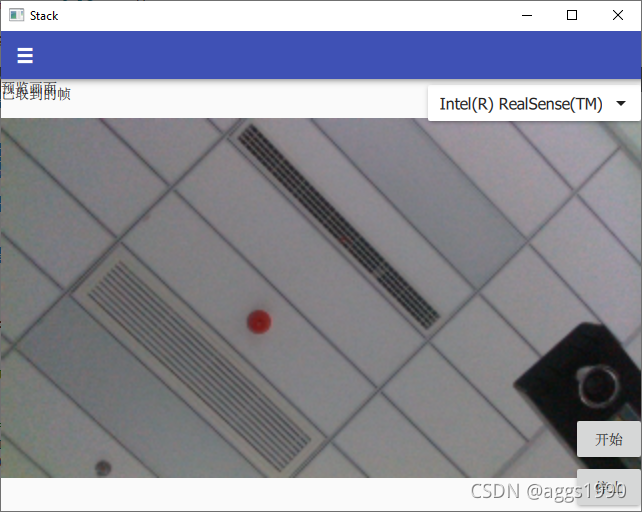
可以看到,因为取景器的源被占用了,所以无法正常显示
本教程示例源码
后记
直接取出的帧,解决了图像倒置或镜像的问题,但这不是绝对的,不少移动设备默认前置摄像头的预览是镜像的,请读者注意测试下
因时间关系,笔者在win10下使用minGW(64+32位)和VS2019(64+32位)测试成功,android(arm64_v8a)测试失败,其他平台未测试,感兴趣的小伙伴可以测试下其他平台






 扫一扫
扫一扫


 1122
1122

 被折叠的 条评论
为什么被折叠?
被折叠的 条评论
为什么被折叠?
 到【灌水乐园】发言





