



什么是Dubbo
Apache Dubbo 是一款微服务开发框架,它提供了 RPC通信 与 微服务治理 两大关键能力。这意味着,使用 Dubbo 开发的微服务,将具备相互之间的远程发现与通信能力, 同时利用 Dubbo 提供的丰富服务治理能力,可以实现诸如服务发现、负载均衡、流量调度等服务治理诉求。同时 Dubbo 是高度可扩展的,用户几乎可以在任意功能点去定制自己的实现,以改变框架的默认行为来满足自己的业务需求。
Dubbo架构图:
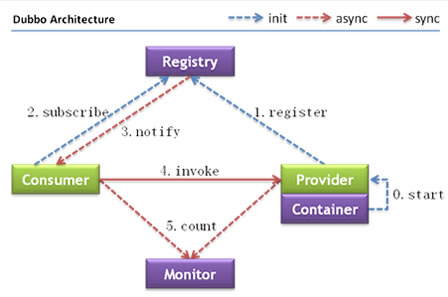
节点角色说明:
| 节点 | 角色名称 |
|---|---|
| Provider | 暴露服务的服务提供方 |
| Consumer | 调用远程服务的服务消费方 |
| Registry | 服务注册与发现的注册中心 |
| Monitor | 统计服务的调用次数和调用时间的监控中心 |
| Container | 服务运行容器 |
虚线都是异步访问,实线都是同步访问 蓝色虚线:在启动时完成的功能 红色虚线(实线)都是程序运行过程中执行的功能
调用关系说明:
- 服务容器负责启动,加载,运行服务提供者。
- 服务提供者在启动时,向注册中心注册自己提供的服务。
- 服务消费者在启动时,向注册中心订阅自己所需的服务。
- 注册中心返回服务提供者地址列表给消费者,如果有变更,注册中心将基于长连接推送变更数据给消费者。
- 服务消费者,从提供者地址列表中,基于软负载均衡算法,选一台提供者进行调用,如果调用失败,再选另一台调用。
- 服务消费者和提供者,在内存中累计调用次数和调用时间,定时每分钟发送一次统计数据到监控中心。
Dubbo原理
初始化过程细节: 第一步,就是将服务装载容器中,然后准备注册服务。和spring中启动过程类似,spring启动时,将bean装载进容器中的时候,首先要解析bean。所以dubbo也是先读配置文件解析服务。
解析服务:
1、基于dubbo.jar内的Meta-inf/spring.handlers配置,spring在遇到dubbo名称空间时,会回调DubboNamespaceHandler类。
2、所有的dubbo标签,都统一用DubboBeanDefinitionParser进行解析,基于一对一属性映射,将XML标签解析为Bean对象。生产者或者消费者初始化的时候,会将Bean对象转会为url格式,将所有Bean属性转成url的参数。 然后将URL传给Protocol扩展点,基于扩展点的Adaptive机制,根据URL的协议头,进行不同协议的服务暴露和引用。
暴露服务:
a、 直接暴露服务端口
在没有使用注册中心的情况,这种情况一般适用在开发环境下,服务的调用这和提供在同一个IP上,只需要打开服务的端口即可。 即,当配置 or ServiceConfig解析出的URL的格式为: Dubbo://service-host/com.xxx.TxxService?version=1.0.0 基于扩展点的Adaptiver机制,通过URL的“dubbo://”协议头识别,直接调用DubboProtocol的export()方法,打开服务端口。
b、向注册中心暴露服务:
和上一种的区别:需要将服务的IP和端口一同暴露给注册中心。 ServiceConfig解析出的url格式为: registry://registry-host/com.alibaba.dubbo.registry.RegistryService?export=URL.encode(
基于扩展点的Adaptive机制,通过URL的“registry://”协议头识别,调用RegistryProtocol的export方法,将export参数中的提供者URL先注册到注册中心,再重新传给Protocol扩展点进行暴露: Dubbo://service-host/com.xxx.TxxService?version=1.0.0
引用服务:
a、直接引用服务:
在没有注册中心的,直连提供者情况下, ReferenceConfig解析出的URL格式为: Dubbo://service-host/com.xxx.TxxService?version=1.0.0
基于扩展点的Adaptive机制,通过url的“dubbo://”协议头识别,直接调用DubboProtocol的refer方法,返回提供者引用。
b、从注册中心发现引用服务:
此时,ReferenceConfig解析出的URL的格式为: registry://registry-host/com.alibaba.dubbo.registry.RegistryService?refer=URL.encode(“consumer://consumer-host/com.foo.FooService?version=1.0.0”)
基于扩展点的Apaptive机制,通过URL的“registry://”协议头识别,就会调用RegistryProtocol的refer方法,基于refer参数总的条件,查询提供者URL,如: Dubbo://service-host/com.xxx.TxxService?version=1.0.0
基于扩展点的Adaptive机制,通过提供者URL的“dubbo://”协议头识别,就会调用DubboProtocol的refer()方法,得到提供者引用。 然后RegistryProtocol将多个提供者引用,通过Cluster扩展点,伪装成单个提供这引用返回。
Dubbo构建
Dubbo作为一个RPC框架,其最核心的功能就是要实现跨网络的远程调用。本小节就是要创建两个应用,一个作为服务的提供方,一个作为服务的消费方。通过Dubbo来实现服务消费方远程调用服务提供方的方法。
服务提供商
创建步骤:
1,创建maven工程(打包方式为war)dubbodemo_provider,在pom.xml文件中导入如下坐标
 <properties>
        <project.build.sourceEncoding>UTF-8</project.build.sourceEncoding>
        <maven.compiler.source>1.8</maven.compiler.source>
        <maven.compiler.target>1.8</maven.compiler.target>
        <spring.version>5.0.5.RELEASE</spring.version>
    </properties>
    <dependencies>
        <dependency>
            <groupId>org.springframework</groupId>
            <artifactId>spring-context</artifactId>
            <version>${spring.version}</version>
        </dependency>
        <dependency>
            <groupId>org.springframework</groupId>
            <artifactId>spring-beans</artifactId>
            <version>${spring.version}</version>
        </dependency>
        <dependency>
            <groupId>org.springframework</groupId>
            <artifactId>spring-webmvc</artifactId>
            <version>${spring.version}</version>
        </dependency>
        <dependency>
            <groupId>org.springframework</groupId>
            <artifactId>spring-jdbc</artifactId>
            <version>${spring.version}</version>
        </dependency>
        <dependency>
            <groupId>org.springframework</groupId>
            <artifactId>spring-aspects</artifactId>
            <version>${spring.version}</version>
        </dependency>
        <dependency>
            <groupId>org.springframework</groupId>
            <artifactId>spring-jms</artifactId>
            <version>${spring.version}</version>
        </dependency>
        <dependency>
            <groupId>org.springframework</groupId>
            <artifactId>spring-context-support</artifactId>
            <version>${spring.version}</version>
        </dependency> <!-- dubbo相关 -->
        <dependency>
            <groupId>com.alibaba</groupId>
            <artifactId>dubbo</artifactId>
            <version>2.6.0</version>
        </dependency>
        <dependency>
            <groupId>org.apache.zookeeper</groupId>
            <artifactId>zookeeper</artifactId>
            <version>3.4.7</version>
        </dependency>
        <dependency>
            <groupId>com.github.sgroschupf</groupId>
            <artifactId>zkclient</artifactId>
            <version>0.1</version>
        </dependency>
        <dependency>
            <groupId>javassist</groupId>
            <artifactId>javassist</artifactId>
            <version>3.12.1.GA</version>
        </dependency>
        <dependency>
            <groupId>com.alibaba</groupId>
            <artifactId>fastjson</artifactId>
            <version>1.2.47</version>
        </dependency>
    </dependencies>
    <build>
    <plugins>
        <plugin>
            <groupId>org.apache.maven.plugins</groupId>
            <artifactId>maven-compiler-plugin</artifactId>
            <version>2.3.2</version>
            <configuration>
                <source>1.8</source>
                <target>1.8</target>
            </configuration>
        </plugin>
        <plugin>
            <groupId>org.apache.tomcat.maven</groupId>
            <artifactId>tomcat7-maven-plugin</artifactId>
            <configuration> <!-- 指定端口 -->
                <port>8081</port> <!-- 请求路径 -->
                <path>/</path>
            </configuration>
        </plugin>
    </plugins>
2,配置web.xml文件
    <!DOCTYPE web-app PUBLIC "-//Sun Microsystems, Inc.//DTD Web Application 2.3//EN"
    "http://java.sun.com/dtd/web-app_2_3.dtd" >
    <web-app>
        <display-name>Archetype Created Web Application</display-name>
        <context-param>
            <param-name>contextConfigLocation</param-name>
            <param-value>classpath:applicationContext*.xml</param-value>
        </context-param>
        <listener>
            <listener-class>org.springframework.web.context.ContextLoaderListener</listener-class>
        </listener>
    </web-app>
3,创建服务接口
public interface MyService {
    String hello(String name);
}
4,创建服务实现类
package com.zzk.service.impl;
import com.alibaba.dubbo.config.annotation.Service;

@Servcie
public class MyServiceImpl implements MyService{
    @Override
    public String hello(String name) {
        return "hello " + name;
    }
}
注意:服务实现类上使用的Service注解是Dubbo提供的,用于对外发布服务
5,在src/main/resources下创建applicationContext-service.xml
<?xml version="1.0" encoding="UTF-8"?>
<beans xmlns="http://www.springframework.org/schema/beans" xmlns:xsi="http://www.w3.org/2001/XMLSchema-instance"
       xmlns:p="http://www.springframework.org/schema/p" xmlns:context="http://www.springframework.org/schema/context"
       xmlns:dubbo="http://code.alibabatech.com/schema/dubbo" xmlns:mvc="http://www.springframework.org/schema/mvc"
       xsi:schemaLocation="http://www.springframework.org/schema/beans http://www.springframework.org/schema/beans/spring-beans.xsd
       http://www.springframework.org/schema/mvc http://www.springframework.org/schema/mvc/spring-mvc.xsd
       http://code.alibabatech.com/schema/dubbo http://code.alibabatech.com/schema/dubbo/dubbo.xsd
       http://www.springframework.org/schema/context http://www.springframework.org/schema/context/spring-context.xsd">
    <!-- 当前应用名称,用于注册中心计算应用间依赖关系,注意:消费者和提供者应用名不要一样 -->
    <dubbo:application name="dubbodemo_provider"/>
    <!-- 连接服务注册中心zookeeper ip为zookeeper所在服务器的ip地址-->
    <dubbo:registry address="zookeeper://192.168.134.129:2181"/>
    <!-- 注册 协议和port -->
    <dubbo:protocol name="dubbo" port="20881"></dubbo:protocol>
    <!-- 扫描指定包,加入@Service注解的类会被发布为服务 -->
    <dubbo:annotation package="com.zzk.service.impl"/>
</beans>
6,启动服务
tomcat7:run
服务消费方
创建步骤:
1,创建maven工程(打包方式为war)dubbodemo_consumer,pom.xml配置和上面服务提供者相同,只需要将Tomcat插件的端口号改为8082即可
2,配置web.xml文件
<!DOCTYPE web-app PUBLIC "-//Sun Microsystems, Inc.//DTD Web Application 2.3//EN"
        "http://java.sun.com/dtd/web-app_2_3.dtd" >
<web-app>
    <display-name>Archetype Created Web Application</display-name>
    <servlet>
        <servlet-name>springmvc</servlet-name>
        <servlet-class>org.springframework.web.servlet.DispatcherServlet</servlet- class>
        <!-- 指定加载的配置文件 ,通过参数contextConfigLocation加载 -->
        <init-param>
            <param-name>contextConfigLocation</param-name>
            <param-value>classpath:applicationContext-web.xml</param-value>
        </init-param>
        <load-on-startup>1</load-on-startup>
    </servlet>
    <servlet-mapping>
        <servlet-name>springmvc</servlet-name>
        <url-pattern>*.do</url-pattern>
    </servlet-mapping>
</web-app>
3,将服务提供者工程中的hello接口复制到当前工程
package com.zzk.controller;

import com.alibaba.dubbo.config.annotation.Reference;
import com.zzk.service.MyService;
import org.springframework.stereotype.Controller;
import org.springframework.web.bind.annotation.RequestMapping;
import org.springframework.web.bind.annotation.ResponseBody;

@Controller
@RequestMapping("/demo")
public class HelloController {
    @Reference
    private MyService myService;

    @RequestMapping("/hello")
    @ResponseBody
    public String getName(String name) {
        //远程调用
        String result = myService.hello(name);
        System.out.println(result);
        return result;
    }
}
注意:Controller中注入HelloService使用的是Dubbo提供的@Reference注解
5,在src/main/resources下创建applicationContext-web.xml
<?xml version="1.0" encoding="UTF-8"?>
<beans xmlns="http://www.springframework.org/schema/beans" xmlns:xsi="http://www.w3.org/2001/XMLSchema-instance"
       xmlns:p="http://www.springframework.org/schema/p" xmlns:context="http://www.springframework.org/schema/context"
       xmlns:dubbo="http://code.alibabatech.com/schema/dubbo" xmlns:mvc="http://www.springframework.org/schema/mvc"
       xsi:schemaLocation="http://www.springframework.org/schema/beans http://www.springframework.org/schema/beans/spring-beans.xsd
       http://www.springframework.org/schema/mvc http://www.springframework.org/schema/mvc/spring-mvc.xsd
       http://code.alibabatech.com/schema/dubbo http://code.alibabatech.com/schema/dubbo/dubbo.xsd
       http://www.springframework.org/schema/context http://www.springframework.org/schema/context/spring-context.xsd">
    <!-- 当前应用名称,用于注册中心计算应用间依赖关系,注意:消费者和提供者应用名不要一样 -->
    <dubbo:application name="dubbodemo-consumer"/>
    <!-- 连接服务注册中心zookeeper ip为zookeeper所在服务器的ip地址-->
    <dubbo:registry address="zookeeper://192.168.134.129:2181"/>
    <!-- 扫描的方式暴露接口 -->
    <dubbo:annotation package="com.zzk.controller"/>
</beans>
6,运行测试
tomcat7:run启动
在浏览器输入http://localhost:8082/demo/hello.do?name=zzk,查看浏览器输出结果
Dubbo管理控制台
我们在开发时,需要知道Zookeeper注册中心都注册了哪些服务,有哪些消费者来消费这些服务。我们可以通过部署一个管理中心来实现。其实管理中心就是一个web应用,部署到tomcat即可。
安装
安装步骤:
1,将资料中的dubbo-admin-2.6.0.war文件复制到tomcat的webapps目录下
2,启动tomcat,此war文件会自动解压
3,修改WEB-INF下的dubbo.properties文件,注意dubbo.registry.address对应的值需要对应当前使用的Zookeeper的ip地址和端口号dubbo.registry.address=zookeeper://192.168.134.129:2181dubbo.admin.root.password=root
dubbo.admin.guest.password=guest
4,重启tomcat
使用
操作步骤:
1,访问http://localhost:8080/dubbo-admin-2.6.0/,输入用户名(root)和密码(root)
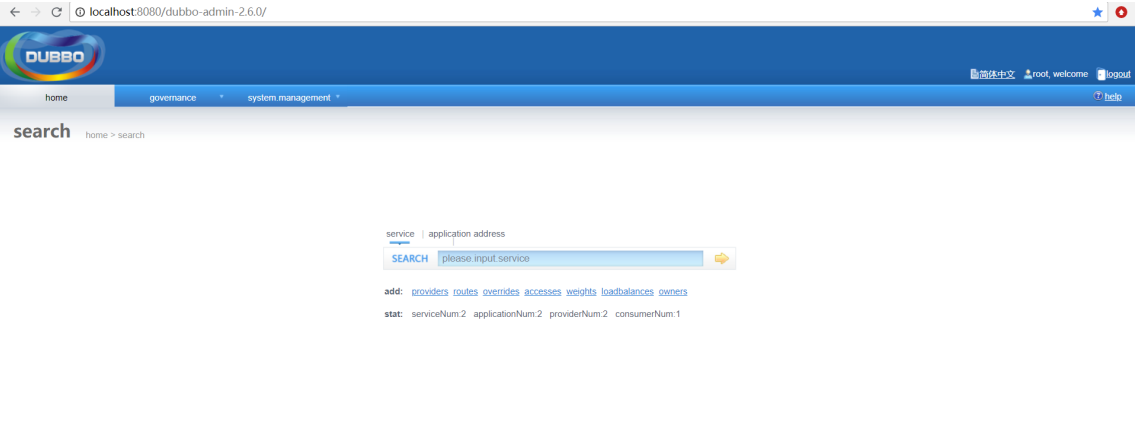
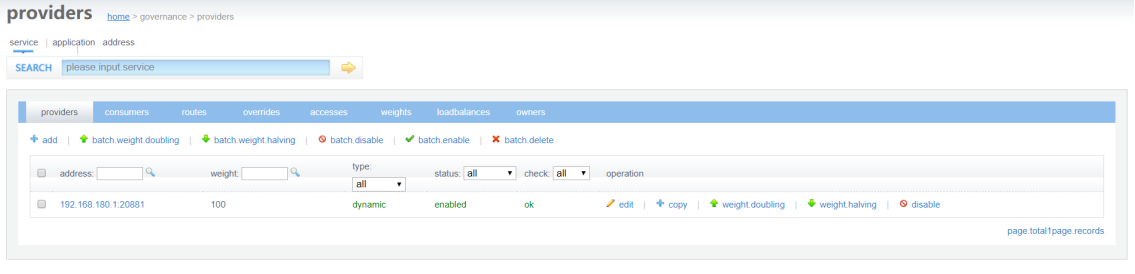
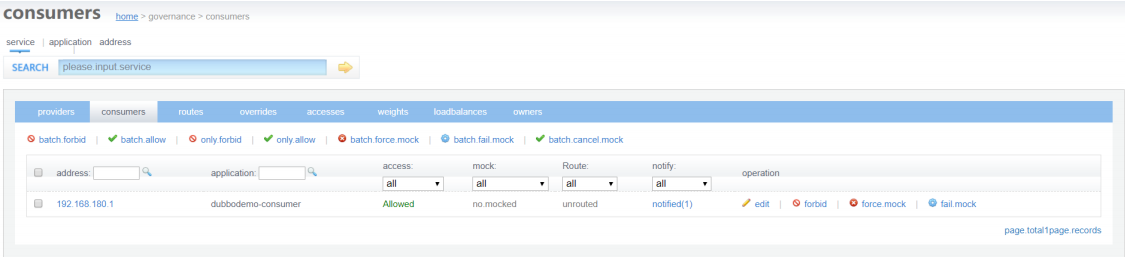
2,启动服务提供者工程和服务消费者工程,可以在查看到对应的信息
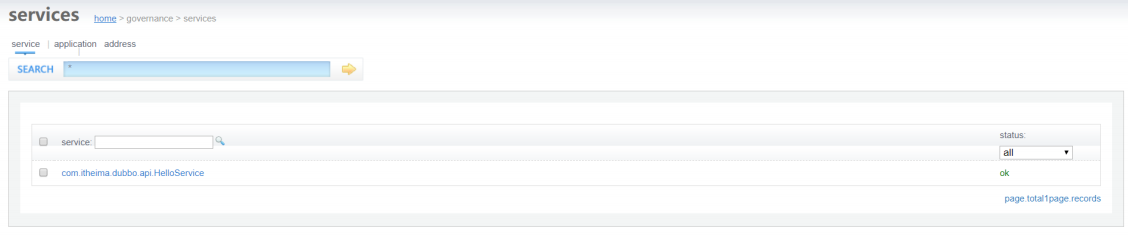
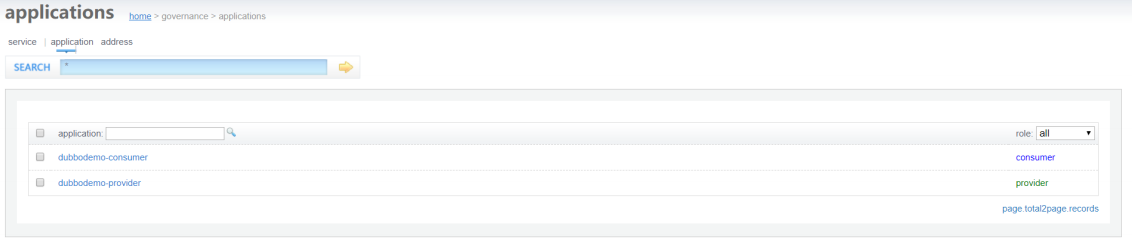





 扫一扫
扫一扫


 777
777

 被折叠的 条评论
为什么被折叠?
被折叠的 条评论
为什么被折叠?
 到【灌水乐园】发言





