


目录
轮播组件 Swiper
Swiper () {内容}
通常尺寸给 Swiper 设置
内容会拉伸到 Swiper 大小
循环 loop
.loop(true) // 默认值
自动循环 autoPlay
.autoPlay(false) // 默认值
自动循环间隔 interval
.interval(3000)
纵向滑动 vertical
.vertical(false) // 默认值
轮播导航点 indicator
一旦对轮播导航点进行设置
导航点将自动修改为显示
      .indicator(false) //  隐藏轮播导航点
      .indicator(
        Indicator.dot() //  轮播导航按钮设置
          .itemWidth(20)  //  未选中宽
          .itemHeight(20) //  未选中高
          .color('#999')  //  未选中颜色
          .selectedItemWidth(40)  //  选中宽
          .selectedItemHeight(40) //  选中高
          .selectedColor('#00f')  //  选中颜色
轮播箭头 displayArrow
下面是查看官方示例,自己领悟的,请谨慎使用
      .displayArrow({ // 设置导航箭头样式
        showBackground: true, //  是否在背景上显示
        isSidebarMiddle: false, //  是否位于内容两侧
        backgroundSize: 40, //  背景大小
        backgroundColor: Color.White, //  背景颜色
        arrowSize: 40,  //  箭头大小
        arrowColor: Color.Red //  箭头颜色
      }, false)  //  是否隐藏  true隐藏  false不隐藏
固定宽高比 aspectRatio
.aspectRatio(1)
便于适配不同的屏幕大小,不至于漏信息
简易示例
根据老师要求做一个纵向布局的,这是第二版
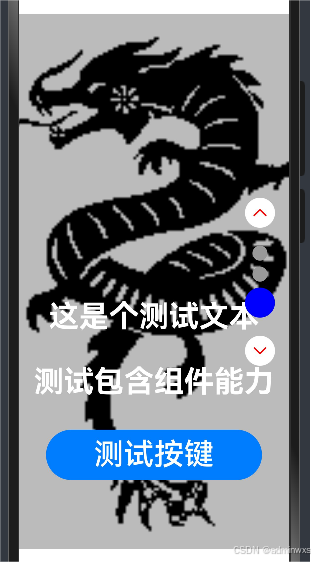
@Entry
@Component
struct Index {
@State jd1: string = ''
build() {
Column(){
Swiper(){
Text('1').backgroundColor('#f00').fontSize(40).padding( 最低0.47元/天 解锁文章






 扫一扫
扫一扫


 633
633

 被折叠的 条评论
为什么被折叠?
被折叠的 条评论
为什么被折叠?
 到【灌水乐园】发言





