


 本文详细介绍了ASP.NET Core中的视图组件,包括其组成、方法定义、搜索路径、调用方式以及通过实例展示如何创建并使用TopTags和Top10Tags视图组件获取和展示数据。
一、组成:
一个视图组件包括两个部分,派生自ViewComponent的类及其返回结果。类似控制器。
定义一个视图组件,如控制器一样,必须是公开,非嵌套,非抽象的类。一般,视图组件名称为类名去掉”ViewComponent“后缀。也可通过ViewComponentAttribute.Name属性进行明确指定。
二、视图组件方法:
在InvokeAsync/Invoke方法中定义逻辑,并返回IViewComponentResult。参数可直接来源于视图组件间调用,通过匿名类属性进行传递。
三、视图组件搜索路径:
运行时对视图搜索路径如下:
Views/Components/
Views/Shared/Components
视图组件默认名称为Default,通过可默认命名为Default.cshtml;或可指定视图名称,在调用View方法返回时,将名称一同返回。
四、视图组件调用:
-
从视图中调用
@Component.Invoke("视图组件名",<匿名类型参数>)。或@await Component.InvokeAsync("视图组件名",<匿名类型参数>)。 -
从控制器直接调用:
直接在Action中返回,return ViewComponent("视图组件名称", new {arg0=xx,arg1=xxx});的形式调用。
五、简单示例:
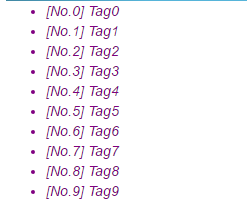
通过创建一个视图组件,返回前n个标识,进行显示。
视图组件类:(则该视图名称为”TopTags“)
namespace ViewComponentAbout.Components
{
    public class TopTagsViewComponent : ViewComponent
    {
        private readonly ITagService _tagService;

        public TopTagsViewComponent(ITagService tagService)
        {
            _tagService = tagService;
        }

        public IViewComponentResult Inovke(int count)
        {
            var tags = _tagService.LoadTopTags(count);
            var models = tags.Select((tag) =>
                new TagViewModel
                {
                    Id = tag.Id,
                    Name = tag.Name
                });
            return View(models);
        }

        public async Task<IViewComponentResult> InvokeAsync(int count)
        {
            var tags = await _tagService.LoadTopTagsAsync(count);
            var models = tags.Select((tag) =>
                new TagViewModel
                {
                    Id = tag.Id,
                    Name = tag.Name
                });
            return View(models);
        }
    }
}
数据来源Services:
namespace ViewComponentAbout.Services
{
    public interface ITagService
    {
        IEnumerable<Tag> LoadTopTags(int count);
        Task<IEnumerable<Tag>> LoadTopTagsAsync(int count);
    }
}

namespace ViewComponentAbout.Services
{
    public class TagService : ITagService
    {
        private static Func<List<Tag>> _tags = () =>
        {
            var tags = new List<Tag>();
            for (int i = ; i < ; ++i)
            {
                tags.Add(new Tag { Id = $"No.{i}", Name = $"Tag{i}", Description = "Tag entity", CreatedOn = DateTime.Now });
            }
            return tags;
        };

        public IEnumerable<Tag> LoadTopTags(int count)
        {
            return _tags().Take(count);
        }

        public async Task<IEnumerable<Tag>> LoadTopTagsAsync(int count)
        {
            return await Task.Run(() => _tags().Take(count));
        }
    }
}
实体:
namespace ViewComponentAbout.Entities
{
    public class Tag
    {
        public string Id { get; set; }
        public string Name { get; set; }
        public DateTime CreatedOn { get; set; }
        public string Description { get; set; }
    }
}
ViewModel:
namespace ViewComponentAbout.ViewModels
{
    public class TagViewModel
    {
        public string Id { get; set; }
        public string Name { get; set; }
    }
}
视图组件页面:(位于/Views/Shared/Components/TopTags/Default.cshtml)
@model IEnumerable<ViewComponentAbout.ViewModels.TagViewModel>

<style>
    ul li {color:purple;font-style:italic;}
</style>

@if(Model.Any())
{
    <ul>
        @foreach(var tag in Model)
        {
            <li>
                [@tag.Id] @tag.Name
            </li>
        }
    </ul>
}
Startup中,在ConfigureServices添加服务注入:
services.AddSingleton<ITagService, TagService>();
在Index.cshtml页面中,使用如下:
@await Component.InvokeAsync("TopTags", new { count = })
效果:
创建一个命名视图组件:
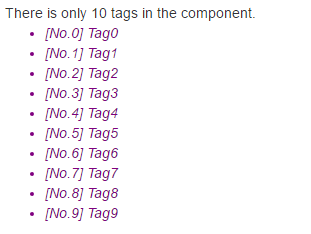
获取前10个Tag数据,如:(视图名:Top10Tags)
namespace ViewComponentAbout.Components
{
    public class Top10TagsViewComponent : ViewComponent
    {
        private readonly ITagService _tagService;

        public Top10TagsViewComponent(ITagService tagService)
        {
            _tagService = tagService;
        }

        public IViewComponentResult Inovke()
        {
            var tags = _tagService.LoadTopTags();
            var models = tags.Select((tag) =>
                new TagViewModel
                {
                    Id = tag.Id,
                    Name = tag.Name
                });
            return View("TagComponentName", models);
        }

        public async Task<IViewComponentResult> InvokeAsync()
        {
            var tags = await _tagService.LoadTopTagsAsync();
            var models = tags.Select((tag) =>
                new TagViewModel
                {
                    Id = tag.Id,
                    Name = tag.Name
                });
            return View("TagComponentName", models);
        }
    }
}
组件视图页面:(位于 /Views/Shared/Components/Top10Tags/TagComponentName.cshtml)
@model IEnumerable<ViewComponentAbout.ViewModels.TagViewModel>

<style>
    ul li {color:purple;font-style:italic;}
</style>
There is only 10 tags in the component.
@if(Model.Any())
{
    <ul>
        @foreach(var tag in Model)
        {
            <li>
                [@tag.Id] @tag.Name
            </li>
        }
    </ul>
}
调用:
@await Component.InvokeAsync("Top10Tags")
效果:





 扫一扫
扫一扫


 95
95

 被折叠的 条评论
为什么被折叠?
被折叠的 条评论
为什么被折叠?
 到【灌水乐园】发言





