



 本文介绍如何使用!important提高CSS选择器的优先级,解决默认背景与hover背景的样式冲突。通过实例展示,帮助读者理解并应用到菜单栏设计中。
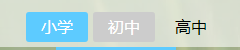
蓝色背景是默认样式,灰色背景是hover样式。
初写菜单栏时,代码夸夸夸一顿敲。发现把鼠标移到蓝色按钮上去也变成了灰色。
其实这个时候只需要在蓝色背景后面加上 !important 把优先级提到最高。
就会发现hover背景和默认背景不会冲突了。
.btn{
    /*按钮样式请参考我的另一篇文章*/
}
.btn-cur{
    background: #5DCBFF !important;
}
.btn:hover{
    background: #ccc;
}
一个简单的菜单hover效果
<!DOCTYPE html>
<html>
	<head>
		<meta charset="UTF-8">
		<title></title>
		<style type="text/css">
			body,html{
				padding: 0;
				margin: 0;
				width: 100%;
				height: 100%;
			}
			ul li{
				position: relative;
				float: left;
				list-style: none;
				width: 100px;
				height: 50px;
				background: #ccc;
				margin-left: 50px;
			}
			ul:after{
				content: "";
				display: block;
				clear: both;
			}
			li:before{
				content: "";
				position: absolute;
				left: 50%;
				top: 100%;
				height: 3px;
				background: aqua;
				width: 0;
				transition: all .8s;
			}
			li:hover:before{
				left: 0;
				width: 100%;
			}
		</style>
	</head>
	<body>
		<ul>
			<li></li>
			<li></li>
			<li></li>
			<li></li>
		</ul>
	</body>
</html>
如图:






 扫一扫
扫一扫


 926
926

 被折叠的 条评论
为什么被折叠?
被折叠的 条评论
为什么被折叠?
 到【灌水乐园】发言





