


 这篇博客介绍了一个C#程序,用于在文件上添加一个右键菜单选项,让用户能以管理员权限运行CMD。代码创建了注册表项,使得在文件夹上右键点击时,可以快速启动命令提示符并定位到该文件夹路径。
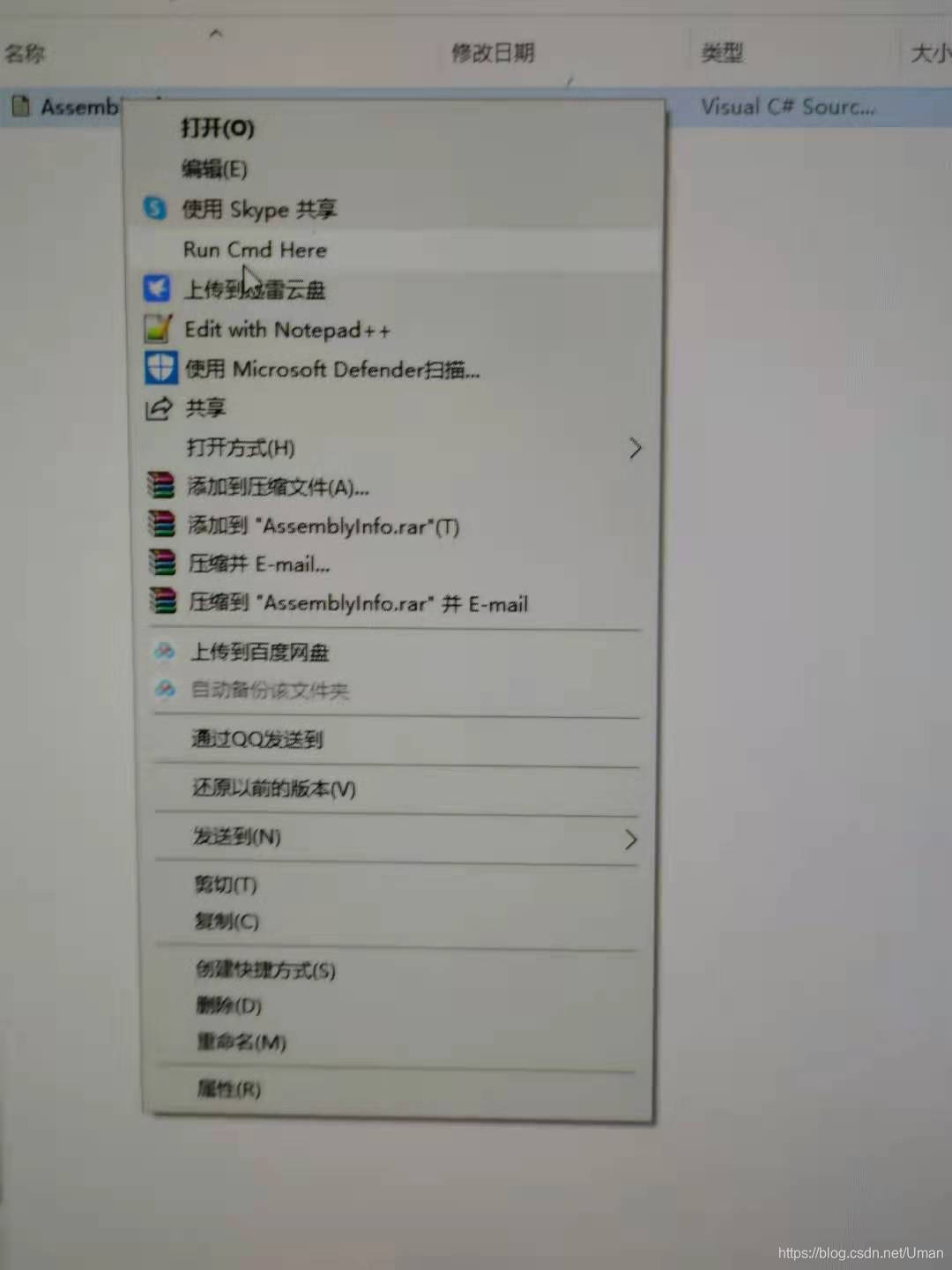
第一次以管理员身份运行该文件,运行后,在文件上点击右键:
如图所示:
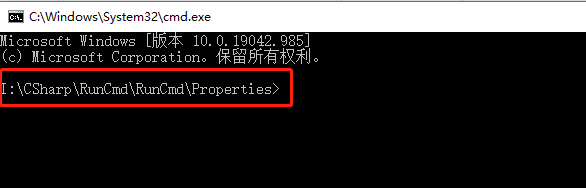
当前路径是:

运行后:
代码如下:
其中注册表部分参考了网络大咖代码,在这里致谢。
using System;
using System.Collections.Generic;
using System.Diagnostics;
using System.Linq;
using System.Text;
using System.Windows.Forms;
using Microsoft.Win32;
/// <summary>
///  Used to run cmd from the system contextmenu in the currnet dir...
/// </summary>
namespace RunCmd
{
    class Program
    {
        static void Main(string[] args)
        {


            string curPath = "";
            if (args.Length > 0)
            {
                int pos = args[0].LastIndexOf("\\");
                curPath = args[0].Substring(0, pos);
                Process process = new Process();
                //设定程序名
                process.StartInfo.FileName = "cmd.exe";
                process.StartInfo.WorkingDirectory = curPath;
                process.Start();
            }
            else
            {
                string execPath = System.AppDomain.CurrentDomain.SetupInformation.ApplicationBase;
                execPath = System.Diagnostics.Process.GetCurrentProcess().MainModule.FileName;
                string itemName = "Run Cmd Here";
                string itemVale = GetRegistData(itemName);
                if (itemVale == "")
                {
                    AddFileContextMenuItem(itemName, execPath + " %1");
                }
            }
        }
        static private void AddFileContextMenuItem(string itemName, string associatedProgramFullPath)
        {
            //创建项:shell
            RegistryKey shellKey = Registry.ClassesRoot.OpenSubKey(@"*\shell", RegistryKeyPermissionCheck.ReadWriteSubTree,System.Security.AccessControl.RegistryRights.FullControl);
            if (shellKey == null)
            {
                shellKey = Registry.ClassesRoot.CreateSubKey(@"*\shell");
            }

            //创建项:右键显示的菜单名称
            RegistryKey rightCommondKey = shellKey.CreateSubKey(itemName);
            RegistryKey associatedProgramKey = rightCommondKey.CreateSubKey("command");

            //创建默认值:关联的程序
            associatedProgramKey.SetValue(string.Empty, associatedProgramFullPath);

            //刷新到磁盘并释放资源
            associatedProgramKey.Close();
            rightCommondKey.Close();
            shellKey.Close();
        }
        static private string GetRegistData(string name)
        {
            string registData = ""; ;
            try
            {
                RegistryKey maraSun = Registry.ClassesRoot;
                RegistryKey shell = maraSun.OpenSubKey(@"*\shell", RegistryKeyPermissionCheck.ReadWriteSubTree, System.Security.AccessControl.RegistryRights.FullControl);
                RegistryKey command = shell.OpenSubKey(name + "\\command", true);
                registData = command.GetValue("").ToString();
            }
            catch { }
            return registData;
        }
    }
}
马拉孙于 2021-07-06
北京泛五地区





 扫一扫
扫一扫


 4476
4476

 被折叠的 条评论
为什么被折叠?
被折叠的 条评论
为什么被折叠?
 到【灌水乐园】发言





