



 本文围绕iOS本地化的strings文件展开,介绍了.strings文件,包括系统自动生成用于App系统显示本地化的文件,以及代码中用宏做本地化的默认文件;还说明了.strings格式、infoPlist.strings用途、宏NSLocalizedString调用,最后提及本地化注意问题。
iOS 本地化的 strings 文件
很多本地化都教程都提到了如何去做多语言的 .strings 文件, 然后在代码中调用 NSLocalizedString(key, comment) 就好了。 这里来说下 .strings 文件。
.strings 文件
在创建 project 时,Xcode 会自动生成 InfoPlist.strings。 InfoPlist.strings 是用来做一些 App 系统显示层面上的本地化的(如 App 名字)。还有一个是代码中用到的字符串用宏 NSLocalizedString(key, comment) 做本地化默认 .strings 文件— Localizable.strings。当然,你也可以自定义其他的 .strings 来做代码中的本地化,不过就要用宏 NSLocalizedStringFromTable(key, tbl, comment) 来指定 .strings 文件的来源。
列个表格看下
| strings 名称 | 作用 |
|---|---|
| InfoPlist.strings | App 系统显示层面上的本地化的(如 App 名字) |
| Localizable.strings | 代码中用到的字符串用宏 NSLocalizedString(key, comment) 做本地化默认 .strings 文件 |
| xxx.strings | 自定义本地化文件,用宏 NSLocalizedStringFromTable(key, tbl, comment)来指定 .strings 文件的来源 |
.strings 格式
key = value ;
例子
@"Name" = @"名称";
CFBundleDisplayName = @"啊呸呸";
infoPlist.strings
正如其名字描述的,对 xxInfo.plist 的中描述的本地化。
宏 NSLocalizedString
#define NSLocalizedString(key, comment) \
	    [[NSBundle mainBundle] localizedStringForKey:(key) value:@"" table:nil]
具体调用的是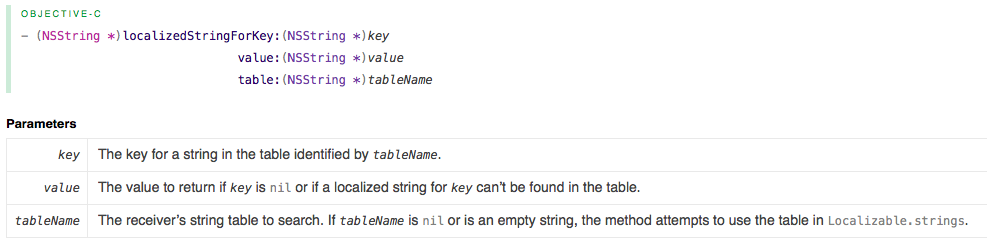
可以看到 table 传参 nil,其实就是指定了默认的本地化文件Localizable.strings。
本地化注意问题
- 注意
.strings文件的选择 .strings中重复的 key 会导致只取第一个匹配- 格式
key = value ;注意最后的冒号,不加编译不过
原文地址:http://xummer26.com/blog/iOS-localized-strings-file.html





 扫一扫
扫一扫


 2940
2940

 被折叠的 条评论
为什么被折叠?
被折叠的 条评论
为什么被折叠?
 到【灌水乐园】发言





