


 本文详细介绍了Python中的列表数据类型,包括列表的定义、查找、增加、删除等操作,以及切片、遍历、函数和方法的使用。通过实例展示了如何高效地管理和操作列表,如获取平均分、最高分、列表去重等。此外,还涵盖了列表推导式的应用和列表相关函数如sum、max、min等的使用方法。
序章 为什么要学习列表
(1)定义变量保存20个学生的分数
# ①不用列表的写法
score1 = 98
score2 = 91
score3 = 93
score4 = 96
...
score20 = 80
# ②用列表的写法
scores = [98, 91, 93, 96, ..., 80]
(2)求平均分
# ①不用列表的写法
print((score1 + score2 + score3 + ... + score20) / 20)
# ②用列表的写法
print(sum(scores)/len(scores))
(3)求最高分
# ①不用列表的写法
m_score = score1
if score2 > m_score:
    m_score = score2
if score3 > m_score:
    m_score = score3
if score4 > m_score:
    m_score = score4
...
if score20 > m_score:
    m_score = score20
print(m_score)
# ②用列表的写法
print(max(scores))
1. 什么是列表(list)
(1)列表是容器型数据类型(可以同时保存多个数据)
(2)将[]作为容器的标志,里面多个元素(一个容器中每个独立的数据就是元素)用逗号隔开
(3)列表的可变性:元素的个数、元素的值和元素的顺序可变;列表支持增删改
列表的有序性:列表支持下标操作
(4)列表的元素:任何类型的数据都可以作为列表的元素
RIGHT Example 1 空列表:
list1 = []
print(list1)
RIGHT Example 2 列表中的元素的类型:
# 同一个列表中元素的类型可以相同
list2 = [29, 34, 56, 67]
print(list2)

# 同一个列表中元素的类型可以不同
list3 = [29, 2.3, 'abc', True]
print(list3)

# 一个列表可以作为另一个列表的元素
list4 = [10, [20, 30]]
print(list4)
RIGHT Example 3 列表是有序的:
print([10, 20, 30] == [10, 30, 20])    # False

# 集合是无序的
print({10, 20, 30} == {10, 30, 20})    # True
2. 列表的查操作
2.1 获取单个元素
2.1.1 语法
# 获取指定列表中指定下标对应的元素
列表[下标]
2.1.2 对语法的说明
(1)列表:可以使具体某个列表,也可以是保存列表的变量
(2)[]:固定写法
(3)下标:又叫索引,是元素在有序序列中的位置信息
RIGHT Example:
python中元素对应的下标有两种:①从前往后从0开始不断增加;②从后往前从-1开始不断减小
games = ['英雄联盟', '王者荣耀', '开心消消乐', '炉石传说', '部落冲突', '原神', '绝地求生']
print(games[1], games[-6])          # 王者荣耀
print(games[-1])                    # 绝地求生
WRONG Example:
# 注意:下标不能越界print(games[100]) # 报错,IndexError:list index out of range
2.2 获取部分元素:切片
2.2.1 完整语法
列表[开始下标:结束下标:步长]
2.2.1.1 获取切片结果过程
第一步:看步长对应的方向和开始下标到结束下标对应的方向是否一致,如果不一致,切片的结果一定是空
RIGHT Example:
games = ['英雄联盟', '王者荣耀', '开心消消乐', '炉石传说', '部落冲突', '原神', '绝地求生']print(games[1:-1:2]) # ['王者荣耀', '炉石传说', '原神']
WRONG Example:
games = ['英雄联盟', '王者荣耀', '开心消消乐', '炉石传说', '部落冲突', '原神', '绝地求生']print(games[1:-1:-2]) # []print(games[4:0:1]) # []
第二步:确定有效范围:从开始下标对应的元素到结束下标对应的元素就是有效范围,有限范围内,结束下标对应的位置取不到
[开始下标,结束下标)
第三步:获取元素:步长的正负确定获取方向,步长绝对值确定获取的时候是否跳着取。如果绝对值为1,表示一个一个地取;绝对值为2,表示取一个跳一个
RIGHT Example:
games = ['英雄联盟', '王者荣耀', '开心消消乐', '炉石传说', '部落冲突', '原神', '绝地求生']print(games[2:-2:1]) # ['开心消消乐', '炉石传说', '部落冲突']print(games[6:-6:-2]) # ['绝地求生', '部落冲突', '开心消消乐']print(games[1:-1:3]) # ['王者荣耀', '部落冲突']print(games[2:6:-2]) # []print(games[0:5:4]) # ['英雄联盟', '部落冲突']print(games[6:-4:-1]) # ['绝地求生', '原神', '部落冲突']
2.2.1.2 写切片表达式获取指定的结果
第一步:确定开始的下标:看结果中第一个元素在原列表中的下标
第二步:确定步长:看获取元素的方向来确定正负;看取值的时候跳过的情况确定绝对值
第三步:确定结束下标:[开始下标, 结束下标)对应的范围能够包含所有已经获取到的元素
RIGHT Example:
games = ['英雄联盟', '王者荣耀', '开心消消乐', '炉石传说', '部落冲突', '原神', '绝地求生']# ['王者荣耀', '开心消消乐', '炉石传说']print(games[1:-3:1])# ['开心消消乐', '部落冲突']print(games[2:-2:2])# ['原神', '部落冲突', '炉石传说']print(games[-2:2:-1])
2.2.2 省略语法
(1)省略步长:列表[开始下标:结束下标] == 列表[开始下标:结束下标:1]
意义:省略步长的时候,步长为1
RIGHT Example:
movies = ['肖申克的救赎', '双城之战', '你的名字', '海上钢琴师', '风雨哈佛路', '当幸福来敲门', '乡村老尸', '咒怨']print(movies[2:5]) # ['你的名字', '海上钢琴师', '风雨哈佛路']print(movies[1:-2]) # ['双城之战', '你的名字', '海上钢琴师', '风雨哈佛路', '当幸福来敲门']print(movies[-2:2]) # []
(2)省略开始下标:列表[:结束下标:步长]、列表[:结束下标]
如果步长为正,从第一个元素开始往后取;如果步长为负,从最后一个开始往前取
RIGHT Example:
print(movies[:3]) # ['肖申克的救赎', '双城之战', '你的名字']print(movies[:3:-1]) # ['咒怨', '乡村老尸', '当幸福来敲门', '风雨哈佛路']print(movies[:-2:-2]) # ['咒怨']
(3)省略结束下标:列表[开始下标::步长]、列表[开始下标:]
如果步长为正,从开始下标开始往后取,一直取到最后一个元素;如果步长为负,从开始下标开始往前取,一直取到第一个元素
RIGHT Example:
print(movies[2:]) # ['你的名字', '海上钢琴师', '风雨哈佛路', '当幸福来敲门', '乡村老尸', '咒怨']print(movies[3::2]) # ['海上钢琴师', '当幸福来敲门', '咒怨']print(movies[3::-2]) # ['海上钢琴师', '双城之战']
2.3 遍历列表
将列表中的元素一个一个地全部取出来
2.3.1 方法1:直接获取元素
语法
for 变量 in 列表 循环体(变量依次取到的就是列表中的元素)
APPLICATION 1 求和:
nums = [28, 73, 55, 60, 98, 21]sum = 0for x in nums: sum += xprint(sum)
APPLICATION 2 统计奇数个数:
nums = [28, 73, 55, 60, 98, 21]count = 0for x in nums: if x % 2: count += 1print(count)
2.3.2 方法2:通过遍历下标来遍历元素
语法
for 变量 in range(len(列表)) 循环体(变量取到的是每个元素的下标,列表[下标]就可以获取到元素)
RIGHT Example:
# 正着取for index in range(len(movies)): print(index, movies[index])"""0 肖申克的救赎1 双城之战2 你的名字3 海上钢琴师4 风雨哈佛路5 当幸福来敲门6 乡村老尸7 咒怨"""# 倒着取for index in range(len(movies) - 1, -1, -1): print(index, movies[index])"""7 咒怨6 乡村老尸5 当幸福来敲门4 风雨哈佛路3 海上钢琴师2 你的名字1 双城之战0 肖申克的救赎"""
2.3.3 方法3:同时遍历下标和元素
语法
for 下标,元素 in enumerate(列表): 循环体(变量1依次获取到的是每个元素的下标,变量2依次获取到的是每个元素)
RIGHT Example:
# 只能正着一个个取for index,item in enumerate(movies): print(index, item) """0 肖申克的救赎1 双城之战2 你的名字3 海上钢琴师4 风雨哈佛路5 当幸福来敲门6 乡村老尸7 咒怨 """
3. 列表的增操作
3.1 append
(1)在列表的最后添加指定元素
(2)语法
列表.append(元素)
注意:使用append没有返回值(增、删、改都同理,pop除外)
RIGHT Example:
nums = [10, 20]print(nums)nums.append(100)print(nums) # [10, 20, 100]nums.append(200)print(nums) # [10, 20, 100, 200]nums.append([100, 200])print(nums) # [10, 20, 100, 200, [100, 200]]
WRONG Example:
nums = [10, 20]x = nums.append(100)print(x) # None
APPLICATION 1 提取列表中的奇数并组成一个新列表:
nums = [11, 20, 22, 39, 33, 7, 18, 2]list_odd = []for x in nums: if x % 2: list_odd.append(x)print(list_odd)
3.2 insert
(1)在列表中指定下标对应的元素前插入指定元素
(2)语法
列表.insert(下标,元素)
RIGHT Example:
nums = [10, 20, 30]print(nums) # [10, 20, 30]nums.insert(1, 100)print(nums) # [10, 100, 20, 30]nums.insert(0, 200)print(nums) # [200, 10, 100, 20, 30]nums.insert(666, 44)print(nums) # [200, 10, 100, 20, 30, 44]
APPLICATION 1 输入一个数字,将输入的数字插入到nums中,但要求插入后nums仍然是从小到大排序:
num_insert = int(input('请输入一个整数:'))nums = [10, 23, 45, 67, 89, 200]for index, item in enumerate(nums): if num_insert <= item: nums.insert(index, num_insert) breakelse: nums.append(num_insert)print(nums)
4. 列表的删操作
(1)del
语法
del 列表[下标]
(2)remove
语法
列表.remove(元素)
(3)pop
语法
列表.pop()、列表.pop(下标)
APPLICATION 1 删除scores中所有低于60的元素:
WRONG Answer:
scores = [98, 79, 45, 55, 72, 64, 82, 90, 23, 45, 59]
for x in scores:
    if x < 60:
        scores.remove(x)
print(scores)

# [98, 79, 55, 72, 64, 82, 90, 45]
RIGHT Answer:
# 删除scores中所有低于60的元素

# 方法1:使用备份
scores = [98, 79, 45, 55, 72, 64, 82, 90, 23, 45, 59]
scores_0 = scores[:]
for x in scores_0:
    if x < 60:
        scores.remove(x)
print(scores)
del scores_0

# 方法2:用遍历下标的方式遍历列表(-长度~-1或者(长度-1~0))
# -长度-1
scores = [98, 79, 45, 55, 72, 64, 82, 90, 23, 45, 59]
for x in range(-len(scores), 0):
    if scores[x] < 60:
        del scores[x]
print(scores)

# 长度-1~0
scores = [98, 79, 45, 55, 72, 64, 82, 90, 23, 45, 59]
for x in range(len(scores)-1, -1, -1):
    if scores[x] < 60:
        del scores[x]
print(scores)

# 方法3:使用while
scores = [98, 79, 45, 55, 72, 64, 82, 90, 23, 45, 59]
index = 0
while index < len(scores):
    if scores[index] < 60:
        del scores[index]
    else:
        index += 1
print(scores)
"""
第1次:while 0 < 6,while True: if scores[0] < 60, if 98 < 60, if False, index += 1, index = 1
第2次:while 1 < 6,while True: if scores[1] < 60, if 79 < 60, if False, index += 1, index = 2
第3次:while 2 < 6,while True: if scores[2] < 60, if 45 < 60, if True, del scores[2]
第4次:while 2 < 5,while True: if scores[2] < 60, if 55 < 60, if True, del scores[2]
"""

# 方法4:使用append
scores = [98, 79, 45, 55, 72, 64, 82, 90, 23, 45, 59]
scores_pass = []
for x in scores:
    if x >= 60:
        scores_pass.append(x)
print(scores_pass)
del scores
5. 列表相关操作
5.1 数学运算符
(1)列表1 + 列表2:将两个列表合并产生一个新的列表
RIGHT Example:
list1 = [10, 20, 30]
list2 = [100, 200]
result = list1 + list2
print(result)                    # 10, 20, 30, 100, 200
print(list1, list2)              # 没变
(2)列表 * N、N * 列表:N个列表合并成一个新的列表
RIGHT Example:
print(list2 * 2) # list2 + list2, [100, 200, 100, 200]

# 创建一个列表,列表中有100个None
list3 = [None] * 100
print(list3)
5.2 比较运算符
(1)比较是否相等:==、!=
RIGHT Example:
print([10, 20, 30] == [10, 20, 30])      # True
print([10, 20, 30] == [30, 20, 10])      # False

# 列表可以和其他类型数据比较是否相等
print([10, 20, 30] == '10, 20, 30')      # False
(2)比较大小:两个列表可以比较大小
原理:两个列表比较大小,比较的是第一对不相等的元素的大小(相同位置上的元素属于一对)
两个比较大小的元素,类型必须一致,否则报错
RIGHT Example:
print([100, 200, 300, 400] > [101, 201])  # False
print([1, 2, 300000, 400000] > [1, 3, -2313123])  # False
print([1, 2, '123', 400000] < [1, 3, -2313123])  # True
WRONG Example:
print([1, '2', 300000, 400000] < [1, 3, -2313123]) # TypeError
5.3 in和not in
(1)元素 in 列表:判断列表中是否存在指定元素
(2)元素 not in 列表:判断列表中是否不存在指定元素
print(10 in [10, 20, 30])  # True
print([10, 20] in [10, 20, 30])  # False
print([10, 20] in [[10, 20], 30])  # True
APPLICATION 1 去重:
names = ['张三', '李四', '张三', '王五', '张三', '李四']

# 方法1:
names_1 = []
for x in names:
    if x not in names_1:
        names_1.append(x)
print(names_1)

# 方法2:
for x in range(len(names)):
    temp = names.pop()
    if temp not in names:
        names.insert(0, temp)
print(names)
6. 列表相关函数
列表相关函数:sum、max、min、sorted、len、list
(1)sum(序列):求数字序列中所有元素的和
RIGHT Example:
scores = [19, 23, 89, 90, 99, 83]
print(sum(scores))  # 403

print(sum(range(1, 101)))  # 5050
(2)max(序列):求序列中最大的元素
min(序列):求序列中最小的元素
RIGHT Example:
print(max(scores))  # 99
print(min(scores))  # 19
(3)sorted(序列):将序列中的元素从小到大排序,产生一个新的列表
sorted(序列, reverse=True):将序列中元素从大到小排序,产生一个新的列表
RIGHT Example 1 从小到大排序:
new_scores = sorted(scores)
print(scores)              # [19, 23, 89, 90, 99, 83]
print(new_scores)          # [19, 23, 83, 89, 90, 99]
RIGHT Example 2 从大到小排序:
new_scores = sorted(scores, reverse=True)
print(new_scores)          # [99, 90, 89, 83, 23, 19]
(4)len(序列):获取序列中元素的个数
(5)list(序列):将指定的序列转换成列表,将序列中的元素作为列表的元素(所有的序列都可以转换成列表)
RIGHT Example:
list1 = list('abcdee124')
print(list1)  # ['a', 'b', 'c', 'd', 'e', 'e', '1', '2', '4']

list2 = list(range(3))
print(list2)  # [0, 1, 2]
7. 列表相关方法
(1)列表.clear():清空列表
RIGHT Example:
# 清空容器,但容器还在(优选)
nums = [10, 23, 67, 89]
nums.clear()
print(nums)  # []
WRONG Example:
# 直接找另外一个空容器,再扔掉原来的容器
nums = [10, 23, 67, 89]
nums = []
print(nums)  # []
(2)列表.copy:复制原列表,产生一个一模一样的新列表
nums = [10, 23, 67, 89]
print('-----------------------------修改前------------------------')

# 使用copy
new_nums1 = nums.copy()
print('new_nums1:', new_nums1)

# 直接赋值
new_nums2 = nums
print('new_nums2:', new_nums2)

print('-----------------------------修改后------------------------')
nums.append(100)
print('nums:', nums)
print('new_nums1:', new_nums1)
print('new_nums2:', new_nums2)

"""
-----------------------------修改前------------------------
new_nums1: [10, 23, 67, 89]
new_nums2: [10, 23, 67, 89]
-----------------------------修改后------------------------
nums: [10, 23, 67, 89, 100]
new_nums1: [10, 23, 67, 89]
new_nums2: [10, 23, 67, 89, 100]
"""
原理图示:
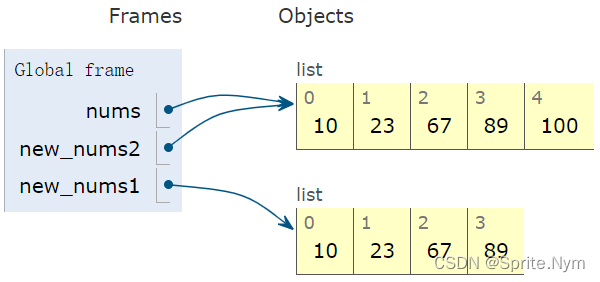
(3)列表.count(元素):统计指定元素的个数
RIGHT Example:
nums = [10, 20, 30, 10, 20, 10]
print(nums.count(10))  # 3
print(nums.count(20))  # 2
print(nums.count(40))  # 0
(4)列表.extend(序列):将序列中的元素全部添加到列表的最后
nums = [10, 23, 67, 89]
nums.extend('abc')
print(nums)  # [10, 23, 67, 89, 'a', 'b', 'c']

nums.extend([100, 200])
print(nums)  # [10, 23, 67, 89, 'a', 'b', 'c', 100, 200]
(5)列表.index(元素):获取指定元素在列表中的下标值(标准下标值,从0开始的那个)
RIGHT Example:
nums = [10, 20, 10, 30]
print(nums.index(10))  # 0
print(nums.index(20))  # 1
WRONG Example:
print(nums.index(100)) # 报错,ValueError:100 is not in list
(6)列表.reverse():将列表中的元素逆序
RIGHT Example:
# 使用reverse,会修改原列表
nums = [10, 20, 45, 10, 30, 99]
nums.reverse()
print(nums) # [99, 30, 10, 45, 20, 10]

# 使用切片,不改变原列表,切片产生新列表
nums = [10, 20, 45, 10, 30, 99]
print(nums[::-1])  # [99, 30, 10, 45, 20, 10]
(7)列表.sort():将列表中的元素从小到大排序
列表.sort(reverse=True):将列表中的元素从大到小排序
RIGHT Example:
nums = [10, 20, 45, 10, 30, 99]
nums.sort()
print(nums)  # [10, 10, 20, 30, 45, 99]

nums = [10, 20, 45, 10, 30, 99]
new_nums = sorted(nums)
print(new_nums)  # [10, 10, 20, 30, 45, 99]
说明:sort和sorted的区别
| sort | sorted |
|---|---|
| 只有列表能用 | 序列都能用 |
| 打乱原列表顺序 | 不打乱原列表顺序,产生新列表 |
| 多花时间换空间 | 多花空间换时间 |
8. 列表推导式
8.1 结构1
(1)语法
[表达式 for 变量 in 序列]
(2)功能:创建一个列表,列表中的元素是表达式的结果:让变量去序列中取值,一个一个地取,每取一个值就计算一次表达式的结果
RIGHT Example:
list1 = [10 for x in 'abc']
print(list1)  # 10, 10, 10

list2 = [x for x in range(3)]
print(list2)  # 0, 1, 2

list3 = [x * 2 for x in range(3)]
print(list3)  # 0, 2, 4

list4 = [x % 2 == 0 for x in range(5)]
print(list4)  # [True, False, True, False, True]
(3)应用:将原序列中所有的元素,经过统一的变换,转换成新的列表
APPLICATION 1 提取nums中所有元素的个位数:
nums = [23, 78, 562, 98, 71, 99]
nums1 = [x % 10 for x in nums]
print(nums1)
APPLICATION 2 将nums中所有元素都乘10:
nums = [23, 78, 562, 98, 71, 99]
nums2 = [x * 10 for x in nums]
print(nums2)
APPLICATION 3 将钱的单位换算成万并保留两位小数:
money = [19283900, 10203923, 1827300, 67720, 679012]
new_money = [f'{x / 10000:.2f}万' for x in money]
print(new_money)  # ['1928.39万', '1020.39万', '182.73万', '6.77万', '67.90万']
8.2 结构2
(1)语法
[表达式 for 变量 in 序列 if 条件语句]
(2)功能:创建一个列表,列表中的元素是表达式的结果:让变量去序列中取值,一个一个地取,每取一个值就判断一次条件语句是否为True,如果为True就计算一次表达式的结果
RIGHT Example:
list1 = [x for x in range(5) if x % 2 == 0]
print(list1)  # 0, 2, 4

nums = [23, 89, 67, 21, 78, 20]
list2 = [x for x in nums if x % 10 < 5]
print(list2)  # [23, 21, 20]
(3)应用:提取序列中满足某个条件的所有元素
APPLICATION 1 删除scores中小于60的元素:
scores = [30, 56, 78, 91, 83, 88, 45, 57, 60]
scores_pass = [x for x in scores if x >= 60]
print(scores_pass)

# 再复习一遍用del的写法
scores = [30, 56, 78, 91, 83, 88, 45, 57, 60]
for x in range(-len(scores), -1):
    if scores[x] < 60:
        del scores[x]
print(scores)
APPLICATION Plus 将scores中元素全部变成’及格’或者’不及格’:
注意:这个场景因为不涉及筛选操作,只是作转换,所以无法用结构2解决,放在这里提醒不要混淆
scores = [30, 56, 78, 91, 83, 88, 45, 57, 60]

# 方法1:先遍历再判断
scores_class = []
for x in scores:
    if x >= 60:
        scores_class.append('及格')
    else:
        scores_class.append('不及格')
print(scores_class)

# 方法2:不完全满足题目
scores_pass = [x >= 60 for x in scores]
print(scores_pass)

# 方法3:使用三目运算符
scores_pass = ['及格' if x >= 60 else '不及格' for x in scores]
print(scores_pass)





 扫一扫
扫一扫


 1862
1862

 被折叠的 条评论
为什么被折叠?
被折叠的 条评论
为什么被折叠?
 到【灌水乐园】发言





