



 本文详细介绍了Android系统中的Binder机制,包括其整体流程、关键接口及类的实现方式,以及ServiceManager的作用和服务注册流程。
整体流程
binder服务端在ServiceManager注册binder服务,客户端通过ServiceManager获取binder客户端(一般是实现了IBinder接口的对象)来进行binder通信:
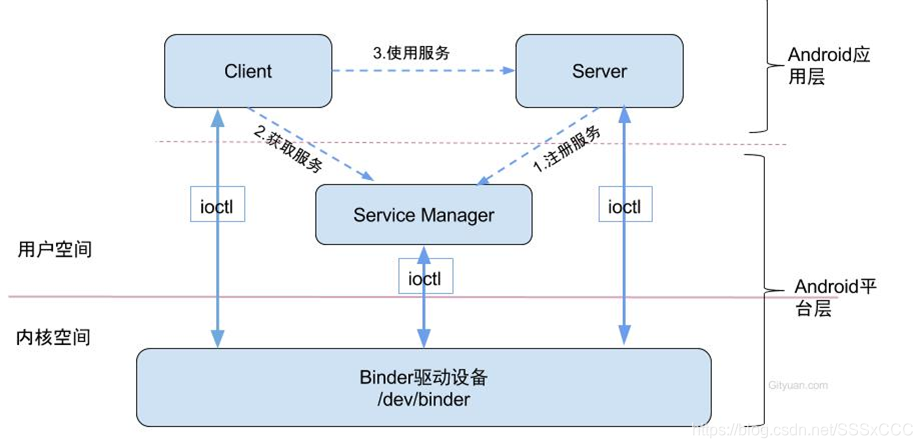
binder在linux内核层实现,只需要对数据进行一次复制,通信效率高。
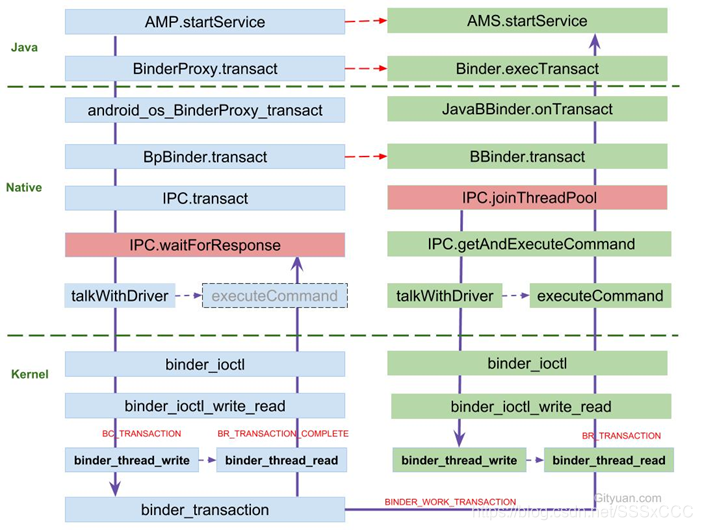
IBinder接口定义了transact、dump、linkToDeath等方法,并定义了DeathRecipient接口,在frameworks/native/include/binder/IBinder.h和frameworks/base/core/java/android/os/IBinder.java中实现。
BBinder类继承了IBinder接口,实现了onTransact等方法,是binder的服务端,在frameworks/native/include/binder/Binder.h和frameworks/native/libs/binder/include/binder/Binder.h中定义(两文件相同),在frameworks/native/libs/binder/Binder.cpp中实现。
frameworks/base/core/java/android/os/Binder.java类继承了IBinder接口,也实现了onTransact等方法,也是binder的服务端。
ServiceManager
ServiceManager使用方法:
java层通过frameworks/base/core/java/android/os/ServiceManager.java类的addService等静态方法使用;
c++层通过defalutServiceManager方法拿到ServiceManager的客户端对象并使用。
defalutServiceManager方法在frameworks/native/libs/binder/IServiceManager.cpp中实现:
sp<IServiceManager> defaultServiceManager()
{
    std::call_once(gSmOnce, []() {
        sp<AidlServiceManager> sm = nullptr;
        while (sm == nullptr) {
            sm = interface_cast<AidlServiceManager>(ProcessState::self()->getContextObject(nullptr));
            if (sm == nullptr) {
                ALOGE("Waiting 1s on context object on %s.", ProcessState::self()->getDriverName().c_str());
                sleep(1);
            }
        }

        gDefaultServiceManager = new ServiceManagerShim(sm);
    });

    return gDefaultServiceManager;
}
其中sm是真的ServiceManager,而ServiceManagerShim只是实现了IServiceManager接口的代理类。
IServiceManager接口在frameworks/native/libs/binder/include/binder/IServiceManager.h和frameworks/native/include/binder/IServiceManager.h中定义(两个文件相同)。
ServiceManager在frameworks/native/cmds/servicemanager/ServiceManager.cpp和ServiceManager.h中实现,部分方法如下:
Status ServiceManager::addService(const std::string& name, const sp<IBinder>& binder, bool allowIsolated, int32_t dumpPriority) {
    auto ctx = mAccess->getCallingContext();

    // apps cannot add services
    if (multiuser_get_app_id(ctx.uid) >= AID_APP) {
        return Status::fromExceptionCode(Status::EX_SECURITY);
    }

    if (!mAccess->canAdd(ctx, name)) {
        return Status::fromExceptionCode(Status::EX_SECURITY);
    }

    if (binder == nullptr) {
        return Status::fromExceptionCode(Status::EX_ILLEGAL_ARGUMENT);
    }

    if (!isValidServiceName(name)) {
        LOG(ERROR) << "Invalid service name: " << name;
        return Status::fromExceptionCode(Status::EX_ILLEGAL_ARGUMENT);
    }

#ifndef VENDORSERVICEMANAGER
    if (!meetsDeclarationRequirements(binder, name)) {
        // already logged
        return Status::fromExceptionCode(Status::EX_ILLEGAL_ARGUMENT);
    }
#endif  // !VENDORSERVICEMANAGER

    // implicitly unlinked when the binder is removed
    if (binder->remoteBinder() != nullptr && binder->linkToDeath(this) != OK) {
        LOG(ERROR) << "Could not linkToDeath when adding " << name;
        return Status::fromExceptionCode(Status::EX_ILLEGAL_STATE);
    }

    auto entry = mNameToService.emplace(name, Service {
        .binder = binder,
        .allowIsolated = allowIsolated,
        .dumpPriority = dumpPriority,
        .debugPid = ctx.debugPid,
    });

    auto it = mNameToRegistrationCallback.find(name);
    if (it != mNameToRegistrationCallback.end()) {
        for (const sp<IServiceCallback>& cb : it->second) {
            entry.first->second.guaranteeClient = true;
            // permission checked in registerForNotifications
            cb->onRegistration(name, binder);
        }
    }

    return Status::ok();
}

Status ServiceManager::getService(const std::string& name, sp<IBinder>* outBinder) {
    *outBinder = tryGetService(name, true);
    // returns ok regardless of result for legacy reasons
    return Status::ok();
}

Status ServiceManager::checkService(const std::string& name, sp<IBinder>* outBinder) {
    *outBinder = tryGetService(name, false);
    // returns ok regardless of result for legacy reasons
    return Status::ok();
}

sp<IBinder> ServiceManager::tryGetService(const std::string& name, bool startIfNotFound) {
    auto ctx = mAccess->getCallingContext();

    sp<IBinder> out;
    Service* service = nullptr;
    if (auto it = mNameToService.find(name); it != mNameToService.end()) {
        service = &(it->second);

        if (!service->allowIsolated) {
            uid_t appid = multiuser_get_app_id(ctx.uid);
            bool isIsolated = appid >= AID_ISOLATED_START && appid <= AID_ISOLATED_END;

            if (isIsolated) {
                return nullptr;
            }
        }
        out = service->binder;
    }

    if (!mAccess->canFind(ctx, name)) {
        return nullptr;
    }

    if (!out && startIfNotFound) {
        tryStartService(name);
    }

    if (out) {
        // Setting this guarantee each time we hand out a binder ensures that the client-checking
        // loop knows about the event even if the client immediately drops the service
        service->guaranteeClient = true;
    }

    return out;
}





 扫一扫
扫一扫


 920
920

 被折叠的 条评论
为什么被折叠?
被折叠的 条评论
为什么被折叠?
 到【灌水乐园】发言





