


本文将带你掌握:工具创建(预制/自定义/服务器端)、工具节点、带工具调用的条件边、结构化输出,以及监控Token消耗的回调函数。代码可直接运行,让我们开始吧!
一、什么是LLM的工具?
简单说,工具就是你想让基础模型执行的任何函数。
关键区别在于:LLM无法看到函数代码来推断其功能——它需要一份清晰的描述,说明函数的作用、输入参数和返回结果。
你可以把普通模型想象成装在罐子里的大脑:它懂语言、会推理、甚至有记忆(来自训练数据),但无法接触外部世界。而工具就是赋予这个大脑的“身体”。有了工具,模型就能搜索网络、整理文件、分析数据库、执行代码——做任何你的函数允许的事。
那么从哪里获取工具呢?
- 自定义工具:像写普通函数一样创建
- 预制工具:使用LangChain集成工具[1],涵盖各种常用场景
- 服务器端工具:某些聊天模型内置在服务器端执行的工具,特别是网页搜索和代码解释器
二、创建你的第一个工具
编写工具非常简单。假设你需要一个获取天气数据的工具(这里我们简化实现,直接返回固定答案):
def get_weather(city: str) -> str: return f"It's rainy in {city}."
要让LLM将其识别为工具,需要用@tool装饰器包装,并提供清晰的文档字符串,这部分描述将成为工具提示的一部分:
from langchain.tools import toolfrom dotenv import load_dotenvload_dotenv() # 加载环境变量(如OPENAI_API_KEY)@tool(parse_docstring=True)def get_weather(city: str) -> str: """返回指定城市的天气状况。 Args: city (str): 要查询的城市 Returns: str: 天气描述 """ return f"It's rainy in {city}."
快速体验:使用ReAct代理
为了演示代理如何使用工具,我们先使用LangChain内置的ReAct代理[2](最流行的预定义智能工作流)。在这种工作流中,代理规划、反思并使用可用工具执行操作。

ReAct代理工作流程
我们像之前一样调用代理,并添加InMemorySaver作为记忆存储(这是一种checkpoint[3]实现):
from langchain.agents import create_agentfrom langchain_core.messages import HumanMessagefrom langgraph.checkpoint.memory import InMemorySaver# 创建检查点(记忆)存储checkpointer = InMemorySaver()config = {"configurable": {"thread_id": "1"}} # 区分不同对话线程# 创建带有天气工具的代理agent = create_agent( model="openai:gpt-4o", tools=[get_weather], checkpointer=checkpointer)# 对话循环whileTrue: query = input("query: ") new_state = agent.invoke( {"messages": [HumanMessage(query)]}, config, ) answer = new_state["messages"][-1].content # 获取最后一条消息内容 print("answer:", answer)# 输出示例:# query: hello# answer: Hello! How can I assist you today?# query: what's the weather like in Cracow?# answer: The weather in Cracow is currently rainy. Is there anything else you'd like to know?
注意:在LangChain旧版本中,此函数名为
create_react_agent,你可能在其他资料中看到这个名称。
三、为LangGraph代理添加网络搜索
现在回到上篇文章的代理工作流,我们为它添加真正的网络搜索能力!
与其自己编写搜索工具,不如直接导入DuckDuckGoSearchResults。为了让LLM“知道”这个工具,我们将其绑定到模型上:
from langchain_community.tools import DuckDuckGoSearchResults# 创建两个模型实例:一个普通版,一个带工具版model = init_chat_model("openai:gpt-4o")model_with_search = model.bind_tools([DuckDuckGoSearchResults()]) # 关键:绑定工具!
更新ask_llm函数,使用带工具的模型:
def ask_llm(state: State) -> State: user_query = input("query: ") user_message = HumanMessage(user_query) # 使用带搜索工具的模型 answer_message: AIMessage = model_with_search.invoke( state["messages"] + [user_message] ) return {"messages": [user_message, answer_message]}
关键组件:ToolNode
现在模型响应可能包含工具调用,但我们需要执行这些调用。使用预定义的ToolNode:
from langgraph.prebuilt import ToolNode# 添加工具执行节点graph.add_node("web_search", ToolNode(tools=[DuckDuckGoSearchResults()]))
条件边:智能判断是否需要搜索
但并非每次都需要调用工具——有些问题不需要网络搜索就能回答。我们需要检查是否有工具调用:有则执行并总结结果,无则直接提供答案。
使用tools_condition函数,它根据模型响应返回"tools"(需要执行工具)或END(不需要):
def show_answer(state: State) -> State: print("answer: ", state["messages"][-1].content) return {"iteration": state["iteration"] + 1}def sum_up_search(state: State) -> State: # 使用普通模型(无工具)总结搜索结果 answer_message: AIMessage = model.invoke(state["messages"]) return {"messages": [answer_message]}# 构建完整工作流graph.add_edge(START, "ask_llm")graph.add_conditional_edges( "ask_llm", tools_condition, # 判断是否需要工具 { "tools": "web_search", # 需要工具 → 执行搜索 END: "show_answer", # 不需要 → 直接显示答案 },)graph.add_edge("web_search", "sum_up_search")graph.add_edge("sum_up_search", "show_answer")graph.add_conditional_edges( "show_answer", lambda state: state["iteration"] < ITERATION_LIMIT, { True: "ask_llm", False: END, }, )
完整的工作流程如下:
- 用户提问 → LLM接收并判断是否需要工具
- 需要工具 → 执行工具 → LLM总结结果 → 显示答案
- 不需要工具 → 直接显示答案
- 检查迭代限制 → 继续循环或结束
完整代码示例:
from langgraph.graph import StateGraph, START, ENDfrom langchain.chat_models import init_chat_modelfrom langchain_core.messages import HumanMessage, AIMessagefrom langgraph.prebuilt import ToolNode, tools_conditionfrom langchain_community.tools import DuckDuckGoSearchResultsfrom langchain.agents import AgentStatefrom dotenv import load_dotenvclass State(AgentState): iteration: intITERATION_LIMIT = 5load_dotenv()# 初始化模型model = init_chat_model("openai:gpt-4o")model_with_search = model.bind_tools([DuckDuckGoSearchResults()])# 定义各节点函数(同上文ask_llm、show_answer、sum_up_search)# 构建图graph = StateGraph(State)graph.add_node("ask_llm", ask_llm)graph.add_node("web_search", ToolNode(tools=[DuckDuckGoSearchResults()]))graph.add_node("show_answer", show_answer)graph.add_node("sum_up_search", sum_up_search)# 连接节点(同上文条件边设置)# ...(连接代码见上文)workflow = graph.compile()# 可视化图结构(可选)with open("graph_search.png", "wb") as f: f.write(workflow.get_graph().draw_mermaid_png())# 运行代理workflow.invoke({"iteration": 0}, {"recursion_limit": 100})
```
带网络搜索的代理工作流
**运行示例**:
```plaintext
query: hianswer: Hello! How can I assist you today?query: what are popular events in Cracowanswer: Here are some events in Kraków you might be interested in:1. **Unsound Festival**: This is an annual festival that showcases electronic and experimental music...2. **European Games 2023**: Kraków and the Malopolska region recently hosted the European Games...
四、智能关闭:让代理听懂“再见”
目前聊天机器人运行固定的迭代次数,用户体验不佳。理想情况是:当用户表示结束对话时(如说“再见”、“今天就到这里”),代理能智能关闭。
如果你的直觉告诉你要用条件边,完全正确!但需要一点技巧。
首先,如何判断用户想结束对话?你可以列出结束语列表,但这太原始且麻烦。更好的方法是让LLM来评估——判断用户是否想结束对话对模型来说是简单任务。
然而,条件边需要明确的返回值集合。用LLM判断时,我们得到的是完整消息,每次都不一样。所以必须使用结构化输出来强制模型返回指定格式。
结构化输出:让LLM“填空”
要强制LLM使用特定格式,首先需要定义它。我们使用pydantic创建类,指定属性、类型和描述:
from pydantic import BaseModel, Fieldfrom typing import Literalclass Decision(BaseModel): decision: Literal["yes", "no"] = Field( description="用户是否指定结束对话(是/否)" )
定义格式后,用with_structured_output方法强制LLM使用,类似bind_tools:
# 创建带结构化输出的模型model_decision = model.with_structured_output(Decision)def end_condition(state: State) -> Literal["yes", "no"]: # 注意:不需要整个消息历史来做决定,可以只使用最近的消息(优化点) decision: Decision = model_decision.invoke( state["messages"] + [SystemMessage("用户是否想结束对话?")] ) return decision.decision
整合智能关闭到工作流
在检查迭代次数后添加智能关闭条件。需要一个虚拟节点来连接两个条件边:
def should_end(_: State) -> State: return {} # 虚拟节点,不改变状态# 添加到图中graph.add_node("should_end", should_end)# 在show_answer后添加迭代检查graph.add_conditional_edges( "show_answer", lambda state: state["iteration"] < ITERATION_LIMIT, { True: "should_end", # 未达迭代限制 → 检查是否结束 False: END, # 达到限制 → 直接结束 },)# 添加智能结束判断graph.add_conditional_edges( "should_end", end_condition, # 调用上面定义的判断函数 { "yes": END, # 用户想结束 → 结束 "no": "ask_llm", # 用户不想结束 → 继续提问 },)
完整智能关闭代码结构:
# ...(前面导入和定义同上)class State(AgentState): iteration: intclass Decision(BaseModel): decision: Literal["yes", "no"] = Field( description="whether the user specified to end the conversation (yes) or not (no)" )# 初始化三个模型版本model = init_chat_model("openai:gpt-4o")model_with_search = model.bind_tools([DuckDuckGoSearchResults()])model_decision = model.with_structured_output(Decision)# 定义各节点函数(ask_llm, show_answer, sum_up_search, end_condition, should_end)# 构建完整图结构graph = StateGraph(State)# ...(添加所有节点)# ...(连接所有边,包括智能关闭条件边)workflow = graph.compile()workflow.invoke({"iteration": 0}, {"recursion_limit": 100})
```
带智能关闭的代理工作流
**运行效果**:
```plaintext
query: hianswer: Hello! How can I assist you today?query: that's it for todayanswer: Alright, if you have any more questions in the future, feel free to ask. Have a great day!# 对话智能结束
五、监控与回调:了解你的Token消耗
你已经见过回调的一种用法:在ReAct代理中记忆状态。另一个重要用途是监控Token使用量。
通常,你可以直接从AIMessage检查Token使用情况:
answer: AIMessage = model.invoke({"messages": [HumanMessage("hi")]})print(answer.usage_metadata)# 输出类似:{'input_tokens': 15, 'output_tokens': 8, 'total_tokens': 23}
如果使用结构化输出,消息没有usage_metadata字段,但仍可以通过回调检查:
from langchain_core.callbacks import UsageMetadataCallbackHandlercallback = UsageMetadataCallbackHandler()answer: Decision = model_decision.invoke( state["messages"] + [SystemMessage("用户是否想结束对话?")], config={"callbacks": [callback]} # 传入回调)print(callback.usage_metadata)
练习建议:监控每次模型调用的输入/输出Token总数(无论是否使用结构化输出),并在每次响应后打印计数。
写在最后
通过本文,你已经掌握了为LangGraph代理添加工具的核心技能:
- 创建三类工具:自定义工具、预制工具、服务器端工具
- 实现条件工作流:智能判断何时使用工具
- 结构化输出:强制LLM返回可预测格式
- 智能对话管理:让代理理解结束意图
- 资源监控:跟踪Token消耗
这些技能让你的AI代理从“空谈理论”变为“能办实事”——它现在可以搜索网络、查询数据、智能判断对话状态,真正成为有用的助手。
小挑战:尝试修改
end_condition函数,只使用最近的几条消息(而非整个历史)来判断是否结束对话。这能减少Token消耗并提高响应速度。
学AI大模型的正确顺序,千万不要搞错了
🤔2026年AI风口已来!各行各业的AI渗透肉眼可见,超多公司要么转型做AI相关产品,要么高薪挖AI技术人才,机遇直接摆在眼前!
有往AI方向发展,或者本身有后端编程基础的朋友,直接冲AI大模型应用开发转岗超合适!
就算暂时不打算转岗,了解大模型、RAG、Prompt、Agent这些热门概念,能上手做简单项目,也绝对是求职加分王🔋
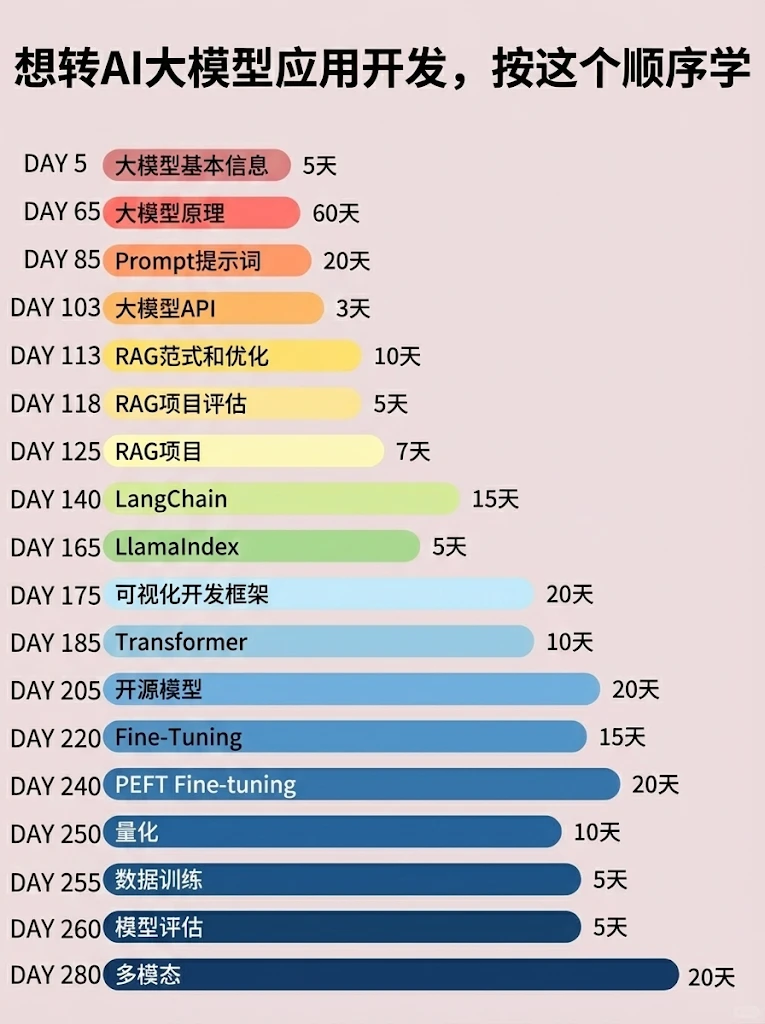
📝给大家整理了超全最新的AI大模型应用开发学习清单和资料,手把手帮你快速入门!👇👇
学习路线:
✅大模型基础认知—大模型核心原理、发展历程、主流模型(GPT、文心一言等)特点解析
✅核心技术模块—RAG检索增强生成、Prompt工程实战、Agent智能体开发逻辑
✅开发基础能力—Python进阶、API接口调用、大模型开发框架(LangChain等)实操
✅应用场景开发—智能问答系统、企业知识库、AIGC内容生成工具、行业定制化大模型应用
✅项目落地流程—需求拆解、技术选型、模型调优、测试上线、运维迭代
✅面试求职冲刺—岗位JD解析、简历AI项目包装、高频面试题汇总、模拟面经
以上6大模块,看似清晰好上手,实则每个部分都有扎实的核心内容需要吃透!
我把大模型的学习全流程已经整理📚好了!抓住AI时代风口,轻松解锁职业新可能,希望大家都能把握机遇,实现薪资/职业跃迁~
这份完整版的大模型 AI 学习资料已经上传优快云,朋友们如果需要可以微信扫描下方优快云官方认证二维码免费领取【保证100%免费】

 2422


 扫一扫


 被折叠的 条评论
为什么被折叠?
 到【灌水乐园】发言


