


初始化插件:
vim
bash-completion
net-tools
curl
openssh-server
lrzsz
wget
zip
unzip
tree
可选:
docker
git
python
java
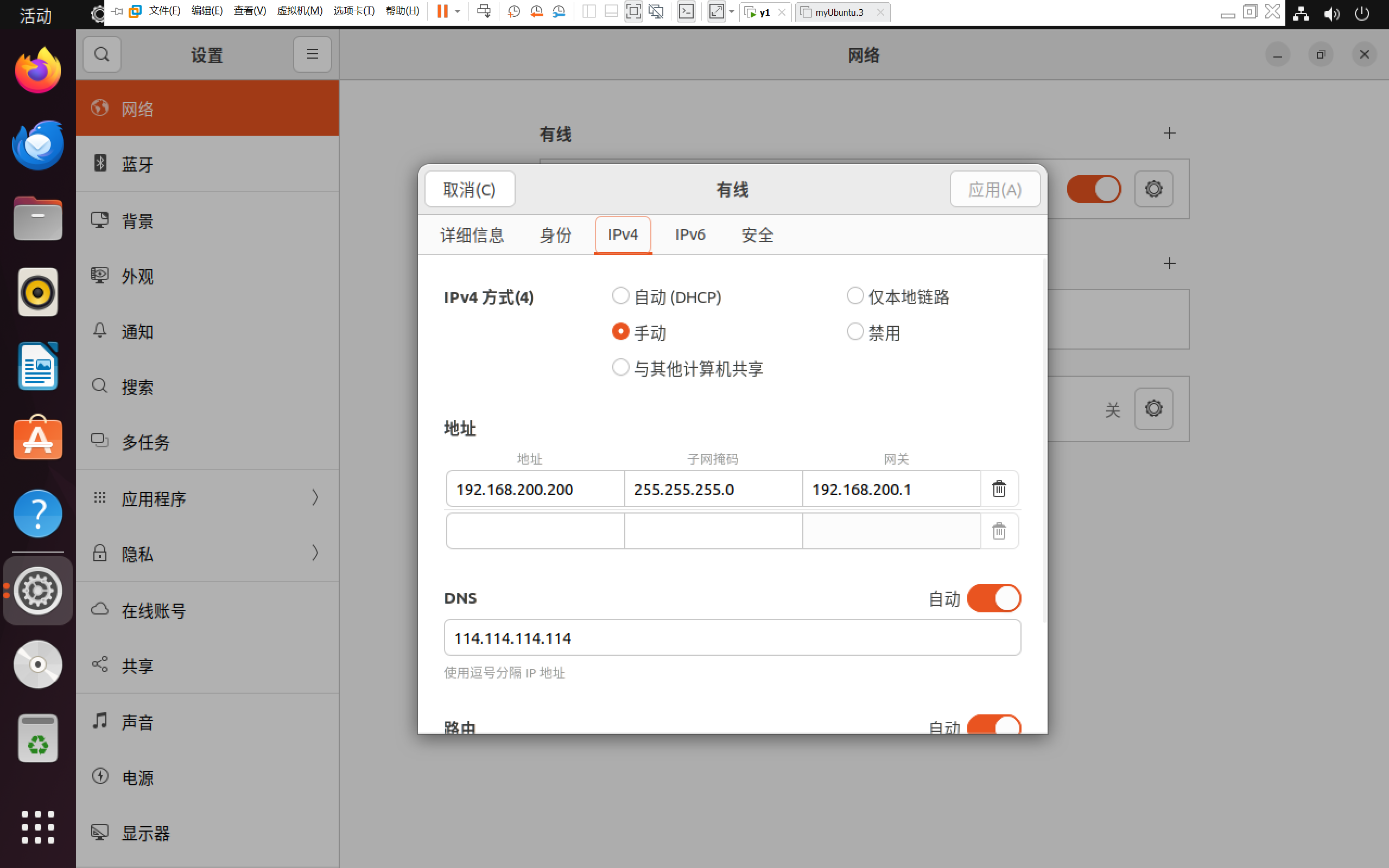
Ubuntu如何修改网卡
一、图形化操作
如图所示
二、命令行操作
cd /etc/netplan
ls
vim 01-network-manager-all.yaml

# Let NetworkManager manage all devices on this system
network:
  version: 2
  renderer: networkd
  ethernets:
    ens33:  # 你的网卡名称
      dhcp4: no
      addresses: [192.168.200.200/24]  #你的ip地址
      routes:
        - to: default
          via: 192.168.200.1  # 你的网关
      nameservers:
        addresses: [8.8.8.8, 114.114.114.114]
netplan apply修改成功
Ubuntu 22.04.5 LTS如何换源
首先按ctrl+alt+(F2/F3/F4/F5/F6)切换至命令控制台进行以下操作
查询当前乌班图版本,换源时要选择正确的版本代号
cat /etc/os-release

PRETTY_NAME="Ubuntu 22.04.5 LTS"
NAME="Ubuntu"
VERSION_ID="22.04"
VERSION="22.04.5 LTS (Jammy Jellyfish)"
VERSION_CODENAME=jammy
ID=ubuntu
ID_LIKE=debian
HOME_URL="https://www.ubuntu.com/"
SUPPORT_URL="https://help.ubuntu.com/"
BUG_REPORT_URL="https://bugs.launchpad.net/ubuntu/"
PRIVACY_POLICY_URL="https://www.ubuntu.com/legal/terms-and-policies/privacy-policy"
UBUNTU_CODENAME=jammy
将原来的源文件备份好
cp /etc/apt/sources.list /etc/apt/sources.list.backup
进入源文件,替换成国内镜像源(阿里云/清华源)
vi /etc/apt/sources.list阿里云
deb https://mirrors.aliyun.com/ubuntu/ jammy main restricted universe multiverse
deb-src https://mirrors.aliyun.com/ubuntu/ jammy main restricted universe multiverse

deb https://mirrors.aliyun.com/ubuntu/ jammy-security main restricted universe multiverse
deb-src https://mirrors.aliyun.com/ubuntu/ jammy-security main restricted universe multiverse

deb https://mirrors.aliyun.com/ubuntu/ jammy-updates main restricted universe multiverse
deb-src https://mirrors.aliyun.com/ubuntu/ jammy-updates main restricted universe multiverse

# deb https://mirrors.aliyun.com/ubuntu/ jammy-proposed main restricted universe multiverse
# deb-src https://mirrors.aliyun.com/ubuntu/ jammy-proposed main restricted universe multiverse

deb https://mirrors.aliyun.com/ubuntu/ jammy-backports main restricted universe multiverse
deb-src https://mirrors.aliyun.com/ubuntu/ jammy-backports main restricted universe multiverse
清华源
deb https://mirrors.tuna.tsinghua.edu.cn/ubuntu/ noble main restricted universe multiverse
deb https://mirrors.tuna.tsinghua.edu.cn/ubuntu/ noble-updates main restricted universe multiverse
deb https://mirrors.tuna.tsinghua.edu.cn/ubuntu/ noble-backports main restricted universe multivers
deb http://security.ubuntu.com/ubuntu/ noble-security main restricted universe multiverse
随后更新源
apt update安装插件
apt install -y vim bash-completion net-tools curl openssh-server lrzsz wget zip unzip tree设置自启动
systemctl enable ssh
至此初始所需的插件环境已搭建完成
故障排错
若重启后发现进不去桌面且报错,请跳转至我的另一篇文章
Ubuntu 22.04.5 LTS 解决Oh no Something has gone wrong 方法-优快云博客







 扫一扫
扫一扫


 761
761

 被折叠的 条评论
为什么被折叠?
被折叠的 条评论
为什么被折叠?
 到【灌水乐园】发言





