

【Halcon视觉】定位

本文介绍了Halcon在工业视觉中的应用,特别是在工件定位上的能力。通过边缘提取和直线拟合找到交点,实现精确定位。Halcon的这项功能对于推动制造业的智能化起到重要作用。

1.前言

        Halcon中的边缘提取,可拟合直线。通过两条直线的交点,可实现工件定位。

2.效果
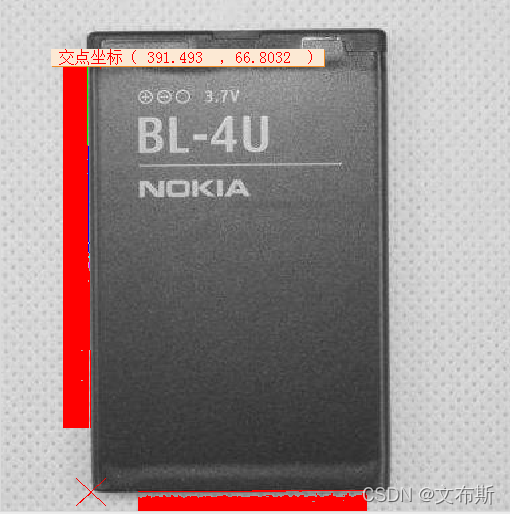
3.代码

*关窗
dev_close_window ()

*开窗
dev_open_window (0, 0, 512, 512, 'black', WindowHandle)

*清理窗口
dev_clear_window ()

*读取图片
read_image (Image, 'C:/Users/Administrator/Desktop/图片/电池1.jpg')

*灰度化
rgb1_to_gray (Image, GrayImage)

*阈值化
threshold (GrayImage, Regions, 32, 161)

*裁剪
reduce_domain (GrayImage, Regions, MyImageReduced)


**********第一条直线**********

*画矩形
draw_rectangle1 (WindowHandle, Row1, Column1, Row2, Column2)

*生成矩形
gen_rectangle1 (Rectangle, Row1, Column1, Row2, Column2)

*裁剪
reduce_domain (MyImageReduced, Rectangle, ImageReduced)

*轮廓
edges_sub_pix (ImageReduced, Edges, 'canny', 1, 20, 40)

*分割轮廓
segment_contours_xld (Edges, ContoursSplit, 'lines_circles', 5, 4, 2)

*选择轮廓
select_contours_xld (ContoursSplit, SelectedConto
### C# 中使用 Halcon 进行视觉定位 在 C# 中集成 Halcon 来完成视觉定位任务,主要依赖于 Halcon 提供的 .NET 接口 `halcondotnet.dll`。此接口允许开发者利用 Halcon 强大的图像处理功能,在应用程序中实现诸如物体识别、位置校正等功能。 #### 创建项目并配置环境 为了使 Visual Studio 支持 Halcon 功能,需执行如下操作: - 下载并安装 HALCON 和 Visual Studio; - 新建一个 C# 控制台或 Windows Forms 项目; - 将 Halcon 的库文件(如 `HalconDotNet.dll`)添加至项目的引用列表[^1]。 #### 编写代码初始化 Halcon 组件 下面是一个简单的例子展示如何设置 Halcon 窗口以及加载图像进行初步处理: ```csharp using System; using Mvtec.Halcon; namespace MachineVisionExample { class Program { static void Main(string[] args) { try { // 初始化 Halcon 图像显示窗口 HWindowControl halconWindow = new HWindowControl(); // 加载测试图片 string imagePath = @"path\to\your\image.jpg"; HObject image = null; HOperatorSet.ReadImage(out image, imagePath); // 显示读取到的图像 halconWindow.SetFullImagePart(image); halconWindow.DispObj(image); Console.WriteLine("Press any key to continue..."); Console.ReadKey(); // 清理资源 if (image != null && !image.IsInitialized()) image.Dispose(); } catch (Exception ex) { Console.Error.WriteLine($"Error occurred: {ex.Message}"); } } } } ``` 这段程序展示了基本框架,包括创建 Halcon 窗口对象、加载指定路径下的图像文件,并将其呈现在图形界面上[^2]。 #### 实现视觉定位逻辑 对于具体的视觉定位应用来说,可能涉及到模板匹配、边缘检测或其他高级技术。这里给出一个简化版的例子说明如何寻找特定形状的位置: ```csharp // 假设已经有一个名为 'template' 的模板图和待测目标 'target' HObject template, target; double scoreThreshold = 0.7; // 设置相似度阈值 // 执行模板匹配算法找出最佳匹配区域 HTuple row, column, angle, score; HOperatorSet.FindShapeModel(target, out row, out column, out angle, out score, 0, Math.PI * 2, "use_polarity", scoreThreshold, -1, "least_squares", false, "auto", ref template); if ((int)(score.TupleLength()) > 0){ Console.WriteLine($"Found match at ({row.D()),{column.D()}) with rotation={angle.D()} and confidence={score.D()}"); } else { Console.WriteLine("No matches found."); } ``` 上述片段实现了基于形状模型的方法来确定给定模式在另一幅较大场景中的确切坐标及旋转角度[^3]。
评论
添加红包

请填写红包祝福语或标题

红包个数最小为10个

红包金额最低5元

当前余额3.43前往充值 >
需支付:10.00
成就一亿技术人!
领取后你会自动成为博主和红包主的粉丝 规则
hope_wisdom
发出的红包
实付
使用余额支付
点击重新获取
扫码支付
钱包余额 0

抵扣说明:

1.余额是钱包充值的虚拟货币,按照1:1的比例进行支付金额的抵扣。
2.余额无法直接购买下载,可以购买VIP、付费专栏及课程。

余额充值



