


一、简介
1 DCT算法:
DCT变换的全称是离散余弦变换(Discrete Cosine Transform),离散余弦变换相当于一个长度大概是它两倍的离散傅里叶变换,这个离散傅里叶变换是对一个实偶函数进行的。通过数字信号处理的学习我们知道实函数的傅立叶变换获得的频谱大多是复数,而偶函数的傅立叶变换结果是实函数。以此为基础,使信号函数成为偶函数,去掉频谱函数的虚部,是余弦变换的特点之一。它可以将将一组光强数据转换成频率数据,以便得知强度变化的情形。若对高频的数据做些修饰,再转回原来形式的数据时,显然与原始数据有些差异,但是人类的眼睛却是不容易辨认出来。压缩时,将原始图像数据分成8*8数据单元矩阵,例如亮度值的第一个矩阵内。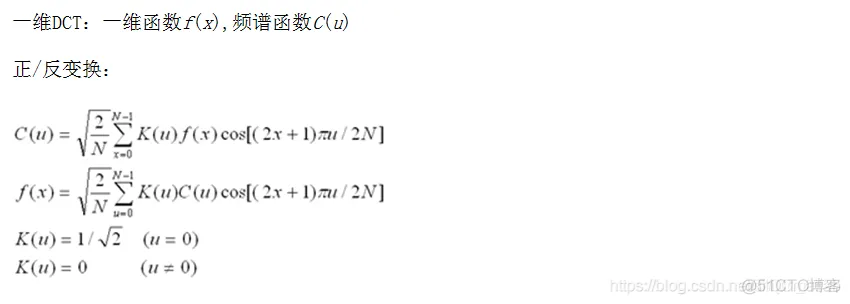
2 DCT产生的工程背景:
视频信号的频谱线在0-6MHz范围内,而且1幅视频图像内包含的大多数为低频频谱线,只在占图像区域比例很低的图像边缘的视频信号中才含有高频的谱线。因此,在视频信号数字处理时,可根据频谱因素分配比特数:对包含信息量大的低频谱区域分配较多的比特数,对包含信息量低的高频 谱区域分配较少的比特数,而图像质量并没有可察觉的损伤,达到码率压缩的目的。然而,这一切要在低熵(Entropy)值的情况下,才能达到有效的编码。能否对一串数据进行有效的编码,取决于每个数据出现的概率。每个数据出现的概率差别大,就表明熵值低, 可以对该串数据进行高效编码。反之,出现的概率差别小,熵值高,则不能进行高效编码。视频信号的数字化是在规定的取样频率下由A/D转换器对视频电平转换而来的,每个像素的视频信号幅度随着每层的时间而周期性地变化。每个像素的平均信息量的总和为总平均信息量,即熵值。由于每个视频电平发生几乎具有相等的概率,所以视频信号的熵值很高。 熵值是一个定义码率压缩率的参数,视频图像的压缩率依赖于视频信号的熵值,在多数情况下视频信号为高熵值,要进行高效编码,就要将高熵值变为低熵值。怎样变成低熵值呢?这就需要分析视频频谱的特点。大多数情况下,视频频谱的幅度随着频率的升高而降低。其中 低频频谱在几乎相等的概率下获得0到最高的电平。与此相对照,高频频谱通常得到的是低电平及稀少的高电平。显然,低频频谱具有较高的熵值,高频频谱具有较低的熵值。据此,可对视频的低频分量和高频分量分别处理,获得高频的压缩值。
自从Ahmed和Rao于1974年给出了离散余弦变换(DCT)的定义以来,离散余弦变换(DCT)与改进型离散余弦变换(MDCT)就成为广泛应用于信号处理和图像处理特别是用于图像压缩和语音压缩编解码的重要工具和技术,一直是国际学术界和高科技产业界的研究热点。现在的很多图像和视频编码标准(如MPEG-1 , MEPG-2 ,MEPG-4中的第二部分)都要求实现整数的8×8 的DCT和IDCT,而MDCT 和IMDCT 则主要被应用于音频信号的编解码中(如MPEG-1 ,MEPG-2 和AC-]等标准的音频编码部分)。正是由于这类变换被广泛采用,对于这类变换的快速算法的研究才显得尤为重要。特别是针对特定的应用条件下的快速算法的研究对于提高整个系统的性能表现有很大帮助。
由上面的引用可见,码率压缩基于变换编码和熵值编码两种算法。前者用于降低熵值,后者将数据变为可降低比特数的有效编码方式。在MPEG标准中,变换编码采用的是DCT,变换过程本身虽然并不产生码率压缩作用,但是变换后的频率系数却非常有利于码率压缩。 实际上压缩数字视频信号的整个过程分为块取样、DCT、量化、编码4个主要过程进行-----首先在时间域将原始图像分成N(水平)×N(垂直)取样块,根据需要可选择4×4、4×8、8×8、8×16、16×16等块,这些取样的像素块代表了原图像帧各像素的灰度值,其范围在139-163之间,并依序送入DCT编码器,以便将取样块由时间域转换为频率域的DCT系数块。DCT系统的转换分别在每个取样块中进行,这些块中每个取样是数字化后的值,表示一场中对应像素的视频信号幅度值
3 离散余弦变换的实现:
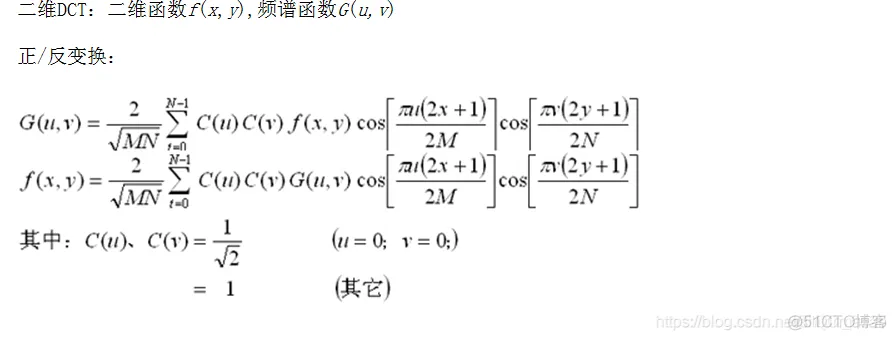
实现DCT的方法很多,最直接的是根据DCT的定义来计算。以二维8xSDCT为例,需要作4096次乘法和3584次加法。这种算法的实现需要巨大的计算量,不具有实用价值。在应用中,需要寻找快速而又精确的算法。较为常用的方法是利用DCT的可拆分特性,同样以二维8xSDCT为例,先进行8行一维DCT需要64xS次乘法和56xS次加法,再进行8列一维DCT要64xS次乘法和56xS次加法,共需要64x8xZ=1024次乘法和56x8xZ=896次加法,计算量大为减少。
除此之外,DCT还有很多公开的快速算法。快速算法主要是通过减少运算次数而减少运算时间,这对于设计快速的硬件系统非常有效。二维DCT的快速算法则一般采用行列分离DCT算法,即转换为两次一维变换,其间通过转置矩阵连接。最为经典和常用的快速算法是由Arai等人于1988年提出的AAN算法以及Loeffier等人于1989年提出的LLM算法。但是,由于行列分离DCT算法能够重复使用一维变换结构,因此在实际实现上,尤其在硬件上比二维直接计算算法更有优势。
二、源代码
function varargout = dct_encoding(varargin)
% DCT_ENCODING M-file for dct_encoding.fig
%      DCT_ENCODING, by itself, creates a new DCT_ENCODING or raises the existing
%      singleton*.
%
%      H = DCT_ENCODING returns the handle to a new DCT_ENCODING or the handle to
%      the existing singleton*.
%
%      DCT_ENCODING('CALLBACK',hObject,eventData,handles,...) calls the local
%      function named CALLBACK in DCT_ENCODING.M with the given input arguments.
%
%      DCT_ENCODING('Property','Value',...) creates a new DCT_ENCODING or raises the
%      existing singleton*.  Starting from the left, property value pairs are
%      applied to the GUI before dct_encoding_OpeningFunction gets called.  An
%      unrecognized property name or invalid value makes property application
%      stop.  All inputs are passed to dct_encoding_OpeningFcn via varargin.
%
%      *See GUI Options on GUIDE's Tools menu.  Choose "GUI allows only one
%      instance to run (singleton)".
%
% See also: GUIDE, GUIDATA, GUIHANDLES

% Edit the above text to modify the response to help dct_encoding

% Last Modified by GUIDE v2.5 18-Jun-2009 20:11:16

% Begin initialization code - DO NOT EDIT
gui_Singleton = 1;
gui_State = struct('gui_Name',       mfilename, ...
                   'gui_Singleton',  gui_Singleton, ...
                   'gui_OpeningFcn', @dct_encoding_OpeningFcn, ...
                   'gui_OutputFcn',  @dct_encoding_OutputFcn, ...
                   'gui_LayoutFcn',  [] , ...
                   'gui_Callback',   []);
if nargin & isstr(varargin{1})
    gui_State.gui_Callback = str2func(varargin{1});
end

if nargout
    [varargout{1:nargout}] = gui_mainfcn(gui_State, varargin{:});
else
    gui_mainfcn(gui_State, varargin{:});
end
% End initialization code - DO NOT EDIT


% --- Executes just before dct_encoding is made visible.
function dct_encoding_OpeningFcn(hObject, eventdata, handles, varargin)
% This function has no output args, see OutputFcn.
% hObject    handle to figure
% eventdata  reserved - to be defined in a future version of MATLAB
% handles    structure with handles and user data (see GUIDATA)
% varargin   command line arguments to dct_encoding (see VARARGIN)
cr = 0.5;
I = imread('lena.bmp');
axes(handles.axes1);
imshow(I);
I = double(I)/255;
t = dctmtx(8);
dctcoe = blkproc(I,[8 8],'P1*x*P2',t,t');
coevar = im2col(dctcoe,[8 8],'distinct');
coe = coevar;
[y,ind] = sort(coevar);
[m,n] = size(coevar);
snum = 64-64*cr;
for i = 1:n
    coe(ind(1:snum),i) = 0;
end
B2 = col2im(coe,[8 8],[512 512],'distinct');
I2 = blkproc(B2,[8,8],'P1*x*P2',t',t);
axes(handles.axes2);
imshow(I2);
e = double(I) - double(I2);
[m,n]=size(e);
erms = sqrt(sum(e(:).^2)/(m*n));
set(handles.erms_edit,'string',erms);
set(handles.cr_edit,'string',0.5);
% Choose default command line output for dct_encoding
handles.output = hObject;

% Update handles structure
guidata(hObject, handles);

% UIWAIT makes dct_encoding wait for user response (see UIRESUME)
% uiwait(handles.figure1);


% --- Outputs from this function are returned to the command line.
function varargout = dct_encoding_OutputFcn(hObject, eventdata, handles)
% varargout  cell array for returning output args (see VARARGOUT);
% hObject    handle to figure
% eventdata  reserved - to be defined in a future version of MATLAB
% handles    structure with handles and user data (see GUIDATA)

% Get default command line output from handles structure
varargout{1} = handles.output;


% --- Executes during object creation, after setting all properties.
function image_pop_menu_CreateFcn(hObject, eventdata, handles)
% hObject    handle to image_pop_menu (see GCBO)
% eventdata  reserved - to be defined in a future version of MATLAB
% handles    empty - handles not created until after all CreateFcns called

% Hint: popupmenu controls usually have a white background on Windows.
%       See ISPC and COMPUTER.
if ispc
    set(hObject,'BackgroundColor','white');
else
    set(hObject,'BackgroundColor',get(0,'defaultUicontrolBackgroundColor'));
end


% --- Executes on selection change in image_pop_menu.
function image_pop_menu_Callback(hObject, eventdata, handles)
% hObject    handle to image_pop_menu (see GCBO)
% eventdata  reserved - to be defined in a future version of MATLAB
% handles    structure with handles and user data (see GUIDATA)
val = get(hObject,'value');
str = get(hObject,'string');
cr = str2num(get(handles.cr_edit,'string'));
switch str{val}
    case 'Lena'
        I = imread('lena.bmp');
    case 'Cameraman'
        I = imread('cameraman.tif');
    case 'Peppers'
        I = imread('peppers.bmp');
    case 'Fingerprint'
        I = imread('fingerprint.jpg');
    case 'Licenceplate'
        I = imread('licenceplate.jpg');
    case 'Cloudy'
        I = imread('cloudy.tif');
end
[M N] = size(I);
axes(handles.axes1);
imshow(I);
I = double(I)/255;
t = dctmtx(8);
dctcoe = blkproc(I,[8 8],'P1*x*P2',t,t');
coevar = im2col(dctcoe,[8 8],'distinct');
coe = coevar;
[y,ind] = sort(coevar);
[m,n] = size(coevar);
snum = 64-64*cr;
for i = 1:n
    coe(ind(1:snum),i) = 0;
end
B2 = col2im(coe,[8 8],[M N],'distinct');
I2 = blkproc(B2,[8,8],'P1*x*P2',t',t);
axes(handles.axes2);
imshow(I2);
e = double(I) - double(I2);
[m,n]=size(e);
erms = sqrt(sum(e(:).^2)/(m*n));
set(handles.erms_edit,'string',erms);
set(handles.cr_edit,'string',0.5);
% Hints: contents = get(hObject,'String') returns image_pop_menu contents as cell array
%        contents{get(hObject,'Value')} returns selected item from image_pop_menu


% --- Executes during object creation, after setting all properties.
function cr_edit_CreateFcn(hObject, eventdata, handles)
% hObject    handle to cr_edit (see GCBO)
% eventdata  reserved - to be defined in a future version of MATLAB
% handles    empty - handles not created until after all CreateFcns called

% Hint: edit controls usually have a white background on Windows.
%       See ISPC and COMPUTER.
if ispc
    set(hObject,'BackgroundColor','white');
else
    set(hObject,'BackgroundColor',get(0,'defaultUicontrolBackgroundColor'));
end


function cr_edit_Callback(hObject, eventdata, handles)
% hObject    handle to cr_edit (see GCBO)
% eventdata  reserved - to be defined in a future version of MATLAB
% handles    structure with handles and user data (see GUIDATA)

% Hints: get(hObject,'String') returns contents of cr_edit as text
%        str2double(get(hObject,'String')) returns contents of cr_edit as a double


% --- Executes on button press in close_button.
function close_button_Callback(hObject, eventdata, handles)
% hObject    handle to close_button (see GCBO)
% eventdata  reserved - to be defined in a future version of MATLAB
% handles    structure with handles and user data (see GUIDATA)
close(dct_encoding);

% --- Executes on button press in apply_button.
function apply_button_Callback(hObject, eventdata, handles)
% hObject    handle to apply_button (see GCBO)
% eventdata  reserved - to be defined in a future version of MATLAB
% handles    structure with handles and user data (see GUIDATA)
cr = str2num(get(handles.cr_edit,'string'));
I = getimage(handles.axes1);
I = double(I)/255;
t = dctmtx(8);
dctcoe = blkproc(I,[8 8],'P1*x*P2',t,t');
coevar = im2col(dctcoe,[8 8],'distinct');
coe = coevar;
[y,ind] = sort(coevar);
[m,n] = size(coevar);
snum = 64-floor(64*cr);
for i = 1:n
    coe(ind(1:snum),i) = 0;
end
- 1.
- 2.
- 3.
- 4.
- 5.
- 6.
- 7.
- 8.
- 9.
- 10.
- 11.
- 12.
- 13.
- 14.
- 15.
- 16.
- 17.
- 18.
- 19.
- 20.
- 21.
- 22.
- 23.
- 24.
- 25.
- 26.
- 27.
- 28.
- 29.
- 30.
- 31.
- 32.
- 33.
- 34.
- 35.
- 36.
- 37.
- 38.
- 39.
- 40.
- 41.
- 42.
- 43.
- 44.
- 45.
- 46.
- 47.
- 48.
- 49.
- 50.
- 51.
- 52.
- 53.
- 54.
- 55.
- 56.
- 57.
- 58.
- 59.
- 60.
- 61.
- 62.
- 63.
- 64.
- 65.
- 66.
- 67.
- 68.
- 69.
- 70.
- 71.
- 72.
- 73.
- 74.
- 75.
- 76.
- 77.
- 78.
- 79.
- 80.
- 81.
- 82.
- 83.
- 84.
- 85.
- 86.
- 87.
- 88.
- 89.
- 90.
- 91.
- 92.
- 93.
- 94.
- 95.
- 96.
- 97.
- 98.
- 99.
- 100.
- 101.
- 102.
- 103.
- 104.
- 105.
- 106.
- 107.
- 108.
- 109.
- 110.
- 111.
- 112.
- 113.
- 114.
- 115.
- 116.
- 117.
- 118.
- 119.
- 120.
- 121.
- 122.
- 123.
- 124.
- 125.
- 126.
- 127.
- 128.
- 129.
- 130.
- 131.
- 132.
- 133.
- 134.
- 135.
- 136.
- 137.
- 138.
- 139.
- 140.
- 141.
- 142.
- 143.
- 144.
- 145.
- 146.
- 147.
- 148.
- 149.
- 150.
- 151.
- 152.
- 153.
- 154.
- 155.
- 156.
- 157.
- 158.
- 159.
- 160.
- 161.
- 162.
- 163.
- 164.
- 165.
- 166.
- 167.
- 168.
- 169.
- 170.
- 171.
- 172.
- 173.
- 174.
- 175.
- 176.
- 177.
- 178.
- 179.
- 180.
- 181.
- 182.
- 183.
- 184.
- 185.
- 186.
- 187.
- 188.
- 189.
- 190.
- 191.
- 192.
- 193.
- 194.
- 195.
- 196.
- 197.
- 198.
- 199.
- 200.
- 201.
- 202.
- 203.
- 204.
- 205.
- 206.
- 207.
- 208.
- 209.
- 210.
- 211.
- 212.
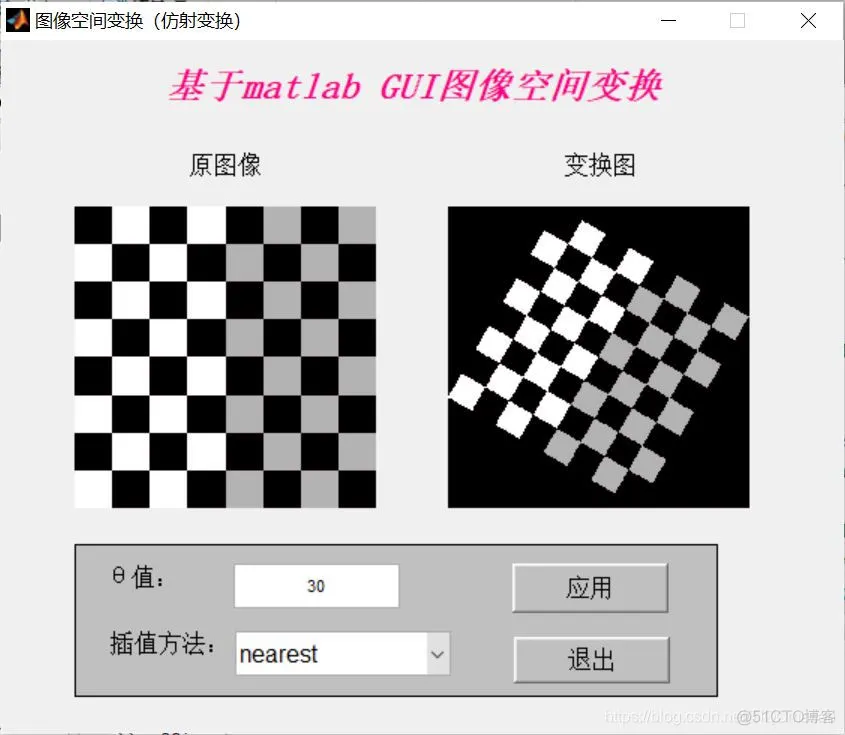
三、运行结果





 扫一扫
扫一扫


 2万+
2万+

 被折叠的 条评论
为什么被折叠?
被折叠的 条评论
为什么被折叠?
 到【灌水乐园】发言





