 Hu几何矩在图像处理中的应用与局限


一、简介
几何矩是由Hu(Visual pattern recognition by moment invariants)在1962年提出的,具有平移、旋转和尺度不变性。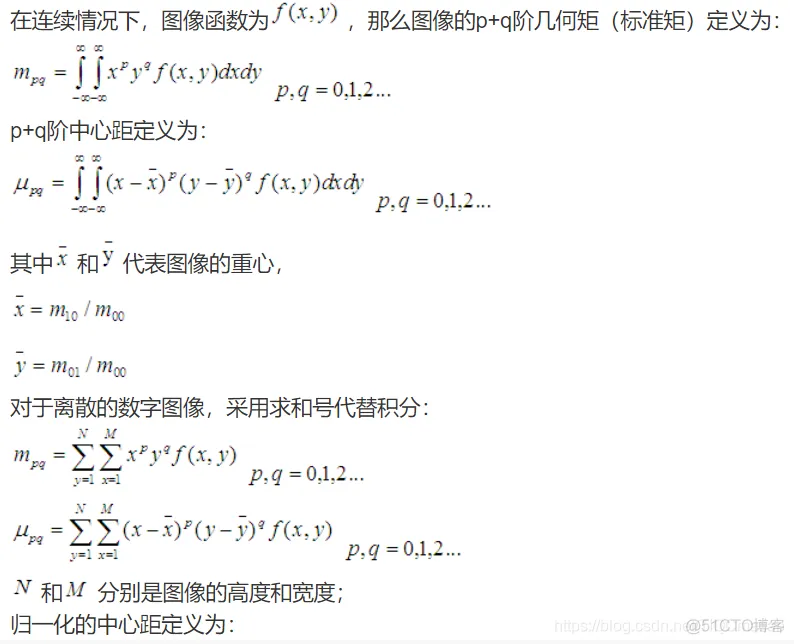
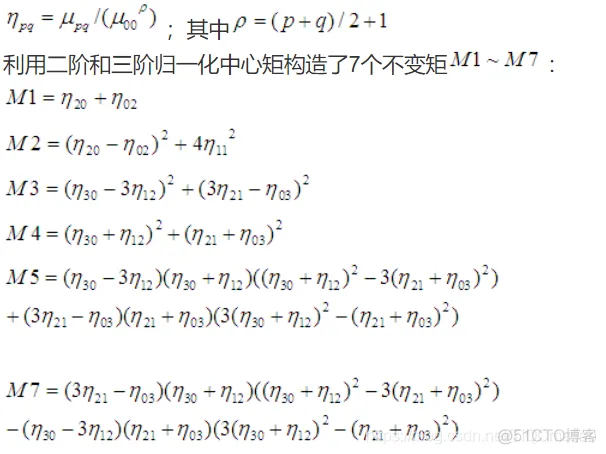
这7个不变矩构成一组特征量,Hu.M.K在1962年证明了他们具有旋转,缩放和平移不变性。
实际上,在对图片中物体的识别过程中,只有 和 不变性保持的比较好,其他的几个不变矩带来的误差比较大,有学者认为只有基于二阶矩的不变矩对二维物体的描述才是真正的具有旋转、缩放和平移不变性( 和 刚好都是由二阶矩组成的)。不过我没有证明是否是真的事这样的。
由Hu矩组成的特征量对图片进行识别,优点就是速度很快,缺点是识别率比较低,我做过手势识别,对于已经分割好的手势轮廓图,识别率也就30%左右,对于纹理比较丰富的图片,识别率更是不堪入眼,只有10%左右。这一部分原因是由于Hu不变矩只用到低阶矩(最多也就用到三阶矩),对于图像的细节未能很好的描述出来,导致对图像的描述不够完整。
Hu不变矩一般用来识别图像中大的物体,对于物体的形状描述得比较好,图像的纹理特征不能太复杂,像识别水果的形状,或者对于车牌中的简单字符的识别效果会相对好一些。
定义如下:
① (p+q)阶不变矩定义:
② 对于数字图像,离散化,定义为:
③ 归一化中心矩定义:
④Hu矩定义
二、源代码
clc; clear all; close all;
warning off all;
filename = '待检索图像\\im1.bmp';
[I, map] = imread(filename);
I = ind2rgb(I, map);
I1 = Gray_Convert(I, 0);
bw1 = Image_Binary(I1, 0);
Hu = Compute_HuNicolas(bw1);
[resultNames, index] = CoMatrix_Process(filename, 1);
[fresultNames, index] = Hu_Process(filename, Hu, resultNames, index);
D = Analysis(filename, fresultNames, index, 1);
function [resultNames, index] = CoMatrix_Process(filename, flag)
if nargin < 2
    flag = 1;
end
if nargin < 1
    filename = '待检索图像\\im1.bmp';
end

resultValues = [];
resultNames = {};
files = ls('图片库\\*.*');

[queryx, querymap] = imread(filename);
if isempty(querymap)
    [queryx, querymap] = rgb2ind(queryx, 256);
end
for i = 1 : size(files, 1)
    file = fullfile('图片库\\', files(i, :));
    [pathstr, name, ext] = fileparts(file);
    if length(strtrim(ext)) > 3
        [X, RGBmap] = imread(file);
        HSVmap = rgb2hsv(RGBmap);
        D = Compute_QuadDistance(queryx, querymap, X, HSVmap);
        resultValues(end+1) = D;
        resultNames{end+1} = {file};
    end
end
[sortedValues, index] = sort(resultValues);
query = ind2rgb(queryx, querymap);
query = rgb2gray(query);
if flag
    figure;
    imshow(queryx, querymap);
    title('待检索图像', 'FontWeight', 'Bold');
    figure;
    set(gcf, 'units', 'normalized', 'position',[0 0 1 1]);
    for i = 1 : 10
        tempstr = cell2mat(resultNames{index(i)});
        [X, RGBmap] = imread(tempstr);
        img = ind2rgb(X, RGBmap);
        subplot(2, 5, i); imshow(img, []);
        img = rgb2gray(img);
        dm = imabsdiff(query, img);
        df = (1-sum(dm(:))/sum(query(:)))*100;
        xlabel(sprintf('相似度:%.2f%%', abs(df)), 'FontWeight', 'Bold');
        str = sprintf('检索结果排序%d', i);
        title(str, 'FontWeight', 'Bold');
    end
end
function Hu = Compute_HuNicolas(in_image)
format long
if ndims(in_image) == 3
    image = rgb2gray(in_image);
else
    image = in_image;
end
image = double(image);
m00=sum(sum(image));
m10=0;
m01=0;
[row,col]=size(image);
for i=1:row
    for j=1:col
        m10=m10+i*image(i,j);
        m01=m01+j*image(i,j);
    end
end
u10=m10/m00;
u01=m01/m00;
n20 = 0;
n02 = 0;
n11 = 0;
n30 = 0;
n12 = 0;
n21 = 0;
n03 = 0;
for i=1:row
    for j=1:col
        n20=n20+i^2*image(i,j);
        n02=n02+j^2*image(i,j);
        n11=n11+i*j*image(i,j);
        n30=n30+i^3*image(i,j);
        n03=n03+j^3*image(i,j);
        n12=n12+i*j^2*image(i,j);
        n21=n21+i^2*j*image(i,j);
    end
end
n20=n20/m00^2;
n02=n02/m00^2;
n11=n11/m00^2;
n30=n30/m00^2.5;
n03=n03/m00^2.5;
n12=n12/m00^2.5;
n21=n21/m00^2.5;
h1 = n20 + n02;
h2 = (n20-n02)^2 + 4*(n11)^2;
h3 = (n30-3*n12)^2 + (3*n21-n03)^2;
h4 = (n30+n12)^2 + (n21+n03)^2;
h5 = (n30-3*n12)*(n30+n12)*((n30+n12)^2-3*(n21+n03)^2)+(3*n21-n03)*(n21+n03)*(3*(n30+n12)^2-(n21+n03)^2);
h6 = (n20-n02)*((n30+n12)^2-(n21+n03)^2)+4*n11*(n30+n12)*(n21+n03);
h7 = (3*n21-n03)*(n30+n12)*((n30+n12)^2-3*(n21+n03)^2)+(3*n12-n30)*(n21+n03)*(3*(n30+n12)^2-(n21+n03)^2);
Hu = [h1 h2 h3 h4 h5 h6 h7];- 1.
- 2.
- 3.
- 4.
- 5.
- 6.
- 7.
- 8.
- 9.
- 10.
- 11.
- 12.
- 13.
- 14.
- 15.
- 16.
- 17.
- 18.
- 19.
- 20.
- 21.
- 22.
- 23.
- 24.
- 25.
- 26.
- 27.
- 28.
- 29.
- 30.
- 31.
- 32.
- 33.
- 34.
- 35.
- 36.
- 37.
- 38.
- 39.
- 40.
- 41.
- 42.
- 43.
- 44.
- 45.
- 46.
- 47.
- 48.
- 49.
- 50.
- 51.
- 52.
- 53.
- 54.
- 55.
- 56.
- 57.
- 58.
- 59.
- 60.
- 61.
- 62.
- 63.
- 64.
- 65.
- 66.
- 67.
- 68.
- 69.
- 70.
- 71.
- 72.
- 73.
- 74.
- 75.
- 76.
- 77.
- 78.
- 79.
- 80.
- 81.
- 82.
- 83.
- 84.
- 85.
- 86.
- 87.
- 88.
- 89.
- 90.
- 91.
- 92.
- 93.
- 94.
- 95.
- 96.
- 97.
- 98.
- 99.
- 100.
- 101.
- 102.
- 103.
- 104.
- 105.
- 106.
- 107.
- 108.
- 109.
- 110.
- 111.
- 112.
- 113.
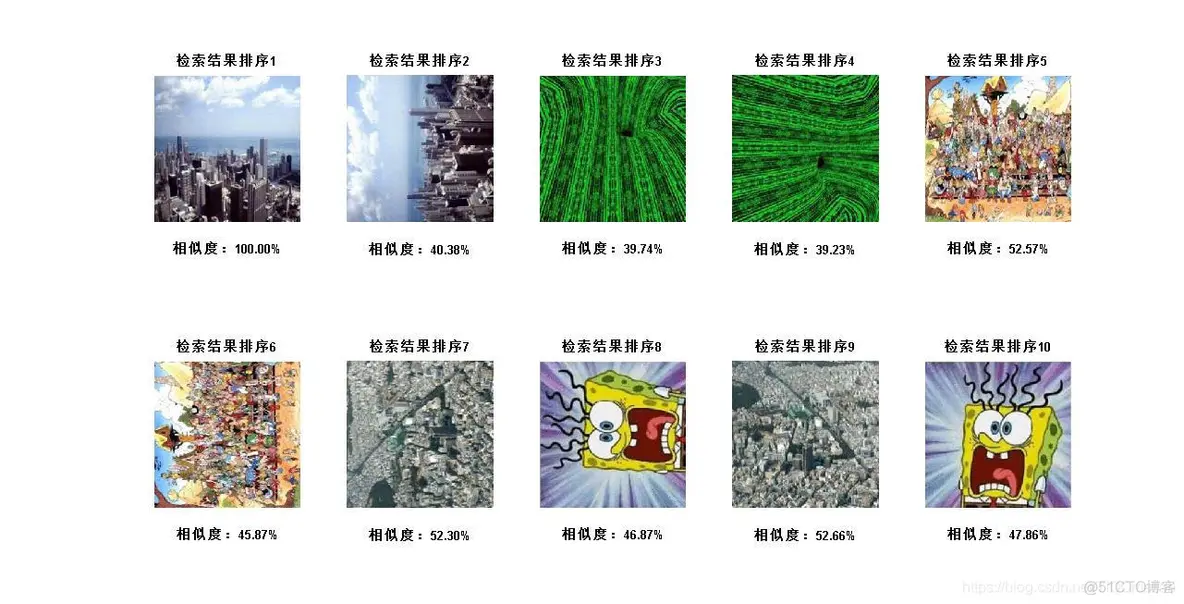
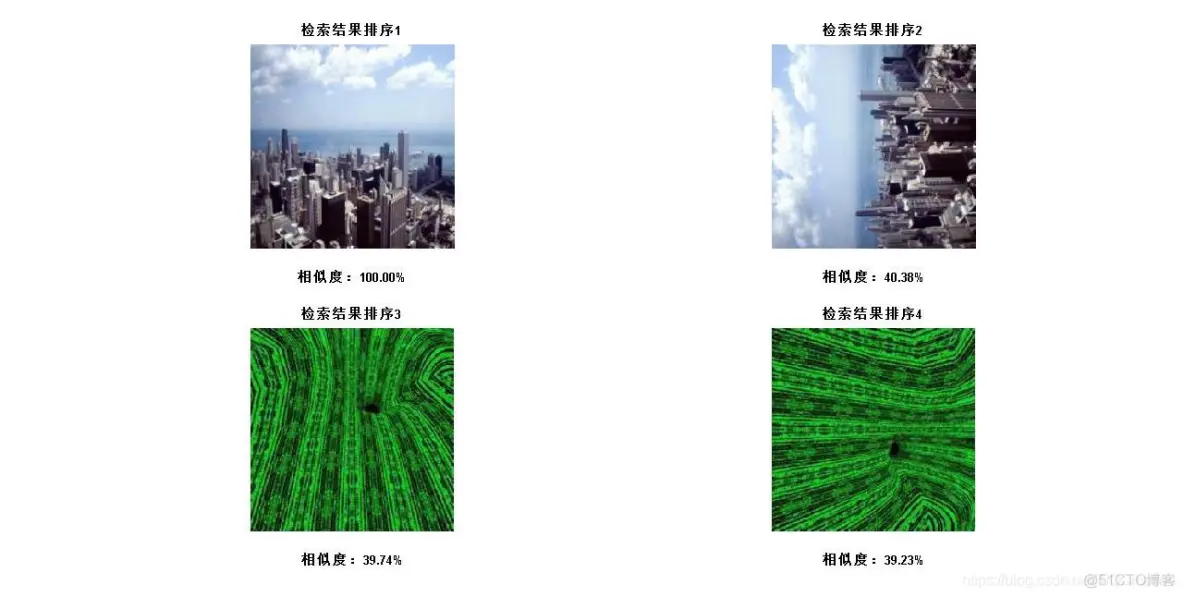
三、运行结果





 扫一扫
扫一扫


 195
195

 被折叠的 条评论
为什么被折叠?
被折叠的 条评论
为什么被折叠?
 到【灌水乐园】发言





