


一、简介
短波按照国际无线电咨询委员会(CCIR,现在的ITU-R)的划分是指波长在l00ml0m,频率为3MHz30MHz的电磁波。利用短波进行的无线电通信称为短波通信,又称高频(HF)通信。实际上,为了充分利用短波近距离通信的优点,短波通信实际使用的频率范围为1.5MHz~30MHz。
自从1921年发生在意大利罗马的一次意外事故,短波被发现可实现远距离通信以来,短波通信迅速发展,成为了世界各国中、远程通信的主要手段,被广泛地用于政府、军事、外交、气象、商业等部门,用以传送电报、电话、传真、低速数据和图像、语音广播等信息。在卫星通信出现以前,短波在国际通信、防汛救灾、海难救援以及军事通信等方面发挥了独特的重要作用。
短波通信可以利用地波传播,但主要是利用天波传播。
地波传播的衰耗随工作频率的升高而递增,在同样的地面条件下,频率越高,衰耗越大。利用地波只适用于近距离通信,其工作频率一般选在5MHz以下。地波传播受天气影响小,比较稳定,信道参数基本不随时间变化,故地波传播信道可视为恒参信道。
天波是无线电波经电离层反射回地面的部分,倾斜投射的电磁波经电离层反射后,可以传到几千千米外的地面。天波的传播损耗比地波小得多,经地面与电离层之间多次反射(多跳传播)之后,可以达到极远的地方,因此,利用天波可以进行环球通信。天波传播因受电离层变化和多径传播的严重影响极不稳定,其信道参数随时间而急剧变化,因此称为变参信道。天波不仅可以用于远距离通信,而且还可以用于近距离通信。
在地形复杂,短波地波或视距微波受阻挡而无法到达的地区,利用高仰角投射的天波可以实现通信。与卫星通信、地面微波、同轴电缆、光缆等通信手段相比,短波通信也有着许多显著的优点:
1)短波通信不需要建立中继站即可实现远距离通信,因而建设和维护费用低,建设周期短;
2)设备简单,可以根据使用要求固定设置,进行定点固定通信。也可以背负或装入车辆、舰船、飞行器中进行移动通信;
3)电路调度容易,临时组网方便、迅速,具有很大的使用灵活性;
4)对自然灾害或战争的抗毁能力强。通信设备体积小,容易隐蔽,便于改变工作频率以躲避敌人干扰和,破坏后容易恢复。
这些是短波通信被长期保留,至今仍然被广泛使用的主要原因。短波通信也存在着一些明显的缺点:
1)可供使用的频段窄,通信容量小。按照国际规定,每个短波电台占用3.7kHz的频率宽度,而整个短波频段可利用的频率范围只有28.5MHz。为了避免相互间的干扰,全球只能容纳7700多个可通信道,通信空间十分拥挤。并且3kHz通信频带宽度,在很大程度上限制了通信的容量和数据传输的速率。
2)短波的天波信道是变参信道,信号传输稳定性差。短波无线电通信主要是依赖电离层进行远距离信号传输的,电离层作为信号反射媒质的弱点是参量的可变性很大。它的特点是路径损耗、延时散步、噪声和干扰,都随昼夜、频率、地点而不断变化着。
一方面电离层的变化使信号产生衰落,衰落的幅度和频次不断变化;
另一方面天波信道存在着严重的多径效应,造成频率选择性衰落和多径延时。选择性衰落使信号失真,多径延时使接收信号在时间上扩散,成为短波链路数据传输的主要限制。
3)大气和工业无线电噪声干扰严重。随着工业电器化的发展,短波频段工业电器辐射的无线电噪声干扰平均强度很高,加上大气无线电噪声和无线电台间干扰,在过去,几瓦、十几瓦发射功率就能实现的远距离短波无线电通信,而在今天,10倍、几十倍于这样的功率也不一定能够保证可靠的通信。大气和工业无线电噪声主要集中在无线电频谱的低端,随着频率的升高,强度逐渐降低。虽然,在短波频段这类噪声干扰比中长波段低,但强度仍很高,影响着短波通信的可靠性,尤其是脉冲型突发噪声,经常会使数据传输出现突发错误,严重影响通信质量。
这些问题的存在,不仅限制了短波通信的发展,而且也不能很好地适应人们日益增长的对数据通信,特别是对高速数据通信业务的需求。当20世纪60年代卫星通信兴起时,由于卫星通信与短波通信相比具有信道稳定、可靠性高、通信质量好、通信容量大等优点,短波通信受到严重挑战。许多原属短波通信的一些重要业务,被卫星通信所取代;对短波通信的投入急剧减少,短波通信的地位大为降低。至70年代后期,有人甚至怀疑短波通信存在的价值。
然而,实践证明卫星通信的初建费用高,灵活性有限。曾被设想为可能取代短波通信的卫星通信,并不能满足所有情况下的用户需要。事实上也不是所有用户都需要宽带线路。
此外,在战争时期,卫星通信容易遭受敌方击,信道不易抵御敌方的电磁干扰。与此相比,短波通信不仅成本低廉,容易实现,更重要的是具有天然的不易被“摧毁”的“中继系统”–电离层。卫星中继系统可能发生故障或被摧毁,而电离层这个中继系统,除非高空原子弹爆炸才可能使它中断,何况高空原子弹爆炸也仅仅是有限的电离层区域内短时间影响电离密度。
1980年2月,美国国防部核武器局(DefenseNuclearAgency)在一份报告中提出:“一个国家,在遭受原子袭击后,恢复通信联络最有希望的解决办法是采用价格不高,能够自动寻找信道的高频通信系统”。
事实上,从20世纪70年代末,80年代初开始,短波通信又重新受到重视。许多国家加速了对短波通信技术的研究与开发,陆续推出了一些性能优良的新型设备和系统。美军在1979年修改的综合战术通信计划中,又突出了短波通信的地位,把它列为第一线指挥控制通信手段之一;80年代初开始,美军实施了遍及三军的一系列短波通信改进计划;在海湾战争中,美、法等国军队大量运用短波通信,取得了突出的效果。近年来,其他一些国家的军队,也把短波通信列为重要的通信手段之一。
此外,在民用通信的某些领域,短波通信的应用也有发展的趋势。特别是近十几年来,由于多种新技术的应用,短波通信技术及装备取得了很大进展,短波通信原有的缺点,已有不少得到了克服,短波通信链路的质量大大提高,无论是电话传输还是数据传输的质量可以与卫星通信相比,短波通信又重新焕发了青春。
function varargout = SW(varargin)
% SW M-file for SW.fig
%      SW, by itself, creates a new SW or raises the existing
%      singleton*.
%
%      H = SW returns the handle to a new SW or the handle to
%      the existing singleton*.
%
%      SW('CALLBACK',hObject,eventData,handles,...) calls the local
%      function named CALLBACK in SW.M with the given input arguments.
%
%      SW('Property','Value',...) creates a new SW or raises the
%      existing singleton*.  Starting from the left, property value pairs are
%      applied to the GUI before SW_OpeningFcn gets called.  An
%      unrecognized property name or invalid value makes property application
%      stop.  All inputs are passed to SW_OpeningFcn via varargin.
%
%      *See GUI Options on GUIDE's Tools menu.  Choose "GUI allows only one
%      instance to run (singleton)".
%
% See also: GUIDE, GUIDATA, GUIHANDLES

% Edit the above text to modify the response to help SW

% Last Modified by GUIDE v2.5 26-Jul-2015 17:13:01

% Begin initialization code - DO NOT EDIT
gui_Singleton = 1;
gui_State = struct('gui_Name',       mfilename, ...
                   'gui_Singleton',  gui_Singleton, ...
                   'gui_OpeningFcn', @SW_OpeningFcn, ...
                   'gui_OutputFcn',  @SW_OutputFcn, ...
                   'gui_LayoutFcn',  [] , ...
                   'gui_Callback',   []);
if nargin && ischar(varargin{1})
    gui_State.gui_Callback = str2func(varargin{1});
end

if nargout
    [varargout{1:nargout}] = gui_mainfcn(gui_State, varargin{:});
else
    gui_mainfcn(gui_State, varargin{:});
end
% End initialization code - DO NOT EDIT


% --- Executes just before SW is made visible.
function SW_OpeningFcn(hObject, eventdata, handles, varargin)
set(handles.run,'enable','off');
set(handles.sendsignal,'enable','off');
set(handles.receivesignal,'enable','off');
set(handles.axes1,'visible','off');
set(handles.axes2,'visible','off');
% This function has no output args, see OutputFcn.
% hObject    handle to figure
% eventdata  reserved - to be defined in a future version of MATLAB
% handles    structure with handles and user data (see GUIDATA)
% varargin   command line arguments to SW (see VARARGIN)

% Choose default command line output for SW
handles.output = hObject;

% Update handles structure
guidata(hObject, handles);

% UIWAIT makes SW wait for user response (see UIRESUME)
% uiwait(handles.figure1);


% --- Outputs from this function are returned to the command line.
function varargout = SW_OutputFcn(hObject, eventdata, handles)
% varargout  cell array for returning output args (see VARARGOUT);
% hObject    handle to figure
% eventdata  reserved - to be defined in a future version of MATLAB
% handles    structure with handles and user data (see GUIDATA)

% Get default command line output from handles structure
varargout{1} = handles.output;


% --- Executes on button press in selectfile.
function selectfile_Callback(hObject, eventdata, handles)
%FilterSpec={'*.wav','*.wma'};
FilterSpec=('*.wav');
[fname,pname]=uigetfile(FilterSpec,'选择音频文件');
sourceFile=strcat(pname,fname);
set(handles.soucepath,'String',sourceFile);
[source,samplefs] = wavread(fname);
[m2,d2]=wavfinfo(fname);

%title('原始语音信号时域波形');?
%xlabel('时间轴');?
%ylabel('幅值?A');
handles.source = source;
handles.samplefs = samplefs;
guidata(hObject,handles);


set(handles.run,'enable','on','Backgroundcolor',[0 1 0]);
set(handles.sendsignal,'enable','on','Backgroundcolor',[0 1 0 ]);
set(handles.receivesignal,'enable','off');
set(handles.axes1,'visible','Off');
set(handles.axes2,'visible','Off');


% hObject    handle to selectfile (see GCBO)
% eventdata  reserved - to be defined in a future version of MATLAB
% handles    structure with handles and user data (see GUIDATA)


function soucepath_Callback(hObject, eventdata, handles)
%cd (get(handles.soucepath,'string'));
%load_listbox(pwd,handles);
% hObject    handle to soucepath (see GCBO)
% eventdata  reserved - to be defined in a future version of MATLAB
% handles    structure with handles and user data (see GUIDATA)

% Hints: get(hObject,'String') returns contents of soucepath as text
%        str2double(get(hObject,'String')) returns contents of soucepath as a double


% --- Executes during object creation, after setting all properties.
function soucepath_CreateFcn(hObject, eventdata, handles)
% hObject    handle to soucepath (see GCBO)
% eventdata  reserved - to be defined in a future version of MATLAB
% handles    empty - handles not created until after all CreateFcns called

% Hint: edit controls usually have a white background on Windows.
%       See ISPC and COMPUTER.
if ispc && isequal(get(hObject,'BackgroundColor'), get(0,'defaultUicontrolBackgroundColor'))
    set(hObject,'BackgroundColor','white');
end


% --- Executes on selection change in modulationtype.
function modulationtype_Callback(hObject, eventdata, handles)
switch get(handles.modulationtype,'value')
    case 1
        set(handles.modparm_txt,'String','调制指数:','Visible','on');
        set(handles.modparm,'Visible','on','String','0.2');
         set(handles.text13,'Visible','on');
        set(handles.demodmethod,'Style','popupmenu','string',{'相干解调 ','包络检波'});
    case 2
        set(handles.modparm_txt,'Visible','off');
        set(handles.modparm,'Visible','off');
         set(handles.text13,'Visible','off');
        set(handles.demodmethod,'Style','edit','string','相干解调');
    case 3
        set(handles.modparm_txt,'String','最大频偏:','Visible','on');
         set(handles.text13,'Visible','off');
        set(handles.modparm,'Visible','on','String','80000');
        set(handles.demodmethod,'Style','edit','string','相干解调');
end
% hObject    handle to modulationtype (see GCBO)
% eventdata  reserved - to be defined in a future version of MATLAB
% handles    structure with handles and user data (see GUIDATA)

% Hints: contents = get(hObject,'String') returns modulationtype contents as cell array
%        contents{get(hObject,'Value')} returns selected item from modulationtype


% --- Executes during object creation, after setting all properties.
function modulationtype_CreateFcn(hObject, eventdata, handles)
% hObject    handle to modulationtype (see GCBO)
% eventdata  reserved - to be defined in a future version of MATLAB
% handles    empty - handles not created until after all CreateFcns called

% Hint: popupmenu controls usually have a white background on Windows.
%       See ISPC and COMPUTER.
if ispc && isequal(get(hObject,'BackgroundColor'), get(0,'defaultUicontrolBackgroundColor'))
    set(hObject,'BackgroundColor','white');
end


function modparm_Callback(hObject, eventdata, handles)
modparm = str2double(get(handles.modparm,'String'));
if modparm>1
    errordlg('调制指数不能超过1','错误');
    return
end
% hObject    handle to modparm (see GCBO)
% eventdata  reserved - to be defined in a future version of MATLAB
% handles    structure with handles and user data (see GUIDATA)

% Hints: get(hObject,'String') returns contents of modparm as text
%        str2double(get(hObject,'String')) returns contents of modparm as a double


% --- Executes during object creation, after setting all properties.
function modparm_CreateFcn(hObject, eventdata, handles)
% hObject    handle to modparm (see GCBO)
% eventdata  reserved - to be defined in a future version of MATLAB
% handles    empty - handles not created until after all CreateFcns called

% Hint: edit controls usually have a white background on Windows.
%       See ISPC and COMPUTER.
if ispc && isequal(get(hObject,'BackgroundColor'), get(0,'defaultUicontrolBackgroundColor'))
    set(hObject,'BackgroundColor','white');
end


function minfreq_Callback(hObject, eventdata, handles)
% hObject    handle to minfreq (see GCBO)
% eventdata  reserved - to be defined in a future version of MATLAB
% handles    structure with handles and user data (see GUIDATA)

% Hints: get(hObject,'String') returns contents of minfreq as text
%        str2double(get(hObject,'String')) returns contents of minfreq as a double


% --- Executes during object creation, after setting all properties.
function minfreq_CreateFcn(hObject, eventdata, handles)
% hObject    handle to minfreq (see GCBO)
% eventdata  reserved - to be defined in a future version of MATLAB
% handles    empty - handles not created until after all CreateFcns called

% Hint: edit controls usually have a white background on Windows.
%       See ISPC and COMPUTER.
if ispc && isequal(get(hObject,'BackgroundColor'), get(0,'defaultUicontrolBackgroundColor'))
    set(hObject,'BackgroundColor','white');
end


function maxfreq_Callback(hObject, eventdata, handles)
% hObject    handle to maxfreq (see GCBO)
% eventdata  reserved - to be defined in a future version of MATLAB
% handles    structure with handles and user data (see GUIDATA)

% Hints: get(hObject,'String') returns contents of maxfreq as text
%        str2double(get(hObject,'String')) returns contents of maxfreq as a double


% --- Executes during object creation, after setting all properties.
function maxfreq_CreateFcn(hObject, eventdata, handles)
% hObject    handle to maxfreq (see GCBO)
% eventdata  reserved - to be defined in a future version of MATLAB
% handles    empty - handles not created until after all CreateFcns called

% Hint: edit controls usually have a white background on Windows.
%       See ISPC and COMPUTER.
if ispc && isequal(get(hObject,'BackgroundColor'), get(0,'defaultUicontrolBackgroundColor'))
    set(hObject,'BackgroundColor','white');
end


function upsamplefactor_Callback(hObject, eventdata, handles)
% hObject    handle to upsamplefactor (see GCBO)
% eventdata  reserved - to be defined in a future version of MATLAB
% handles    structure with handles and user data (see GUIDATA)

% Hints: get(hObject,'String') returns contents of upsamplefactor as text
%        str2double(get(hObject,'String')) returns contents of upsamplefactor as a double


% --- Executes during object creation, after setting all properties.
function upsamplefactor_CreateFcn(hObject, eventdata, handles)
% hObject    handle to upsamplefactor (see GCBO)
% eventdata  reserved - to be defined in a future version of MATLAB
% handles    empty - handles not created until after all CreateFcns called

% Hint: edit controls usually have a white background on Windows.
%       See ISPC and COMPUTER.
if ispc && isequal(get(hObject,'BackgroundColor'), get(0,'defaultUicontrolBackgroundColor'))
    set(hObject,'BackgroundColor','white');
end


function fc_Callback(hObject, eventdata, handles)
fc = str2double(get(handles.fc,'String'));
if fc<1.6||fc>30
    errordlg('请将载波频率设置在1.6MHz至30MHz之间','错误');
    return
end
% hObject    handle to fc (see GCBO)
% eventdata  reserved - to be defined in a future version of MATLAB
% handles    structure with handles and user data (see GUIDATA)

% Hints: get(hObject,'String') returns contents of fc as text
%        str2double(get(hObject,'String')) returns contents of fc as a double


% --- Executes during object creation, after setting all properties.
function fc_CreateFcn(hObject, eventdata, handles)
% hObject    handle to fc (see GCBO)
% eventdata  reserved - to be defined in a future version of MATLAB
% handles    empty - handles not created until after all CreateFcns called

% Hint: edit controls usually have a white background on Windows.
%       See ISPC and COMPUTER.
if ispc && isequal(get(hObject,'BackgroundColor'), get(0,'defaultUicontrolBackgroundColor'))
    set(hObject,'BackgroundColor','white');
end
- 1.
- 2.
- 3.
- 4.
- 5.
- 6.
- 7.
- 8.
- 9.
- 10.
- 11.
- 12.
- 13.
- 14.
- 15.
- 16.
- 17.
- 18.
- 19.
- 20.
- 21.
- 22.
- 23.
- 24.
- 25.
- 26.
- 27.
- 28.
- 29.
- 30.
- 31.
- 32.
- 33.
- 34.
- 35.
- 36.
- 37.
- 38.
- 39.
- 40.
- 41.
- 42.
- 43.
- 44.
- 45.
- 46.
- 47.
- 48.
- 49.
- 50.
- 51.
- 52.
- 53.
- 54.
- 55.
- 56.
- 57.
- 58.
- 59.
- 60.
- 61.
- 62.
- 63.
- 64.
- 65.
- 66.
- 67.
- 68.
- 69.
- 70.
- 71.
- 72.
- 73.
- 74.
- 75.
- 76.
- 77.
- 78.
- 79.
- 80.
- 81.
- 82.
- 83.
- 84.
- 85.
- 86.
- 87.
- 88.
- 89.
- 90.
- 91.
- 92.
- 93.
- 94.
- 95.
- 96.
- 97.
- 98.
- 99.
- 100.
- 101.
- 102.
- 103.
- 104.
- 105.
- 106.
- 107.
- 108.
- 109.
- 110.
- 111.
- 112.
- 113.
- 114.
- 115.
- 116.
- 117.
- 118.
- 119.
- 120.
- 121.
- 122.
- 123.
- 124.
- 125.
- 126.
- 127.
- 128.
- 129.
- 130.
- 131.
- 132.
- 133.
- 134.
- 135.
- 136.
- 137.
- 138.
- 139.
- 140.
- 141.
- 142.
- 143.
- 144.
- 145.
- 146.
- 147.
- 148.
- 149.
- 150.
- 151.
- 152.
- 153.
- 154.
- 155.
- 156.
- 157.
- 158.
- 159.
- 160.
- 161.
- 162.
- 163.
- 164.
- 165.
- 166.
- 167.
- 168.
- 169.
- 170.
- 171.
- 172.
- 173.
- 174.
- 175.
- 176.
- 177.
- 178.
- 179.
- 180.
- 181.
- 182.
- 183.
- 184.
- 185.
- 186.
- 187.
- 188.
- 189.
- 190.
- 191.
- 192.
- 193.
- 194.
- 195.
- 196.
- 197.
- 198.
- 199.
- 200.
- 201.
- 202.
- 203.
- 204.
- 205.
- 206.
- 207.
- 208.
- 209.
- 210.
- 211.
- 212.
- 213.
- 214.
- 215.
- 216.
- 217.
- 218.
- 219.
- 220.
- 221.
- 222.
- 223.
- 224.
- 225.
- 226.
- 227.
- 228.
- 229.
- 230.
- 231.
- 232.
- 233.
- 234.
- 235.
- 236.
- 237.
- 238.
- 239.
- 240.
- 241.
- 242.
- 243.
- 244.
- 245.
- 246.
- 247.
- 248.
- 249.
- 250.
- 251.
- 252.
- 253.
- 254.
- 255.
- 256.
- 257.
- 258.
- 259.
- 260.
- 261.
- 262.
- 263.
- 264.
- 265.
- 266.
- 267.
- 268.
- 269.
- 270.
- 271.
- 272.
- 273.
- 274.
- 275.
- 276.
- 277.
- 278.
- 279.
- 280.
- 281.
- 282.
- 283.
- 284.
- 285.
- 286.
- 287.
- 288.
- 289.
- 290.
- 291.
- 292.
- 293.
- 294.
- 295.
- 296.
- 297.
- 298.
- 299.
二、源代码
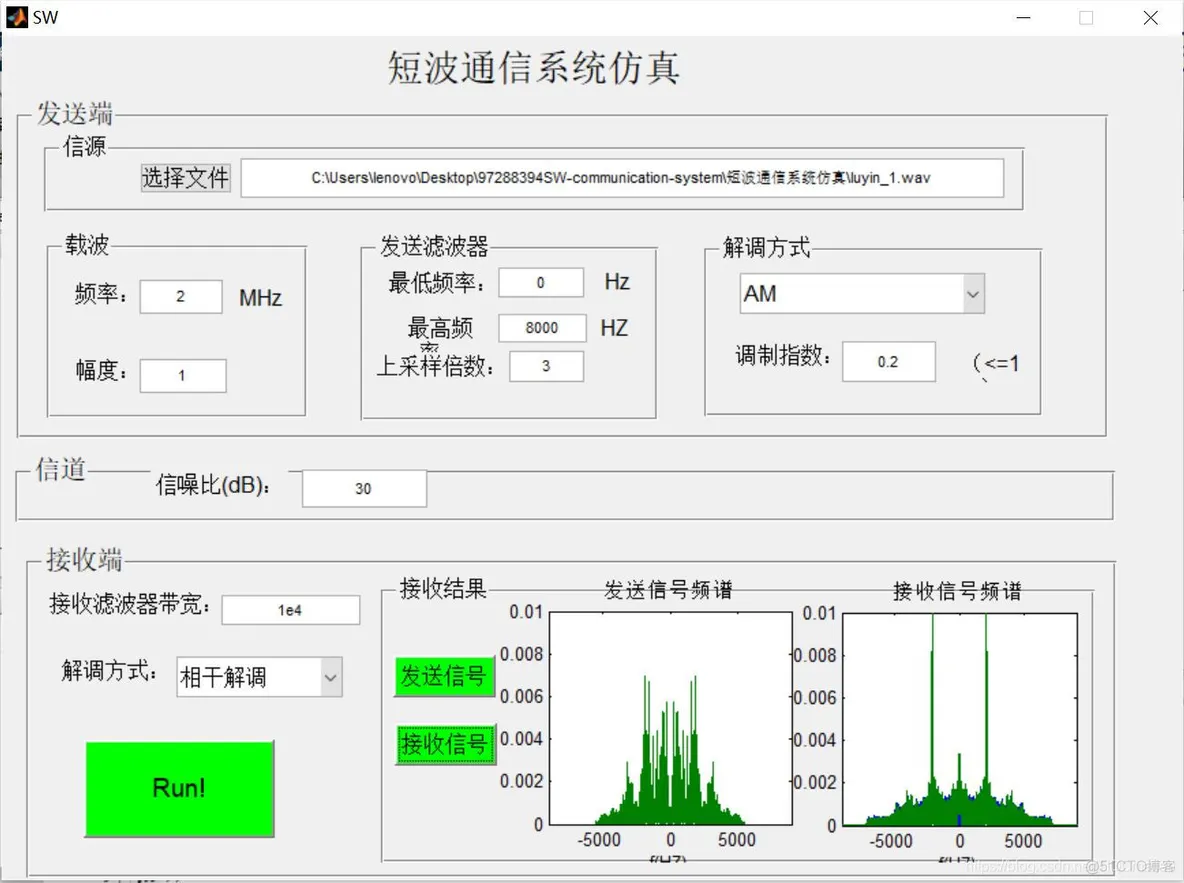
三、运行结果





 扫一扫
扫一扫


 703
703

 被折叠的 条评论
为什么被折叠?
被折叠的 条评论
为什么被折叠?
 到【灌水乐园】发言





