


-
贝叶斯决策论:贝叶斯决策论考虑如何基于已知的概率和误判损失来选择最优的类别标记。
-
先验概率(prior probability):是指根据以往经验和分析得到的概率。即没有考虑原因,在获得数据和依据之前就对概率进行了猜测,得到了概率。
-
似然函数(likelihood function):似然用来描述已知随机变量输出结果时,未知参数的可能取值。似然函数关注的是由已知的结果和某固有属性的关系,而不是结果或者原因的概率,所以称似然是对固有属性的拟合,所以不能称之为概率。
-
后验概率(Posterior probability):是在相关证据或者背景给定并纳入考虑之后的条件概率。是由因及果的概率。
-
先验分布:根据一般的经验认为随机变量应该满足的分布
后验分布:通过当前训练数据修正的随机变量的分布,比先验分布更符合当前数据
似然估计:已知训练数据,给定了模型,通过让似然性极大化估计模型参数的一种方法
后验分布往往是基于先验分布和极大似然估计计算出来的。
-
先验、似然、后验的区分总结:
1)先验——根据若干年的统计(经验)或者气候(常识),某地方下雨的概率;
2)似然——下雨(果)的时候有乌云(因/证据/观察的数据)的概率,即已经有了果,对证据发生的可能性描述;
3)后验——根据天上有乌云(原因或者证据/观察数据),下雨(结果)的概率;
后验 ~ 先验*似然 : 存在下雨的可能(先验),下雨之前会有乌云(似然)~ 通过现在有乌云推断下雨概率(后验);
或者:
设定背景:酒至半酣,忽阴云漠漠,骤雨将至。
情景一:“天不会下雨的,历史上这里下雨的概率是20%”----先验概率“但阴云漠漠时,下雨的概率是80%”----后验概率
情景二:“飞飞别急着走啊,历史上酒桌上死人的概率只有5%“----先验概率”可他是曹操啊,梦里都杀人“----后验概率
-
最大似然估计(Maximum Likelihood Estimation):最大似然估计是利用已知的样本的结果,在使用某个模型的基础上,反推最有可能导致这样结果的模型参数值。
-
贝叶斯公式:
-
- 1.
Copy
在通常情况下,“事件A在事件B发生的条件下的概率”与“事件B在事件A发生的条件下的概率”是不一样的,但两者的关系是确定的,贝叶斯公式研究的就是这种关系。 -
公式:

-
解释:
- P(A|B)为后验概率,即指事件B发生的条件下事件A发生的概率,因为该概率得自于B的取值而称为A的后验概率。
- P(A)为先验概率(边缘概率),即A的发生不用考虑B的任何方面的因素。
- P(B|A)为条件概率(类条件概率密度),即指在事件A发生的条件下事件B发生的概率,和1一样被称为B的后验概率。
—>称为似然 - P(B)为”用于归一化的证据因子(evidence)“可以当成一个已知的量,在贝叶斯分类器种P(B)的值与分类无关。
-
-
正态分布(高斯分布):
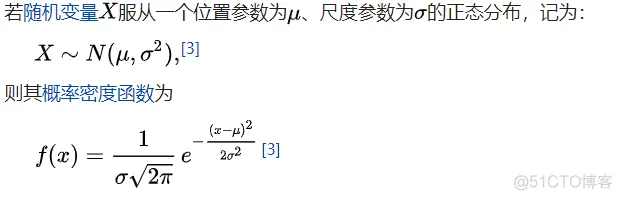
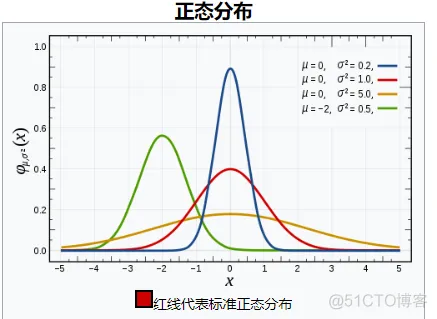
-
多源正态分布:
- 个人理解:将二分类的高斯分布扩展为多个分类的问题。定义详见:https://www.cnblogs.com/bingjianing/p/9117330.html
- 包含了标准化、归化等过程。
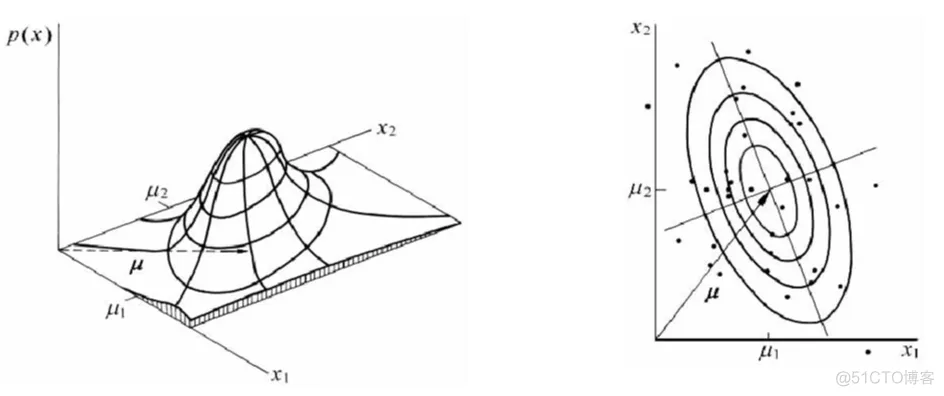
左图为多源高斯分布示意 右图为多远高斯分布的归化过程#
(以上为先导概率论知识)
贝叶斯分类器-
贝叶斯决策论:
- 前提:所有相关概率已知
- 关注点:误判损失
-
期望损失(风险):在N种可能的标记种,λij是指将Cj误分为Ci时所产生的损失。基于后验概率:
P(ci|x)得到误分为Ci时所产生的期望损失,这个损失也叫做”风险“,当我们制定一个准则h使得对于每一个样本x风险最小时(此时整个样本的总体风险R(h*)(贝叶斯风险)也达到最小),称h为贝叶斯最优分类器。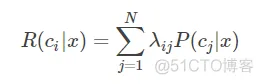
期望损失(风险)表达式

总体风险表达式
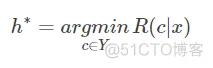
使每个样本的风险最小
-
后验概率最大化与风险最小化:对于二分类问题,λ要么等于0要么等于1
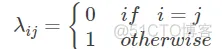
-
此时所以条件风险(该条件下的风险)为
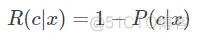
-
所以当分类错误率达到最小时,需要后验概率P最小,继而使后验概率最大化就是使风险最小化。即:
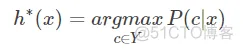
-
-
由3和贝叶斯公式得到,想获得最小风险需要获得最大的后验概率,想获得最大的后验概率需要获得最大的似然。以此引导出——>最大似然估计。
-
首先,我们的目标是:
P(x|c)这一似然概率,根据频率学派的观点:参数虽然未知,当存在客观的固定值。
我们假设似然概率被一个确定的θc控制,你那么我们的目标就是通过训练集来确定θ c的值,从而确定似然概率的值。
-
假设Dc表示训练集D上的第c类样本的集合,他们满足条件:样本服从独立分布,则参数θc对于数据集Dc的似然可以表示为:
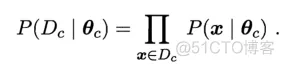
形如:P(A|B)=P(AB)/P(B)
- 1.
Copy
两边取对数(对数似然):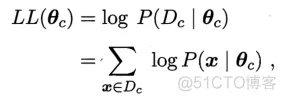
此时,θc最大时的最大似然估计表达式为:
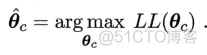
不足:该方法严重依赖假设:存在客观的固定值。
-
MLE估计结果的有偏和无偏性:
- 对于均值:无偏
- 对于反差:有偏,1/n要改为1/(n-1)
-
最大似然估计在样本不足的情况下会出现一个问题:假设我抛10次硬币,有7次是正面朝上,那么我的最大似然估计的概率就是0.7,但是根据常识我们的概率应该靠近0.5才对,这里就需要考虑先验概率。——>引出最大后验概率估计。
-
MAP和MLE的区别:最大似然估计是求参数θ, 使似然函数P(x|θ)最大。最大后验概率估计则是想求θ使P(x|θ)P(θ)最大。求得的θ不单单让似然函数大,θ自己出现的先验概率也得大。
-
MAP的基本思想仍然是基于贝叶斯公式本身,MLE的目的是求出最大的似然估计值,而MAP的目的是求出最大的后验概率本身,在MLE的基础上加上了一个先验概率,他的表达式为:
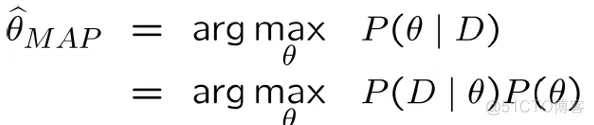
-
主要区别在于贝叶斯学派和频率学派的区别。
- 引导:
- 如果有d个样本,每个样本有2种状态0或1,
维度为k????,那么他们的组合有2^dk-1种,但是当所有条件独立时,他们的结果有(2-1)dk-1种,使得参数大大减少。 - 所以,在该条件成立之上的朴素贝叶斯之所以叫做”朴素“是因为他需要满足”所有条件独立“这个条件。
- 如果有d个样本,每个样本有2种状态0或1,
- 朴素贝叶斯分类器所依赖的概率模型就是MAP和MLE。
- 应用:文本分类/垃圾邮件筛选等。
function varargout = NaiveBayesClassifier(varargin)
% NAIVEBAYESCLASSIFIER M-file for NaiveBayesClassifier.fig
%      NAIVEBAYESCLASSIFIER, by itself, creates a new NAIVEBAYESCLASSIFIER or raises the existing
%      singleton*.
%
%      H = NAIVEBAYESCLASSIFIER returns the handle to a new NAIVEBAYESCLASSIFIER or the handle to
%      the existing singleton*.
%
%      NAIVEBAYESCLASSIFIER('CALLBACK',hObject,eventData,handles,...) calls the local
%      function named CALLBACK in NAIVEBAYESCLASSIFIER.M with the given input arguments.
%
%      NAIVEBAYESCLASSIFIER('Property','Value',...) creates a new NAIVEBAYESCLASSIFIER or raises the
%      existing singleton*.  Starting from the left, property value pairs are
%      applied to the GUI before NaiveBayesClassifier_OpeningFcn gets called.  An
%      unrecognized property name or invalid value makes property application
%      stop.  All inputs are passed to NaiveBayesClassifier_OpeningFcn via varargin.
%
%      *See GUI Options on GUIDE's Tools menu.  Choose "GUI allows only one
%      instance to run (singleton)".
%
% See also: GUIDE, GUIDATA, GUIHANDLES

% Edit the above text to modify the response to help NaiveBayesClassifier

% Last Modified by GUIDE v2.5 09-May-2013 06:54:52

% Begin initialization code - DO NOT EDIT
gui_Singleton = 1;
gui_State = struct('gui_Name',       mfilename, ...
                   'gui_Singleton',  gui_Singleton, ...
                   'gui_OpeningFcn', @NaiveBayesClassifier_OpeningFcn, ...
                   'gui_OutputFcn',  @NaiveBayesClassifier_OutputFcn, ...
                   'gui_LayoutFcn',  [] , ...
                   'gui_Callback',   []);
if nargin && ischar(varargin{1})
    gui_State.gui_Callback = str2func(varargin{1});
    clc;

    % set window potition (get_size_screen/gsl_)
    gsl_ = get(0,'ScreenSize');

end

if nargout
    [varargout{1:nargout}] = gui_mainfcn(gui_State, varargin{:});
else
    gui_mainfcn(gui_State, varargin{:});
end
% End initialization code - DO NOT EDIT


% --- Executes just before NaiveBayesClassifier is made visible.
function NaiveBayesClassifier_OpeningFcn(hObject, eventdata, handles, varargin)
% This function has no output args, see OutputFcn.
% hObject    handle to figure
% eventdata  reserved - to be defined in a future version of MATLAB
% handles    structure with handles and user data (see GUIDATA)
% varargin   command line arguments to NaiveBayesClassifier (see VARARGIN)

% Choose default command line output for NaiveBayesClassifier
handles.output = hObject;

% Update handles structure
guidata(hObject, handles);

% UIWAIT makes NaiveBayesClassifier wait for user response (see UIRESUME)
% uiwait(handles.NaiveBayesClassifier);

% Set the figure icon by matlabfreecode.wordpress.com
warning('off','MATLAB:HandleGraphics:ObsoletedProperty:JavaFrame');
jframe=get(handles.NaiveBayesClassifier,'javaframe');
jIcon=javax.swing.ImageIcon('citrus-icon.png');
jframe.setFigureIcon(jIcon);

% --- Outputs from this function are returned to the command line.
function varargout = NaiveBayesClassifier_OutputFcn(hObject, eventdata, handles)
% varargout  cell array for returning output args (see VARARGOUT);
% hObject    handle to figure
% eventdata  reserved - to be defined in a future version of MATLAB
% handles    structure with handles and user data (see GUIDATA)

% Get default command line output from handles structure
varargout{1} = handles.output;


% --- Executes on button press in NaiveBayesClassifier.
function trainingdata_Callback(hObject, eventdata, handles)
% hObject    handle to NaiveBayesClassifier (see GCBO)
% eventdata  reserved - to be defined in a future version of MATLAB
% handles    structure with handles and user data (see GUIDATA)
NaiveBayesClassifierProject=guidata(gcbo);
GetImageTraining=get(NaiveBayesClassifierProject.ImageTraining,'Userdata');

% determine the training data path
path_data_train=strrep(cd,...
    'Matlab_Code_To_Classification_Citrus','CitrusImage\Data Training');

% data training of Citrus nipis (jn)
lots_of_data_train_jn=7;

% data training of Citrus lemon (jl)
lots_of_data_train_jl=3;

% data training of Citrus orange (jm)
lots_of_data_train_jm=5;

lots_of_feature=4;
lots_of_class=3;

% initialization of matrix dataset
dataset=zeros(lots_of_data_train_jn,lots_of_feature);

for i=1:(lots_of_data_train_jn+lots_of_data_train_jl+lots_of_data_train_jm)

    if(i<=lots_of_data_train_jn)
        % membaca setiap file citra jeruk nipis
        filename=strcat(path_data_train,'\','CitrusNipis',...
        num2str(i),'.jpg');
        class{i}='Nipis';
    elseif(i<=(lots_of_data_train_jn+lots_of_data_train_jl))
        % membaca setiap file citra jeruk lemon
        filename=strcat(path_data_train,'\','CitrusLemon',...
            num2str(i-lots_of_data_train_jn),'.jpg');
        class{i}='Lemon';
    else
        % membaca setiap file citra jeruk manis
        filename=strcat(path_data_train,'\','CitrusOrange',...
            num2str(i-(lots_of_data_train_jn+lots_of_data_train_jl)),'.jpg');
        class{i}='Orange';
    end

    I = imread (filename);

    % merisize image size
    % I = imresize(I,[256 256]);

    if(size(I,3)==4)
        I(:,:,1)=[]; % convert to I = [MxNx3]
    end

    % count mean Red, Green, Blue
    mean_red=mean(mean(I(:,:,1)));
    mean_green=mean(mean(I(:,:,2)));
    mean_blue=mean(mean(I(:,:,3)));

    axes(handles.ImageTraining);
    imshow(I);

    set(NaiveBayesClassifierProject.ImageTraining,'Userdata',I);

    SizeImageTraining=size(I);
    StringSizeImageTraining=sprintf(strcat(num2str(SizeImageTraining(1)),'x',num2str(SizeImageTraining(2)),'x',num2str(SizeImageTraining(3))));
    StringSizeImageTraining = strrep(StringSizeImageTraining,'x',' x ');

    set(handles.SizeImageTraining,'String',StringSizeImageTraining);

    % set(handles.SizeImageTraining,'String',StringSizeImageTraining);

    set(handles.NameImageTraining,'String',sprintf(strcat('Image Training (Color) ->',num2str(i))));

    %% create gray-scale image
    I_gray=Function_ColorToGray(I);

    axes(handles.ImageGray);
    imshow(I_gray);

    %%

    %% create binary image
%     level=graythresh(I);
%     I_biner=im2bw(I_gray,level);

    I_biner=zeros(size(I_gray,1),size(I_gray,2));
    I_biner(find(I_gray<255))=1;

    axes(handles.ImageBinary);
    imshow(I_biner);

    %% create max filter image from binary image
       %windowing_size must be valued an odd number >=3
       windowing_size=5;
       max_filter_I_biner=Function_MaxFilterBiner_(I_biner,windowing_size);

       axes(handles.ImageMaxFilter);
       imshow(max_filter_I_biner);


    %% count diameter with unit length horizontal each pixel
       % determine index which contains the value 1
         [idx_,idy_]=find(max_filter_I_biner==1);
         diameter=idy_(numel(idy_))-idy_(1)+1;


    %% create boundary line in diameter horizontal

        %numel((XY2Index(1,idy_(1),size(I_gray,1)):XY2Index(size(I_gray,1),idy_(numel(idy_)),size(I_gray,1)))')


        % replace pixel value
        I_red=I(:,:,1);
        I_red(:,idy_(1):(idy_(1)+10))=105;
        I_red(:,(idy_(numel(idy_))-10):idy_(numel(idy_)))=105;
        I(:,:,1)=I_red;

        I_green=I(:,:,2);
        I_green(:,idy_(1):(idy_(1)+10))=75;
        I_green(:,(idy_(numel(idy_))-10):idy_(numel(idy_)))=75;
        I(:,:,2)=I_green;

        I_blue=I(:,:,3);
        I_blue(:,idy_(1):(idy_(1)+10))=245;
        I_blue(:,(idy_(numel(idy_))-10):idy_(numel(idy_)))=245;
        I(:,:,3)=I_blue;


        axes(handles.ImageTraining);
        imshow(I);

%     %% count diameter with unit length vertical each pixel
%        % determine index which contains the value 1
%          [idx_v,idy_v]=find(max_filter_I_biner==1);
%          [value_max,idx_v_max]=max(idx_v);
%          [value_min,idx_v_min]=min(idx_v);
%          diameter_v=value_max-value_min+1;
%
%     %% create boundary line in diameter vertical
%
%         % replace pixel value
%         I_red=I(:,:,1);
%         I_red(idx_v(idx_v_min):(idx_v(idx_v_min)+10),:)=105;
%         I_red((idx_v(idx_v_max)-10):idx_v(idx_v_max),:)=105;
%         I(:,:,1)=I_red;
%
%         I_green=I(:,:,2);
%         I_green(idx_v(idx_v_min):(idx_v(idx_v_min)+10),:)=75;
%         I_green((idx_v(idx_v_max)-10):idx_v(idx_v_max),:)=75;
%         I(:,:,2)=I_green;
%
%         I_blue=I(:,:,3);
%         I_blue(idx_v(idx_v_min):(idx_v(idx_v_min)+10),:)=245;
%         I_blue((idx_v(idx_v_max)-10):idx_v(idx_v_max),:)=245;
%         I(:,:,3)=I_blue;
%
%         axes(handles.ImageTraining);
%         imshow(I);

    % collect the feature value
    dataset(i,:)=[mean_red mean_green mean_blue diameter];

end

class';
%
% dataset_class{1}={mat2cell(dataset) class{1}'}
%
% dataset_class{1}

dataset;

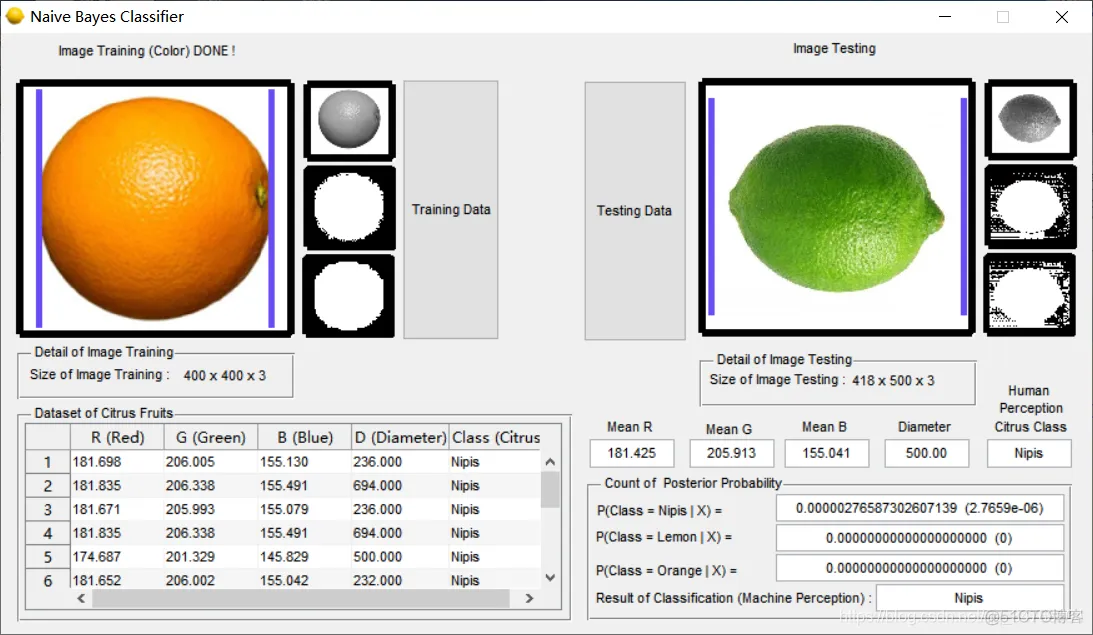
set(handles.NameImageTraining,'String',sprintf(strcat('Image Training (Color) DONE !')));

merge_data={dataset,class'};

% lots of data multiply with lots of feature
data_multiply_feature=(lots_of_data_train_jn+lots_of_data_train_jl+lots_of_data_train_jm)*lots_of_feature;

% collect data feature R, G, B and Diameter
for i=1:data_multiply_feature
   dat_init{i}=num2str(merge_data{1}(i),'%.3f');
end

% collect data class Citrus : Nipis, Lemon and Orange
for j=1:(lots_of_data_train_jn+lots_of_data_train_jl+lots_of_data_train_jm)
   dat_init{data_multiply_feature+j}=char(merge_data{2}(j));
end

dat=reshape(dat_init,[(lots_of_data_train_jn+lots_of_data_train_jl+lots_of_data_train_jm) (lots_of_feature+1)]);

set(NaiveBayesClassifierProject.DataTraining,'Userdata',dat);

%% insert data into dataset
t=uitable('Data', dat, 'ColumnName',...
        {'R (Red)', 'G (Green)', 'B (Blue)', 'D (Diameter)','Class (Citrus)'},...
        'Position', [20 20 430 150]);


    set(NaiveBayesClassifierProject.dataset_all_feature_class,'Userdata',dataset);

% --- Executes during object creation, after setting all properties.
function SizeImageTraining_CreateFcn(hObject, eventdata, handles)
% hObject    handle to SizeImageTraining (see GCBO)
% eventdata  reserved - to be defined in a future version of MATLAB
% handles    empty - handles not created until after all CreateFcns called


% --- Executes during object creation, after setting all properties.
function SizeImageTesting_CreateFcn(hObject, eventdata, handles)
% hObject    handle to SizeImageTesting (see GCBO)
% eventdata  reserved - to be defined in a future version of MATLAB
% handles    empty - handles not created until after all CreateFcns called


% --- Executes during object creation, after setting all properties.
function NameImageTraining_CreateFcn(hObject, eventdata, handles)
% hObject    handle to NameImageTraining (see GCBO)
% eventdata  reserved - to be defined in a future version of MATLAB
% handles    empty - handles not created until after all CreateFcns called


% --- Executes during object creation, after setting all properties.
function uitabledataset_CreateFcn(hObject, eventdata, handles)
% hObject    handle to uitabledataset (see GCBO)
% eventdata  reserved - to be defined in a future version of MATLAB
% handles    empty - handles not created until after all CreateFcns called


% --- Executes when entered data in editable cell(s) in uitabledataset.
function uitabledataset_CellEditCallback(hObject, eventdata, handles)
% hObject    handle to uitabledataset (see GCBO)
% eventdata  structure with the following fields (see UITABLE)
%	Indices: row and column indices of the cell(s) edited
%	PreviousData: previous data for the cell(s) edited
%	EditData: string(s) entered by the user
%	NewData: EditData or its converted form set on the Data property. Empty if Data was not changed
%	Error: error string when failed to convert EditData to appropriate value for Data
% handles    structure with handles and user data (see GUIDATA)


% --- Executes when selected cell(s) is changed in uitabledataset.
function uitabledataset_CellSelectionCallback(hObject, eventdata, handles)
% hObject    handle to uitabledataset (see GCBO)
% eventdata  structure with the following fields (see UITABLE)
%	Indices: row and column indices of the cell(s) currently selecteds
% handles    structure with handles and user data (see GUIDATA)


% --- Executes on button press in testingdata.
function testingdata_Callback(hObject, eventdata, handles)
% hObject    handle to testingdata (see GCBO)
% eventdata  reserved - to be defined in a future version of MATLAB
% handles    structure with handles and user data (see GUIDATA)
NaiveBayesClassifierProject=guidata(gcbo);

% data training of Citrus nipis (jn)
lots_of_data_train_jn=7;

% data training of Citrus lemon (jl)
lots_of_data_train_jl=3;

% data training of Citrus orange (jm)
lots_of_data_train_jm=5;

lots_of_feature=4;
lots_of_class=3;

[basefilename,path]= uigetfile({'*.*'},'Open All Image File');
filename= fullfile(path, basefilename);

if sum(strfind(lower(basefilename), '.'))==0
else

    I_testing = imread (filename);

    % if I = [MxNx4]
    if(size(I_testing,3)==4)
        I_testing(:,:,1)=[]; % convert to I = [MxNx3]
    end

    %set(NaiveBayesClassifierProject.NaiveBayesClassifier,'CurrentAxes',NaiveBayesClassifierProject.ImageTraining);
    %set (imshow(I));

    axes(handles.ImageTesting);
    imshow(I_testing);

    % count mean Red, Green, Blue
    mean_red_testing=mean(mean(I_testing(:,:,1)));
    mean_green_testing=mean(mean(I_testing(:,:,2)));
    mean_blue_testing=mean(mean(I_testing(:,:,3)));

    set(NaiveBayesClassifierProject.var_mean_red_testing,...
        'String',num2str(mean_red_testing,'%.3f'));

    set(NaiveBayesClassifierProject.var_mean_green_testing,...
        'String',num2str(mean_green_testing,'%.3f'));

    set(NaiveBayesClassifierProject.var_mean_blue_testing,...
        'String',num2str(mean_blue_testing,'%.3f'));

    set(NaiveBayesClassifierProject.ImageTesting,'Userdata',I_testing);

    SizeImageTesting=size(I_testing);
    StringSizeImageTesting=sprintf(strcat(num2str(SizeImageTesting(1)),'x',num2str(SizeImageTesting(2)),'x',num2str(SizeImageTesting(3))));
    StringSizeImageTesting = strrep(StringSizeImageTesting,'x',' x ');

    set(handles.SizeImageTesting,'String',StringSizeImageTesting);

    %% create gray-scale image
    I_gray_testing=Function_ColorToGray(I_testing);

    axes(handles.ImageGrayTesting);
    imshow(I_gray_testing);

    %%

    %% create binary image _testing
%     level=graythresh(I_testing);
%     I_biner_testing=im2bw(I_gray_testing,level);

    I_biner_testing=zeros(size(I_gray_testing,1),size(I_gray_testing,2));
    I_biner_testing(find(I_gray_testing<255))=1;

    axes(handles.ImageBinaryTesting);
    imshow(I_biner_testing);

    %% create max filter image from biner_testing image
       %windowing_size must be valued an odd number >=3
       windowing_size=5;
       max_filter_I_biner_testing=Function_MaxFilterBiner_(I_biner_testing,windowing_size);

       axes(handles.ImageMaxFilterTesting);
       imshow(max_filter_I_biner_testing);


    %% count diameter with unit length each pixel
       % determine index which contains the value 1 (white color)
         [idx_,idy_]=find(max_filter_I_biner_testing==1);
         diameter_testing=idy_(numel(idy_))-idy_(1)+1;

         set(NaiveBayesClassifierProject.var_diameter_testing,...
        'String',num2str(diameter_testing,'%.2f'));

    % collect feature value
    dataset(1,:)=[mean_red_testing mean_green_testing mean_blue_testing diameter_testing];

    if(isempty(strfind(basefilename, 'Lemon'))==0)
        class_testing{1}='Lemon';
    elseif(isempty(strfind(basefilename, 'Orange'))==0)
        class_testing{1}='Orange';
    elseif(isempty(strfind(basefilename, 'Nipis'))==0)
        class_testing{1}='Nipis';
    else
        class_testing{1}='UnKnown';
    end

    class_testing{1}

    set(NaiveBayesClassifierProject.var_class_testing,...
        'String',char(class_testing{1}));

    % replace pixel value
        I_red=I_testing(:,:,1);
        I_red(:,idy_(1):(idy_(1)+10))=105;
        I_red(:,(idy_(numel(idy_))-10):idy_(numel(idy_)))=105;
        I_testing(:,:,1)=I_red;

        I_green=I_testing(:,:,2);
        I_green(:,idy_(1):(idy_(1)+10))=75;
        I_green(:,(idy_(numel(idy_))-10):idy_(numel(idy_)))=75;
        I_testing(:,:,2)=I_green;

        I_blue=I_testing(:,:,3);
        I_blue(:,idy_(1):(idy_(1)+10))=245;
        I_blue(:,(idy_(numel(idy_))-10):idy_(numel(idy_)))=245;
        I_testing(:,:,3)=I_blue;


        axes(handles.ImageTesting);
        imshow(I_testing);


      %% count Probability of Posterior
        %GetDataTraining=get(NaiveBayesClassifierProject.DataTraining,'User
        %data');
        %Getmean_varian=get(NaiveBayesClassifierProject.dataset_all_feature_class,'Userdata');
        dataset=get(NaiveBayesClassifierProject.dataset_all_feature_class,'Userdata');

        Xrgbd=[mean_red_testing;mean_green_testing;mean_blue_testing;...
            diameter_testing];

%         % normalization dataset
%         dataset
%         Xrgbd=Xrgbd'
%         dataset_Xrgbd=[dataset;Xrgbd];
%         dataset_Xrgbd_norm=dataset_Xrgbd./(padarray((sum(dataset_Xrgbd.*dataset_Xrgbd).^0.5),[(size(dataset_Xrgbd,1)-1) 0],'replicate','post'))
%
%         % replace dataset and Xrgbd with normalization
%         dataset = dataset_Xrgbd_norm(1:(size(dataset_Xrgbd_norm,1)-1),:)
%         Xrgbd = dataset_Xrgbd_norm(size(dataset_Xrgbd_norm,1),:)

        %% count & save result of mean and varian from every feature & class
            % Initialization
            Getmean_varian=zeros(2*lots_of_class,lots_of_feature);

            for i=1:lots_of_feature
                % set feature 1 for R, 2 for G, 3 for B, 4 for D
                feature_rgbd=dataset(:,i);

                % count mean_class_citrus_nipis(jn),_lemon(jl),_orange(jm)
                mean_feature_rgbd_jn=mean(feature_rgbd(1:lots_of_data_train_jn));
                mean_feature_rgbd_jl=mean(feature_rgbd(...
                    (lots_of_data_train_jn+1):(lots_of_data_train_jn+lots_of_data_train_jl)));
                mean_feature_rgbd_jm=mean(feature_rgbd(...
                    (lots_of_data_train_jn+lots_of_data_train_jl+1):...
                    (lots_of_data_train_jn+lots_of_data_train_jl+lots_of_data_train_jm)));

                % count varian_class_citrus_nipis(jn),_lemon(jl),_orange(jm
                varian_feature_rgbd_jn=var(feature_rgbd(1:lots_of_data_train_jn));
                varian_feature_rgbd_jl=var(feature_rgbd(...
                    (lots_of_data_train_jn+1):(lots_of_data_train_jn+lots_of_data_train_jl)));
                varian_feature_rgbd_jm=var(feature_rgbd(...
                    (lots_of_data_train_jn+lots_of_data_train_jl+1):...
                    (lots_of_data_train_jn+lots_of_data_train_jl+lots_of_data_train_jm)));

                Getmean_varian(:,i)=[mean_feature_rgbd_jn,mean_feature_rgbd_jl,...
                    mean_feature_rgbd_jm,varian_feature_rgbd_jn,varian_feature_rgbd_jl,...
                    varian_feature_rgbd_jm];
            end

        %% note of format mean_varian matrix :
           % size :
             % rows = 2*lots_of_class
             % column = lots_of_feature

        % content mean_varian matrix :
         % -----------------------------------------------------------------------------------
         % |       Red        |     Green         |      Blue         |      Diameter        |
         % -----------------------------------------------------------------------------------
         % |   mean_jn_red    |   mean_jn_green   |  mean_jn_blue     |   mean_jn_diameter   |
         % |   mean_jl_red    |   mean_jl_green   |  mean_jl_blue     |   mean_jl_diameter   |
         % |   mean_jm_red    |   mean_jm_green   |  mean_jm_blue     |   mean_jm_diameter   |
         % |  varian_jn_red   |  varian_jn_green  |  varian_jn_blue   |  varian_jn_diameter  |
         % |  varian_jl_red   |  varian_jl_green  |  varian_jl_blue   |  varian_jl_diameter  |
         % |  varian_jm_red   |  varian_jm_green  |  varian_jm_blue   |  varian_jm_diameter  |
         % -----------------------------------------------------------------------------------
        %%


        % count Probability of Prior
        P_Prior_jn=lots_of_data_train_jn/(lots_of_data_train_jn+...
        lots_of_data_train_jl+lots_of_data_train_jm);
        P_Prior_jl=lots_of_data_train_jl/(lots_of_data_train_jn+...
            lots_of_data_train_jl+lots_of_data_train_jm);
        P_Prior_jm=lots_of_data_train_jm/(lots_of_data_train_jn+...
            lots_of_data_train_jl+lots_of_data_train_jm);

        % initialization Probability value of Posterior
        P_Posterior_jn=1*P_Prior_jn
        P_Posterior_jl=1*P_Prior_jl
        P_Posterior_jm=1*P_Prior_jm

%% note format Getmean_varian matrix :
   % size :
     % rows = 2*lots_of_class
     % column = lots_of_feature

% content of Getmean_varian matrix :
 % -----------------------------------------------------------------------------------
 % |       Red        |     Green         |      Blue         |      Diameter        |
 % -----------------------------------------------------------------------------------
 % |   mean_jn_red    |   mean_jn_green   |  mean_jn_blue     |   mean_jn_diameter   |
 % |   mean_jl_red    |   mean_jl_green   |  mean_jl_blue     |   mean_jl_diameter   |
 % |   mean_jm_red    |   mean_jm_green   |  mean_jm_blue     |   mean_jm_diameter   |
 % |  varian_jn_red   |  varian_jn_green  |  varian_jn_blue   |  varian_jn_diameter  |
 % |  varian_jl_red   |  varian_jl_green  |  varian_jl_blue   |  varian_jl_diameter  |
 % |  varian_jm_red   |  varian_jm_green  |  varian_jm_blue   |  varian_jm_diameter  |
 % -----------------------------------------------------------------------------------
%%

        % count Probability of Likelihood from RBGD feature
        for i=1:lots_of_feature
            mean_varian_RGBD=Getmean_varian(:,i);
            P_Likelihood_x_RGB_to_jn=...
                (1/sqrt(2*(22/7)*mean_varian_RGBD(4)))...
                *exp(-1*(((Xrgbd(i)-mean_varian_RGBD(1))^2)/(2*mean_varian_RGBD(4))))
            P_Posterior_jn=P_Posterior_jn*P_Likelihood_x_RGB_to_jn

            mean_varian_RGBD(5)
            mean_varian_RGBD(2)
            Xrgbd(i)
            P_Likelihood_x_RGB_to_jl=...
                (1/sqrt(2*(22/7)*mean_varian_RGBD(5)))...
                *exp(-1*(((Xrgbd(i)-mean_varian_RGBD(2))^2)/(2*mean_varian_RGBD(5))))
            P_Posterior_jl=P_Posterior_jl*P_Likelihood_x_RGB_to_jl

            P_Likelihood_x_RGB_to_jm=...
                (1/sqrt(2*(22/7)*mean_varian_RGBD(6)))...
                *exp(-1*(((Xrgbd(i)-mean_varian_RGBD(3))^2)/(2*mean_varian_RGBD(6))))
            P_Posterior_jm=P_Posterior_jm*P_Likelihood_x_RGB_to_jm
        end

        set(NaiveBayesClassifierProject.posterior_class_jn,...
        'String',strcat(num2str(P_Posterior_jn,'%.20f'),{'  ('},num2str(P_Posterior_jn),')'));
        set(NaiveBayesClassifierProject.posterior_class_jl,...
        'String',strcat(num2str(P_Posterior_jl,'%.20f'),{'  ('},num2str(P_Posterior_jl),')'));
        set(NaiveBayesClassifierProject.posterior_class_jm,...
        'String',strcat(num2str(P_Posterior_jm,'%.20f'),{'  ('},num2str(P_Posterior_jm),')'));

        All_P_Posterior=[P_Posterior_jn;P_Posterior_jl;P_Posterior_jm];

        [vmax_Posterior,idxmax_Posterior]=max(All_P_Posterior);

        Decision_Of_Classification='';
        if(idxmax_Posterior==1)
            Decision_Of_Classification='Nipis';
        elseif(idxmax_Posterior==2)
            Decision_Of_Classification='Lemon';
        else
            Decision_Of_Classification='Orange';
        end

        set(NaiveBayesClassifierProject.classification_result,...
        'String',Decision_Of_Classification);


end


function var_mean_red_testing_Callback(hObject, eventdata, handles)
% hObject    handle to var_mean_red_testing (see GCBO)
% eventdata  reserved - to be defined in a future version of MATLAB
% handles    structure with handles and user data (see GUIDATA)

% Hints: get(hObject,'String') returns contents of var_mean_red_testing as text
%        str2double(get(hObject,'String')) returns contents of var_mean_red_testing as a double
NaiveBayesClassifierProject = guidata(gcbo);
var_mean_red_testing = str2double(get(hObject, 'String'));
NaiveBayesClassifierProject.var_mean_red_testing = var_mean_red_testing;

% --- Executes during object creation, after setting all properties.
function var_mean_red_testing_CreateFcn(hObject, eventdata, handles)
% hObject    handle to var_mean_red_testing (see GCBO)
% eventdata  reserved - to be defined in a future version of MATLAB
% handles    empty - handles not created until after all CreateFcns called

% Hint: edit controls usually have a white background on Windows.
%       See ISPC and COMPUTER.
if ispc && isequal(get(hObject,'BackgroundColor'), get(0,'defaultUicontrolBackgroundColor'))
    set(hObject,'BackgroundColor','white');
end


function var_mean_green_testing_Callback(hObject, eventdata, handles)
% hObject    handle to var_mean_green_testing (see GCBO)
% eventdata  reserved - to be defined in a future version of MATLAB
% handles    structure with handles and user data (see GUIDATA)

% Hints: get(hObject,'String') returns contents of var_mean_green_testing as text
%        str2double(get(hObject,'String')) returns contents of var_mean_green_testing as a double
NaiveBayesClassifierProject = guidata(gcbo);
var_mean_green_testing = str2double(get(hObject, 'String'));
NaiveBayesClassifierProject.var_mean_green_testing = var_mean_green_testing;


% --- Executes during object creation, after setting all properties.
function var_mean_green_testing_CreateFcn(hObject, eventdata, handles)
% hObject    handle to var_mean_green_testing (see GCBO)
% eventdata  reserved - to be defined in a future version of MATLAB
% handles    empty - handles not created until after all CreateFcns called

% Hint: edit controls usually have a white background on Windows.
%       See ISPC and COMPUTER.
if ispc && isequal(get(hObject,'BackgroundColor'), get(0,'defaultUicontrolBackgroundColor'))
    set(hObject,'BackgroundColor','white');
end


function var_mean_blue_testing_Callback(hObject, eventdata, handles)
% hObject    handle to var_mean_blue_testing (see GCBO)
% eventdata  reserved - to be defined in a future version of MATLAB
% handles    structure with handles and user data (see GUIDATA)

% Hints: get(hObject,'String') returns contents of var_mean_blue_testing as text
%        str2double(get(hObject,'String')) returns contents of var_mean_blue_testing as a double
NaiveBayesClassifierProject = guidata(gcbo);
var_mean_blur_testing = str2double(get(hObject, 'String'));
NaiveBayesClassifierProject.var_mean_blue_testing = var_mean_blue_testing;


% --- Executes during object creation, after setting all properties.
function var_mean_blue_testing_CreateFcn(hObject, eventdata, handles)
% hObject    handle to var_mean_blue_testing (see GCBO)
% eventdata  reserved - to be defined in a future version of MATLAB
% handles    empty - handles not created until after all CreateFcns called

% Hint: edit controls usually have a white background on Windows.
%       See ISPC and COMPUTER.
if ispc && isequal(get(hObject,'BackgroundColor'), get(0,'defaultUicontrolBackgroundColor'))
    set(hObject,'BackgroundColor','white');
end


function var_diameter_testing_Callback(hObject, eventdata, handles)
% hObject    handle to var_diameter_testing (see GCBO)
% eventdata  reserved - to be defined in a future version of MATLAB
% handles    structure with handles and user data (see GUIDATA)

% Hints: get(hObject,'String') returns contents of var_diameter_testing as text
%        str2double(get(hObject,'String')) returns contents of var_diameter_testing as a double
NaiveBayesClassifierProject = guidata(gcbo);
var_diameter_testing = str2double(get(hObject, 'String'));
NaiveBayesClassifierProject.var_diameter_testing = var_diameter_testing;


% --- Executes during object creation, after setting all properties.
function var_diameter_testing_CreateFcn(hObject, eventdata, handles)
% hObject    handle to var_diameter_testing (see GCBO)
% eventdata  reserved - to be defined in a future version of MATLAB
% handles    empty - handles not created until after all CreateFcns called

% Hint: edit controls usually have a white background on Windows.
%       See ISPC and COMPUTER.
if ispc && isequal(get(hObject,'BackgroundColor'), get(0,'defaultUicontrolBackgroundColor'))
    set(hObject,'BackgroundColor','white');
end


function var_class_testing_Callback(hObject, eventdata, handles)
% hObject    handle to var_class_testing (see GCBO)
% eventdata  reserved - to be defined in a future version of MATLAB
% handles    structure with handles and user data (see GUIDATA)

% Hints: get(hObject,'String') returns contents of var_class_testing as text
%        str2double(get(hObject,'String')) returns contents of var_class_testing as a double
NaiveBayesClassifierProject = guidata(gcbo);
var_class_testing = str2double(get(hObject, 'String'));
NaiveBayesClassifierProject.var_class_testing = var_class_testing;


% --- Executes during object creation, after setting all properties.
function var_class_testing_CreateFcn(hObject, eventdata, handles)
% hObject    handle to var_class_testing (see GCBO)
% eventdata  reserved - to be defined in a future version of MATLAB
% handles    empty - handles not created until after all CreateFcns called

% Hint: edit controls usually have a white background on Windows.
%       See ISPC and COMPUTER.
if ispc && isequal(get(hObject,'BackgroundColor'), get(0,'defaultUicontrolBackgroundColor'))
    set(hObject,'BackgroundColor','white');
end


function posterior_class_jn_Callback(hObject, eventdata, handles)
% hObject    handle to posterior_class_jn (see GCBO)
% eventdata  reserved - to be defined in a future version of MATLAB
% handles    structure with handles and user data (see GUIDATA)

% Hints: get(hObject,'String') returns contents of posterior_class_jn as text
%        str2double(get(hObject,'String')) returns contents of posterior_class_jn as a double
NaiveBayesClassifierProject = guidata(gcbo);
var_class_jn = str2double(get(hObject, 'String'));
NaiveBayesClassifierProject.var_class_jn = var_class_jn;

% --- Executes during object creation, after setting all properties.
function posterior_class_jn_CreateFcn(hObject, eventdata, handles)
% hObject    handle to posterior_class_jn (see GCBO)
% eventdata  reserved - to be defined in a future version of MATLAB
% handles    empty - handles not created until after all CreateFcns called

% Hint: edit controls usually have a white background on Windows.
%       See ISPC and COMPUTER.
if ispc && isequal(get(hObject,'BackgroundColor'), get(0,'defaultUicontrolBackgroundColor'))
    set(hObject,'BackgroundColor','white');
end


function posterior_class_jl_Callback(hObject, eventdata, handles)
% hObject    handle to posterior_class_jl (see GCBO)
% eventdata  reserved - to be defined in a future version of MATLAB
% handles    structure with handles and user data (see GUIDATA)

% Hints: get(hObject,'String') returns contents of posterior_class_jl as text
%        str2double(get(hObject,'String')) returns contents of posterior_class_jl as a double
NaiveBayesClassifierProject = guidata(gcbo);
var_class_jl = str2double(get(hObject, 'String'));
NaiveBayesClassifierProject.var_class_jl = var_class_jl;

% --- Executes during object creation, after setting all properties.
function posterior_class_jl_CreateFcn(hObject, eventdata, handles)
% hObject    handle to posterior_class_jl (see GCBO)
% eventdata  reserved - to be defined in a future version of MATLAB
% handles    empty - handles not created until after all CreateFcns called

% Hint: edit controls usually have a white background on Windows.
%       See ISPC and COMPUTER.
if ispc && isequal(get(hObject,'BackgroundColor'), get(0,'defaultUicontrolBackgroundColor'))
    set(hObject,'BackgroundColor','white');
end


function posterior_class_jm_Callback(hObject, eventdata, handles)
% hObject    handle to posterior_class_jm (see GCBO)
% eventdata  reserved - to be defined in a future version of MATLAB
% handles    structure with handles and user data (see GUIDATA)

% Hints: get(hObject,'String') returns contents of posterior_class_jm as text
%        str2double(get(hObject,'String')) returns contents of posterior_class_jm as a double
NaiveBayesClassifierProject = guidata(gcbo);
var_class_jm = str2double(get(hObject, 'String'));
NaiveBayesClassifierProject.var_class_jm = var_class_jm;


% --- Executes during object creation, after setting all properties.
function posterior_class_jm_CreateFcn(hObject, eventdata, handles)
% hObject    handle to posterior_class_jm (see GCBO)
% eventdata  reserved - to be defined in a future version of MATLAB
% handles    empty - handles not created until after all CreateFcns called

% Hint: edit controls usually have a white background on Windows.
%       See ISPC and COMPUTER.
if ispc && isequal(get(hObject,'BackgroundColor'), get(0,'defaultUicontrolBackgroundColor'))
    set(hObject,'BackgroundColor','white');
end


function mean_class_jn_Callback(hObject, eventdata, handles)
% hObject    handle to txt_mean_var (see GCBO)
% eventdata  reserved - to be defined in a future version of MATLAB
% handles    structure with handles and user data (see GUIDATA)

% Hints: get(hObject,'String') returns contents of txt_mean_var as text
%        str2double(get(hObject,'String')) returns contents of txt_mean_var as a double
NaiveBayesClassifierProject = guidata(gcbo);
mean_class_jn = str2double(get(hObject, 'String'));
NaiveBayesClassifierProject.mean_class_jn = mean_class_jn;

% --- Executes during object creation, after setting all properties.
function mean_class_jn_CreateFcn(hObject, eventdata, handles)
% hObject    handle to txt_mean_var (see GCBO)
% eventdata  reserved - to be defined in a future version of MATLAB
% handles    empty - handles not created until after all CreateFcns called

% Hint: edit controls usually have a white background on Windows.
%       See ISPC and COMPUTER.
if ispc && isequal(get(hObject,'BackgroundColor'), get(0,'defaultUicontrolBackgroundColor'))
    set(hObject,'BackgroundColor','white');
end


function varian_class_jn_Callback(hObject, eventdata, handles)
% hObject    handle to varian_class_jn (see GCBO)
% eventdata  reserved - to be defined in a future version of MATLAB
% handles    structure with handles and user data (see GUIDATA)

% Hints: get(hObject,'String') returns contents of varian_class_jn as text
%        str2double(get(hObject,'String')) returns contents of varian_class_jn as a double
NaiveBayesClassifierProject = guidata(gcbo);
varian_class_jn = str2double(get(hObject, 'String'));
NaiveBayesClassifierProject.varian_class_jn = varian_class_jn;

% --- Executes during object creation, after setting all properties.
function varian_class_jn_CreateFcn(hObject, eventdata, handles)
% hObject    handle to varian_class_jn (see GCBO)
% eventdata  reserved - to be defined in a future version of MATLAB
% handles    empty - handles not created until after all CreateFcns called

% Hint: edit controls usually have a white background on Windows.
%       See ISPC and COMPUTER.
if ispc && isequal(get(hObject,'BackgroundColor'), get(0,'defaultUicontrolBackgroundColor'))
    set(hObject,'BackgroundColor','white');
end


function mean_class_jl_Callback(hObject, eventdata, handles)
% hObject    handle to mean_class_jl (see GCBO)
% eventdata  reserved - to be defined in a future version of MATLAB
% handles    structure with handles and user data (see GUIDATA)

% Hints: get(hObject,'String') returns contents of mean_class_jl as text
%        str2double(get(hObject,'String')) returns contents of mean_class_jl as a double
NaiveBayesClassifierProject = guidata(gcbo);
mean_class_jl = str2double(get(hObject, 'String'));
NaiveBayesClassifierProject.mean_class_jl = mean_class_jl;

% --- Executes during object creation, after setting all properties.
function mean_class_jl_CreateFcn(hObject, eventdata, handles)
% hObject    handle to mean_class_jl (see GCBO)
% eventdata  reserved - to be defined in a future version of MATLAB
% handles    empty - handles not created until after all CreateFcns called

% Hint: edit controls usually have a white background on Windows.
%       See ISPC and COMPUTER.
if ispc && isequal(get(hObject,'BackgroundColor'), get(0,'defaultUicontrolBackgroundColor'))
    set(hObject,'BackgroundColor','white');
end


function varian_class_jl_Callback(hObject, eventdata, handles)
% hObject    handle to varian_class_jl (see GCBO)
% eventdata  reserved - to be defined in a future version of MATLAB
% handles    structure with handles and user data (see GUIDATA)

% Hints: get(hObject,'String') returns contents of varian_class_jl as text
%        str2double(get(hObject,'String')) returns contents of varian_class_jl as a double
NaiveBayesClassifierProject = guidata(gcbo);
varian_class_jl = str2double(get(hObject, 'String'));
NaiveBayesClassifierProject.varian_class_jl = varian_class_jl;

% --- Executes during object creation, after setting all properties.
function varian_class_jl_CreateFcn(hObject, eventdata, handles)
% hObject    handle to varian_class_jl (see GCBO)
% eventdata  reserved - to be defined in a future version of MATLAB
% handles    empty - handles not created until after all CreateFcns called

% Hint: edit controls usually have a white background on Windows.
%       See ISPC and COMPUTER.
if ispc && isequal(get(hObject,'BackgroundColor'), get(0,'defaultUicontrolBackgroundColor'))
    set(hObject,'BackgroundColor','white');
end


function mean_class_jm_Callback(hObject, eventdata, handles)
% hObject    handle to mean_class_jm (see GCBO)
% eventdata  reserved - to be defined in a future version of MATLAB
% handles    structure with handles and user data (see GUIDATA)

% Hints: get(hObject,'String') returns contents of mean_class_jm as text
%        str2double(get(hObject,'String')) returns contents of mean_class_jm as a double
NaiveBayesClassifierProject = guidata(gcbo);
mean_class_jm = str2double(get(hObject, 'String'));
NaiveBayesClassifierProject.mean_class_jm = mean_class_jm;

% --- Executes during object creation, after setting all properties.
function mean_class_jm_CreateFcn(hObject, eventdata, handles)
% hObject    handle to mean_class_jm (see GCBO)
% eventdata  reserved - to be defined in a future version of MATLAB
% handles    empty - handles not created until after all CreateFcns called

% Hint: edit controls usually have a white background on Windows.
%       See ISPC and COMPUTER.
if ispc && isequal(get(hObject,'BackgroundColor'), get(0,'defaultUicontrolBackgroundColor'))
    set(hObject,'BackgroundColor','white');
end


function varian_class_jm_Callback(hObject, eventdata, handles)
% hObject    handle to varian_class_jm (see GCBO)
% eventdata  reserved - to be defined in a future version of MATLAB
% handles    structure with handles and user data (see GUIDATA)

% Hints: get(hObject,'String') returns contents of varian_class_jm as text
%        str2double(get(hObject,'String')) returns contents of varian_class_jm as a double
NaiveBayesClassifierProject = guidata(gcbo);
varian_class_jm = str2double(get(hObject, 'String'));
NaiveBayesClassifierProject.varian_class_jm = varian_class_jm;

% --- Executes during object creation, after setting all properties.
function varian_class_jm_CreateFcn(hObject, eventdata, handles)
% hObject    handle to varian_class_jm (see GCBO)
% eventdata  reserved - to be defined in a future version of MATLAB
% handles    empty - handles not created until after all CreateFcns called

% Hint: edit controls usually have a white background on Windows.
%       See ISPC and COMPUTER.
if ispc && isequal(get(hObject,'BackgroundColor'), get(0,'defaultUicontrolBackgroundColor'))
    set(hObject,'BackgroundColor','white');
end


function classification_result_Callback(hObject, eventdata, handles)
% hObject    handle to classification_result (see GCBO)
% eventdata  reserved - to be defined in a future version of MATLAB
% handles    structure with handles and user data (see GUIDATA)

% Hints: get(hObject,'String') returns contents of classification_result as text
%        str2double(get(hObject,'String')) returns contents of classification_result as a double


% --- Executes during object creation, after setting all properties.
function classification_result_CreateFcn(hObject, eventdata, handles)
% hObject    handle to classification_result (see GCBO)
% eventdata  reserved - to be defined in a future version of MATLAB
% handles    empty - handles not created until after all CreateFcns called

% Hint: edit controls usually have a white background on Windows.
%       See ISPC and COMPUTER.
if ispc && isequal(get(hObject,'BackgroundColor'), get(0,'defaultUicontrolBackgroundColor'))
    set(hObject,'BackgroundColor','white');
end


% --- Executes during object creation, after setting all properties.
function ImageTraining_CreateFcn(hObject, eventdata, handles)
% hObject    handle to ImageTraining (see GCBO)
% eventdata  reserved - to be defined in a future version of MATLAB
% handles    empty - handles not created until after all CreateFcns called

% Hint: place code in OpeningFcn to populate ImageTraining


% --- Executes during object creation, after setting all properties.
function ImageTraining_CreateFcn(hObject, eventdata, handles)
% hObject    handle to ImageTraining (see GCBO)
% eventdata  reserved - to be defined in a future version of MATLAB
% handles    empty - handles not created until after all CreateFcns called

% Hint: place code in OpeningFcn to populate ImageTraining


% --- Executes during object creation, after setting all properties.
function SizeImageTraining_CreateFcn(hObject, eventdata, handles)
% hObject    handle to SizeImageTraining (see GCBO)
% eventdata  reserved - to be defined in a future version of MATLAB
% handles    empty - handles not created until after all CreateFcns called


% --- Executes during object creation, after setting all properties.
function NameImageTraining_CreateFcn(hObject, eventdata, handles)
% hObject    handle to NameImageTraining (see GCBO)
% eventdata  reserved - to be defined in a future version of MATLAB
% handles    empty - handles not created until after all CreateFcns called


function var_class_testing_Callback(hObject, eventdata, handles)
% hObject    handle to var_class_testing (see GCBO)
% eventdata  reserved - to be defined in a future version of MATLAB
% handles    structure with handles and user data (see GUIDATA)

% Hints: get(hObject,'String') returns contents of var_class_testing as text
%        str2double(get(hObject,'String')) returns contents of var_class_testing as a double


% --- Executes during object creation, after setting all properties.
function var_class_testing_CreateFcn(hObject, eventdata, handles)
% hObject    handle to var_class_testing (see GCBO)
% eventdata  reserved - to be defined in a future version of MATLAB
% handles    empty - handles not created until after all CreateFcns called

% Hint: edit controls usually have a white background on Windows.
%       See ISPC and COMPUTER.
if ispc && isequal(get(hObject,'BackgroundColor'), get(0,'defaultUicontrolBackgroundColor'))
    set(hObject,'BackgroundColor','white');
end


function posterior_class_jn_Callback(hObject, eventdata, handles)
% hObject    handle to posterior_class_jn (see GCBO)
% eventdata  reserved - to be defined in a future version of MATLAB
% handles    structure with handles and user data (see GUIDATA)

% Hints: get(hObject,'String') returns contents of posterior_class_jn as text
%        str2double(get(hObject,'String')) returns contents of posterior_class_jn as a double


% --- Executes during object creation, after setting all properties.
function posterior_class_jn_CreateFcn(hObject, eventdata, handles)
% hObject    handle to posterior_class_jn (see GCBO)
% eventdata  reserved - to be defined in a future version of MATLAB
% handles    empty - handles not created until after all CreateFcns called

% Hint: edit controls usually have a white background on Windows.
%       See ISPC and COMPUTER.
if ispc && isequal(get(hObject,'BackgroundColor'), get(0,'defaultUicontrolBackgroundColor'))
    set(hObject,'BackgroundColor','white');
end


function posterior_class_jl_Callback(hObject, eventdata, handles)
% hObject    handle to posterior_class_jl (see GCBO)
% eventdata  reserved - to be defined in a future version of MATLAB
% handles    structure with handles and user data (see GUIDATA)

% Hints: get(hObject,'String') returns contents of posterior_class_jl as text
%        str2double(get(hObject,'String')) returns contents of posterior_class_jl as a double


% --- Executes during object creation, after setting all properties.
function posterior_class_jl_CreateFcn(hObject, eventdata, handles)
% hObject    handle to posterior_class_jl (see GCBO)
% eventdata  reserved - to be defined in a future version of MATLAB
% handles    empty - handles not created until after all CreateFcns called

% Hint: edit controls usually have a white background on Windows.
%       See ISPC and COMPUTER.
if ispc && isequal(get(hObject,'BackgroundColor'), get(0,'defaultUicontrolBackgroundColor'))
    set(hObject,'BackgroundColor','white');
end


function posterior_class_jm_Callback(hObject, eventdata, handles)
% hObject    handle to posterior_class_jm (see GCBO)
% eventdata  reserved - to be defined in a future version of MATLAB
% handles    structure with handles and user data (see GUIDATA)

% Hints: get(hObject,'String') returns contents of posterior_class_jm as text
%        str2double(get(hObject,'String')) returns contents of posterior_class_jm as a double


% --- Executes during object creation, after setting all properties.
function posterior_class_jm_CreateFcn(hObject, eventdata, handles)
% hObject    handle to posterior_class_jm (see GCBO)
% eventdata  reserved - to be defined in a future version of MATLAB
% handles    empty - handles not created until after all CreateFcns called

% Hint: edit controls usually have a white background on Windows.
%       See ISPC and COMPUTER.
if ispc && isequal(get(hObject,'BackgroundColor'), get(0,'defaultUicontrolBackgroundColor'))
    set(hObject,'BackgroundColor','white');
end- 1.
- 2.
- 3.
- 4.
- 5.
- 6.
- 7.
- 8.
- 9.
- 10.
- 11.
- 12.
- 13.
- 14.
- 15.
- 16.
- 17.
- 18.
- 19.
- 20.
- 21.
- 22.
- 23.
- 24.
- 25.
- 26.
- 27.
- 28.
- 29.
- 30.
- 31.
- 32.
- 33.
- 34.
- 35.
- 36.
- 37.
- 38.
- 39.
- 40.
- 41.
- 42.
- 43.
- 44.
- 45.
- 46.
- 47.
- 48.
- 49.
- 50.
- 51.
- 52.
- 53.
- 54.
- 55.
- 56.
- 57.
- 58.
- 59.
- 60.
- 61.
- 62.
- 63.
- 64.
- 65.
- 66.
- 67.
- 68.
- 69.
- 70.
- 71.
- 72.
- 73.
- 74.
- 75.
- 76.
- 77.
- 78.
- 79.
- 80.
- 81.
- 82.
- 83.
- 84.
- 85.
- 86.
- 87.
- 88.
- 89.
- 90.
- 91.
- 92.
- 93.
- 94.
- 95.
- 96.
- 97.
- 98.
- 99.
- 100.
- 101.
- 102.
- 103.
- 104.
- 105.
- 106.
- 107.
- 108.
- 109.
- 110.
- 111.
- 112.
- 113.
- 114.
- 115.
- 116.
- 117.
- 118.
- 119.
- 120.
- 121.
- 122.
- 123.
- 124.
- 125.
- 126.
- 127.
- 128.
- 129.
- 130.
- 131.
- 132.
- 133.
- 134.
- 135.
- 136.
- 137.
- 138.
- 139.
- 140.
- 141.
- 142.
- 143.
- 144.
- 145.
- 146.
- 147.
- 148.
- 149.
- 150.
- 151.
- 152.
- 153.
- 154.
- 155.
- 156.
- 157.
- 158.
- 159.
- 160.
- 161.
- 162.
- 163.
- 164.
- 165.
- 166.
- 167.
- 168.
- 169.
- 170.
- 171.
- 172.
- 173.
- 174.
- 175.
- 176.
- 177.
- 178.
- 179.
- 180.
- 181.
- 182.
- 183.
- 184.
- 185.
- 186.
- 187.
- 188.
- 189.
- 190.
- 191.
- 192.
- 193.
- 194.
- 195.
- 196.
- 197.
- 198.
- 199.
- 200.
- 201.
- 202.
- 203.
- 204.
- 205.
- 206.
- 207.
- 208.
- 209.
- 210.
- 211.
- 212.
- 213.
- 214.
- 215.
- 216.
- 217.
- 218.
- 219.
- 220.
- 221.
- 222.
- 223.
- 224.
- 225.
- 226.
- 227.
- 228.
- 229.
- 230.
- 231.
- 232.
- 233.
- 234.
- 235.
- 236.
- 237.
- 238.
- 239.
- 240.
- 241.
- 242.
- 243.
- 244.
- 245.
- 246.
- 247.
- 248.
- 249.
- 250.
- 251.
- 252.
- 253.
- 254.
- 255.
- 256.
- 257.
- 258.
- 259.
- 260.
- 261.
- 262.
- 263.
- 264.
- 265.
- 266.
- 267.
- 268.
- 269.
- 270.
- 271.
- 272.
- 273.
- 274.
- 275.
- 276.
- 277.
- 278.
- 279.
- 280.
- 281.
- 282.
- 283.
- 284.
- 285.
- 286.
- 287.
- 288.
- 289.
- 290.
- 291.
- 292.
- 293.
- 294.
- 295.
- 296.
- 297.
- 298.
- 299.
- 300.
- 301.
- 302.
- 303.
- 304.
- 305.
- 306.
- 307.
- 308.
- 309.
- 310.
- 311.
- 312.
- 313.
- 314.
- 315.
- 316.
- 317.
- 318.
- 319.
- 320.
- 321.
- 322.
- 323.
- 324.
- 325.
- 326.
- 327.
- 328.
- 329.
- 330.
- 331.
- 332.
- 333.
- 334.
- 335.
- 336.
- 337.
- 338.
- 339.
- 340.
- 341.
- 342.
- 343.
- 344.
- 345.
- 346.
- 347.
- 348.
- 349.
- 350.
- 351.
- 352.
- 353.
- 354.
- 355.
- 356.
- 357.
- 358.
- 359.
- 360.
- 361.
- 362.
- 363.
- 364.
- 365.
- 366.
- 367.
- 368.
- 369.
- 370.
- 371.
- 372.
- 373.
- 374.
- 375.
- 376.
- 377.
- 378.
- 379.
- 380.
- 381.
- 382.
- 383.
- 384.
- 385.
- 386.
- 387.
- 388.
- 389.
- 390.
- 391.
- 392.
- 393.
- 394.
- 395.
- 396.
- 397.
- 398.
- 399.
- 400.
- 401.
- 402.
- 403.
- 404.
- 405.
- 406.
- 407.
- 408.
- 409.
- 410.
- 411.
- 412.
- 413.
- 414.
- 415.
- 416.
- 417.
- 418.
- 419.
- 420.
- 421.
- 422.
- 423.
- 424.
- 425.
- 426.
- 427.
- 428.
- 429.
- 430.
- 431.
- 432.
- 433.
- 434.
- 435.
- 436.
- 437.
- 438.
- 439.
- 440.
- 441.
- 442.
- 443.
- 444.
- 445.
- 446.
- 447.
- 448.
- 449.
- 450.
- 451.
- 452.
- 453.
- 454.
- 455.
- 456.
- 457.
- 458.
- 459.
- 460.
- 461.
- 462.
- 463.
- 464.
- 465.
- 466.
- 467.
- 468.
- 469.
- 470.
- 471.
- 472.
- 473.
- 474.
- 475.
- 476.
- 477.
- 478.
- 479.
- 480.
- 481.
- 482.
- 483.
- 484.
- 485.
- 486.
- 487.
- 488.
- 489.
- 490.
- 491.
- 492.
- 493.
- 494.
- 495.
- 496.
- 497.
- 498.
- 499.
- 500.
- 501.
- 502.
- 503.
- 504.
- 505.
- 506.
- 507.
- 508.
- 509.
- 510.
- 511.
- 512.
- 513.
- 514.
- 515.
- 516.
- 517.
- 518.
- 519.
- 520.
- 521.
- 522.
- 523.
- 524.
- 525.
- 526.
- 527.
- 528.
- 529.
- 530.
- 531.
- 532.
- 533.
- 534.
- 535.
- 536.
- 537.
- 538.
- 539.
- 540.
- 541.
- 542.
- 543.
- 544.
- 545.
- 546.
- 547.
- 548.
- 549.
- 550.
- 551.
- 552.
- 553.
- 554.
- 555.
- 556.
- 557.
- 558.
- 559.
- 560.
- 561.
- 562.
- 563.
- 564.
- 565.
- 566.
- 567.
- 568.
- 569.
- 570.
- 571.
- 572.
- 573.
- 574.
- 575.
- 576.
- 577.
- 578.
- 579.
- 580.
- 581.
- 582.
- 583.
- 584.
- 585.
- 586.
- 587.
- 588.
- 589.
- 590.
- 591.
- 592.
- 593.
- 594.
- 595.
- 596.
- 597.
- 598.
- 599.
- 600.
- 601.
- 602.
- 603.
- 604.
- 605.
- 606.
- 607.
- 608.
- 609.
- 610.
- 611.
- 612.
- 613.
- 614.
- 615.
- 616.
- 617.
- 618.
- 619.
- 620.
- 621.
- 622.
- 623.
- 624.
- 625.
- 626.
- 627.
- 628.
- 629.
- 630.
- 631.
- 632.
- 633.
- 634.
- 635.
- 636.
- 637.
- 638.
- 639.
- 640.
- 641.
- 642.
- 643.
- 644.
- 645.
- 646.
- 647.
- 648.
- 649.
- 650.
- 651.
- 652.
- 653.
- 654.
- 655.
- 656.
- 657.
- 658.
- 659.
- 660.
- 661.
- 662.
- 663.
- 664.
- 665.
- 666.
- 667.
- 668.
- 669.
- 670.
- 671.
- 672.
- 673.
- 674.
- 675.
- 676.
- 677.
- 678.
- 679.
- 680.
- 681.
- 682.
- 683.
- 684.
- 685.
- 686.
- 687.
- 688.
- 689.
- 690.
- 691.
- 692.
- 693.
- 694.
- 695.
- 696.
- 697.
- 698.
- 699.
- 700.
- 701.
- 702.
- 703.
- 704.
- 705.
- 706.
- 707.
- 708.
- 709.
- 710.
- 711.
- 712.
- 713.
- 714.
- 715.
- 716.
- 717.
- 718.
- 719.
- 720.
- 721.
- 722.
- 723.
- 724.
- 725.
- 726.
- 727.
- 728.
- 729.
- 730.
- 731.
- 732.
- 733.
- 734.
- 735.
- 736.
- 737.
- 738.
- 739.
- 740.
- 741.
- 742.
- 743.
- 744.
- 745.
- 746.
- 747.
- 748.
- 749.
- 750.
- 751.
- 752.
- 753.
- 754.
- 755.
- 756.
- 757.
- 758.
- 759.
- 760.
- 761.
- 762.
- 763.
- 764.
- 765.
- 766.
- 767.
- 768.
- 769.
- 770.
- 771.
- 772.
- 773.
- 774.
- 775.
- 776.
- 777.
- 778.
- 779.
- 780.
- 781.
- 782.
- 783.
- 784.
- 785.
- 786.
- 787.
- 788.
- 789.
- 790.
- 791.
- 792.
- 793.
- 794.
- 795.
- 796.
- 797.
- 798.
- 799.
- 800.
- 801.
- 802.
- 803.
- 804.
- 805.
- 806.
- 807.
- 808.
- 809.
- 810.
- 811.
- 812.
- 813.
- 814.
- 815.
- 816.
- 817.
- 818.
- 819.
- 820.
- 821.
- 822.
- 823.
- 824.
- 825.
- 826.
- 827.
- 828.
- 829.
- 830.
- 831.
- 832.
- 833.
- 834.
- 835.
- 836.
- 837.
- 838.
- 839.
- 840.
- 841.
- 842.
- 843.
- 844.
- 845.
- 846.
- 847.
- 848.
- 849.
- 850.
- 851.
- 852.
- 853.
- 854.
- 855.
- 856.
- 857.
- 858.
- 859.
- 860.
- 861.
- 862.
- 863.
- 864.
- 865.
- 866.
- 867.
- 868.
- 869.
- 870.
- 871.
- 872.
- 873.
- 874.
- 875.
- 876.
- 877.
- 878.
- 879.
- 880.
- 881.
- 882.
- 883.
- 884.
- 885.
- 886.
- 887.
- 888.
- 889.
- 890.
- 891.
- 892.
- 893.
- 894.
- 895.
- 896.
- 897.
- 898.
- 899.
- 900.
- 901.
- 902.
- 903.
- 904.
- 905.
- 906.
- 907.
- 908.
- 909.
- 910.
- 911.
- 912.
- 913.
- 914.
- 915.
- 916.
- 917.
- 918.
- 919.
- 920.
- 921.
- 922.
- 923.
- 924.
- 925.
- 926.
- 927.
- 928.
- 929.
- 930.
- 931.
- 932.
- 933.
- 934.
- 935.
- 936.
- 937.
- 938.
- 939.
- 940.
- 941.
- 942.
- 943.
- 944.
- 945.
- 946.
- 947.
- 948.
- 949.
- 950.
- 951.
- 952.
- 953.
- 954.
- 955.
- 956.
- 957.
- 958.
- 959.
- 960.
- 961.
- 962.
- 963.
- 964.
- 965.
- 966.
- 967.
- 968.
- 969.
- 970.
- 971.
- 972.
- 973.
- 974.
- 975.
- 976.
- 977.
- 978.
- 979.
- 980.
- 981.
- 982.
- 983.
- 984.
- 985.
- 986.
- 987.
- 988.
- 989.
- 990.
- 991.
- 992.
- 993.
- 994.
- 995.
- 996.
- 997.
- 998.
- 999.
- 1000.
- 1001.
- 1002.
- 1003.
- 1004.
- 1005.
- 1006.
- 1007.
- 1008.
- 1009.
- 1010.
- 1011.
- 1012.
- 1013.
- 1014.
- 1015.
- 1016.
- 1017.
- 1018.
- 1019.
- 1020.
- 1021.
- 1022.
- 1023.
- 1024.
- 1025.
- 1026.
- 1027.
- 1028.
- 1029.
- 1030.
- 1031.
- 1032.
- 1033.
- 1034.
- 1035.
- 1036.
- 1037.
- 1038.
- 1039.
- 1040.
- 1041.
- 1042.
- 1043.
- 1044.
- 1045.
- 1046.
- 1047.
- 1048.
- 1049.
- 1050.
- 1051.
- 1052.
- 1053.
- 1054.
- 1055.
- 1056.
- 1057.
- 1058.
- 1059.
- 1060.
- 1061.
- 1062.
- 1063.
- 1064.
- 1065.
- 1066.
- 1067.
- 1068.
- 1069.
- 1070.
- 1071.
- 1072.
- 1073.
- 1074.
- 1075.
- 1076.
- 1077.
- 1078.
- 1079.
- 1080.
- 1081.
- 1082.
- 1083.
- 1084.
- 1085.
- 1086.
- 1087.
- 1088.
- 1089.
- 1090.
- 1091.
- 1092.
- 1093.
- 1094.
- 1095.
- 1096.
- 1097.
- 1098.
- 1099.
- 1100.
- 1101.
- 1102.
- 1103.
- 1104.
- 1105.
- 1106.
- 1107.
- 1108.
- 1109.
- 1110.
- 1111.
- 1112.
- 1113.
- 1114.
- 1115.
- 1116.
- 1117.
- 1118.
- 1119.
- 1120.





 扫一扫
扫一扫


 被折叠的 条评论
为什么被折叠?
被折叠的 条评论
为什么被折叠?
 到【灌水乐园】发言





