


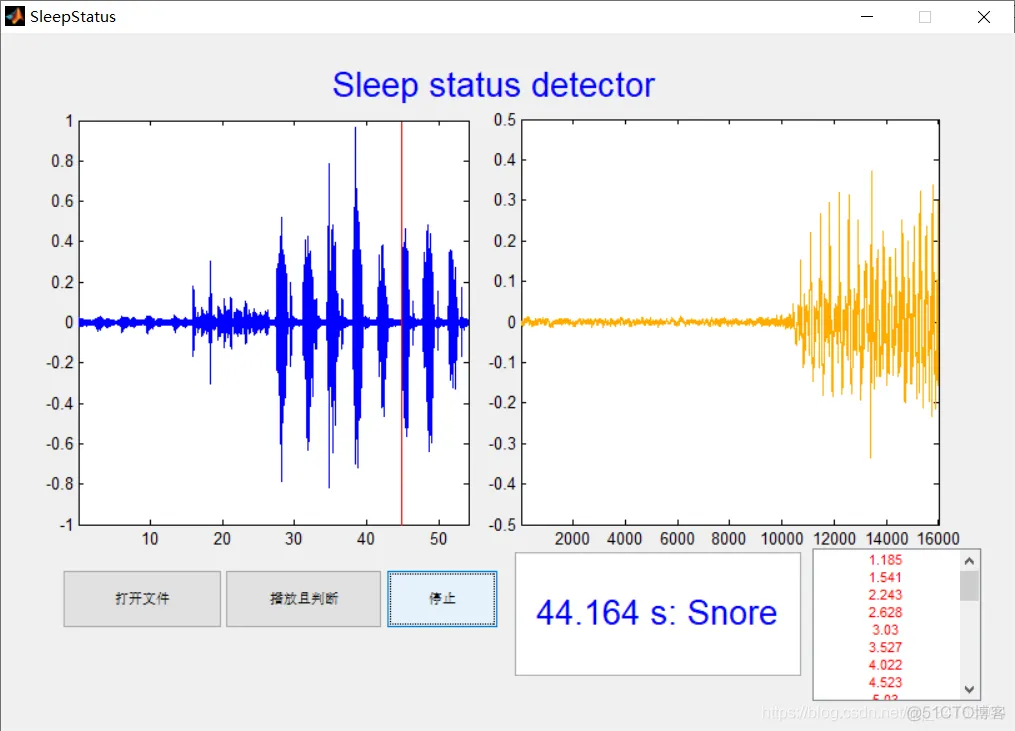
在每个睡眠阶段采集检测目标的睡眠生理信号,睡眠生理信号包括心率信号和呼吸信号;对呼吸信号进行预处理得到呼吸轮廓信号;对心率信号进行预处理得到心率周期的均匀时间序列;分别提取呼吸轮廓信号和均匀时间序列的特征信息,并根据预设的训练样本集获取该睡眠生理信号对应的先验知识;根据特征信息和先验知识以及检测目标的目标特征生成特征集合,并通过主成分分析法从特征集合中确定最优特征子集合得到检测样本;将检测样本与样本集训练得到的检测模型进行匹配,并根据匹配结果输出睡眠呼吸障碍检测信息。
function varargout = SleepStatus(varargin)
% SLEEPSTATUS MATLAB code for SleepStatus.fig
%      SLEEPSTATUS, by itself, creates a new SLEEPSTATUS or raises the existing
%      singleton*.
%
%      H = SLEEPSTATUS returns the handle to a new SLEEPSTATUS or the handle to
%      the existing singleton*.
%
%      SLEEPSTATUS('CALLBACK',hObject,eventData,handles,...) calls the local
%      function named CALLBACK in SLEEPSTATUS.M with the given input arguments.
%
%      SLEEPSTATUS('Property','Value',...) creates a new SLEEPSTATUS or raises the
%      existing singleton*.  Starting from the left, property value pairs are
%      applied to the GUI before SleepStatus_OpeningFcn gets called.  An
%      unrecognized property name or invalid value makes property application
%      stop.  All inputs are passed to SleepStatus_OpeningFcn via varargin.
%
%      *See GUI Options on GUIDE's Tools menu.  Choose "GUI allows only one
%      instance to run (singleton)".
%
% See also: GUIDE, GUIDATA, GUIHANDLES

% Edit the above text to modify the response to help SleepStatus

% Last Modified by GUIDE v2.5 21-Oct-2020 17:16:55

% Begin initialization code - DO NOT EDIT
gui_Singleton = 1;
gui_State = struct('gui_Name',       mfilename, ...
                   'gui_Singleton',  gui_Singleton, ...
                   'gui_OpeningFcn', @SleepStatus_OpeningFcn, ...
                   'gui_OutputFcn',  @SleepStatus_OutputFcn, ...
                   'gui_LayoutFcn',  [] , ...
                   'gui_Callback',   []);
if nargin && ischar(varargin{1})
    gui_State.gui_Callback = str2func(varargin{1});
end

if nargout
    [varargout{1:nargout}] = gui_mainfcn(gui_State, varargin{:});
else
    gui_mainfcn(gui_State, varargin{:});
end
% End initialization code - DO NOT EDIT


% --- Executes just before SleepStatus is made visible.
function SleepStatus_OpeningFcn(hObject, eventdata, handles, varargin)
% This function has no output args, see OutputFcn.
% hObject    handle to figure
% eventdata  reserved - to be defined in a future version of MATLAB
% handles    structure with handles and user data (see GUIDATA)
% varargin   command line arguments to SleepStatus (see VARARGIN)

% Choose default command line output for SleepStatus
handles.output = hObject;

set(handles.text2,'string','Sleep status detector','foregroundcolor','b','fontsize',20);

set(handles.pushbutton1,'String','打开文件');
set(handles.pushbutton2,'String','播放且判断');
set(handles.pushbutton3,'String','停止');

set(handles.edit1,'String','实时判断结果');
set(handles.edit2,'String','过往判断结果');
set(handles.edit2,'Max',10);
set(handles.edit2,'Min',0);

cla(handles.axes1);
cla(handles.axes2);

global player timer_counter accurate_time n_last n_last1 all_result num
player=[];
timer_counter =0;
accurate_time = 0;
n_last =2;
n_last1 =2;
num =1;
all_result={};
% Update handles structure
guidata(hObject, handles);

% UIWAIT makes SleepStatus wait for user response (see UIRESUME)
% uiwait(handles.figure1);


% --- Outputs from this function are returned to the command line.
function varargout = SleepStatus_OutputFcn(hObject, eventdata, handles)
% varargout  cell array for returning output args (see VARARGOUT);
% hObject    handle to figure
% eventdata  reserved - to be defined in a future version of MATLAB
% handles    structure with handles and user data (see GUIDATA)

% Get default command line output from handles structure
varargout{1} = handles.output;


% --- Executes on button press in pushbutton1.
function pushbutton1_Callback(hObject, eventdata, handles)
% hObject    handle to pushbutton1 (see GCBO)
% eventdata  reserved - to be defined in a future version of MATLAB
% handles    structure with handles and user data (see GUIDATA)
global wavfilename timer_counter all_result num
[FileName,PathName] = uigetfile('*.wav','Select the wav-file');
if FileName==0
    wavfilename =[];
    return
end
wavfilename = [PathName,FileName];
[x,fs] = audioread(wavfilename);
x = mean(x,2);
axes(handles.axes1);
plot(x);
ylim([-1 1]);
timer_counter = 0;
accurate_time  =0;
all_result={};
set(handles.edit2,'string','');
num = 1;

% --- Executes on button press in pushbutton2.
function pushbutton2_Callback(hObject, eventdata, handles)
% hObject    handle to pushbutton2 (see GCBO)
% eventdata  reserved - to be defined in a future version of MATLAB
% handles    structure with handles and user data (see GUIDATA)
global wavfilename tAxis player myStruct start_minute start_seconds
if isempty(wavfilename)
    return
end
%default

durT = 30*60; %seconds
fs = 32000;
durS = fs*durT; %samples

[x,fs] = audioread(wavfilename);
x = mean(x,2);
durT = size(x,1)/fs;
durS = size(x,1);

dt = 1/fs;
tAxis = dt:dt:durT;

frameRate = 25; %fps
frameT = 1/frameRate;

mag = 1;

axes(handles.axes1);
cla(handles.axes1);
plot(tAxis, x);
ylim([-mag mag])
xlim([0 durT])
xlabel('Time [s]')

playHeadLoc = 0;
% hold on;
ax = plot([0 playHeadLoc], [-mag mag], 'r', 'LineWidth', 2);

player = audioplayer(x, fs);
myStruct.playHeadLoc = playHeadLoc;
myStruct.frameT = frameT;
myStruct.ax1 = handles.axes1;
myStruct.ax2 = handles.axes2;
myStruct.edit1 = handles.edit1;
myStruct.edit2 = handles.edit2;
tmr1 = timer('ExecutionMode', 'FixedRate', ...
    'Period', 0.5, ...
    'TimerFcn', {@timerCallback});
% tmr2 = timer('ExecutionMode', 'FixedRate', ...
%     'Period', 0.1, ...
%     'TimerFcn', {@timerCallback2});
handles.timer1 = tmr1;
% handles.timer2 = tmr2;

guidata(hObject, handles);

start_time = clock();
start_seconds = start_time(6);
start_minute = start_time(5);

start(tmr1);
% start(tmr2);

playblocking(player);
% play(player);
if ~isplaying(player)
    stop(handles.timer1);
%     stop(handles.timer2);
end

% function timerCallback2(hObj, eventdata)
%     global accurate_time
%     accurate_time = accurate_time + 0.1;


function timerCallback(hObj, eventdata)
 global wavfilename myStruct tAxis timer_counter accurate_time start_minute start_seconds n_last n_last1 all_result num
[x1,fs] = audioread(wavfilename);
x1= mean(x1,2);
length_max = length(x1);

% timer_counter = accurate_time;

start_time = clock();
seconds = start_time(6);
minute = start_time(5);

timer_counter = (minute*60+seconds)-(start_minute*60+start_seconds);
% disp(timer_counter)
axes(myStruct.ax1);
plot(tAxis,x1);
line([timer_counter timer_counter],[-1 1],'color','r');

axis([tAxis(1) tAxis(end)  -1 1]);

time1 = timer_counter;
time2 = time1 + 1;%1s

idx1 = fix(fs*time1);
idx2 = fix(fs*time2);
if (idx1<1)
    idx1 = 1;
end
if(idx1>=length_max)
    idx1 = length_max;
end
if(idx2>=length_max)
    idx2 = length_max;
end
if(idx1>=idx2)
    return
end
x1 = x1([idx1:idx2]);
axes(myStruct.ax2);
plot(x1,'color',[1, 0.6732, 0]);
axis([1 1*fs+1 -.5 .5]);

%判断结果
load hmm.mat
addpath (genpath('HMMall'),'-end');

warning('off');
class_folder={'NormalBreathe','FastBreathe','Snore'};
ResultStr = class_folder;
k = x1;
datacell = MFCC(k,fs);
% size(datacell)
datacell = datacell';
    for j=1:size(hmm,2)
         HMM = hmm{j};
        loglik(j) = mhmm_logprob(datacell,HMM.prior, HMM.transmat, HMM.mu, HMM.Sigma, HMM.mixmat);%计算概率
    end

[d,n] = max(loglik);

% fprintf('文件名:%s,识别结果:%s\n', [class_folder{i},'\\',fname],char(ResultStr{n}));
n_judge = n_last1;%延迟1秒
if n_judge ==1
    set(myStruct.edit1,'string',[num2str(time1),' s: ',char(ResultStr{n_judge})]);
    set(myStruct.edit1,'string',[num2str(time1),' s: ',char(ResultStr{n_judge})]);
    set(myStruct.edit1,'foregroundcolor','r');
    set(myStruct.edit1,'fontsize',20);
    all_result{num} = num2str(time1);
    num = num+1;
    set(myStruct.edit2,'string',all_result);
    set(myStruct.edit2,'foregroundcolor','r');
elseif(n_judge==2)
    set(myStruct.edit1,'string',[num2str(time1),' s: ',char(ResultStr{n_judge})]);
    set(myStruct.edit1,'foregroundcolor','g');
    set(myStruct.edit1,'fontsize',20);
else
    set(myStruct.edit1,'string',[num2str(time1),' s: ',char(ResultStr{n_judge})]);
    set(myStruct.edit1,'foregroundcolor','b');
    set(myStruct.edit1,'fontsize',20);
end
n_last1 = n_last;
n_last = n; %结果留着下下次显示

rmpath (genpath('HMMall'));

warning('on');
% timer_counter = accurate_time;
% timer_counter = timer_counter + 0.5;


function edit1_Callback(hObject, eventdata, handles)
% hObject    handle to edit1 (see GCBO)
% eventdata  reserved - to be defined in a future version of MATLAB
% handles    structure with handles and user data (see GUIDATA)

% Hints: get(hObject,'String') returns contents of edit1 as text
%        str2double(get(hObject,'String')) returns contents of edit1 as a double


% --- Executes during object creation, after setting all properties.
function edit1_CreateFcn(hObject, eventdata, handles)
% hObject    handle to edit1 (see GCBO)
% eventdata  reserved - to be defined in a future version of MATLAB
% handles    empty - handles not created until after all CreateFcns called

% Hint: edit controls usually have a white background on Windows.
%       See ISPC and COMPUTER.
if ispc && isequal(get(hObject,'BackgroundColor'), get(0,'defaultUicontrolBackgroundColor'))
    set(hObject,'BackgroundColor','white');
end


% --- Executes on button press in pushbutton3.
function pushbutton3_Callback(hObject, eventdata, handles)
% hObject    handle to pushbutton3 (see GCBO)
% eventdata  reserved - to be defined in a future version of MATLAB
% handles    structure with handles and user data (see GUIDATA)
global player
if ~isempty(player)
    stop(player);
    stop(handles.timer1);
%     stop(handles.timer2);
end


% --- Executes when user attempts to close figure1.
function figure1_CloseRequestFcn(hObject, eventdata, handles)
% hObject    handle to figure1 (see GCBO)
% eventdata  reserved - to be defined in a future version of MATLAB
% handles    structure with handles and user data (see GUIDATA)

% Hint: delete(hObject) closes the figure
delete(hObject);
global player
if ~isempty(player)
    stop(player);
    stop(handles.timer1);
%     stop(handles.timer2);
end


function edit2_Callback(hObject, eventdata, handles)
% hObject    handle to edit2 (see GCBO)
% eventdata  reserved - to be defined in a future version of MATLAB
% handles    structure with handles and user data (see GUIDATA)

% Hints: get(hObject,'String') returns contents of edit2 as text
%        str2double(get(hObject,'String')) returns contents of edit2 as a double


% --- Executes during object creation, after setting all properties.
function edit2_CreateFcn(hObject, eventdata, handles)
% hObject    handle to edit2 (see GCBO)
% eventdata  reserved - to be defined in a future version of MATLAB
% handles    empty - handles not created until after all CreateFcns called

% Hint: edit controls usually have a white background on Windows.
%       See ISPC and COMPUTER.
if ispc && isequal(get(hObject,'BackgroundColor'), get(0,'defaultUicontrolBackgroundColor'))
    set(hObject,'BackgroundColor','white');
end- 1.
- 2.
- 3.
- 4.
- 5.
- 6.
- 7.
- 8.
- 9.
- 10.
- 11.
- 12.
- 13.
- 14.
- 15.
- 16.
- 17.
- 18.
- 19.
- 20.
- 21.
- 22.
- 23.
- 24.
- 25.
- 26.
- 27.
- 28.
- 29.
- 30.
- 31.
- 32.
- 33.
- 34.
- 35.
- 36.
- 37.
- 38.
- 39.
- 40.
- 41.
- 42.
- 43.
- 44.
- 45.
- 46.
- 47.
- 48.
- 49.
- 50.
- 51.
- 52.
- 53.
- 54.
- 55.
- 56.
- 57.
- 58.
- 59.
- 60.
- 61.
- 62.
- 63.
- 64.
- 65.
- 66.
- 67.
- 68.
- 69.
- 70.
- 71.
- 72.
- 73.
- 74.
- 75.
- 76.
- 77.
- 78.
- 79.
- 80.
- 81.
- 82.
- 83.
- 84.
- 85.
- 86.
- 87.
- 88.
- 89.
- 90.
- 91.
- 92.
- 93.
- 94.
- 95.
- 96.
- 97.
- 98.
- 99.
- 100.
- 101.
- 102.
- 103.
- 104.
- 105.
- 106.
- 107.
- 108.
- 109.
- 110.
- 111.
- 112.
- 113.
- 114.
- 115.
- 116.
- 117.
- 118.
- 119.
- 120.
- 121.
- 122.
- 123.
- 124.
- 125.
- 126.
- 127.
- 128.
- 129.
- 130.
- 131.
- 132.
- 133.
- 134.
- 135.
- 136.
- 137.
- 138.
- 139.
- 140.
- 141.
- 142.
- 143.
- 144.
- 145.
- 146.
- 147.
- 148.
- 149.
- 150.
- 151.
- 152.
- 153.
- 154.
- 155.
- 156.
- 157.
- 158.
- 159.
- 160.
- 161.
- 162.
- 163.
- 164.
- 165.
- 166.
- 167.
- 168.
- 169.
- 170.
- 171.
- 172.
- 173.
- 174.
- 175.
- 176.
- 177.
- 178.
- 179.
- 180.
- 181.
- 182.
- 183.
- 184.
- 185.
- 186.
- 187.
- 188.
- 189.
- 190.
- 191.
- 192.
- 193.
- 194.
- 195.
- 196.
- 197.
- 198.
- 199.
- 200.
- 201.
- 202.
- 203.
- 204.
- 205.
- 206.
- 207.
- 208.
- 209.
- 210.
- 211.
- 212.
- 213.
- 214.
- 215.
- 216.
- 217.
- 218.
- 219.
- 220.
- 221.
- 222.
- 223.
- 224.
- 225.
- 226.
- 227.
- 228.
- 229.
- 230.
- 231.
- 232.
- 233.
- 234.
- 235.
- 236.
- 237.
- 238.
- 239.
- 240.
- 241.
- 242.
- 243.
- 244.
- 245.
- 246.
- 247.
- 248.
- 249.
- 250.
- 251.
- 252.
- 253.
- 254.
- 255.
- 256.
- 257.
- 258.
- 259.
- 260.
- 261.
- 262.
- 263.
- 264.
- 265.
- 266.
- 267.
- 268.
- 269.
- 270.
- 271.
- 272.
- 273.
- 274.
- 275.
- 276.
- 277.
- 278.
- 279.
- 280.
- 281.
- 282.
- 283.
- 284.
- 285.
- 286.
- 287.
- 288.
- 289.
- 290.
- 291.
- 292.
- 293.
- 294.
- 295.
- 296.
- 297.
- 298.
- 299.
- 300.
- 301.
- 302.
- 303.
- 304.
- 305.
- 306.
- 307.
- 308.
- 309.
- 310.
- 311.
- 312.
- 313.
- 314.
- 315.
- 316.
- 317.
- 318.
- 319.
- 320.
- 321.
- 322.
- 323.
- 324.
- 325.
- 326.
- 327.
- 328.
- 329.
- 330.
- 331.
- 332.
- 333.
- 334.
- 335.
- 336.
- 337.
- 338.
- 339.
- 340.
- 341.
- 342.
- 343.
- 344.
- 345.
- 346.
- 347.
- 348.
- 349.
- 350.
- 351.
- 352.
- 353.
- 354.
- 355.
- 356.
- 357.
- 358.





 扫一扫
扫一扫


 337
337

 被折叠的 条评论
为什么被折叠?
被折叠的 条评论
为什么被折叠?
 到【灌水乐园】发言





