


1 历史
最初的元胞自动机是由冯 · 诺依曼在 1950 年代为模拟生物 细胞的自我复制而提出的. 但是并未受到学术界重视.
1970 年, 剑桥大学的约翰 · 何顿 · 康威设计了一个电脑游戏 “生命游戏” 后, 元胞自动机才吸引了科学家们的注意.
1983 年 S.Wolfram 发表了一系列论文. 对初等元胞机 256 种 规则所产生的模型进行了深入研究, 并用熵来描述其演化行 为, 将细胞自动机分为平稳型, 周期型, 混沌型和复杂型.
2 应用
- 社会学: 元胞自动机经常用于研究个人行为的社会性, 流行 现象. 例如人口迁移, 公共场所内人员的疏散, 流行病传播.
- 图形学: 元胞自动机以其特有的结构的简单性, 内在的并行 性以及复杂计算的能力成为密码学中研究的热点方向之一
- 物理学: 在物理学中, 元胞自动机已成功的应用于流体, 磁 场, 电场, 热传导等的模拟. 例如格子气自动机.
3 一维元胞自动机——交通规则
定义:
-
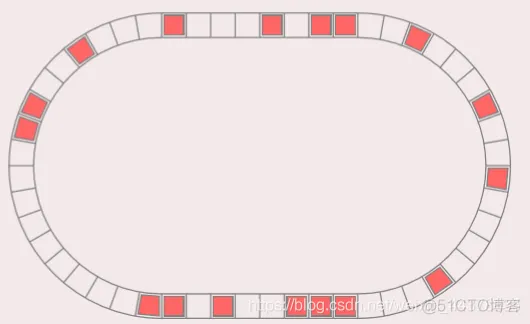
元胞分布于一维线性网格上.
-
元胞仅具有车和空两种状态.
-
元胞状态由周围两邻居决定.
规则:研究的变化对象只是中间的格子,后面的车子要比前面的车子起步延迟1格。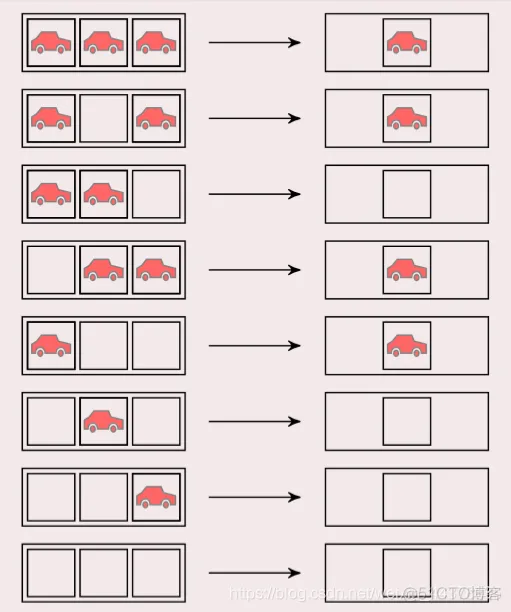
4 二维元胞自动机——生命游戏
定义:
-
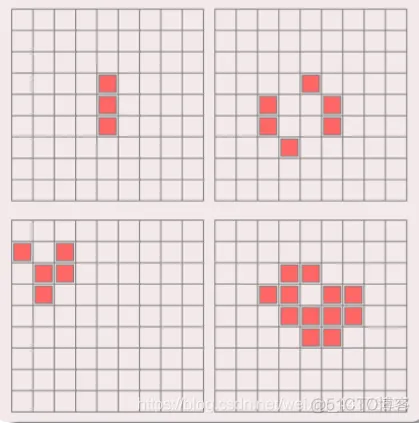
元胞分布于二维方型网格上.
-
元胞仅具有生和死两种状态.
-
元胞状态由周围八邻居决定.
规则: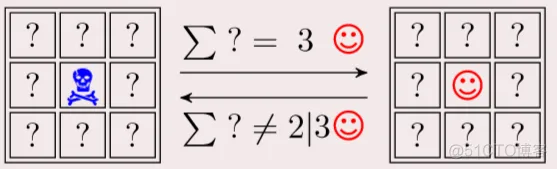
骷髅:死亡;笑脸:生存
周围有三个笑脸,则中间变为笑脸
少于两个笑脸或者多于三个,中间则变死亡。
5 什么是元胞自动机
离散的系统: 元胞是定义在有限的时间和空间上的, 并且元 胞的状态是有限.
动力学系统: 元胞自动机的举止行为具有动力学特征.
简单与复杂: 元胞自动机用简单规则控制相互作用的元胞 模拟复杂世界.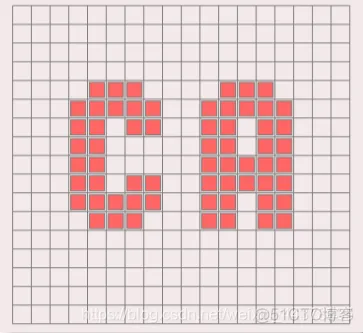
6 构成要素
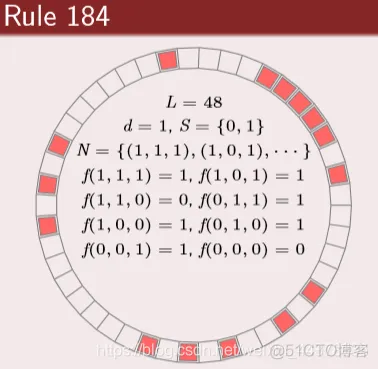 | 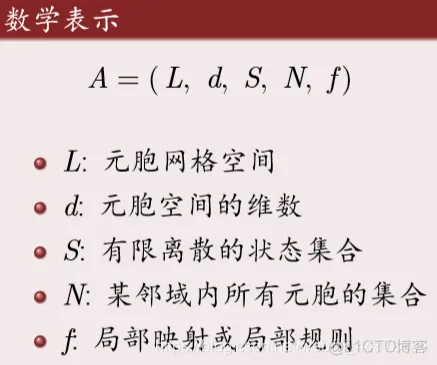 |
(1)元胞 (Cell)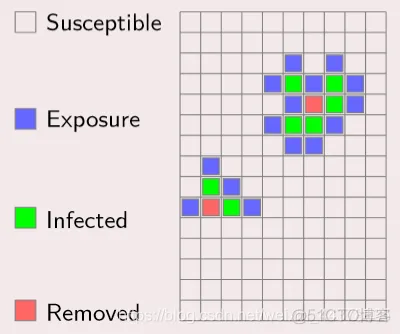
元胞是元胞自动机基本单元:
- 状态: 每一个元胞都有记忆贮存状态的功能.
- 离散: 简单情况下, 元胞只有两种可能状态; 较复杂情况下, 元胞具有多种状态.
- 更新: 元胞的状态都安照动力规则不断更新.
(2)网格 (Lattice)
不同维网格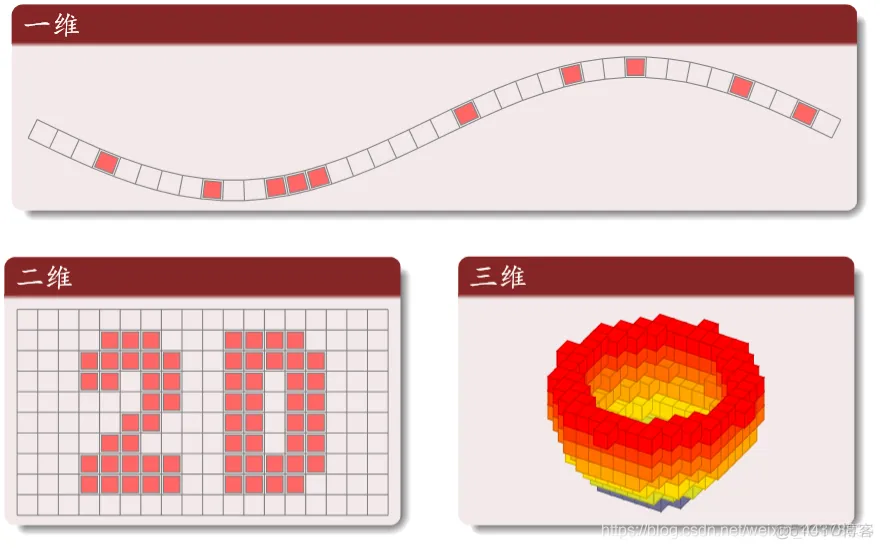
常用二维网格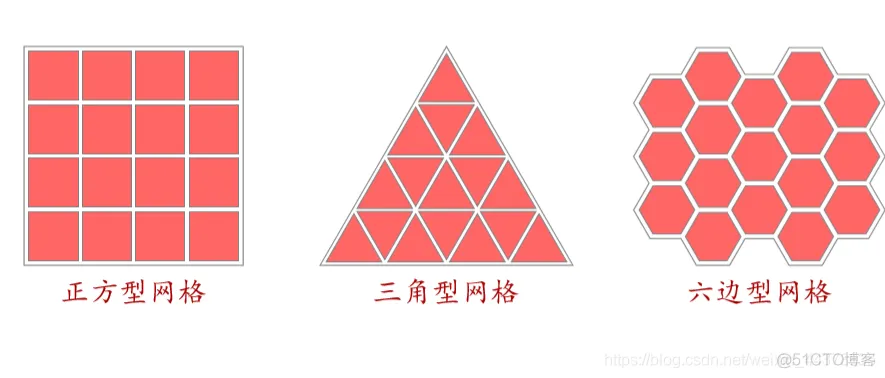
(3)邻居 (Neighborhood)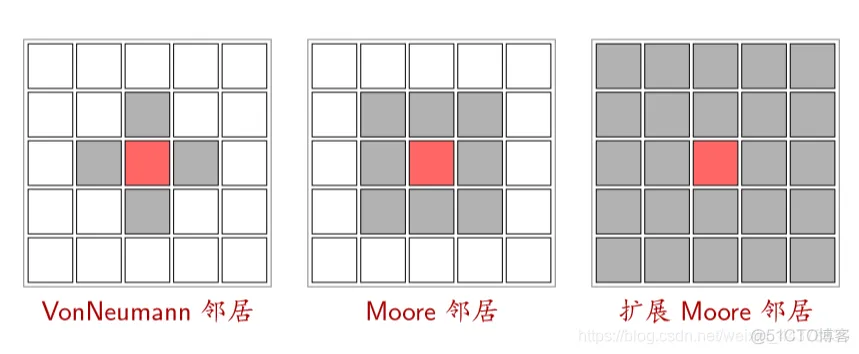
(4)边界 (Boundary)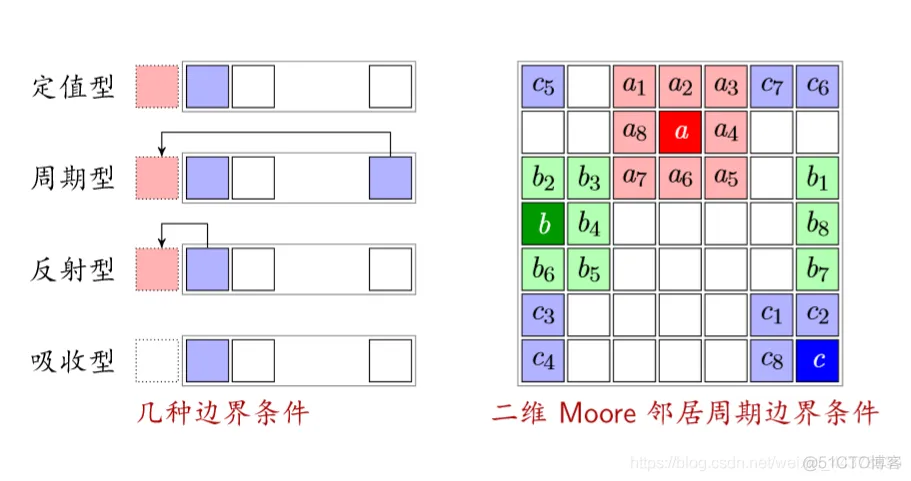
反射型:以自己作为边界的状态
吸收型:不管边界(车开到边界就消失)
(5)规则(状态转移函数)
定义:根据元胞当前状态及其邻居状况确定下一时刻该元胞状态的动力学函数, 简单讲, 就是一个状态转移函数.
分类 :
- 总和型: 某元胞下时刻的状态取决于且仅取决于它所有邻居 的当前状态以及自身的当前状态.
- 合法型: 总和型规则属于合法型规则. 但如果把元胞自动机 的规则限制为总和型, 会使元胞自动机具有局限性.
(6)森林火灾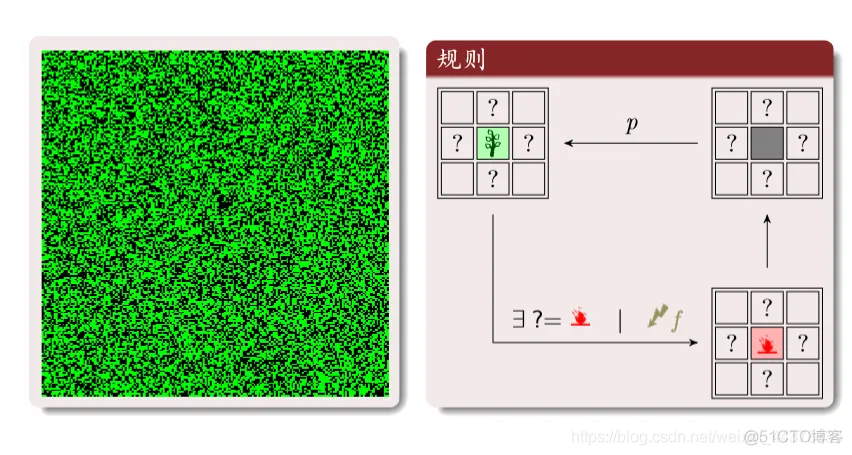
绿色:树木;红色:火;黑色:空地。
三种状态循环转化:
树:周围有火或者被闪电击中就变成火。
空地:以概率p变为树木
理性分析:红为火;灰为空地;绿是树
元胞三种状态的密度和为1
火转化为空地的密度等于空地转换为树的密度(新长出来的树等于烧没的树)
f ff是闪电的概率:远远小于树生成的概率;T s m a x T_{smax}Tsmax是一大群树被火烧的时间尺度
程序实现
周期性边界条件
购进啊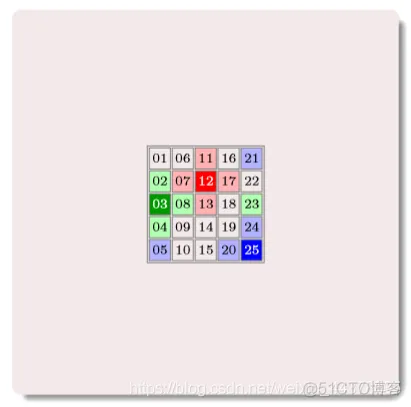
其中的数字为编号
构建邻居矩阵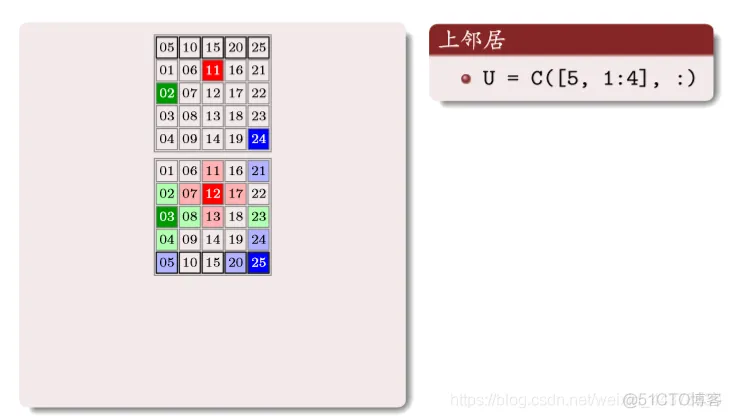
上面矩阵中的数字编号,对应原矩阵相同位置编号的上邻居编号,一 一对应
同样道理: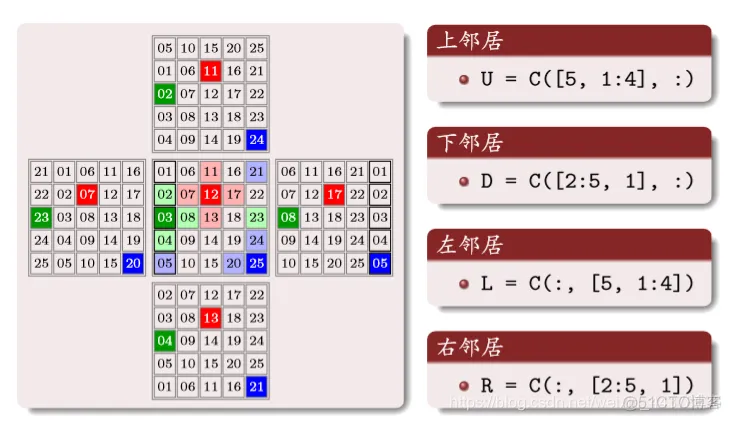
(7)交通概念
车距和密度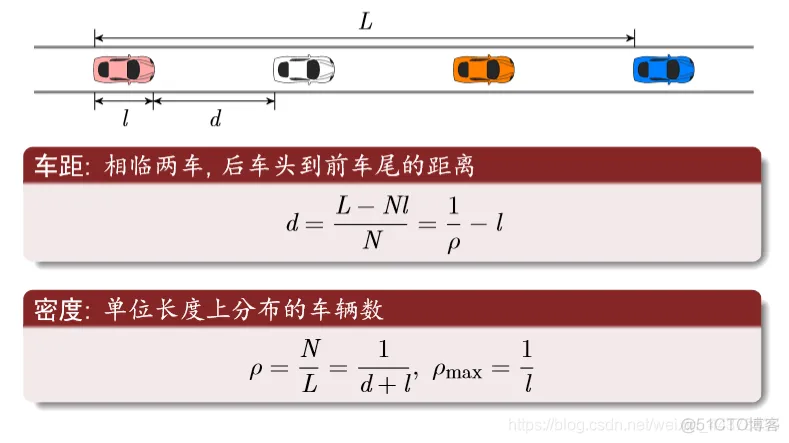
流量方程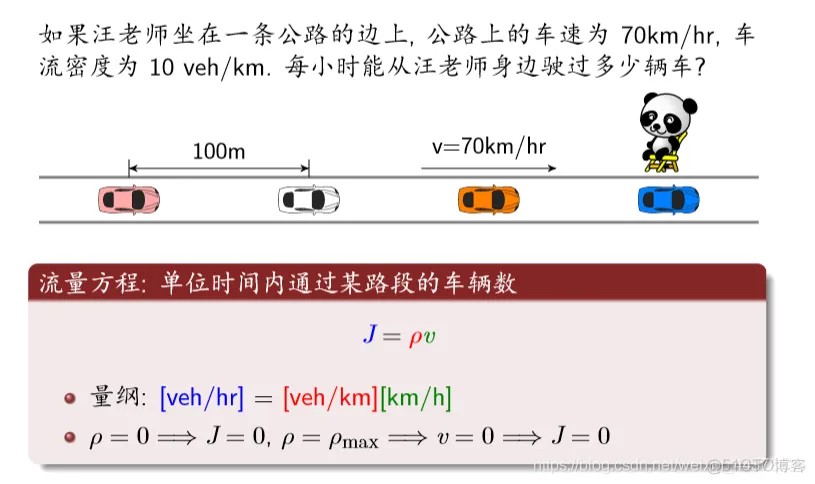
守恒方程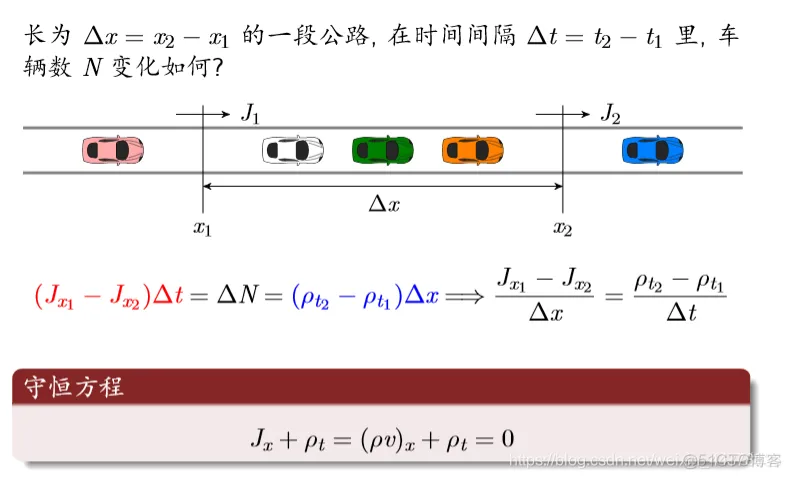
时空轨迹(横轴是空间纵轴为时间)
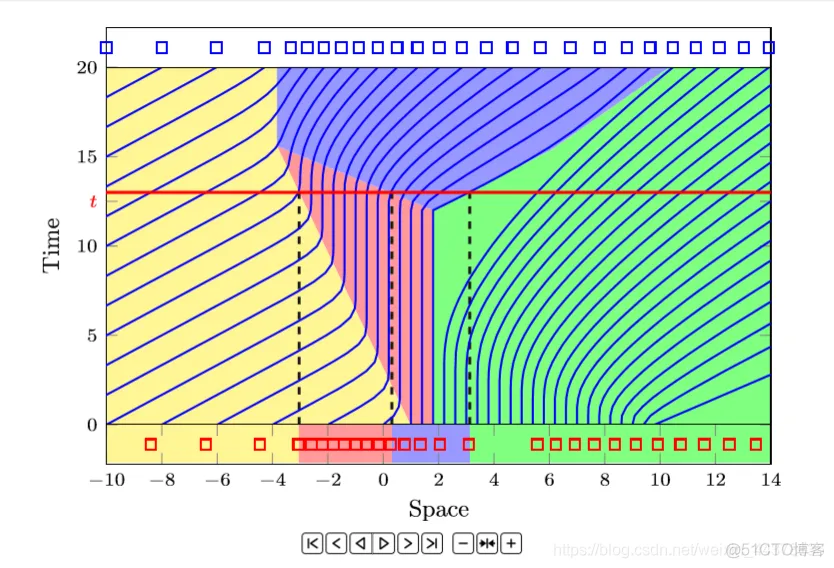
红线横线与蓝色交点表示每个时间车的位置。
如果是竖线则表示车子在该位置对应的时间
宏观连续模型: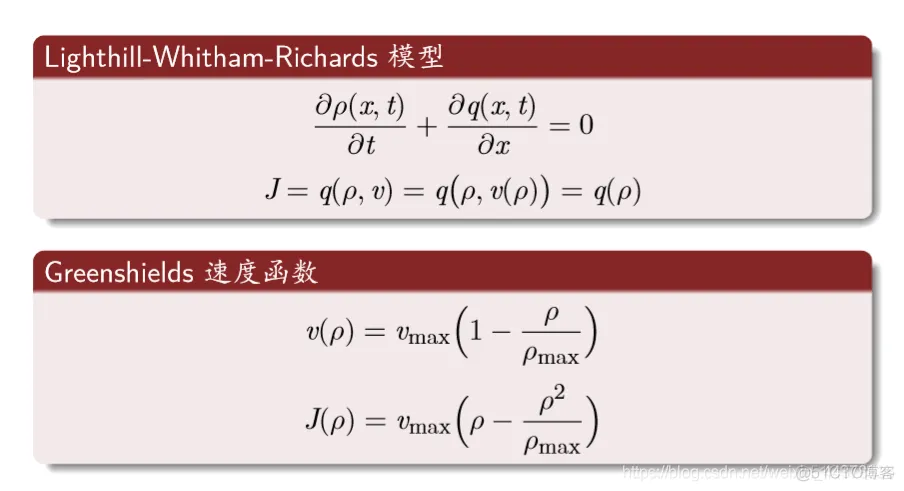 最常用的规则: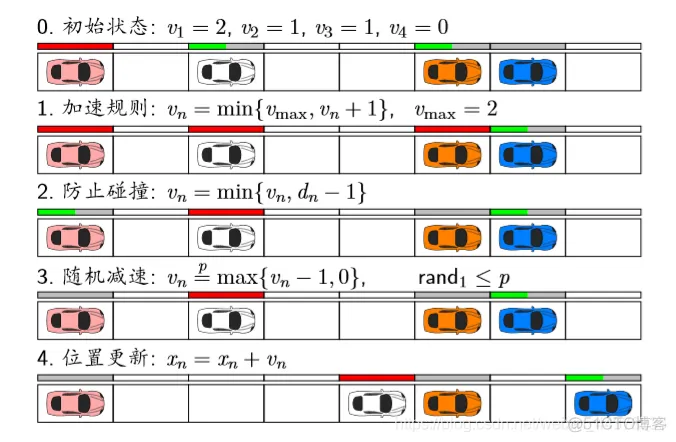
红色条表示速度是满的。
1 加速规则:不能超过v m a x ( 2 格 / s ) v_{max}(2格/s)vmax(2格/s)
2 防止碰撞:不能超过车距
理论分析: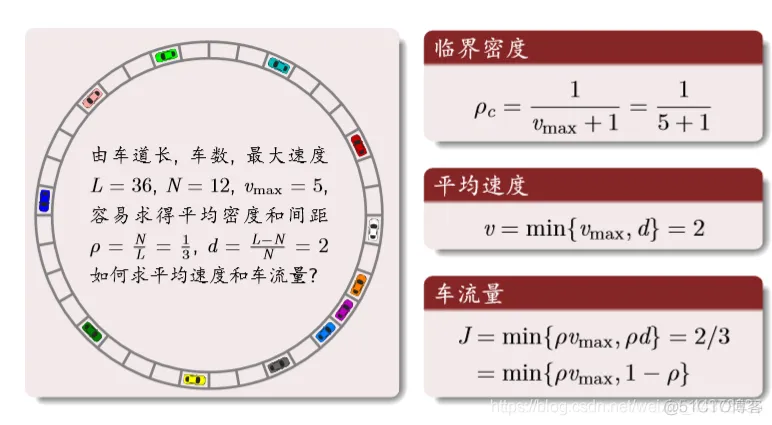
结果分析: 密度与流量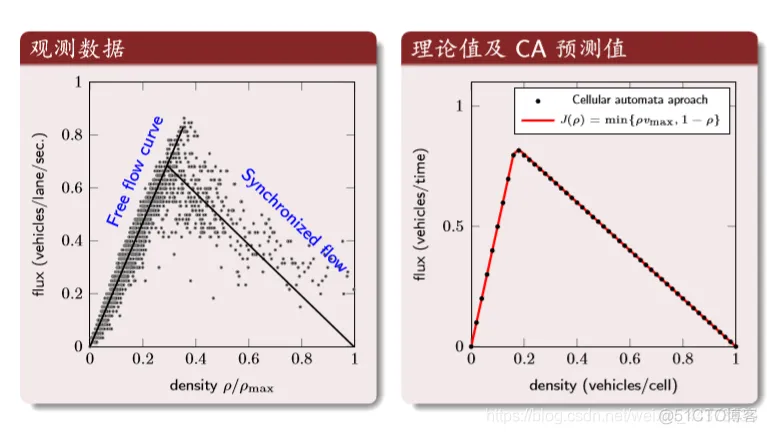
第一个图:横坐标是归一化后的密度,纵坐标是车流量。第二个图:理论值与CA的结果
结果分析: 时空轨迹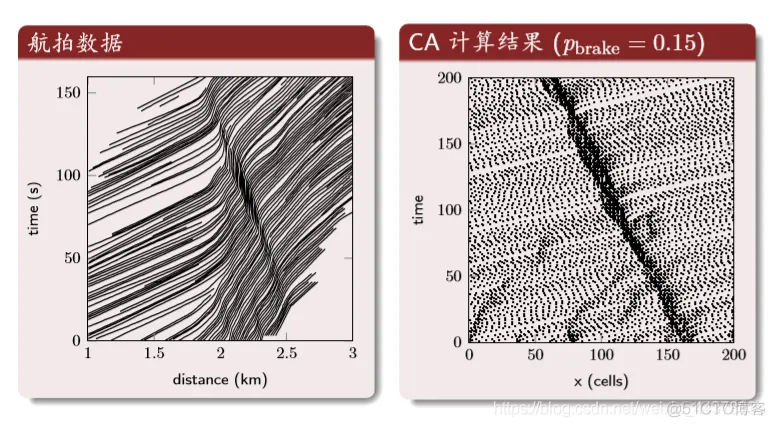
中间的深色区域是交通堵塞的区域。
- 1.
function varargout = renyuanshusan(varargin)

% RENYUANSHUSAN M-file for renyuanshusan.fig

% RENYUANSHUSAN, by itself, creates a new RENYUANSHUSAN or raises the existing

% singleton*.

%

% H = RENYUANSHUSAN returns the handle to a new RENYUANSHUSAN or the handle to

% the existing singleton*.

%

% RENYUANSHUSAN('CALLBACK',hObject,eventData,handles,...) calls the local

% function named CALLBACK in RENYUANSHUSAN.M with the given input arguments.

%

% RENYUANSHUSAN('Property','Value',...) creates a new RENYUANSHUSAN or raises the

% existing singleton*. Starting from the left, property value pairs are

% applied to the GUI before renyuanshusan_OpeningFcn gets called. An

% unrecognized property name or invalid value makes property application

% stop. All inputs are passed to renyuanshusan_OpeningFcn via varargin.

%

% *See GUI Options on GUIDE's Tools menu. Choose "GUI allows only one

% instance to run (singleton)".

%

% See also: GUIDE, GUIDATA, GUIHANDLES


% Edit the above text to modify the response to help renyuanshusan


% Last Modified by GUIDE v2.5 08-Mar-2014 16:52:27


% Begin initialization code - DO NOT EDIT

gui_Singleton = 1;

gui_State = struct('gui_Name', mfilename, ...

'gui_Singleton', gui_Singleton, ...

'gui_OpeningFcn', @renyuanshusan_OpeningFcn, ...

'gui_OutputFcn', @renyuanshusan_OutputFcn, ...

'gui_LayoutFcn', [] , ...

'gui_Callback', []);

if nargin && ischar(varargin{1})

gui_State.gui_Callback = str2func(varargin{1});

end


if nargout

[varargout{1:nargout}] = gui_mainfcn(gui_State, varargin{:});

else

gui_mainfcn(gui_State, varargin{:});

end

% End initialization code - DO NOT EDIT


% --- Executes just before renyuanshusan is made visible.

function renyuanshusan_OpeningFcn(hObject, eventdata, handles, varargin)

% This function has no output args, see OutputFcn.

% hObject handle to figure

% eventdata reserved - to be defined in a future version of MATLAB

% handles structure with handles and user data (see GUIDATA)

% varargin command line arguments to renyuanshusan (see VARARGIN)


% Choose default command line output for renyuanshusan

handles.output = hObject;


% Update handles structure

guidata(hObject, handles);


% UIWAIT makes renyuanshusan wait for user response (see UIRESUME)

% uiwait(handles.figure1);


% --- Outputs from this function are returned to the command line.

function varargout = renyuanshusan_OutputFcn(~, eventdata, handles)

% varargout cell array for returning output args (see VARARGOUT);

% hObject handle to figure

% eventdata reserved - to be defined in a future version of MATLAB

% handles structure with handles and user data (see GUIDATA)


% Get default command line output from handles structure

varargout{1} = handles.output;


function edit1_Callback(~, eventdata, handles)

% hObject handle to edit1 (see GCBO)

% eventdata reserved - to be defined in a future version of MATLAB

% handles structure with handles and user data (see GUIDATA)


% Hints: get(hObject,'String') returns contents of edit1 as text

% str2double(get(hObject,'String')) returns contents of edit1 as a double


% --- Executes during object creation, after setting all properties.

function edit1_CreateFcn(hObject, eventdata, handles)

% hObject handle to edit1 (see GCBO)

% eventdata reserved - to be defined in a future version of MATLAB

% handles empty - handles not created until after all CreateFcns called


% Hint: edit controls usually have a white background on Windows.

% See ISPC and COMPUTER.

if ispc && isequal(get(hObject,'BackgroundColor'), get(0,'defaultUicontrolBackgroundColor'))

set(hObject,'BackgroundColor','white');

end


function edit2_Callback(hObject, eventdata, handles)

% hObject handle to edit2 (see GCBO)

% eventdata reserved - to be defined in a future version of MATLAB

% handles structure with handles and user data (see GUIDATA)


% Hints: get(hObject,'String') returns contents of edit2 as text

% str2double(get(hObject,'String')) returns contents of edit2 as a double


% --- Executes during object creation, after setting all properties.

function edit2_CreateFcn(hObject, eventdata, handles)

% hObject handle to edit2 (see GCBO)

% eventdata reserved - to be defined in a future version of MATLAB

% handles empty - handles not created until after all CreateFcns called


% Hint: edit controls usually have a white background on Windows.

% See ISPC and COMPUTER.

if ispc && isequal(get(hObject,'BackgroundColor'), get(0,'defaultUicontrolBackgroundColor'))

set(hObject,'BackgroundColor','white');

end


function edit3_Callback(hObject, eventdata, handles)

% hObject handle to edit3 (see GCBO)

% eventdata reserved - to be defined in a future version of MATLAB

% handles structure with handles and user data (see GUIDATA)


% Hints: get(hObject,'String') returns contents of edit3 as text

% str2double(get(hObject,'String')) returns contents of edit3 as a double


% --- Executes during object creation, after setting all properties.

function edit3_CreateFcn(hObject, eventdata, handles)

% hObject handle to edit3 (see GCBO)

% eventdata reserved - to be defined in a future version of MATLAB

% handles empty - handles not created until after all CreateFcns called


% Hint: edit controls usually have a white background on Windows.

% See ISPC and COMPUTER.

if ispc && isequal(get(hObject,'BackgroundColor'), get(0,'defaultUicontrolBackgroundColor'))

set(hObject,'BackgroundColor','white');

end


function edit4_Callback(hObject, eventdata, handles)

% hObject handle to edit4 (see GCBO)

% eventdata reserved - to be defined in a future version of MATLAB

% handles structure with handles and user data (see GUIDATA)


% Hints: get(hObject,'String') returns contents of edit4 as text

% str2double(get(hObject,'String')) returns contents of edit4 as a double


% --- Executes during object creation, after setting all properties.

function edit4_CreateFcn(hObject, eventdata, handles)

% hObject handle to edit4 (see GCBO)

% eventdata reserved - to be defined in a future version of MATLAB

% handles empty - handles not created until after all CreateFcns called


% Hint: edit controls usually have a white background on Windows.

% See ISPC and COMPUTER.

if ispc && isequal(get(hObject,'BackgroundColor'), get(0,'defaultUicontrolBackgroundColor'))

set(hObject,'BackgroundColor','white');

end


function edit5_Callback(hObject, eventdata, handles)

% hObject handle to edit5 (see GCBO)

% eventdata reserved - to be defined in a future version of MATLAB

% handles structure with handles and user data (see GUIDATA)


% Hints: get(hObject,'String') returns contents of edit5 as text

% str2double(get(hObject,'String')) returns contents of edit5 as a double


% --- Executes during object creation, after setting all properties.

function edit5_CreateFcn(hObject, eventdata, handles)

% hObject handle to edit5 (see GCBO)

% eventdata reserved - to be defined in a future version of MATLAB

% handles empty - handles not created until after all CreateFcns called


% Hint: edit controls usually have a white background on Windows.

% See ISPC and COMPUTER.

if ispc && isequal(get(hObject,'BackgroundColor'), get(0,'defaultUicontrolBackgroundColor'))

set(hObject,'BackgroundColor','white');

end


function edit6_Callback(hObject, eventdata, handles)

% hObject handle to edit6 (see GCBO)

% eventdata reserved - to be defined in a future version of MATLAB

% handles structure with handles and user data (see GUIDATA)


% Hints: get(hObject,'String') returns contents of edit6 as text

% str2double(get(hObject,'String')) returns contents of edit6 as a double


% --- Executes during object creation, after setting all properties.

function edit6_CreateFcn(hObject, eventdata, handles)

% hObject handle to edit6 (see GCBO)

% eventdata reserved - to be defined in a future version of MATLAB

% handles empty - handles not created until after all CreateFcns called


% Hint: edit controls usually have a white background on Windows.

% See ISPC and COMPUTER.

if ispc && isequal(get(hObject,'BackgroundColor'), get(0,'defaultUicontrolBackgroundColor'))

set(hObject,'BackgroundColor','white');

end


% --- Executes on slider movement.

function slider1_Callback(hObject, eventdata, handles)

% hObject handle to slider1 (see GCBO)

% eventdata reserved - to be defined in a future version of MATLAB

% handles structure with handles and user data (see GUIDATA)


% Hints: get(hObject,'Value') returns position of slider

% get(hObject,'Min') and get(hObject,'Max') to determine range of slider

x=get(hObject,'value');

set(handles.text16,'string',num2str(x));


% --- Executes during object creation, after setting all properties.

function slider1_CreateFcn(hObject, eventdata, handles)

% hObject handle to slider1 (see GCBO)

% eventdata reserved - to be defined in a future version of MATLAB

% handles empty - handles not created until after all CreateFcns called


% Hint: slider controls usually have a light gray background.

if isequal(get(hObject,'BackgroundColor'), get(0,'defaultUicontrolBackgroundColor'))

set(hObject,'BackgroundColor',[.9 .9 .9]);

end


function edit8_Callback(hObject, eventdata, handles)

% hObject handle to edit8 (see GCBO)

% eventdata reserved - to be defined in a future version of MATLAB

% handles structure with handles and user data (see GUIDATA)


% Hints: get(hObject,'String') returns contents of edit8 as text

% str2double(get(hObject,'String')) returns contents of edit8 as a double


% --- Executes during object creation, after setting all properties.

function edit8_CreateFcn(hObject, eventdata, handles)

% hObject handle to edit8 (see GCBO)

% eventdata reserved - to be defined in a future version of MATLAB

% handles empty - handles not created until after all CreateFcns called


% Hint: edit controls usually have a white background on Windows.

% See ISPC and COMPUTER.

if ispc && isequal(get(hObject,'BackgroundColor'), get(0,'defaultUicontrolBackgroundColor'))

set(hObject,'BackgroundColor','white');

end


% --- Executes on slider movement.

function slider2_Callback(hObject, eventdata, handles)

% hObject handle to slider2 (see GCBO)

% eventdata reserved - to be defined in a future version of MATLAB

% handles structure with handles and user data (see GUIDATA)


% Hints: get(hObject,'Value') returns position of slider

% get(hObject,'Min') and get(hObject,'Max') to determine range of slider

x=get(hObject,'value');

set(handles.text18,'string',num2str(x));


% --- Executes during object creation, after setting all properties.

function slider2_CreateFcn(hObject, eventdata, handles)

% hObject handle to slider2 (see GCBO)

% eventdata reserved - to be defined in a future version of MATLAB

% handles empty - handles not created until after all CreateFcns called


% Hint: slider controls usually have a light gray background.

if isequal(get(hObject,'BackgroundColor'), get(0,'defaultUicontrolBackgroundColor'))

set(hObject,'BackgroundColor',[.9 .9 .9]);

end


function edit9_Callback(hObject, eventdata, handles)

% hObject handle to edit9 (see GCBO)

% eventdata reserved - to be defined in a future version of MATLAB

% handles structure with handles and user data (see GUIDATA)


% Hints: get(hObject,'String') returns contents of edit9 as text

% str2double(get(hObject,'String')) returns contents of edit9 as a double


% --- Executes during object creation, after setting all properties.

function edit9_CreateFcn(hObject, eventdata, handles)

% hObject handle to edit9 (see GCBO)

% eventdata reserved - to be defined in a future version of MATLAB

% handles empty - handles not created until after all CreateFcns called


% Hint: edit controls usually have a white background on Windows.

% See ISPC and COMPUTER.

if ispc && isequal(get(hObject,'BackgroundColor'), get(0,'defaultUicontrolBackgroundColor'))

set(hObject,'BackgroundColor','white');

end


% if Pop_beikun> Pop_beikun1;

% Pop_beikun1=Pop_beikun;

set(handles.text27,'string',num2str(Pop_beikun));

% end

if Pop==Pop_beikun||sum(sum(Dst_S))==col*row;

set(handles.text27,'string',num2str(Pop));

break

end

end

hold off

set(handles.text33,'string','仿真结束!!');

return


%%%%%%%%%%%%%%%%%%%%%%

% --- Executes on button press in pushbutton3.

function Exit_S=pushbutton3_Callback(hObject, eventdata, handles)

% hObject handle to pushbutton3 (see GCBO)

% eventdata reserved - to be defined in a future version of MATLAB

% handles structure with handles and user data (see GUIDATA)


function edit11_Callback(hObject, eventdata, handles)

% hObject handle to edit11 (see GCBO)

% eventdata reserved - to be defined in a future version of MATLAB

% handles structure with handles and user data (see GUIDATA)


% Hints: get(hObject,'String') returns contents of edit11 as text

% str2double(get(hObject,'String')) returns contents of edit11 as a double


% --- Executes during object creation, after setting all properties.

function edit11_CreateFcn(hObject, eventdata, handles)

% hObject handle to edit11 (see GCBO)

% eventdata reserved - to be defined in a future version of MATLAB

% handles empty - handles not created until after all CreateFcns called


% Hint: edit controls usually have a white background on Windows.

% See ISPC and COMPUTER.

if ispc && isequal(get(hObject,'BackgroundColor'), get(0,'defaultUicontrolBackgroundColor'))

set(hObject,'BackgroundColor','white');

end


% --- Executes on button press in pushbutton4.

function pushbutton4_Callback(hObject, eventdata, handles,Exit_S)

% hObject handle to pushbutton4 (see GCBO)

% eventdata reserved - to be defined in a future version of MATLAB

% handles structure with handles and user data (see GUIDATA)

close


% --- Executes on button press in pushbutton5.

function pushbutton5_Callback(hObject, eventdata, handles)

% hObject handle to pushbutton5 (see GCBO)

% eventdata reserved - to be defined in a future version of MATLAB

% handles structure with handles and user data (see GUIDATA)

pause off- 1.
- 2.
- 3.
- 4.
- 5.
- 6.
- 7.
- 8.
- 9.
- 10.
- 11.
- 12.
- 13.
- 14.
- 15.
- 16.
- 17.
- 18.
- 19.
- 20.
- 21.
- 22.
- 23.
- 24.
- 25.
- 26.
- 27.
- 28.
- 29.
- 30.
- 31.
- 32.
- 33.
- 34.
- 35.
- 36.
- 37.
- 38.
- 39.
- 40.
- 41.
- 42.
- 43.
- 44.
- 45.
- 46.
- 47.
- 48.
- 49.
- 50.
- 51.
- 52.
- 53.
- 54.
- 55.
- 56.
- 57.
- 58.
- 59.
- 60.
- 61.
- 62.
- 63.
- 64.
- 65.
- 66.
- 67.
- 68.
- 69.
- 70.
- 71.
- 72.
- 73.
- 74.
- 75.
- 76.
- 77.
- 78.
- 79.
- 80.
- 81.
- 82.
- 83.
- 84.
- 85.
- 86.
- 87.
- 88.
- 89.
- 90.
- 91.
- 92.
- 93.
- 94.
- 95.
- 96.
- 97.
- 98.
- 99.
- 100.
- 101.
- 102.
- 103.
- 104.
- 105.
- 106.
- 107.
- 108.
- 109.
- 110.
- 111.
- 112.
- 113.
- 114.
- 115.
- 116.
- 117.
- 118.
- 119.
- 120.
- 121.
- 122.
- 123.
- 124.
- 125.
- 126.
- 127.
- 128.
- 129.
- 130.
- 131.
- 132.
- 133.
- 134.
- 135.
- 136.
- 137.
- 138.
- 139.
- 140.
- 141.
- 142.
- 143.
- 144.
- 145.
- 146.
- 147.
- 148.
- 149.
- 150.
- 151.
- 152.
- 153.
- 154.
- 155.
- 156.
- 157.
- 158.
- 159.
- 160.
- 161.
- 162.
- 163.
- 164.
- 165.
- 166.
- 167.
- 168.
- 169.
- 170.
- 171.
- 172.
- 173.
- 174.
- 175.
- 176.
- 177.
- 178.
- 179.
- 180.
- 181.
- 182.
- 183.
- 184.
- 185.
- 186.
- 187.
- 188.
- 189.
- 190.
- 191.
- 192.
- 193.
- 194.
- 195.
- 196.
- 197.
- 198.
- 199.
- 200.
- 201.
- 202.
- 203.
- 204.
- 205.
- 206.
- 207.
- 208.
- 209.
- 210.
- 211.
- 212.
- 213.
- 214.
- 215.
- 216.
- 217.
- 218.
- 219.
- 220.
- 221.
- 222.
- 223.
- 224.
- 225.
- 226.
- 227.
- 228.
- 229.
- 230.
- 231.
- 232.
- 233.
- 234.
- 235.
- 236.
- 237.
- 238.
- 239.
- 240.
- 241.
- 242.
- 243.
- 244.
- 245.
- 246.
- 247.
- 248.
- 249.
- 250.
- 251.
- 252.
- 253.
- 254.
- 255.
- 256.
- 257.
- 258.
- 259.
- 260.
- 261.
- 262.
- 263.
- 264.
- 265.
- 266.
- 267.
- 268.
- 269.
- 270.
- 271.
- 272.
- 273.
- 274.
- 275.
- 276.
- 277.
- 278.
- 279.
- 280.
- 281.
- 282.
- 283.
- 284.
- 285.
- 286.
- 287.
- 288.
- 289.
- 290.
- 291.
- 292.
- 293.
- 294.
- 295.
- 296.
- 297.
- 298.
- 299.
- 300.
- 301.
- 302.
- 303.
- 304.
- 305.
- 306.
- 307.
- 308.
- 309.
- 310.
- 311.
- 312.
- 313.
- 314.
- 315.
- 316.
- 317.
- 318.
- 319.
- 320.
- 321.
- 322.
- 323.
- 324.
- 325.
- 326.
- 327.
- 328.
- 329.
- 330.
- 331.
- 332.
- 333.
- 334.
- 335.
- 336.
- 337.
- 338.
- 339.
- 340.
- 341.
- 342.
- 343.
- 344.
- 345.
- 346.
- 347.
- 348.
- 349.
- 350.
- 351.
- 352.
- 353.
- 354.
- 355.
- 356.
- 357.
- 358.
- 359.
- 360.
- 361.
- 362.
- 363.
- 364.
- 365.
- 366.
- 367.
- 368.
- 369.
- 370.
- 371.
- 372.
- 373.
- 374.
- 375.
- 376.
- 377.
- 378.
- 379.
- 380.
- 381.
- 382.
- 383.
- 384.
- 385.
- 386.
- 387.
- 388.
- 389.
- 390.
- 391.
- 392.
- 393.
- 394.
- 395.
- 396.
- 397.
- 398.
- 399.
- 400.
- 401.
- 402.
- 403.
- 404.
- 405.
- 406.
- 407.
- 408.
- 409.
- 410.
- 411.
- 412.
- 413.
- 414.
- 415.
- 416.
- 417.
- 418.
- 419.
- 420.
- 421.
- 422.
- 423.
- 424.
- 425.
- 426.
- 427.
- 428.
- 429.
- 430.
- 431.
- 432.
- 433.
- 434.
- 435.
- 436.
- 437.
- 438.
- 439.
- 440.
- 441.
- 442.
- 443.
- 444.
- 445.
- 446.
- 447.
- 448.
- 449.
- 450.
- 451.
- 452.
- 453.
- 454.
- 455.
- 456.
- 457.
- 458.
- 459.
- 460.
- 461.
- 462.
- 463.
- 464.
- 465.
- 466.
- 467.
- 468.
- 469.
- 470.
- 471.
- 472.
- 473.
- 474.
- 475.
- 476.
- 477.
- 478.
- 479.
- 480.
- 481.
- 482.
- 483.
- 484.
- 485.
- 486.
- 487.
- 488.
- 489.
- 490.
- 491.
- 492.
- 493.
- 494.
- 495.
- 496.
- 497.
- 498.
- 499.
- 500.
- 501.
- 502.
- 503.
- 504.
- 505.
- 506.
- 507.
- 508.
- 509.
- 510.
- 511.
- 512.
- 513.
- 514.
- 515.
- 516.
- 517.
- 518.
- 519.
- 520.
- 521.
- 522.
- 523.
- 524.
- 525.
- 526.
- 527.
- 528.
- 529.
- 530.
- 531.
- 532.
- 533.
- 534.
- 535.
- 536.
- 537.
- 538.
- 539.
- 540.
- 541.
- 542.
- 543.
- 544.
- 545.
- 546.
- 547.
- 548.
- 549.
- 550.
- 551.
- 552.
- 553.
- 554.
- 555.
- 556.
- 557.
- 558.
- 559.
- 560.
- 561.
- 562.
- 563.
- 564.
- 565.
- 566.
- 567.
- 568.
- 569.
- 570.
- 571.
- 572.
- 573.
- 574.
- 575.
- 576.
- 577.
- 578.
- 579.
- 580.
- 581.
- 582.
- 583.
- 584.
- 585.
- 586.
- 587.
- 588.
- 589.
- 590.
- 591.
- 592.
- 593.
- 594.
- 595.
- 596.
- 597.
- 598.
- 599.
- 600.
- 601.
- 602.
- 603.
- 604.
- 605.
- 606.
- 607.
- 608.
- 609.
- 610.
- 611.
- 612.
- 613.
- 614.
- 615.
- 616.
- 617.
- 618.
- 619.
- 620.
- 621.
- 622.
- 623.
- 624.
- 625.
- 626.
- 627.
- 628.
- 629.
- 630.





 扫一扫
扫一扫


 259
259

 被折叠的 条评论
为什么被折叠?
被折叠的 条评论
为什么被折叠?
 到【灌水乐园】发言





