



五子棋html网页版源代码
<!DOCTYPE html>
<html>
<head>
    <title>五子棋游戏</title>
    <style>
        body {
            display: flex;
            justify-content: center;
            align-items: center;
            height: 100vh;
            margin: 0;
            background-color: #f0d9b5;
        }

        #game-container {
            text-align: center;
        }

        #board {
            background-color: #e8c873;
            box-shadow: 0 0 10px rgba(0,0,0,0.5);
        }

        #info {
            margin-top: 20px;
            font-size: 24px;
            font-family: Arial, sans-serif;
            color: #6b4423;
        }

        button {
            padding: 10px 20px;
            font-size: 16px;
            background-color: #6b4423;
            color: white;
            border: none;
            border-radius: 5px;
            cursor: pointer;
            margin-top: 10px;
        }
    </style>
</head>
<body>
    <div id="game-container">
        <canvas id="board" width="525" height="525"></canvas>
        <div id="info">黑方回合</div>
        <button onclick="resetGame()">重新开始</button>
    </div>

    <script>
        const canvas = document.getElementById('board');
        const ctx = canvas.getContext('2d');
        const info = document.getElementById('info');

        const CELL_SIZE = 35;
        const BOARD_SIZE = 15;
        let board = [];
        let currentPlayer = 1; // 1: 黑棋, 2: 白棋
        let gameOver = false;

        // 初始化棋盘
        function initBoard() {
            for (let i = 0; i < BOARD_SIZE; i++) {
                board[i] = [];
                for (let j = 0; j < BOARD_SIZE; j++) {
                    board[i][j] = 0;
                }
            }
        }

        // 绘制棋盘
        function drawBoard() {
            ctx.clearRect(0, 0, canvas.width, canvas.height);

            // 绘制网格
            ctx.strokeStyle = '#6b4423';
            ctx.lineWidth = 1;
            for (let i = 0; i < BOARD_SIZE; i++) {
                ctx.beginPath();
                ctx.moveTo(i * CELL_SIZE + CELL_SIZE/2, CELL_SIZE/2);
                ctx.lineTo(i * CELL_SIZE + CELL_SIZE/2, canvas.height - CELL_SIZE/2);
                ctx.stroke();

                ctx.beginPath();
                ctx.moveTo(CELL_SIZE/2, i * CELL_SIZE + CELL_SIZE/2);
                ctx.lineTo(canvas.width - CELL_SIZE/2, i * CELL_SIZE + CELL_SIZE/2);
                ctx.stroke();
            }

            // 绘制星位
            drawStarPoint(3, 3);
            drawStarPoint(11, 3);
            drawStarPoint(3, 11);
            drawStarPoint(11, 11);
            drawStarPoint(7, 7);
        }

        function drawStarPoint(x, y) {
            ctx.fillStyle = '#6b4423';
            ctx.beginPath();
            ctx.arc(x * CELL_SIZE + CELL_SIZE/2, y * CELL_SIZE + CELL_SIZE/2, 5, 0, Math.PI * 2);
            ctx.fill();
        }

        // 绘制棋子
        function drawPiece(x, y, player) {
            ctx.fillStyle = player === 1 ? '#000' : '#fff';
            ctx.beginPath();
            ctx.arc(x * CELL_SIZE + CELL_SIZE/2, y * CELL_SIZE + CELL_SIZE/2, CELL_SIZE/2 - 2, 0, Math.PI * 2);
            ctx.fill();
        }

        // 检查胜利
        function checkWin(x, y) {
            const directions = [
                [[-1, 0], [1, 0]],  // 水平
                [[0, -1], [0, 1]],  // 垂直
                [[-1, -1], [1, 1]], // 主对角线
                [[-1, 1], [1, -1]]  // 副对角线
            ];

            for (let dir of directions) {
                let count = 1;

                for (let d of dir) {
                    let step = 1;
                    while (true) {
                        const nx = x + d[0] * step;
                        const ny = y + d[1] * step;
                        if (nx < 0 || nx >= BOARD_SIZE || ny < 0 || ny >= BOARD_SIZE) break;
                        if (board[nx][ny] === currentPlayer) {
                            count++;
                            step++;
                        } else {
                            break;
                        }
                    }
                }

                if (count >= 5) return true;
            }
            return false;
        }

        // 处理点击事件
        canvas.addEventListener('click', (e) => {
            if (gameOver) return;

            const rect = canvas.getBoundingClientRect();
            const x = Math.round((e.clientX - rect.left - CELL_SIZE/2) / CELL_SIZE);
            const y = Math.round((e.clientY - rect.top - CELL_SIZE/2) / CELL_SIZE);

            if (x >= 0 && x < BOARD_SIZE && y >= 0 && y < BOARD_SIZE && board[x][y] === 0) {
                board[x][y] = currentPlayer;
                drawPiece(x, y, currentPlayer);

                if (checkWin(x, y)) {
                    info.textContent = `${currentPlayer === 1 ? '黑方' : '白方'}获胜!`;
                    gameOver = true;
                } else {
                    currentPlayer = currentPlayer === 1 ? 2 : 1;
                    info.textContent = `${currentPlayer === 1 ? '黑方' : '白方'}回合`;
                }
            }
        });

        function resetGame() {
            initBoard();
            currentPlayer = 1;
            gameOver = false;
            info.textContent = '黑方回合';
            drawBoard();
        }

        // 初始化游戏
        initBoard();
        drawBoard();
    </script>
</body>
</html>
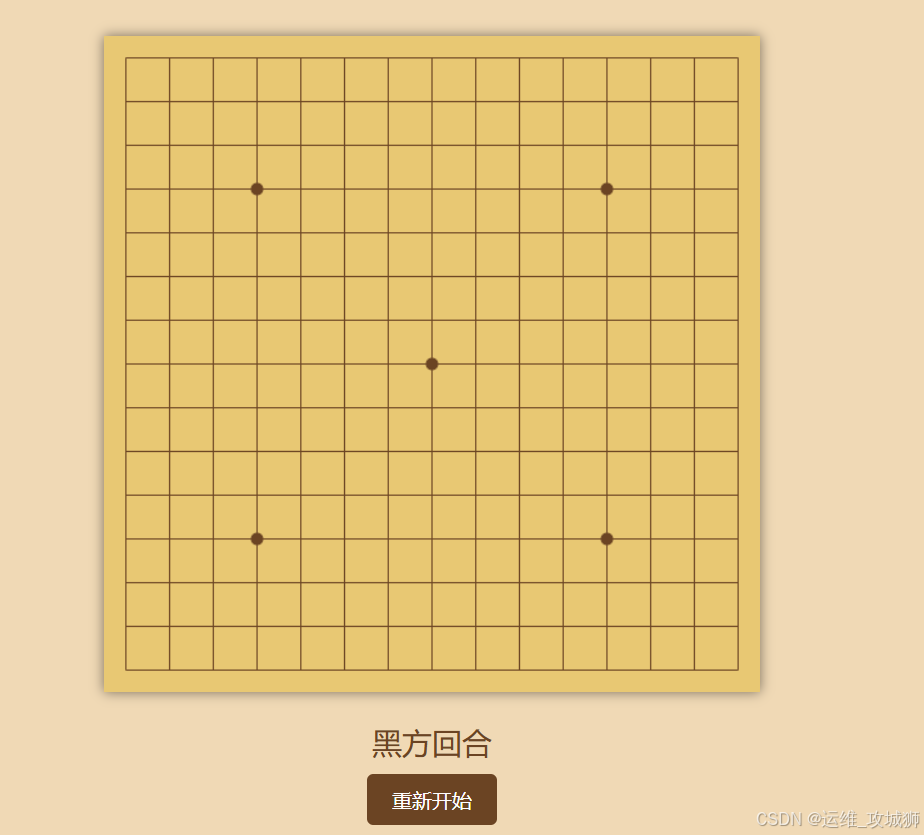
效果图





 扫一扫
扫一扫


 302
302

 被折叠的 条评论
为什么被折叠?
被折叠的 条评论
为什么被折叠?
 到【灌水乐园】发言





