


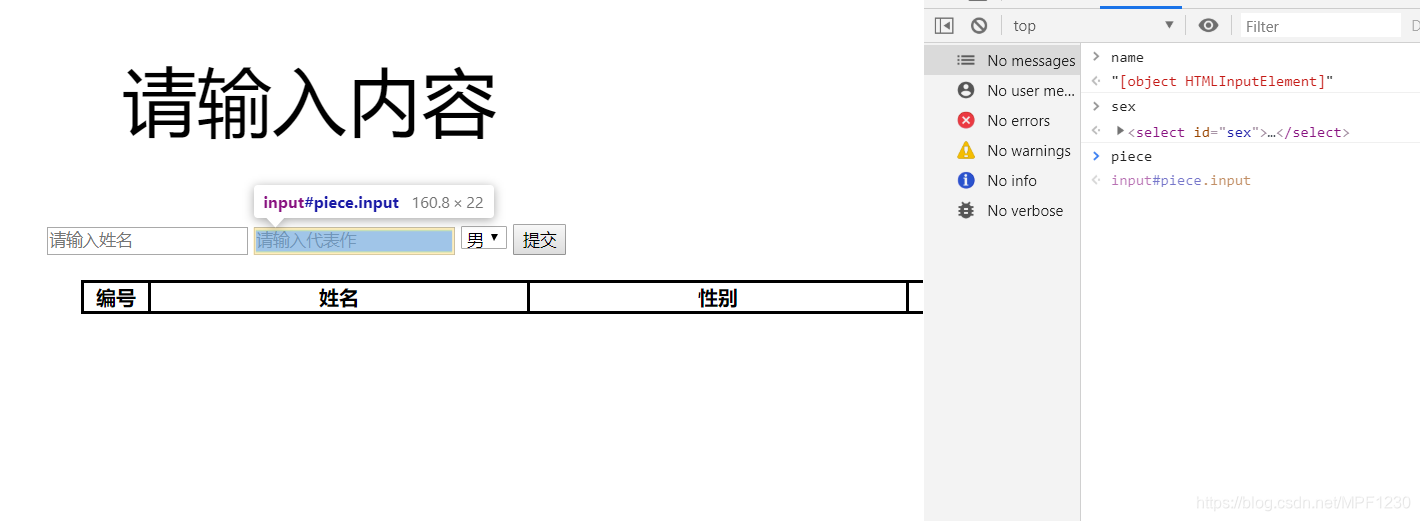
 这篇博客探讨了如何使用JavaScript实现列表的动态添加功能,包括自动生成编号、通过输入框添加内容到列表以及下拉框选择性别。在实现过程中遇到了Chrome浏览器无法获取id为'name'的元素的问题,原因是'id'与window对象的内置属性冲突。解决办法是更改该id名称以避免命名重复。博客还涵盖了DOM操作,如onclick事件、getElement、createElement和appendChild等。

实现效果:
按照顺序自动生成编号,点击提交按钮后,将输入框中的内容添加进入列表当中。以及下拉框来选择性别为男或女。并且当输入框内容为空时,不向列表中添加元素,并且顶部字体变为红色。
包含的相关dom事件练习,onclick事件,获取元素getElement,创建元素createElement,元素节点appendChlid
HTML代码
<!DOCTYPE html>
<html lang="en">
<head>
<meta charset="UTF-8">
<title>Title</title>
<link href="list.css" rel="stylesheet" type="text/css">
</head>
<body>
<p>请输入内容</p>
<input class="input" id="name" type="text" placeholder="请输入姓名">
<input class="input" id="piece" type="text" placeholder="请输入代表作">
<select id="sex">
<option value="男">男</option>
<option value="女">女</option>
</select>
<button id="submit">提交</button>
<br>
<div>
<table id="table">
<tr>
<th class="no">编号</th>
<th>姓名</th>
<th>性别</th>
<th>代表作</th>
</tr>
</table>
</div>
<script type="text/javascript" src="list.js"></script>
</body>
</html>
CSS代码
body{
    margin-top: 50px;
    text-align: center;
}
table{
    margin-top: 20px;
    position: relative;
    left: 300px;
    border-collapse: collapse;
}

td,th{
    width: 300px;
    height: auto;
    text-align: center;
    border: solid black;
    border-collapse: collapse;
}

.no{
    width: 50px;
    height: auto;
    text-align: center;
    border: solid black;
    border-collapse: collapse;
}
p{
    font-size: 60px;
    text-align: center;
    color: black;
}

p.error{
    color: red;
}
JavaScript
var submit = document.getElementById("submit");
var name = document.getElementById("name");
var sex = document.getElementById("sex");
var piece = document.getElementById("piece");
var table = document.getElementById("table");
var p = document.querySelector("p");

var i = 0;

window.onload = function () {
    submit.onclick = function () {

        if(!(name.value.trim()&&sex.value.trim()&&piece.value.trim())){//trim用来去掉空格

            p.className = "error";
            return
        }

        i++;

        var tr = document.createElement("tr");
        table.appendChild(tr);

        var no = document.createElement("td");
        no.className = "no"
        var newname = document.createElement("td");
        var newsex = document.createElement("td");
        var newpiece = document.createElement("td");

        no.innerText = i;
        newname.innerText = name.value;
        newsex.innerText = sex.value;
        newpiece.innerText = piece.value;

        tr.appendChild(no);
        tr.appendChild(newname);
        tr.appendChild(newsex);
        tr.appendChild(newpiece);

        name.value = "";
        sex.value = "";
        piece.value = "";
    }

}
这里出现过的问题,IE浏览器可以运行,但是Chrome浏览器会没办法获取 name元素





 扫一扫
扫一扫


 1026
1026

 被折叠的 条评论
为什么被折叠?
被折叠的 条评论
为什么被折叠?
 到【灌水乐园】发言





