



目录
收发应用广播BroadCast
广播BroadCast是Android四大组件之一,是 Android 系统中的一种组件间通信机制,它用于Android各组件之间的灵活通信,允许应用发送和接收系统或应用内的事件通知。广播可以一对一也可以一对多,对于广播的发送方来说不需要考虑接收方是否在工作,接收方在工作就接受广播反之则丢弃广播。而对于广播的接收方来说,它可能会接收到多种广播,所以对于它来说需要对这些广播进行筛选选择符合条件的广播,之后再进行解析广播的内容。一个活动可以自己发送广播自己接受广播,只要符合接受条件即可。广播主要有两种类型,一种是标准广播一种是有序广播。
1.标准广播
标准广播是完全异步的广播,所有接收者几乎在同一时刻收到广播,效率高。它无法被截断,即无法阻止广播传递给其他接收者。与广播相关的方法主要有三个,sendBroadcast方法用于发送广播,registerReceiver方法用于注册广播的接收器,unregisterReceiver方法用于注销广播的接收器。代码示例如下,发送一个标准广播并接收该广播,注销广播接收器不在接收广播。
<?xml version="1.0" encoding="utf-8"?>
<LinearLayout xmlns:android="http://schemas.android.com/apk/res/android"
    xmlns:app="http://schemas.android.com/apk/res-auto"
    xmlns:tools="http://schemas.android.com/tools"
    android:layout_width="match_parent"
    android:layout_height="match_parent"
    tools:context=".BroadCast.StandardBroadCastActivity"
    android:orientation="vertical">


    <Button
        android:id="@+id/button_send"
        android:layout_width="match_parent"
        android:layout_height="wrap_content"
        android:text="发送标准广播" />

    <Button
        android:id="@+id/button_unregister"
        android:layout_width="match_parent"
        android:layout_height="wrap_content"
        android:text="注销接收器" />

    <TextView
        android:id="@+id/textView_receive"
        android:layout_width="match_parent"
        android:layout_height="wrap_content"
        android:text="接收广播内容:\n" />
</LinearLayout>
部分Java代码,在onCreate方法中注册两个按钮点击监听器,一个按钮发送广播一个按钮注销广播接收器,在onStart方法中注册广播接收器。
public class StandardBroadCastActivity extends AppCompatActivity implements View.OnClickListener {
    //广播动作名称,以它为接头暗号
    private final static String standard_action = "StandardBroadCastActivity";
    private TextView textView_receive;
    private Button button_send, button_unregister;
    private BroadcastReceiver broadcastReceiver = null;

    @Override
    protected void onCreate(Bundle savedInstanceState) {
        super.onCreate(savedInstanceState);
        setContentView(R.layout.activity_standard_broad_cast);

        button_send = findViewById(R.id.button_send);
        button_unregister = findViewById(R.id.button_unregister);
        textView_receive = findViewById(R.id.textView_receive);

        button_send.setOnClickListener(this);
        button_unregister.setOnClickListener(this);
    }

    @Override
    public void onClick(View view) {
        if (view.getId() == R.id.button_send) {
            Intent intent = new Intent(standard_action);
            sendBroadcast(intent);
            Calendar calendar = Calendar.getInstance();
            int hour = calendar.get(Calendar.HOUR_OF_DAY);
            int minute = calendar.get(Calendar.MINUTE);
            int second = calendar.get(Calendar.SECOND);
            textView_receive.setText(textView_receive.getText().toString() + String.format("%d:%d:%d   成功发送标准广播!\n",hour,minute,second));
        } else {
            if (broadcastReceiver != null) {
                unregisterReceiver(broadcastReceiver);
                broadcastReceiver = null;
                Calendar calendar = Calendar.getInstance();
                int hour = calendar.get(Calendar.HOUR_OF_DAY);
                int minute = calendar.get(Calendar.MINUTE);
                int second = calendar.get(Calendar.SECOND);
                textView_receive.setText(textView_receive.getText().toString() + String.format("%d:%d:%d   成功注销广播接收器,不再接收广播!\n",hour,minute,second));
            }
        }
    }

    @Override
    protected void onStart() {
        super.onStart();
        broadcastReceiver = new BroadcastReceiver() {
            @Override
            public void onReceive(Context context, Intent intent) {
                if (intent != null && intent.getAction().equals(standard_action)) {
                    Calendar calendar = Calendar.getInstance();
                    int hour = calendar.get(Calendar.HOUR_OF_DAY);
                    int minute = calendar.get(Calendar.MINUTE);
                    int second = calendar.get(Calendar.SECOND);
                    textView_receive.setText(textView_receive.getText() + String.format("%d:%d:%d   接收到一个标准广播!\n",hour,minute,second));
                }
            }
        };
        registerReceiver(broadcastReceiver, new IntentFilter(standard_action));
    }

}
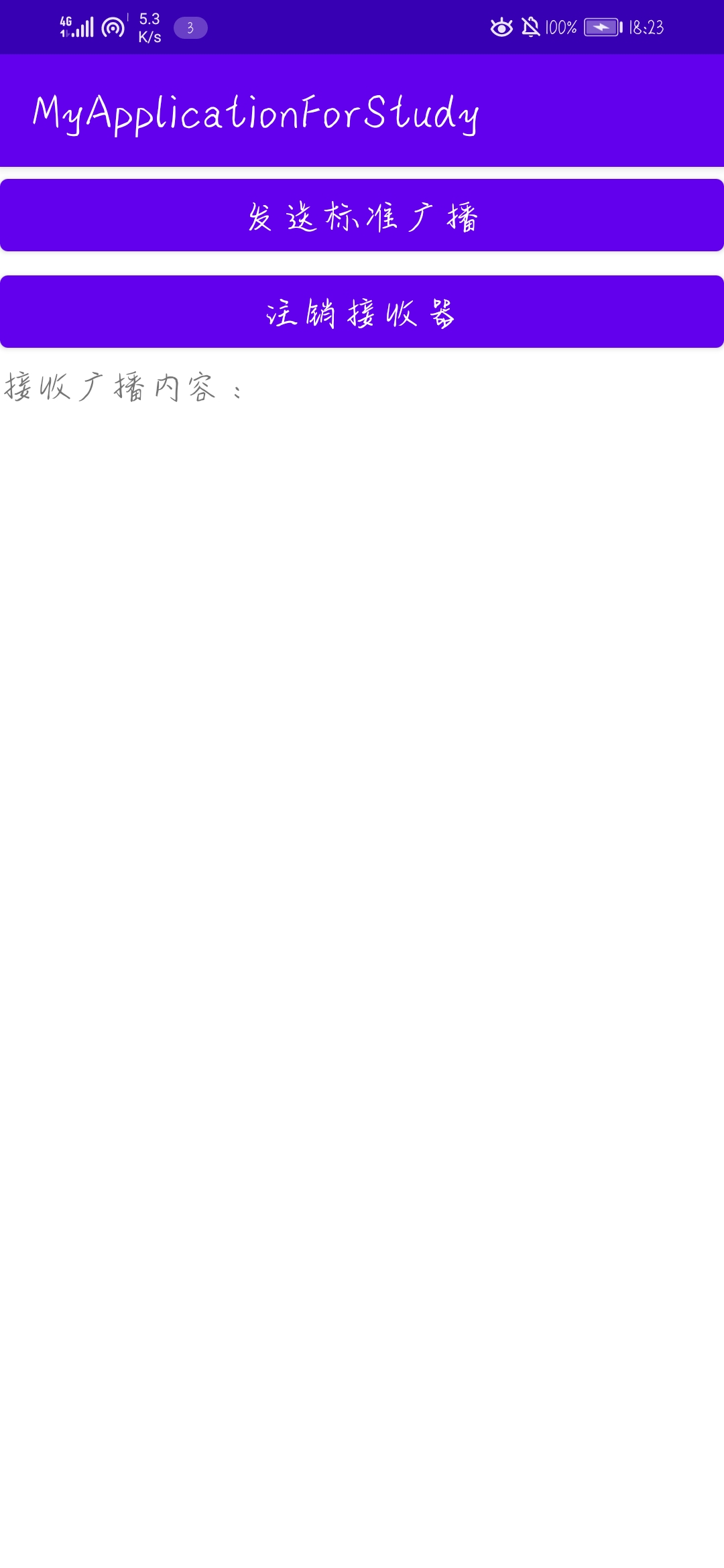
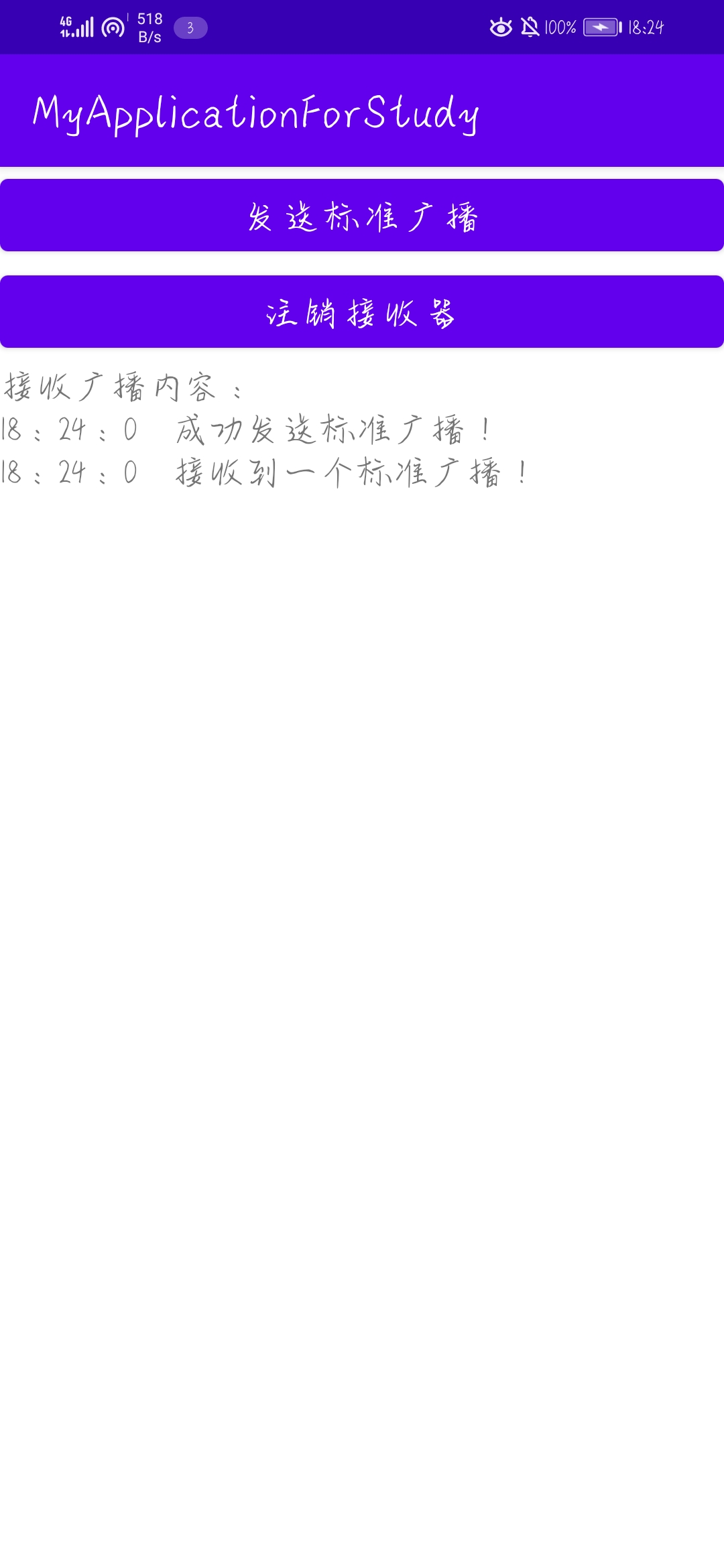
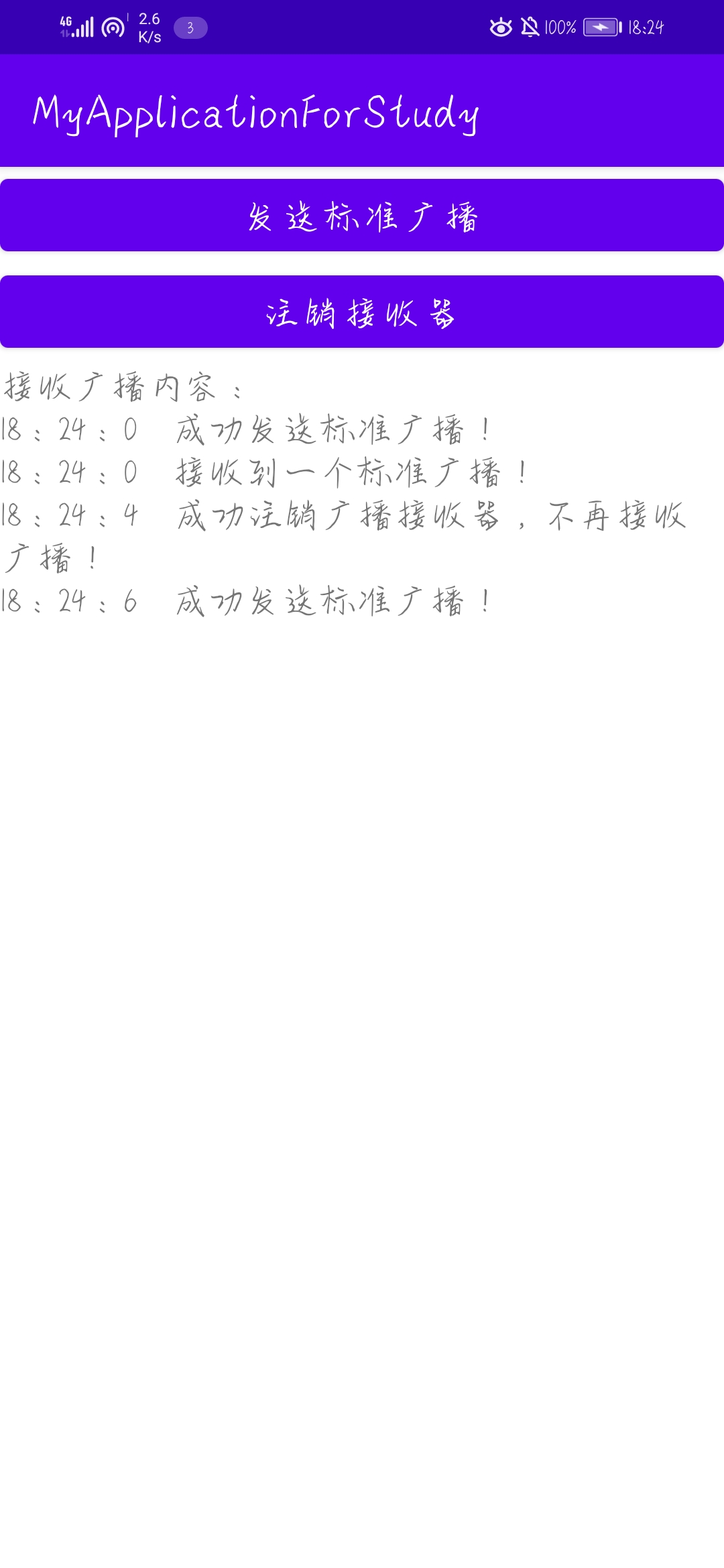
效果图如下,第一张为初始状态,第二张为发送一次标准广播,第三张为注销接收器后发送一次标准广播。可以看到注销接收器后再发送广播就不再接收到广播。
2.有序广播
有序广播是同步执行的广播,同一时间只有一个接收者能收到广播。接收者可以截断广播,使其不再传递。接收者也可以设置优先级,优先级高的先收到广播。标准广播使用的sendBroadcast方法发送出来的广播是无序的,有序广播则需要使用sendOrderedBroadcast方法来发送有序广播。代码示例如下,有两个按钮,一个发送有序广播,一个是否要中断广播;两个文本视图展示接受信息,分别对应两个接收器。
<?xml version="1.0" encoding="utf-8"?>
<LinearLayout xmlns:android="http://schemas.android.com/apk/res/android"
    xmlns:app="http://schemas.android.com/apk/res-auto"
    xmlns:tools="http://schemas.android.com/tools"
    android:layout_width="match_parent"
    android:layout_height="match_parent"
    tools:context=".BroadCast.OrderedBroadCastActivity"
    android:orientation="vertical">

    <Button
        android:id="@+id/button_send"
        android:layout_width="match_parent"
        android:layout_height="wrap_content"
        android:text="发送有序广播" />

    <Button
        android:id="@+id/button_abort"
        android:layout_width="match_parent"
        android:layout_height="wrap_content"
        android:text="中断广播" />

    <TextView
        android:id="@+id/textView_A"
        android:layout_width="match_parent"
        android:layout_height="wrap_content"
        android:text="接收器A的接受区:\n" />
    <TextView
        android:id="@+id/textView_B"
        android:layout_width="match_parent"
        android:layout_height="wrap_content"
        android:text="接收器B的接受区:\n" />
</LinearLayout>
部分Java代码,注册两个接收器A与B,在有序广播中若无设置优先级或者优先级一致则谁先注册谁先接受到有序广播。下方代码中A先注册则A先接收,若将注释掉的代码加进去则B先接收到有序广播。
public class OrderedBroadCastActivity extends AppCompatActivity implements View.OnClickListener {

    //广播动作名称,以它为接头暗号
    private final static String ordered_action = "OrderedBroadCastActivity";
    private Button button_send, button_abort;
    private TextView textView_A, textView_B;
    private BroadcastReceiver A, B;
    //是否中断广播标志
    private boolean if_abort = false;

    @Override
    protected void onCreate(Bundle savedInstanceState) {
        super.onCreate(savedInstanceState);
        setContentView(R.layout.activity_ordered_broad_cast);

        button_send = findViewById(R.id.button_send);
        button_abort = findViewById(R.id.button_abort);
        textView_A = findViewById(R.id.textView_A);
        textView_B = findViewById(R.id.textView_B);

        button_send.setOnClickListener(this);
        button_abort.setOnClickListener(this);
    }

    @Override
    public void onClick(View view) {
        if (view.getId() == R.id.button_send) {
            Intent intent = new Intent(ordered_action);
            sendOrderedBroadcast(intent,null);
        } else {
            if_abort = !if_abort;
        }
    }

    @Override
    protected void onStart() {
        super.onStart();
        A = new BroadcastReceiver() {
            @Override
            public void onReceive(Context context, Intent intent) {
                if (intent != null && intent.getAction().equals(ordered_action)) {
                    Calendar calendar = Calendar.getInstance();
                    int hour = calendar.get(Calendar.HOUR_OF_DAY);
                    int minute = calendar.get(Calendar.MINUTE);
                    int second = calendar.get(Calendar.SECOND);
                    textView_A.setText(textView_A.getText() + String.format("%d:%d:%d   接收到一个标准广播!\n",hour,minute,second));
                    if(if_abort){
                        abortBroadcast();
                    }
                }
            }
        };

        B = new BroadcastReceiver() {
            @Override
            public void onReceive(Context context, Intent intent) {
                if (intent != null && intent.getAction().equals(ordered_action)) {
                    Calendar calendar = Calendar.getInstance();
                    int hour = calendar.get(Calendar.HOUR_OF_DAY);
                    int minute = calendar.get(Calendar.MINUTE);
                    int second = calendar.get(Calendar.SECOND);
                    textView_B.setText(textView_B.getText() + String.format("%d:%d:%d   接收到一个标准广播!\n",hour,minute,second));
                    if(if_abort){
                        abortBroadcast();
                    }
                }
            }
        };
        IntentFilter intentFilter_A,intentFilter_B;

        intentFilter_A = new IntentFilter(ordered_action);
//        intentFilter_A.setPriority(5);
        registerReceiver(A,intentFilter_A);

        intentFilter_B = new IntentFilter(ordered_action);
//        intentFilter_B.setPriority(10);
        registerReceiver(B,intentFilter_B);
    }
}
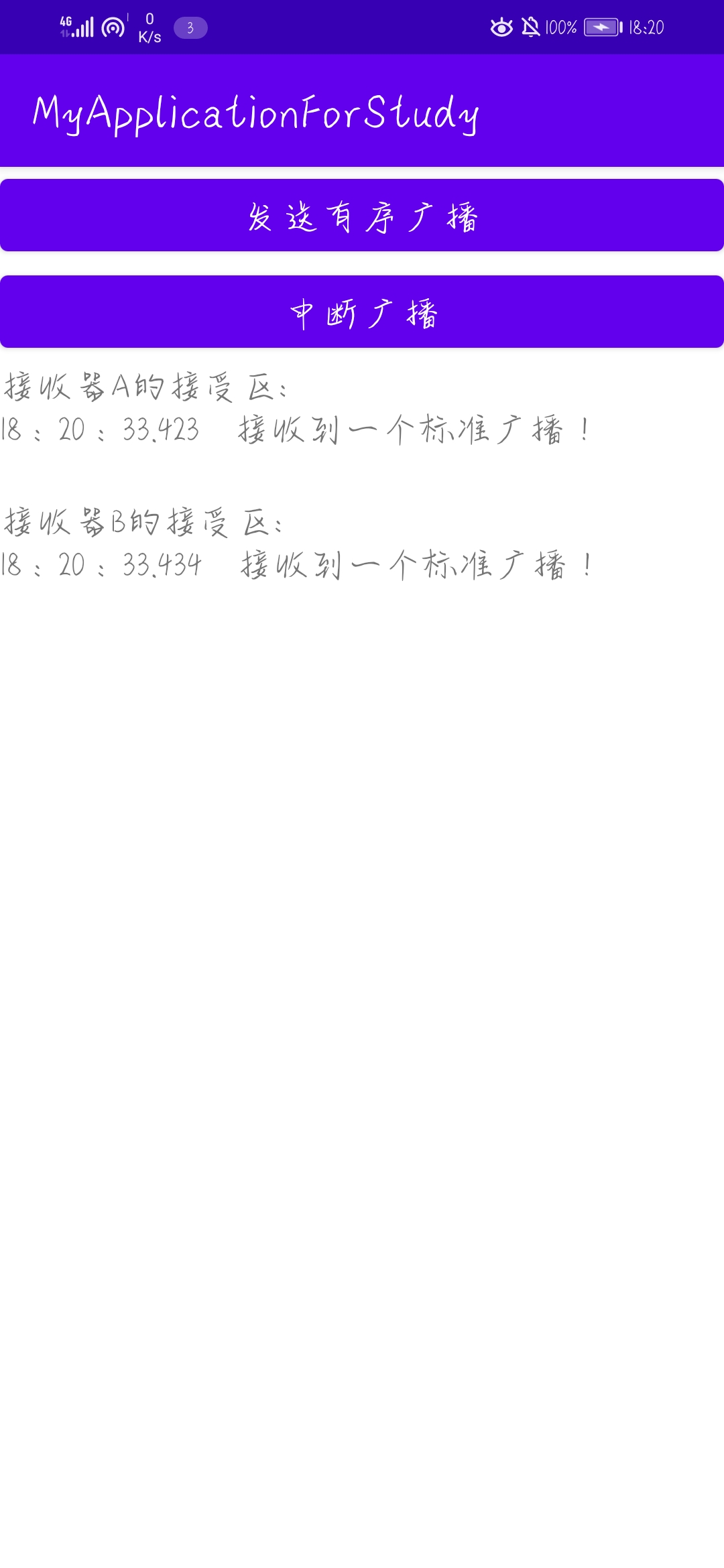
效果图如下,第一张为初始状态,第二张为发送一次有序广播,第三张为中断广播。可以看到A先接收到有序广播,中断时只有A接收到有序广播。






 扫一扫
扫一扫


 741
741

 被折叠的 条评论
为什么被折叠?
被折叠的 条评论
为什么被折叠?
 到【灌水乐园】发言





