


一、拓扑图
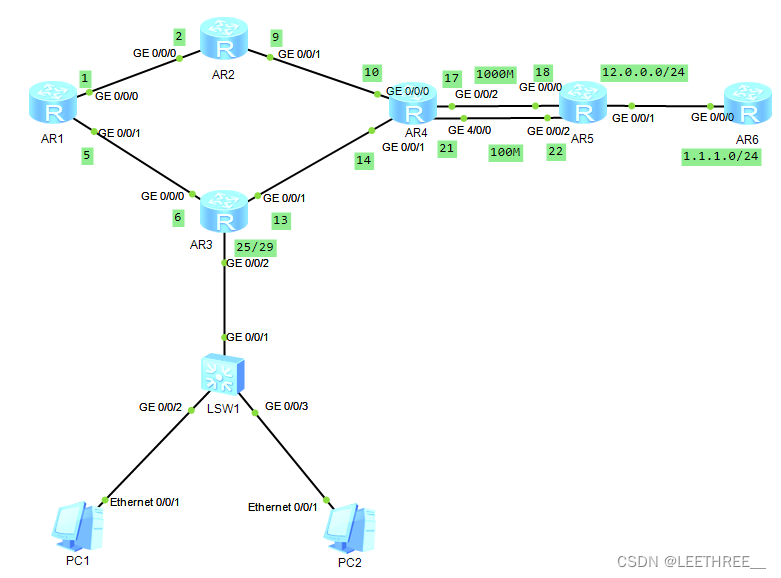
二、实验要求
1、R6为isp接口IP 地址均为公有地址;该设备只能配置 IP 地址,之后不能冉对其进行其他任何配置;
2、R1-R5为局域网,私有 IP 地址192.168.1.0/24,请合理分配
3、R1,R2,R4,各有两个环回地址;R5,R6各有一个环回地址;所有路由器上环回均代表连接用户的接口;
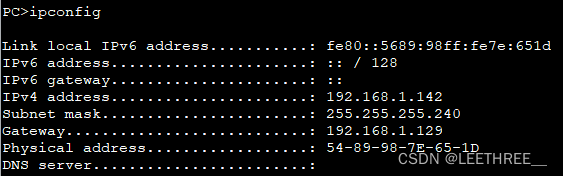
4、R3下的两台 PC 通过 DHCP 自动获取 IP 地址;
5、选路最佳,路由表尽量小,避免环路;
6、R1-R5均可以访问R6的环回;
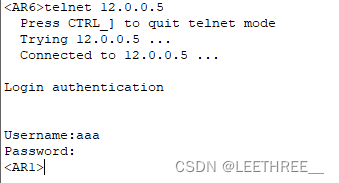
7、R6telnetR5的公有 IP 地址时,实际登陆到R1上;
8、R4与R5正常通过1000n链路,故障时通过100M链路;
三、配置命令
R1:
#
interface GigabitEthernet0/0/0
 ip address 192.168.1.1 255.255.255.252
#
interface GigabitEthernet0/0/1
 ip address 192.168.1.5 255.255.255.252
#
interface LoopBack0
 ip address 192.168.1.33 255.255.255.240
#
interface LoopBack1
 ip address 192.168.1.49 255.255.255.240
#
ip route-static 0.0.0.0 0.0.0.0 192.168.1.2
ip route-static 0.0.0.0 0.0.0.0 192.168.1.6
ip route-static 192.168.1.8 255.255.255.252 192.168.1.2
ip route-static 192.168.1.12 255.255.255.252 192.168.1.6
ip route-static 192.168.1.16 255.255.255.252 192.168.1.2
ip route-static 192.168.1.20 255.255.255.252 192.168.1.6
ip route-static 192.168.1.32 255.255.255.224 NULL0  //配置空接口避免环路
ip route-static 192.168.1.64 255.255.255.224 192.168.1.2
ip route-static 192.168.1.128 255.255.255.240 192.198.1.6
#
aaa
  local-user aaa privilege level 15 password cipher 12345
  local-user aaa service-type telnet
#
user-interface vty 0 4
  authentication-mode aaa
#
R2:
#
interface GigabitEthernet0/0/0
 ip address 192.168.1.2 255.255.255.252
#
interface GigabitEthernet0/0/1
 ip address 192.168.1.9 255.255.255.252
#
interface LoopBack0
 ip address 192.168.1.65 255.255.255.240
#
interface LoopBack1
 ip address 192.168.1.81 255.255.255.240
#
ip route-static 0.0.0.0 0.0.0.0 192.168.1.10
ip route-static 192.168.1.0 255.255.255.0 192.168.1.1
ip route-static 192.168.1.4 255.255.255.252 192.168.1.1
ip route-static 192.168.1.12 255.255.255.252 192.168.1.10
ip route-static 192.168.1.16 255.255.255.252 192.168.1.10
ip route-static 192.168.1.20 255.255.255.252 192.168.1.10
ip route-static 192.168.1.64 255.255.255.224 NULL0 //配置空接口避免环路
ip route-static 192.168.1.128 255.255.255.240 192.168.1.1
ip route-static 192.168.1.128 255.255.255.240 192.168.1.10
#
R3:
#
interface GigabitEthernet0/0/0
 ip address 192.168.1.6 255.255.255.252
#
interface GigabitEthernet0/0/1
 ip address 192.168.1.13 255.255.255.252
#
dhcp enable
#
interface GigabitEthernet0/0/2
 ip address 192.168.1.129 255.255.255.240
 dhcp select interface //DHCP配置
#
ip route-static 0.0.0.0 0.0.0.0 192.168.1.14
ip route-static 0.0.0.0 0.0.0.0 192.168.1.5
ip route-static 192.168.1.0 255.255.255.252 192.168.1.5
ip route-static 192.168.1.8 255.255.255.252 192.168.1.14
ip route-static 192.168.1.16 255.255.255.252 192.168.1.14
ip route-static 192.168.1.20 255.255.255.252 192.168.1.14
ip route-static 192.168.1.32 255.255.255.224 192.168.1.5
ip route-static 192.168.1.64 255.255.255.224 192.168.1.14
#
R4:
#
interface GigabitEthernet0/0/0
 ip address 192.168.1.10 255.255.255.252
#
interface GigabitEthernet0/0/1
 ip address 192.168.1.14 255.255.255.252
#
interface GigabitEthernet0/0/2
 ip address 192.168.1.17 255.255.255.252
#
interface GigabitEthernet4/0/0
 ip address 192.168.1.21 255.255.255.252
#
interface LoopBack0
 ip address 192.168.1.97 255.255.255.240
#
interface LoopBack1
 ip address 192.168.1.113 255.255.255.240
#
ip route-static 0.0.0.0 0.0.0.0 192.168.1.18
ip route-static 0.0.0.0 0.0.0.0 192.168.1.22 preference 70 \\配置浮动静态路由,修改优先级
ip route-static 192.168.1.0 255.255.255.0 NULL0
ip route-static 192.168.1.0 255.255.255.252 192.168.1.9
ip route-static 192.168.1.4 255.255.255.252 192.168.1.13
ip route-static 192.168.1.32 255.255.255.224 192.168.1.9
ip route-static 192.168.1.32 255.255.255.224 192.168.1.13
ip route-static 192.168.1.64 255.255.255.224 192.168.1.9
ip route-static 192.168.1.128 255.255.255.240 192.168.1.13
#
R5:
#
acl number 2000  //配置ACL抓取流量
 rule 5 permit source 192.168.1.0 0.0.0.255
#
interface GigabitEthernet0/0/0
 ip address 192.168.1.18 255.255.255.252
#
interface GigabitEthernet0/0/1
 ip address 12.0.0.5 255.255.255.0
 nat server protocol tcp global current-interface telnet inside 192.168.1.1 teln
et
//配置端口映射
 nat outbound 2000 //配置easynat端口转换
#
interface GigabitEthernet0/0/2
 ip address 192.168.1.22 255.255.255.252
#
interface LoopBack0
 ip address 192.168.1.145 255.255.255.240
#
ip route-static 0.0.0.0 0.0.0.0 12.0.0.6
ip route-static 192.168.1.0 255.255.255.0 192.168.1.17
ip route-static 192.168.1.0 255.255.255.0 192.168.1.21 preference 70
#
R6:
#
interface GigabitEthernet0/0/0
 ip address 12.0.0.6 255.255.255.0
#
interface LoopBack0
 ip address 1.1.1.6 255.255.255.0
#
四、测试
1、主机获取DHCP服务的IP 地址
2、R1-R5可以访问R6的环回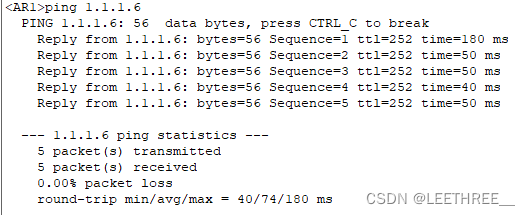
3、R6 telnet R5的公有IP地址时,实际登陆到R1上





 扫一扫
扫一扫


 1051
1051

 被折叠的 条评论
为什么被折叠?
被折叠的 条评论
为什么被折叠?
 到【灌水乐园】发言





