



一、技术栈整合流程
Spring Security集成OAuth2和JWT代码示例
1. 安全配置类(SecurityConfig)
import org.springframework.context.annotation.Bean;
import org.springframework.context.annotation.Configuration;
import org.springframework.security.config.annotation.web.builders.HttpSecurity;
import org.springframework.security.config.annotation.web.configuration.EnableWebSecurity;
import org.springframework.security.config.annotation.web.configuration.WebSecurityConfigurerAdapter;
import org.springframework.security.crypto.bcrypt.BCryptPasswordEncoder;
import org.springframework.security.crypto.password.PasswordEncoder;

/**
 * Spring Security核心配置类
 * 负责定义安全规则和密码加密方式
 */
@Configuration
@EnableWebSecurity
public class SecurityConfig extends WebSecurityConfigurerAdapter {

    /**
     * 配置密码加密器
     * 使用BCrypt强哈希算法加密密码
     */
    @Bean
    public PasswordEncoder passwordEncoder() {
        return new BCryptPasswordEncoder(); // 推荐使用BCrypt加密
    }

    /**
     * 配置HTTP安全规则
     * @param http HTTP安全配置对象
     */
    @Override
    protected void configure(HttpSecurity http) throws Exception {
        http
            .csrf().disable()  // 禁用CSRF保护(API场景常用)
            .authorizeRequests()
                .antMatchers("/oauth/**", "/login/**", "/logout/**").permitAll()  // 开放OAuth2相关端点
                .anyRequest().authenticated()  // 其他请求需要认证
            .and()
            .formLogin().permitAll();  // 允许表单登录
    }
}
2. JWT令牌配置类(TokenConfig)
import org.springframework.context.annotation.Bean;
import org.springframework.context.annotation.Configuration;
import org.springframework.security.oauth2.provider.token.TokenStore;
import org.springframework.security.oauth2.provider.token.store.JwtAccessTokenConverter;
import org.springframework.security.oauth2.provider.token.store.JwtTokenStore;

/**
 * JWT令牌配置类
 * 负责JWT令牌的生成、签名和存储配置
 */
@Configuration
public class TokenConfig {

    // JWT签名密钥(生产环境应从安全配置读取)
    private static final String SIGNING_KEY = "your-secret-key-123456";

    /**
     * 配置JWT令牌存储策略
     * @return JWT令牌存储对象
     */
    @Bean
    public TokenStore tokenStore() {
        return new JwtTokenStore(accessTokenConverter());  // 使用JWT存储令牌
    }

    /**
     * 配置JWT访问令牌转换器
     * 负责令牌的编码/解码和签名验证
     */
    @Bean
    public JwtAccessTokenConverter accessTokenConverter() {
        JwtAccessTokenConverter converter = new JwtAccessTokenConverter();
        converter.setSigningKey(SIGNING_KEY);  // 设置JWT签名密钥
        return converter;
    }
}
3. 授权服务器配置(AuthorizationServerConfig)
import org.springframework.beans.factory.annotation.Autowired;
import org.springframework.context.annotation.Configuration;
import org.springframework.security.authentication.AuthenticationManager;
import org.springframework.security.crypto.password.PasswordEncoder;
import org.springframework.security.oauth2.config.annotation.configurers.ClientDetailsServiceConfigurer;
import org.springframework.security.oauth2.config.annotation.web.configuration.AuthorizationServerConfigurerAdapter;
import org.springframework.security.oauth2.config.annotation.web.configuration.EnableAuthorizationServer;
import org.springframework.security.oauth2.config.annotation.web.configurers.AuthorizationServerEndpointsConfigurer;
import org.springframework.security.oauth2.config.annotation.web.configurers.AuthorizationServerSecurityConfigurer;

/**
 * OAuth2授权服务器配置
 * 负责颁发访问令牌和刷新令牌
 */
@Configuration
@EnableAuthorizationServer
public class AuthorizationServerConfig extends AuthorizationServerConfigurerAdapter {

    @Autowired
    private AuthenticationManager authenticationManager;  // 认证管理器

    @Autowired
    private PasswordEncoder passwordEncoder;  // 密码加密器

    @Autowired
    private TokenStore tokenStore;  // 令牌存储

    @Autowired
    private JwtAccessTokenConverter jwtAccessTokenConverter;  // JWT转换器

    /**
     * 配置客户端详情服务
     * @param clients 客户端配置器
     */
    @Override
    public void configure(ClientDetailsServiceConfigurer clients) throws Exception {
        clients.inMemory()  // 使用内存存储(生产环境用JDBC)
            .withClient("clientapp")  // 客户端ID
            .secret(passwordEncoder.encode("123456"))  // 客户端密钥(加密存储)
            .authorizedGrantTypes("password", "refresh_token")  // 支持的授权模式
            .scopes("all")  // 授权范围
            .accessTokenValiditySeconds(3600)  // 访问令牌有效期(1小时)
            .refreshTokenValiditySeconds(86400);  // 刷新令牌有效期(24小时)
    }

    /**
     * 配置授权服务器端点
     * @param endpoints 端点配置器
     */
    @Override
    public void configure(AuthorizationServerEndpointsConfigurer endpoints) {
        endpoints
            .authenticationManager(authenticationManager)  // 密码模式需要
            .tokenStore(tokenStore)  // 令牌存储方式
            .accessTokenConverter(jwtAccessTokenConverter);  // 使用JWT令牌
    }

    /**
     * 配置授权服务器安全规则
     * @param security 安全配置器
     */
    @Override
    public void configure(AuthorizationServerSecurityConfigurer security) {
        security
            .tokenKeyAccess("permitAll()")  // 公开/oauth/token_key端点
            .checkTokenAccess("isAuthenticated()")  // 认证后可访问/oauth/check_token
            .allowFormAuthenticationForClients();  // 允许客户端表单认证(解决新版本401问题)
    }
}
4. 资源服务器配置(ResourceServerConfig)
import org.springframework.context.annotation.Configuration;
import org.springframework.security.config.annotation.web.builders.HttpSecurity;
import org.springframework.security.oauth2.config.annotation.web.configuration.EnableResourceServer;
import org.springframework.security.oauth2.config.annotation.web.configuration.ResourceServerConfigurerAdapter;

/**
 * 资源服务器配置
 * 负责保护受OAuth2保护的资源
 */
@Configuration
@EnableResourceServer
public class ResourceServerConfig extends ResourceServerConfigurerAdapter {

    /**
     * 配置资源访问规则
     * @param http HTTP安全配置对象
     */
    @Override
    public void configure(HttpSecurity http) throws Exception {
        http
            .authorizeRequests()
            .anyRequest().authenticated();  // 所有资源需要认证
    }
}
关键组件说明:
-
密码加密器
BCryptPasswordEncoder使用加盐哈希算法,比明文存储更安全 -
JWT签名机制
通过JwtAccessTokenConverter设置签名密钥,防止令牌篡改 -
客户端认证方式
allowFormAuthenticationForClients()解决新版本客户端认证问题 -
令牌有效期配置
访问令牌(1小时)和刷新令牌(24小时)的合理时间设置
测试流程:
-
获取令牌(密码模式):
POST /oauth/token Content-Type: application/x-www-form-urlencoded grant_type=password &username=admin &password=admin &client_id=clientapp &client_secret=123456 -
访问受保护资源:
GET /api/protected
Authorization: Bearer <access_token>
注意事项:
-
密钥管理
生产环境应将SIGNING_KEY存储在安全配置中,避免硬编码 -
客户端存储
内存存储(inMemory())仅适用于测试,生产环境需改用jdbcClientDetailsService() -
令牌刷新
使用refresh_token授权类型可获取新的访问令牌:grant_type=refresh_token &refresh_token=<refresh_token> -
用户认证
需实现UserDetailsService加载真实用户数据(示例未展示)
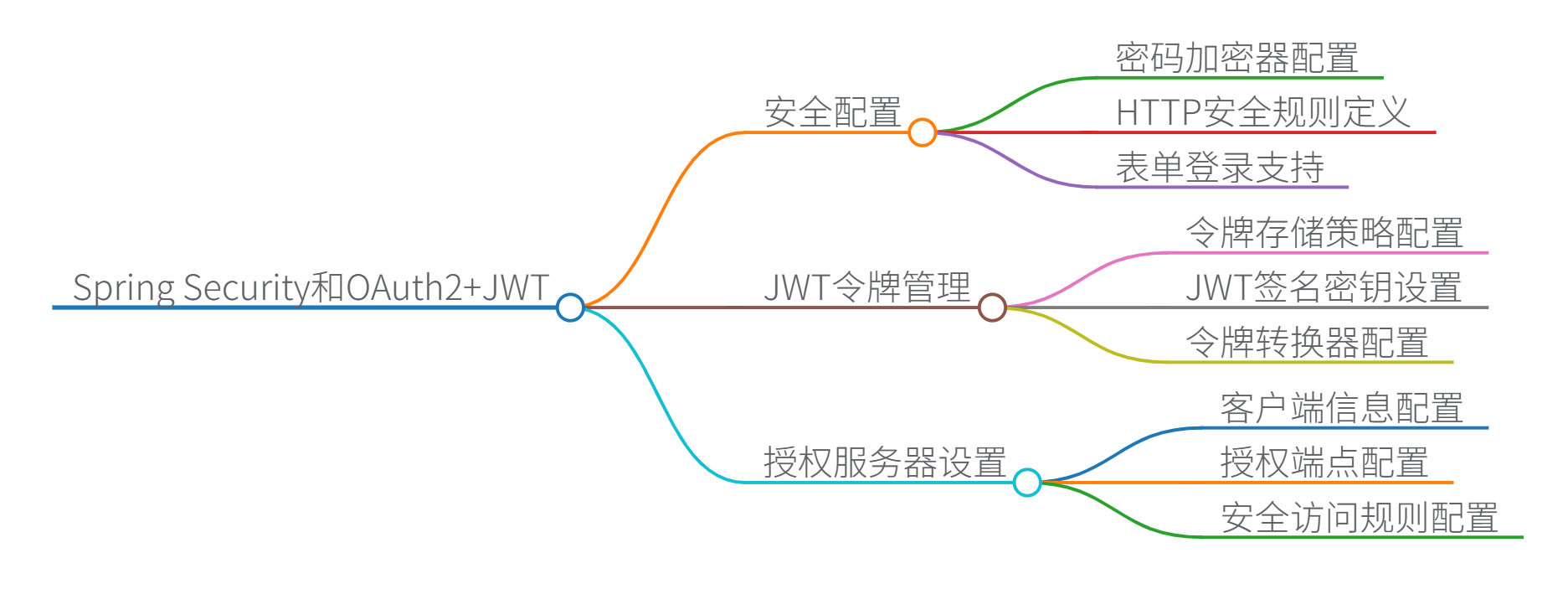
思维导图
二、OAuth2和JWT的工作原理及核心功能相关源码解读
OAuth2与JWT工作原理及源码解析
一、OAuth2核心工作原理
OAuth2是一种授权框架,允许第三方应用在用户授权下访问受保护资源,而不暴露用户凭证。核心流程如下:
源码关键接口(Spring Security OAuth2)
// 授权服务器配置入口
@Configuration
@EnableAuthorizationServer
public class AuthServerConfig extends AuthorizationServerConfigurerAdapter {

    @Override
    public void configure(ClientDetailsServiceConfigurer clients) throws Exception {
        clients.inMemory()
            .withClient("webapp") // 客户端ID
            .secret(passwordEncoder.encode("secret")) // 客户端密钥
            .authorizedGrantTypes("authorization_code", "refresh_token")
            .scopes("read");
    }

    @Override
    public void configure(AuthorizationServerEndpointsConfigurer endpoints) {
        endpoints
            .tokenStore(tokenStore) // 令牌存储策略
            .accessTokenConverter(jwtAccessTokenConverter); // JWT转换器
    }
}
二、JWT结构解析
JWT(JSON Web Token)是无状态令牌,包含三部分:
base64UrlEncode(Header) + "." +
base64UrlEncode(Payload) + "." +
Signature
1. Payload结构示例
{
  "sub": "1234567890",      // 主题(用户ID)
  "name": "John Doe",       // 自定义声明
  "iat": 1516239022,        // 签发时间
  "exp": 1516239322,        // 过期时间
  "scope": "read write"     // 权限范围
}
2. 签名生成源码(JwtAccessTokenConverter)
public class JwtAccessTokenConverter implements AccessTokenConverter {

    private String signingKey = "secret"; // 签名密钥

    protected String encode(OAuth2AccessToken accessToken,
                            OAuth2Authentication authentication) {

        // 1. 构建JWT声明(Claims)
        Map<String, Object> claims = new HashMap<>();
        claims.put("user_name", authentication.getName()); // 添加用户信息

        // 2. 生成签名(HS256算法示例)
        String encodedHeader = base64UrlEncode(header);
        String encodedClaims = base64UrlEncode(claims);
        String signature = HMACSHA256(encodedHeader + "." + encodedClaims, signingKey);

        return encodedHeader + "." + encodedClaims + "." + signature;
    }
}
三、OAuth2+JWT整合流程
令牌验证时序(资源服务器侧)
资源服务器配置源码
@Configuration
@EnableResourceServer
public class ResourceServerConfig extends ResourceServerConfigurerAdapter {

    @Override
    public void configure(HttpSecurity http) throws Exception {
        http
            .authorizeRequests()
            .antMatchers("/api/public/**").permitAll() // 公开端点
            .antMatchers("/api/private/**").authenticated(); // 需认证
    }

    @Bean
    public TokenStore tokenStore() {
        return new JwtTokenStore(jwtAccessTokenConverter()); // JWT存储策略
    }

    @Bean
    public JwtAccessTokenConverter jwtAccessTokenConverter() {
        JwtAccessTokenConverter converter = new JwtAccessTokenConverter();
        converter.setSigningKey("secret"); // 需与授权服务器一致
        return converter;
    }
}
四、核心安全机制对比
| 机制 | OAuth2作用 | JWT作用 |
|---|---|---|
| 身份验证 | 颁发访问令牌的授权流程 | 携带用户身份的令牌格式 |
| 数据完整性 | 依赖HTTPS传输安全 | 通过签名防止篡改 |
| 状态管理 | 可支持有状态会话 | 无状态(自包含声明) |
| 权限控制 | 通过scope定义权限范围 | 在claims中携带权限信息 |
五、最佳实践
- 令牌安全
// 使用RSA非对称加密替代HS256 @Bean public JwtAccessTokenConverter jwtAccessTokenConverter() { JwtAccessTokenConverter converter = new JwtAccessTokenConverter(); converter.setKeyPair(keyStore.getKeyPair("mykey")); // 从密钥库加载 return converter; } - 声明扩展
// 自定义令牌增强器
public class CustomTokenEnhancer implements TokenEnhancer {
    @Override
    public OAuth2AccessToken enhance(OAuth2AccessToken accessToken,
                                     OAuth2Authentication authentication) {
        Map<String, Object> info = new HashMap<>();
        info.put("organization", authentication.getName() + "ORG");
        ((DefaultOAuth2AccessToken) accessToken).setAdditionalInformation(info);
        return accessToken;
    }
}
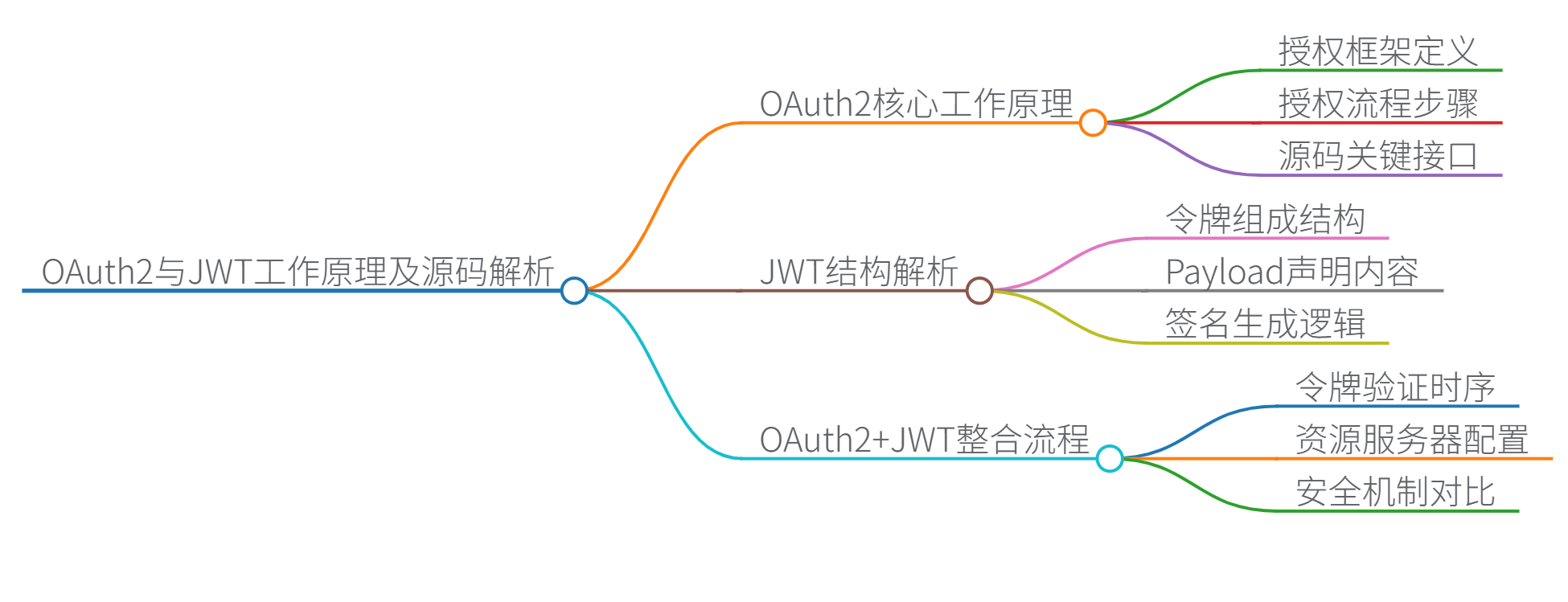
思维导图





 扫一扫
扫一扫


 2393
2393

 被折叠的 条评论
为什么被折叠?
被折叠的 条评论
为什么被折叠?
 到【灌水乐园】发言





