



 本文详细介绍了Python中的turtle模块,用于海龟绘图。turtle是Python内置的图形绘制工具,源于1966年的LOGO语言。文章讲解了如何使用turtle库的基本操作,包括前进、转弯、画圆、颜色控制等,并通过实例展示了如何绘制各种图形,如正方形、圆形、国旗等。此外,还讨论了Tkinter的mainloop函数在图形用户界面中的作用。
目录
海龟绘图
海龟绘图是Python中非常流行的绘图工具。1966年,西蒙·派珀特 博士发明了一种专门给儿童学习编程的语言——LOGO语言。它的特色就是通过编程指挥一只小海龟在屏幕上绘图。
而Python内置了海龟绘图模块,复制了原始的海龟绘图的所有功能。
在下面的程序中,大家会发现一个turtle.mainloop(),在海龟绘图中最后使用此方法可以让绘图窗口不要在绘制结束后关闭
Tkinter模块("Tk 接口")是Python的标准Tk GUI工具包的接口.Tk和Tkinter可以在大多数的Unix平台下使用,同样可以应用在Windows和Macintosh系统里.Tk8.0的后续版本可以实现本地窗口风格,并良好地运行在绝大多数平台中
在此文链接中有较为好理解的解释:https://blog.youkuaiyun.com/San__Qi/article/details/100568682
Python中tkinter的mainloop函数实质
正文
以下是一般大多数tkinter程序员都共有的步骤,它的代码做了以下这些事情:
1.从痛苦inter模块中加载一个组件类。
2.创建该组件类的实例为标签类
3.在父组件中打包新标签。
4.调用主循环,显示窗口,同时开始tkinter的事件循环。
mainloop方法最后执行,将标签显示在屏幕,进入等待状态(注:若组件未打包,则不会在窗口中显示),准备响应用户发起的GUI事件。在mainloop函数中,tkinter内部会监控这些事件,如键盘活动,鼠标单击等。事实上,tkinter的mainloop函数与下面的Python伪代码实质是一样的:def mainloop(): while the main window has not been closed: if an event has occurred: run the associated event handler function
由于这个事件模型,只要GUI还在屏幕上,mainloop调用就不会返回执行代码。当我们写大型代码时,调用mainloop后唯一的做法就是注册调用管理器来响应事件。直到满足终止条件时,调用Tk()实例中的quit来打断mainloop的执行。事实上sys.exit函数也可以用来退出GUI,它通过抛出一个异常进而退出程序,该异常是可以进行捕获的(千万不要采用os._exit方法,它同样可以退出整个程序,但它不会执行清理动作,并且它不能被捕获)。窗口(如Tk根窗口,TopLevel实例)中的destroy函数也可以用来关闭GUI,不过我们通常不采用该方法,但它与quit函数不同,当程序中有多个Tk根窗口时,destroy只有在最后一个根窗口被关闭后才会退出GUI。当然,在mainloop中我们也可以对这些事件进行过滤等操作,不过这与本文无太大关联。
总结自《Python编程》第四版----O’REILLY著。
turtle模块里的方法
-
导入模块
在Python中使用模块的时候需要先导入,例如使用海龟绘图的时候就需要import turtle来进行导入
-
’召唤‘海龟
海龟绘图中小海龟(画笔)的初始形状是一个箭头,我们可以使用turtle里面的shape方法来改变它的形状。
import turtle

turtle.shape('turtle')
这样就把它的形状变成了一只小乌龟。
其他的形状还有:“arrow”, “circle”, “square”, “triangle”, “classic”


-
前进 forward
使用forward方法来控制小海龟朝面向的方向前进
import turtle
turtle.shape('turtle')
turtle.forward(100)
-
画圆 circle ,用法turtle.circle(50,180) 50是圆的半径,180是圆的弧度,一整个圆的默认弧度是360
使用circle方法来命令小海龟绘制圆形
import turtle
turtle.shape('turtle')
turtle.circle(50)
turtle.done()
其中circle后面括号里的数字为圆的半径大小,单位为像素
-
转弯 left
使用left方法可以控制小海龟朝左边转向
import turtle
turtle.shape('turtle')
turtle.left(45)
turtle.forward(100)
这段代码就可以控制小海龟先朝左边转45度,再前进绘制直线。
-
使用一个变量t代替画笔
import turtle
t=turtle.Pen() #使用一个变量t来作为画笔,注意Pen的P是大写的
t.forward(100)
turtle.done()
-
绘制正方形
import turtle
turtle.shape('turtle')
turtle.forward(100)
turtle.left(90)
turtle.forward(100)
turtle.left(90)
turtle.forward(100)
turtle.left(90)
turtle.forward(100)
turtle.left(90)
turtle.mainloop()
-
绘制雪人
import turtle
turtle.shape('turtle')
turtle.circle(50)
turtle.left(180)
turtle.circle(100)
turtle.mainloop()
-
forward前进 -- backward后退
import turtle
turtle.shape('turtle')
turtle.backward(100)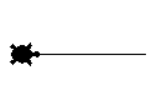
-
left左转 -- right右转
import turtle
turtle.right(45)
turtle.forward(100)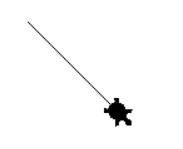
-
红色正方形
import turtle

turtle.pensize(4)
turtle.pencolor('red')

turtle.forward(100)
turtle.right(90)
turtle.forward(100)
turtle.right(90)
turtle.forward(100)
turtle.right(90)
turtle.forward(100)

turtle.mainloop()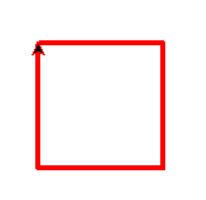
-
绘制国旗
"""
用Python的turtle模块绘制国旗
"""
import turtle


def draw_rectangle(x, y, width, height):
    """绘制矩形"""
    turtle.goto(x, y)
    turtle.pencolor('red')
    turtle.fillcolor('red')
    turtle.begin_fill()
    for i in range(2):
        turtle.forward(width)
        turtle.left(90)
        turtle.forward(height)
        turtle.left(90)
    turtle.end_fill()


def draw_star(x, y, radius):
    """绘制五角星"""
    turtle.setpos(x, y)
    pos1 = turtle.pos()
    turtle.circle(-radius, 72)
    pos2 = turtle.pos()
    turtle.circle(-radius, 72)
    pos3 = turtle.pos()
    turtle.circle(-radius, 72)
    pos4 = turtle.pos()
    turtle.circle(-radius, 72)
    pos5 = turtle.pos()
    turtle.color('yellow', 'yellow')
    turtle.begin_fill()
    turtle.goto(pos3)
    turtle.goto(pos1)
    turtle.goto(pos4)
    turtle.goto(pos2)
    turtle.goto(pos5)
    turtle.end_fill()


def main():
    """主程序"""
    turtle.speed(12)
    turtle.penup()
    x, y = -270, -180
    # 画国旗主体
    width, height = 540, 360
    draw_rectangle(x, y, width, height)
    # 画大星星
    pice = 22
    center_x, center_y = x + 5 * pice, y + height - pice * 5
    turtle.goto(center_x, center_y)
    turtle.left(90)
    turtle.forward(pice * 3)
    turtle.right(90)
    draw_star(turtle.xcor(), turtle.ycor(), pice * 3)
    x_poses, y_poses = [10, 12, 12, 10], [2, 4, 7, 9]
    # 画小星星
    for x_pos, y_pos in zip(x_poses, y_poses):
        turtle.goto(x + x_pos * pice, y + height - y_pos * pice)
        turtle.left(turtle.towards(center_x, center_y) - turtle.heading())
        turtle.forward(pice)
        turtle.right(90)
        draw_star(turtle.xcor(), turtle.ycor(), pice)
    # 隐藏海龟
    turtle.ht()
    # 显示绘图窗口
    turtle.mainloop()


if __name__ == '__main__':
    main()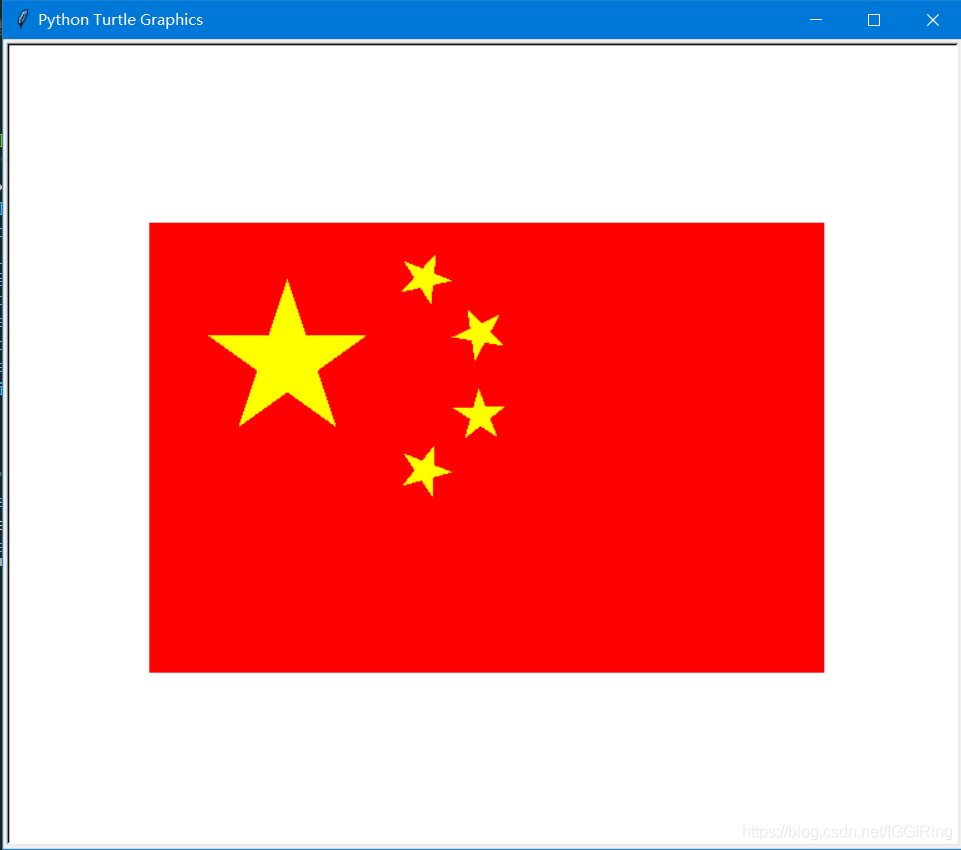
-
绘制小猪佩奇
"""
绘制小猪佩奇
"""
from turtle import *


def nose(x,y):
    """画鼻子"""
    penup()
    # 将海龟移动到指定的坐标
    goto(x,y)
    pendown()
    # 设置海龟的方向(0-东、90-北、180-西、270-南)
    setheading(-30)
    begin_fill()
    a = 0.4
    for i in range(120):
        if 0 <= i < 30 or 60 <= i <90:
            a = a + 0.08
            # 向左转3度
            left(3)
            # 向前走
            forward(a)
        else:
            a = a - 0.08
            left(3)
            forward(a)
    end_fill()
    penup()
    setheading(90)
    forward(25)
    setheading(0)
    forward(10)
    pendown()
    # 设置画笔的颜色(红, 绿, 蓝)
    pencolor(255, 155, 192)
    setheading(10)
    begin_fill()
    circle(5)
    color(160, 82, 45)
    end_fill()
    penup()
    setheading(0)
    forward(20)
    pendown()
    pencolor(255, 155, 192)
    setheading(10)
    begin_fill()
    circle(5)
    color(160, 82, 45)
    end_fill()


def head(x, y):
    """画头"""
    color((255, 155, 192), "pink")
    penup()
    goto(x,y)
    setheading(0)
    pendown()
    begin_fill()
    setheading(180)
    circle(300, -30)
    circle(100, -60)
    circle(80, -100)
    circle(150, -20)
    circle(60, -95)
    setheading(161)
    circle(-300, 15)
    penup()
    goto(-100, 100)
    pendown()
    setheading(-30)
    a = 0.4
    for i in range(60):
        if 0<= i < 30 or 60 <= i < 90:
            a = a + 0.08
            lt(3) #向左转3度
            fd(a) #向前走a的步长
        else:
            a = a - 0.08
            lt(3)
            fd(a)
    end_fill()


def ears(x,y):
    """画耳朵"""
    color((255, 155, 192), "pink")
    penup()
    goto(x, y)
    pendown()
    begin_fill()
    setheading(100)
    circle(-50, 50)
    circle(-10, 120)
    circle(-50, 54)
    end_fill()
    penup()
    setheading(90)
    forward(-12)
    setheading(0)
    forward(30)
    pendown()
    begin_fill()
    setheading(100)
    circle(-50, 50)
    circle(-10, 120)
    circle(-50, 56)
    end_fill()


def eyes(x,y):
    """画眼睛"""
    color((255, 155, 192), "white")
    penup()
    setheading(90)
    forward(-20)
    setheading(0)
    forward(-95)
    pendown()
    begin_fill()
    circle(15)
    end_fill()
    color("black")
    penup()
    setheading(90)
    forward(12)
    setheading(0)
    forward(-3)
    pendown()
    begin_fill()
    circle(3)
    end_fill()
    color((255, 155, 192), "white")
    penup()
    seth(90)
    forward(-25)
    seth(0)
    forward(40)
    pendown()
    begin_fill()
    circle(15)
    end_fill()
    color("black")
    penup()
    setheading(90)
    forward(12)
    setheading(0)
    forward(-3)
    pendown()
    begin_fill()
    circle(3)
    end_fill()


def cheek(x,y):
    """画脸颊"""
    color((255, 155, 192))
    penup()
    goto(x,y)
    pendown()
    setheading(0)
    begin_fill()
    circle(30)
    end_fill()


def mouth(x,y):
    """画嘴巴"""
    color(239, 69, 19)
    penup()
    goto(x, y)
    pendown()
    setheading(-80)
    circle(30, 40)
    circle(40, 80)


def setting():
    """设置参数"""
    pensize(4)
    # 隐藏海龟
    hideturtle()
    colormode(255)
    color((255, 155, 192), "pink")
    setup(840, 500)
    speed(10)


def main():
    """主函数"""
    setting()
    nose(-100, 100)
    head(-69, 167)
    ears(0, 160)
    eyes(0, 140)
    cheek(80, 10)
    mouth(-20, 30)
    done()


if __name__ == '__main__':
    main()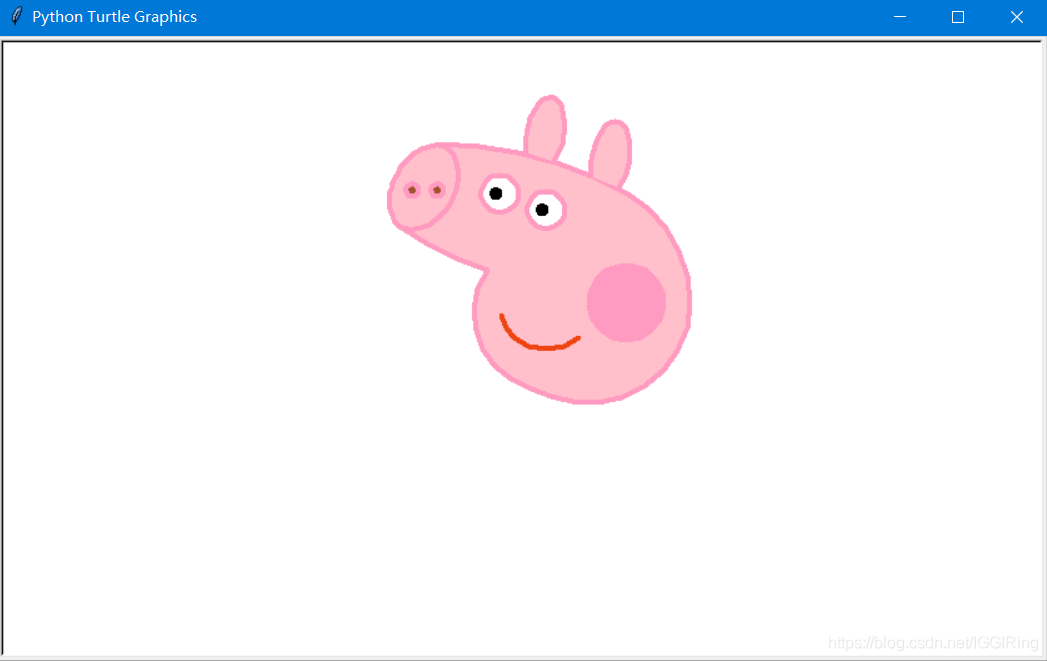
-
绘制玫瑰花 turtle.speed() 控制画笔速度,0为最快速度,1是最慢的速度 ,1-10是逐渐加快的速度
import turtle

import time

turtle.speed(5)

# 设置初始位置

turtle.penup()

turtle.left(90)

turtle.fd(200)

turtle.pendown()

turtle.right(90)
# 花蕊

turtle.fillcolor("red")

turtle.begin_fill()

turtle.circle(10,180)

turtle.circle(25,110)

turtle.left(50)

turtle.circle(60,45)

turtle.circle(20,170)

turtle.right(24)

turtle.fd(30)

turtle.left(10)

turtle.circle(30,110)

turtle.fd(20)

turtle.left(40)

turtle.circle(90,70)

turtle.circle(30,150)

turtle.right(30)

turtle.fd(15)

turtle.circle(80,90)

turtle.left(15)

turtle.fd(45)

turtle.right(165)

turtle.fd(20)

turtle.left(155)

turtle.circle(150,80)

turtle.left(50)

turtle.circle(150,90)

turtle.end_fill()


# 花瓣1

turtle.left(150)

turtle.circle(-90,70)

turtle.left(20)

turtle.circle(75,105)

turtle.setheading(60)

turtle.circle(80,98)

turtle.circle(-90,40)


# 花瓣2

turtle.left(180)

turtle.circle(90,40)

turtle.circle(-80,98)

turtle.setheading(-83)


# 叶子1

turtle.fd(30)

turtle.left(90)

turtle.fd(25)

turtle.left(45)

turtle.fillcolor("green")

turtle.begin_fill()

turtle.circle(-80,90)

turtle.right(90)

turtle.circle(-80,90)

turtle.end_fill()


turtle.right(135)

turtle.fd(60)

turtle.left(180)

turtle.fd(85)

turtle.left(90)

turtle.fd(80)


# 叶子2

turtle.right(90)

turtle.right(45)

turtle.fillcolor("green")

turtle.begin_fill()

turtle.circle(80,90)

turtle.left(90)

turtle.circle(80,90)

turtle.end_fill()


turtle.left(135)

turtle.fd(60)

turtle.left(180)

turtle.fd(60)

turtle.right(90)

turtle.circle(200,60)

turtle.mainloop()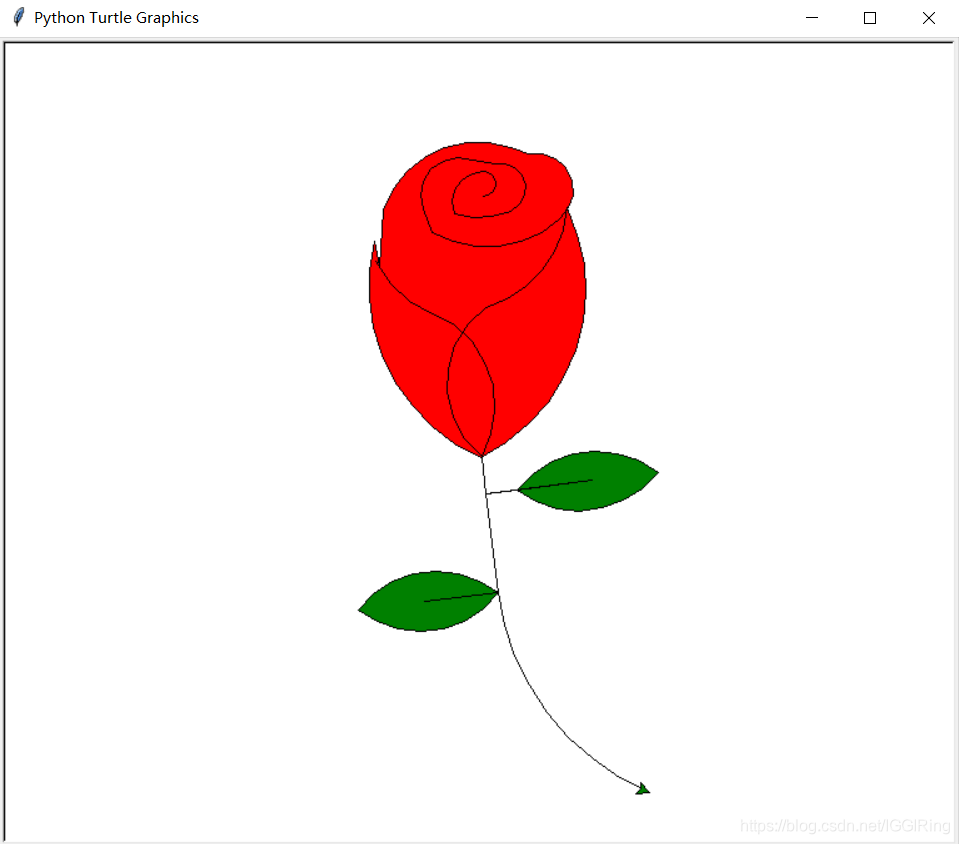
-
绘制太阳花(使用循环)
import turtle

turtle=turtle.Turtle()
screen=turtle.getscreen()

turtle.color('red', 'yellow')
turtle.begin_fill()
for i in range(50):
    turtle.forward(200)
    turtle.left(170)
turtle.end_fill()
screen.mainloop()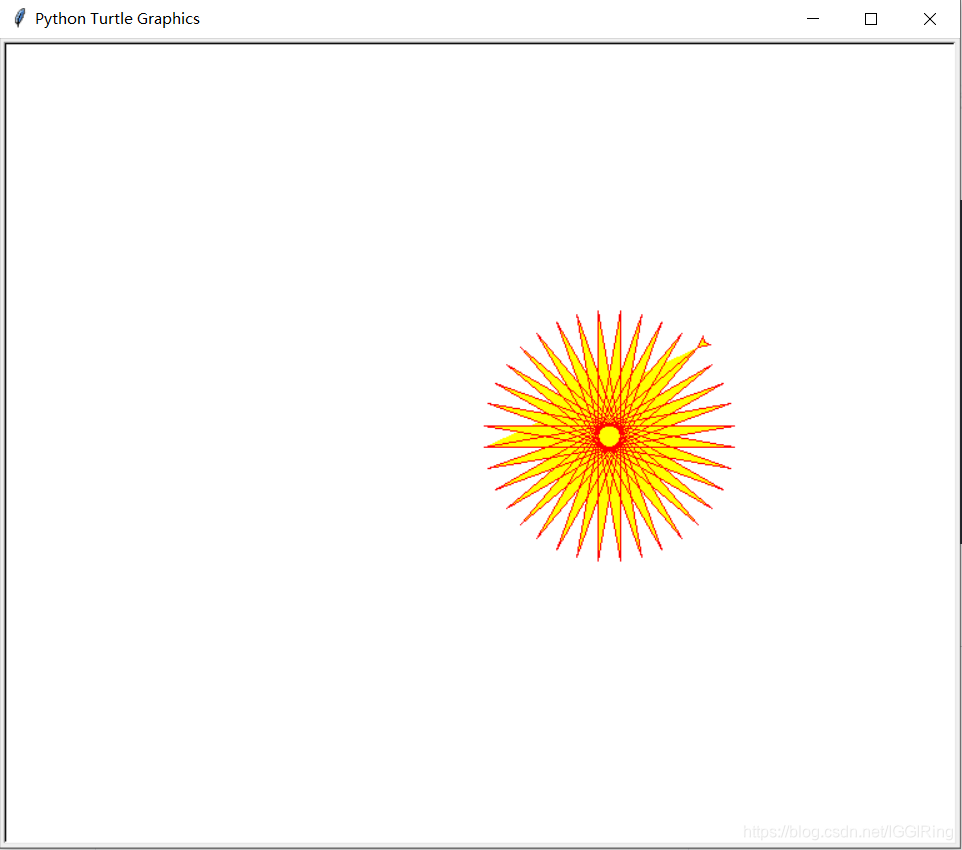
-
移动画笔的坐标 goto(x,y) 移动到x,y处
-
两个画笔坐标之间的距离 = t1.distance(t2)
-
import turtle
turtle.shape('turtle')
turtle.circle(100)
turtle.goto(0,50)
turtle.circle(50)
import turtle t1=turtle.Pen() t2=turtle.Pen() t1.goto(0,100) print(t1.distance(t2)) turtle.done() >>>100.0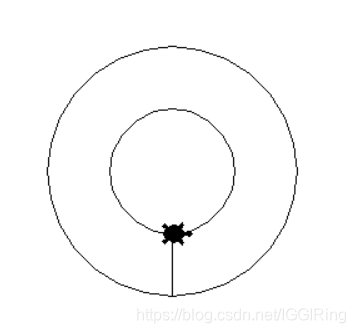
-
抬起画笔,放下画笔(用来隐藏画笔轨迹)
import turtle
turtle.shape('turtle')
turtle.circle(100)
turtle.penup()
turtle.goto(0,50)
turtle.pendown()
turtle.circle(50)
turtle.mainloop()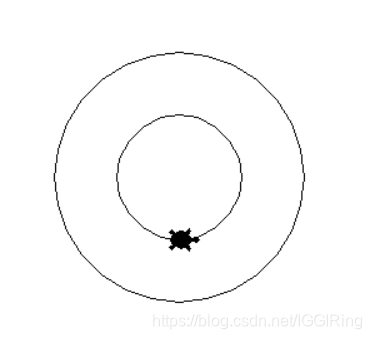
import turtle
turtle.penup()
turtle.goto(100,100)
turtle.pendown()
turtle.mainloop()
无轨迹的让画笔从 (0,0) 移动到(100,100)
-
并排的两个圆
import turtle
turtle.circle(50)
turtle.penup()
turtle.goto(100,0)
turtle.pendown()
turtle.circle(50)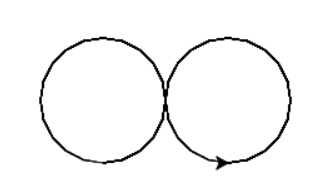
-
一个回字
import turtle
#第一个正方形
turtle.forward(100)
turtle.left(90)
turtle.forward(100)
turtle.left(90)
turtle.forward(100)
turtle.left(90)
turtle.forward(100)
turtle.left(90)
#无痕迹的移动画笔
turtle.penup()
turtle.goto(25,25)
turtle.pendown()
#第二个正方形
turtle.forward(50)
turtle.left(90)
turtle.forward(50)
turtle.left(90)
turtle.forward(50)
turtle.left(90)
turtle.forward(50)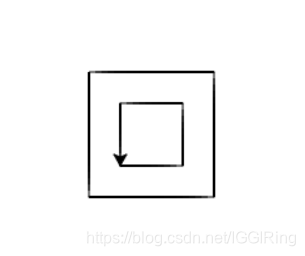
-
呆滞的表情 hideturtle --- showturtle
import turtle
#外面的脸
turtle.circle(150)
#左眼
turtle.penup()
turtle.goto(-70,220)
turtle.pendown()
turtle.forward(50)
#右眼
turtle.penup()
turtle.goto(70,215)
turtle.pendown()
turtle.forward(50)
#嘴巴
turtle.penup()
turtle.goto(40,70)
turtle.pendown()
turtle.circle(60)
#隐藏画笔
turtle.hideturtle()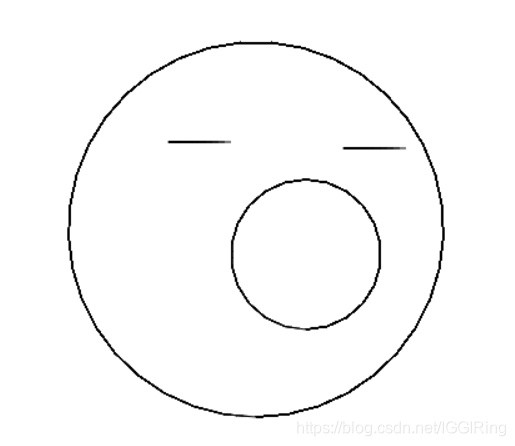
-
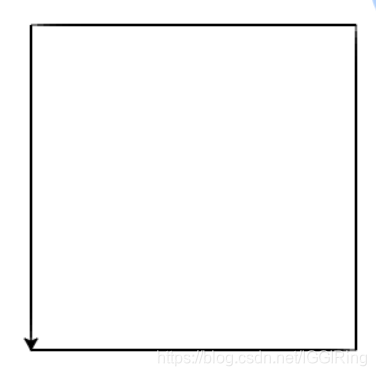
使用变量绘制一个正方形
import turtle
length = 260 #使用变量来绘制一个可以任意修改边长的正方形
turtle.forward(length)
turtle.left(90)
turtle.forward(length)
turtle.left(90)
turtle.forward(length)
turtle.left(90)
turtle.forward(length)
修改边长的时候,只需修改length的值即可
-
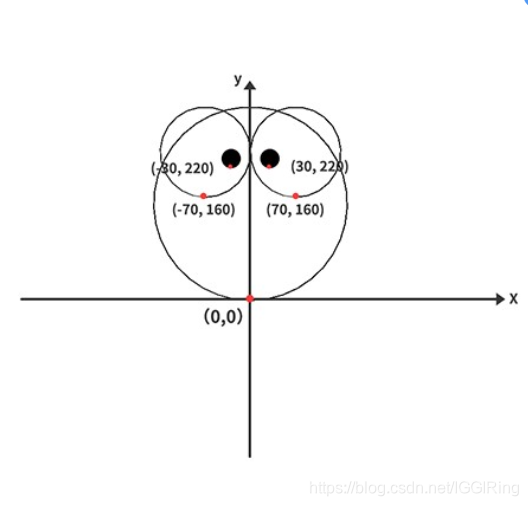
使用变量来绘制一个大眼睛表情,turtle.dot()绘制实心圆,用法turtle.dot(50,'black') 50是实心圆的半径,black是实心圆的颜色,学习使用画笔颜色pencolor,填充颜色fillcolor,begin_fill,end_fill,turtle.done() 停止绘制,但不会关闭窗口
import turtle
#定义变量设置眼睛坐标起点
x = 70
y = 160
#定义变量设置眼球坐标起点
x1 = 30
y1 = 220
eyesize = 60    #定义眼睛半径
facesize = 150    #定义脸的半径
eyesize1 = 20   #定义眼球的半径
turtle.speed(0)  #画笔速度设为最快
eyescolor = 'black'  #定义眼球颜色
turtle.pencolor('yellow') #定义画笔颜色
facecolor = 'blue' #定义脸部颜色
#画脸
turtle.fillcolor(facecolor)  #给脸部填充颜色
turtle.begin_fill()   #开始填充
turtle.circle(facesize)
turtle.end_fill()  #结束填充
#画眼睛
turtle.penup()
#turtle.fillcolor('white')   # 图片未封闭填充颜色,将自动首尾相连形成封闭图形
#turtle.begin_fill()
turtle.goto(-x,y)
turtle.pendown()
turtle.fillcolor('white')   #眼睛颜色定义
turtle.begin_fill()    #眼睛颜色开始填充
turtle.circle(eyesize)
turtle.end_fill()    #用于测试不同结点填充颜色

turtle.penup()
turtle.goto(x,y)
turtle.pendown()
turtle.fillcolor('red')   #用于测试不同结点填充颜色
turtle.begin_fill()   #用于测试不同结点填充颜色
turtle.circle(eyesize)
turtle.end_fill()  #眼睛颜色结束填充
#画眼球
turtle.penup()
turtle.goto(-x1,y1)
turtle.pendown()
turtle.dot(eyesize1,eyescolor)

turtle.penup()
turtle.goto(x1,y1)
turtle.pendown()
turtle.dot(eyesize1,eyescolor)
#隐藏画笔
turtle.hideturtle()
turtle.done()  #停止绘制,但不关闭窗口
#画完后不关闭页面
#turtle.mainloop()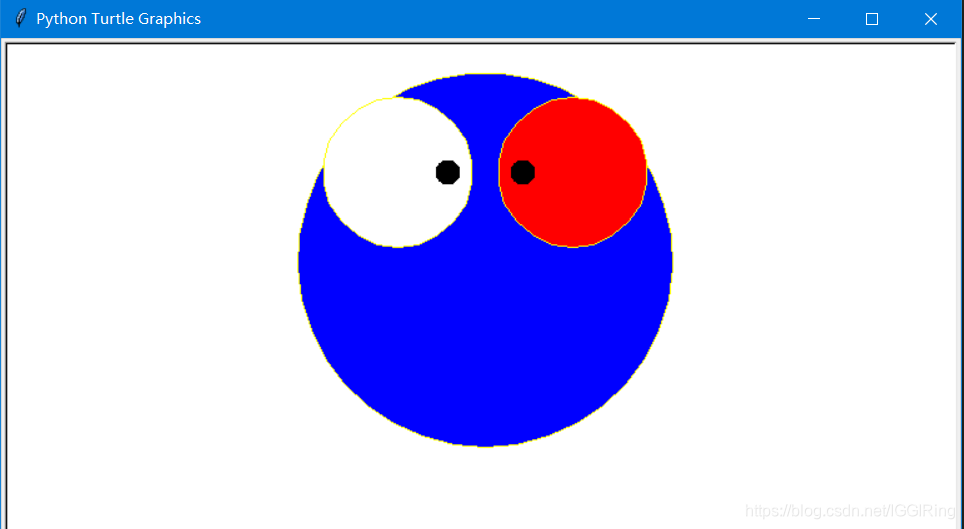
如果调用end_fill之前图形未封闭,会发生什么现象?
import turtle
# 设置填充颜色
turtle.fillcolor('blue')
# 开始填充
turtle.begin_fill()
turtle.forward(150)
turtle.left(90)
turtle.forward(150)
turtle.right(90)
turtle.forward(150)
# 结束填充
turtle.end_fill()
turtle.done()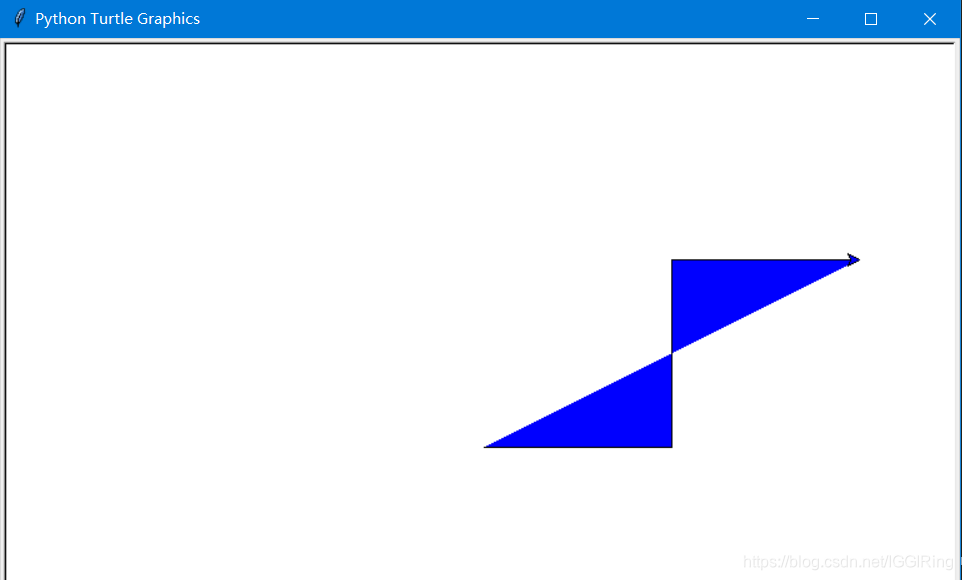
当图形未封闭时,turtle会自动把begin_fill开始填充后,画笔所在的第一个位置,以及end_fill结束填充前,画笔所在的最后一个位置连接起来,形成封闭图形,然后把图形填充上设定的颜色,所以你会注意到蓝色区域的最后一条边时没有轮廓的。
-
Python绘图Turtle库详解
Turtle库是Python语言中一个很流行的绘制图像的函数库,想象一个小乌龟,在一个横轴为x、纵轴为y的坐标系原点,(0,0)位置开始,它根据一组函数指令的控制,在这个平面坐标系中移动,从而在它爬行的路径上绘制了图形。
turtle绘图的基础知识:
1. 画布(canvas)
画布就是turtle为我们展开用于绘图区域,我们可以设置它的大小和初始位置。
设置画布大小
turtle.screensize(canvwidth=None, canvheight=None, bg=None),参数分别为画布的宽(单位像素), 高, 背景颜色。
如:turtle.screensize(800,600, "green")
turtle.screensize() #返回默认大小(400, 300)
turtle.setup(width=0.5, height=0.75, startx=None, starty=None),参数:width, height: 输入宽和高为整数时, 表示像素; 为小数时, 表示占据电脑屏幕的比例,(startx, starty): 这一坐标表示矩形窗口左上角顶点的位置, 如果为空,则窗口位于屏幕中心。
如:turtle.setup(width=0.6,height=0.6)
turtle.setup(width=800,height=800, startx=100, starty=100)
2. 画笔
2.1 画笔的状态
在画布上,默认有一个坐标原点为画布中心的坐标轴,坐标原点上有一只面朝x轴正方向小乌龟。这里我们描述小乌龟时使用了两个词语:坐标原点(位置),面朝x轴正方向(方向), turtle绘图中,就是使用位置方向描述小乌龟(画笔)的状态。
2.2 画笔的属性
画笔(画笔的属性,颜色、画线的宽度等)
设置一支画笔 t=turtle.Pen()后面就可以用t来代替所有的turtle,注意Pen是大写的
1) turtle.pensize():设置画笔的宽度;
2) turtle.pencolor():没有参数传入,返回当前画笔颜色,传入参数设置画笔颜色,可以是字符串如"green", "red",也可以是RGB 3元组。当pencolor里是RGB的参数时,需要使用colormode修改参数,默认是0-1.0的,使用这条语句来修改:turtle.getscreen().colormode(255),不然有可能会报错。
3) turtle.speed(speed):设置画笔移动速度,画笔绘制的速度范围[0,10]整数,数字越大越快。
2.3 绘图命令
操纵海龟绘图有着许多的命令,这些命令可以划分为3种:一种为运动命令,一种为画笔控制命令,还有一种是全局控制命令。
(1) 画笔运动命令
命令
说明
turtle.forward(distance)
向当前画笔方向移动distance像素长度
turtle.backward(distance)
向当前画笔相反方向移动distance像素长度
turtle.right(degree)
顺时针移动degree°
turtle.left(degree)
逆时针移动degree°
turtle.pendown()
移动时绘制图形,缺省时也为绘制
turtle.goto(x,y)
将画笔移动到坐标为x,y的位置
turtle.penup()
提起笔移动,不绘制图形,用于另起一个地方绘制
turtle.circle()
画圆,半径为正(负),表示圆心在画笔的左边(右边)画圆
setx( )
将当前x轴移动到指定位置
sety( )
将当前y轴移动到指定位置
setheading(angle)
设置当前朝向为angle角度
home()
设置当前画笔位置为原点,朝向东。
dot(r)
绘制一个指定直径和颜色的圆点
(2) 画笔控制命令
命令
说明
turtle.fillcolor(colorstring)
绘制图形的填充颜色
turtle.color(color1, color2)
同时设置pencolor=color1, fillcolor=color2
turtle.filling()
返回当前是否在填充状态
turtle.begin_fill()
准备开始填充图形
turtle.end_fill()
填充完成
turtle.hideturtle()
隐藏画笔的turtle形状
turtle.showturtle()
显示画笔的turtle形状
(3) 全局控制命令
命令
说明
turtle.clear()
清空turtle窗口,但是turtle的位置和状态不会改变
turtle.reset()
清空窗口,重置turtle状态为起始状态
turtle.undo()
撤销上一个turtle动作
turtle.isvisible()
返回当前turtle是否可见
stamp()
复制当前图形
turtle.write(s [,font=("font-name",font_size,"font_type")])
写文本,s为文本内容,font是字体的参数,分别为字体名称,大小和类型;font为可选项,font参数也是可选项
(4) 其他命令
命令
说明
turtle.mainloop()或turtle.done()
启动事件循环 -调用Tkinter的mainloop函数。
必须是乌龟图形程序中的最后一个语句。
turtle.mode(mode=None)
设置乌龟模式(“standard”,“logo”或“world”)并执行重置。如果没有给出模式,则返回当前模式。
模式
初始龟标题
正角度
standard
向右(东)
逆时针
logo
向上(北)
顺时针
turtle.delay(delay=None)
设置或返回以毫秒为单位的绘图延迟。
turtle.begin_poly()
开始记录多边形的顶点。当前的乌龟位置是多边形的第一个顶点。
turtle.end_poly()
停止记录多边形的顶点。当前的乌龟位置是多边形的最后一个顶点。将与第一个顶点相连。
turtle.get_poly()
返回最后记录的多边形。
3. 命令详解
3.1 turtle.circle(radius, extent=None, steps=None)
描述:以给定半径画圆
参数:
radius(半径):半径为正(负),表示圆心在画笔的左边(右边)画圆;
extent(弧度) (optional);
steps (optional) (做半径为radius的圆的内切正多边形,多边形边数为steps)。
举例:
circle(50) # 整圆;
circle(50,steps=3) # 三角形;
circle(120, 180) # 半圆
import turtle
turtle.circle(50)
turtle.circle(50,steps=4)
turtle.done()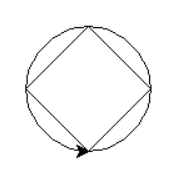






 扫一扫
扫一扫


 2892
2892

 被折叠的 条评论
为什么被折叠?
被折叠的 条评论
为什么被折叠?
 到【灌水乐园】发言





