
nbut线段树专题C - Mayor\'s posters

Description

The citizens of Bytetown, AB, could not stand that the candidates in the mayoral election campaign have been placing their electoral posters at all places at their whim. The city council has finally decided to build an electoral wall for placing the posters and introduce the following rules: 
  • Every candidate can place exactly one poster on the wall. 
  • All posters are of the same height equal to the height of the wall; the width of a poster can be any integer number of bytes (byte is the unit of length in Bytetown). 
  • The wall is divided into segments and the width of each segment is one byte. 
  • Each poster must completely cover a contiguous number of wall segments.

They have built a wall 10000000 bytes long (such that there is enough place for all candidates). When the electoral campaign was restarted, the candidates were placing their posters on the wall and their posters differed widely in width. Moreover, the candidates started placing their posters on wall segments already occupied by other posters. Everyone in Bytetown was curious whose posters will be visible (entirely or in part) on the last day before elections. 
Your task is to find the number of visible posters when all the posters are placed given the information about posters' size, their place and order of placement on the electoral wall. 

Input

The first line of input contains a number c giving the number of cases that follow. The first line of data for a single case contains number 1 <= n <= 10000. The subsequent n lines describe the posters in the order in which they were placed. The i-th line among the n lines contains two integer numbers l i and ri which are the number of the wall segment occupied by the left end and the right end of the i-th poster, respectively. We know that for each 1 <= i <= n, 1 <= l i <= ri <= 10000000. After the i-th poster is placed, it entirely covers all wall segments numbered l i, l i+1 ,... , ri.

Output

For each input data set print the number of visible posters after all the posters are placed. 

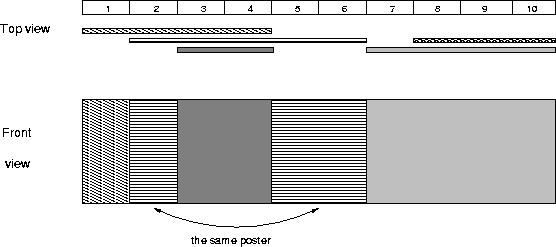
The picture below illustrates the case of the sample input. 
nbut线段树专题C - Mayors posters - 深海灬孤独 - Alex


这题n太大,如果直接去建立线段树,内存一定会不够,所以要离散化

离散化是指,把所有坐标从小到大排序,然后用其序号代替值,这样,压缩了值,但是覆盖关系没变,我们用一个结构体数组去存边和点


其他的:

   本题相当于区间染色,问你最后可以看到几种颜色,那么我们把线段离散化好了后,一个个加入到线段树里,压缩了以后坐标最大也只有20000+

#include<stdio.h>
#include<string.h>
#include<algorithm>
#include<iostream>
using namespace std;
#define maxn 10000+10

struct node
{
int l,r,color;
}tree[maxn<<2];
bool flag[maxn<<1];
int cnt;
struct node2
{
int edge,p;
}edges[maxn<<2];
int mat[maxn<<1][2];
int cmp(node2 a,node2 b)
{
return a.p<b.p;
}
void build(int p,int l,int r)
{
tree[p].l=l;
tree[p].r=r;
tree[p].color=0;//0表示没有颜色
if(l==r)
return ;
int mid=(l+r)>>1;
build(p<<1,l,mid);
build(p<<1|1,mid+1,r);
}

void update(int p,int l,int r,int m)
{
if(l==tree[p].l && r==tree[p].r)//找到区间后,更新
{
tree[p].color=m;
return ;
}
int mid=(tree[p].l + tree[p].r)>>1;
if(tree[p].color>0)//当前节点有色,也就是更新过了,那么就要去更新子节点,然后把当前节点标记为无色,相当于lazy标记
{
tree[p<<1].color=tree[p].color;
tree[p<<1|1].color=tree[p].color;
tree[p].color=0;
}
if(l>mid)
update(p<<1|1,l,r,m);
else if(r<=mid)
update(p<<1,l,r,m);
else
{
update(p<<1,l,mid,m);
update(p<<1|1,mid+1,r,m);
}
}

void query(int p)
{
if(tree[p].color)//假如p节点是有色的,那么他的左右儿子是被他包含的,也就是p节点下的节点都是被覆盖的,看不到

{
if(!flag[tree[p].color])//如果没出现这个颜色
{
cnt++;
flag[tree[p].color]=1;
}
return ;
}
query(p<<1);
query(p<<1|1);
}

int main()
{
int c,n;
while(~scanf("%d",&c))
{
while(c--)
{
scanf("%d",&n);
for(int i=0;i<n;i++)
{
scanf("%d%d",&mat[i][0],&mat[i][1]);
edges[2*i].p=mat[i][0];
edges[2*i].edge=-(i+1);负号表示左边端点
edges[2*i|1].p=mat[i][1];
edges[2*i|1].edge=(i+1);
}
sort(edges,edges+2*n,cmp);//排序
int ans=1;
int temp=edges[0].p;
for(int i=0;i<2*n;i++)
{
if(temp!=edges[i].p)//防止相同端点映射到不同的点
{
ans++;
temp=edges[i].p;
}
if(edges[i].edge<0) //左边
mat[-edges[i].edge-1][0]=ans;
else
mat[edges[i].edge-1][1]=ans;
}
build(1,1,ans);
for(int i=0;i<n;i++)
update(1,mat[i][0],mat[i][1],i+1);
cnt=0;
memset(flag,0,sizeof(flag));
query(1);
printf("%d\n",cnt );
}
}
return 0;
}


### 问题分析 在 CMake 使用 `find_package` 查找 OpenCV 时,如果返回 `OpenCV_FOUND` 为 `FALSE`,通常表明 CMake 未能正确找到 OpenCV 库或其配置文件。以下是一些可能的原因及解决方案: --- ### 可能原因与解决方法 #### 1. OpenCV 未正确安装 如果系统中没有正确安装 OpenCV 库,CMake 将无法找到它。确保 OpenCV 已经正确安装,并且可以通过命令行访问到[^2]。 - **检查 OpenCV 安装**:通过以下命令确认 OpenCV 是否已安装: ```bash pkg-config --modversion opencv4 ``` 如果该命令返回版本号,则说明 OpenCV 已正确安装。 - **解决方法**:如果 OpenCV 未安装,请下载并安装 OpenCV 库。例如,使用以下命令安装(以 Ubuntu 系统为例): ```bash sudo apt-get install libopencv-dev ``` --- #### 2. OpenCV 路径未正确配置 即使 OpenCV 已安装,CMake 可能仍然找不到它,因为路径未正确配置[^3]。 - **设置 `CMAKE_PREFIX_PATH`**:如果 OpenCV 安装在非默认路径下,可以通过设置 `CMAKE_PREFIX_PATH` 指定路径: ```cmake set(CMAKE_PREFIX_PATH "/path/to/your/opencv/installation") find_package(OpenCV REQUIRED) ``` - **手动指定路径**:如果需要明确指定 OpenCV 的配置文件路径,可以设置 `OpenCV_DIR`: ```cmake set(OpenCV_DIR "/path/to/your/opencv/share/OpenCV") find_package(OpenCV REQUIRED) ``` --- #### 3. 配置文件缺失或损坏 CMake 使用 `OpenCVConfig.cmake` 或 `FindOpenCV.cmake` 来查找 OpenCV 库。如果这些文件不存在或损坏,可能导致查找失败[^1]。 - **检查配置文件**:确保安装路径下存在 `OpenCVConfig.cmake` 文件。例如,在 `/usr/local/share/OpenCV` 下应该有该文件。 - **解决方法**:如果文件缺失,重新编译 OpenCV 并确保生成了正确的配置文件。例如: ```bash cmake -D CMAKE_INSTALL_PREFIX=/usr/local .. make sudo make install ``` --- #### 4. 版本不匹配 如果指定了特定版本的 OpenCV(如 `find_package(OpenCV 3 REQUIRED)`),但系统中未安装该版本,也可能导致查找失败[^4]。 - **检查版本**:确认系统中安装的 OpenCV 版本是否满足要求。例如,使用以下命令检查版本: ```bash pkg-config --modversion opencv4 ``` - **解决方法**:如果版本不匹配,可以选择安装所需版本或调整 `find_package` 的版本要求。例如: ```cmake find_package(OpenCV 4 REQUIRED) # 如果需要 OpenCV 4.x ``` --- #### 5. CMake 内置模块问题 CMake 自带的 `FindOpenCV.cmake` 文件可能不支持最新版本的 OpenCV[^5]。 - **解决方法**:避免使用 CMake 自带的 `FindOpenCV.cmake` 文件,改为直接使用 `OpenCVConfig.cmake`: ```cmake find_package(OpenCV REQUIRED CONFIG) ``` --- ### 示例代码 以下是一个完整的 CMakeLists.txt 示例,展示如何正确查找 OpenCV: ```cmake cmake_minimum_required(VERSION 3.10) # 设置 CMAKE_PREFIX_PATH 如果 OpenCV 不在默认路径 set(CMAKE_PREFIX_PATH "/path/to/your/opencv/installation") # 查找 OpenCV find_package(OpenCV 4 REQUIRED) if(OpenCV_FOUND) message(STATUS "OpenCV found: ${OpenCV_INCLUDE_DIRS}") else() message(FATAL_ERROR "OpenCV not found!") endif() # 添加可执行文件并链接 OpenCV add_executable(my_opencv_app main.cpp) target_include_directories(my_opencv_app PRIVATE ${OpenCV_INCLUDE_DIRS}) target_link_libraries(my_opencv_app PRIVATE ${OpenCV_LIBS}) ``` --- ###
评论
添加红包

请填写红包祝福语或标题

红包个数最小为10个

红包金额最低5元

当前余额3.43前往充值 >
需支付:10.00
成就一亿技术人!
领取后你会自动成为博主和红包主的粉丝 规则
hope_wisdom
发出的红包
实付
使用余额支付
点击重新获取
扫码支付
钱包余额 0

抵扣说明:

1.余额是钱包充值的虚拟货币,按照1:1的比例进行支付金额的抵扣。
2.余额无法直接购买下载,可以购买VIP、付费专栏及课程。

余额充值


