



使用javascript-obfuscator 进行代码混淆
文档
包文档 https://doc.yoouu.cn/front-end/javascript-obfuscator.html
github:https://github.com/javascript-obfuscator/javascript-obfuscator
保护知识产权
JavaScript 作为前端主要开发语言,其源代码在客户端是公开可见的。代码混淆可以有效:
- 防止代码被直接复制:混淆后的代码难以理解和复用
- 保护核心算法:商业逻辑和专有技术得到一定程度的保护
- 增加逆向工程难度:即使有经验的开发者也需要大量时间分析
混淆的局限性
代码混淆:
- 不是加密:源代码仍然可以在浏览器中执行
- 不能完全防止逆向:只能增加分析难度和成本
- 不影响网络请求:API调用仍然可以被抓包分析
依赖包
npm install fs-extra javascript-obfuscator rimraf
  "dependencies": {
    "fs-extra": "^11.3.2",
    "javascript-obfuscator": "^4.1.1",
    "rimraf": "^6.1.2"
  }
用法
可以被混淆的代码
// original-code.js
function calculatePrice(quantity, price) {
    const taxRate = 0.1;
    const discount = quantity > 10 ? 0.15 : 0.05;
    const subtotal = quantity * price;
    const tax = subtotal * taxRate;
    const total = subtotal + tax;
    return total * (1 - discount);
}

console.log("Total price:", calculatePrice(5, 100));
console.log("Total price:", calculatePrice(15, 100));
运行
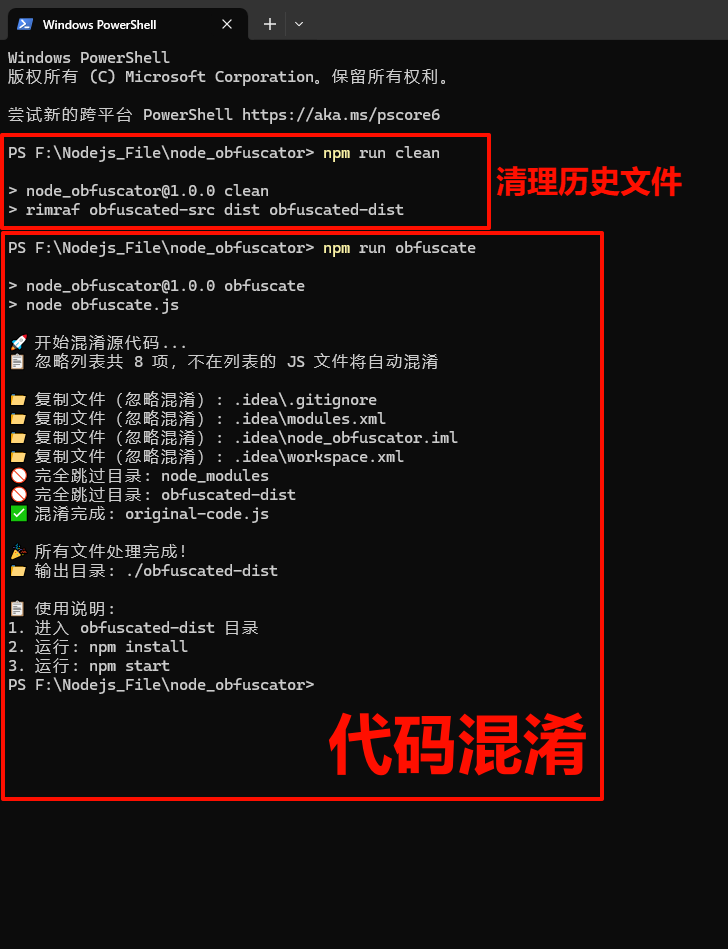
清理历史文件
npm run clean
代码混淆
npm run obfuscate
忽略文件
在这里补充忽略文件,
// 忽略列表(在列表中的文件/目录直接复制,不在的 JS 文件自动混淆)
// 支持格式:单个文件、文件夹、通配符(和 .gitignore 规则一致)
const ignoreList = [
    // 无需混淆的目录(直接复制)
    'files',
    'oss',
    'uploads',
    'bin',
    '.env',
    'license.dat',
    "node_modules",
    "obfuscated-dist",
];
并且在function processAllFiles(dir) 中强制忽略文件
        if (item === 'node_modules' || item === 'obfuscated-dist') {
            console.log(`🚫 完全跳过目录: ${item}`);
            continue; // 直接跳过,不复制、不处理、不递归
        }
package.json
  "scripts": {
    "test": "echo \"Error: no test specified\" && exit 1",
    "obfuscate": "node obfuscate.js",
    "clean": "rimraf obfuscated-src dist obfuscated-dist"
  },
工具代码
const JavaScriptObfuscator = require('javascript-obfuscator');
const fs = require('fs-extra');
const path = require('path');

//  混淆核心配置
const obfuscationConfig = {
    compact: true, // 压缩代码(去除空格、换行,减小体积)
    controlFlowFlattening: true, // 启用控制流扁平化(打乱代码执行逻辑,降低可读性)
    controlFlowFlatteningThreshold: 0.75, // 75% 的代码块会被扁平化(平衡混淆强度和性能)
    deadCodeInjection: true, // 注入死代码(无效代码片段,干扰逆向分析)
    deadCodeInjectionThreshold: 0.4, // 40% 的概率注入死代码(避免过度增大体积)
    debugProtection: false, // 关闭调试保护(无需阻止开发者工具调试)
    debugProtectionInterval: 0, // 调试保护间隔(关闭时设为 0)
    disableConsoleOutput: false, // 不禁用 console 输出(保留日志打印功能)
    identifierNamesGenerator: 'hexadecimal', // 变量名生成方式:十六进制(如 0xabc123)
    log: false, // 关闭混淆过程日志输出
    numbersToExpressions: true, // 将数字转为表达式(如 100 → 0x64 + 0)
    renameGlobals: false, // 不重命名全局变量(避免影响外部调用)
    renameProperties: false, // 不重命名对象属性(避免破坏代码逻辑,如配置项、API 字段)
    selfDefending: true, // 启用自保护(防止代码被二次格式化、反混淆)
    simplify: true, // 简化混淆后的代码(去除冗余逻辑,平衡可读性和体积)
    splitStrings: true, // 拆分字符串(将长字符串拆分为短片段拼接)
    splitStringsChunkLength: 10, // 字符串拆分长度:每 10 个字符拆分一次
    stringArray: true, // 启用字符串数组(将字符串集中存储,通过索引访问)
    stringArrayEncoding: ['base64', 'rc4'], // 字符串数组编码方式(双重加密,增强安全性)
    stringArrayIndexShift: true, // 字符串数组索引偏移(访问时偏移索引,防止直接读取)
    stringArrayWrappersCount: 3, // 字符串数组包装函数数量(3 层嵌套函数,增加复杂度)
    stringArrayWrappersChainedCalls: true, // 包装函数链式调用(如 fn1(fn2(fn3())) )
    stringArrayWrappersParametersMaxCount: 4, // 包装函数最大参数数量(4 个参数,干扰分析)
    stringArrayWrappersType: 'function', // 包装函数类型:普通函数(而非箭头函数)
    stringArrayThreshold: 0.75, // 75% 的字符串会被存入字符串数组(平衡混淆和性能)
    unicodeEscapeSequence: false, // 不使用 Unicode 转义(避免代码可读性过低,便于少量调试)
    sourceMap: false, // 不生成 sourceMap(防止通过映射还原原代码)
    rotateStringArray: true, // 运行时旋转字符串数组(每次执行索引动态变化,静态分析失效)
    shuffleStringArray: true, // 混淆前打乱字符串数组顺序(干扰索引查找,增强安全性)
};

// 源目录和目标目录
const srcDir = '.';
const distDir = './obfuscated-dist';

// 忽略列表(在列表中的文件/目录直接复制,不在的 JS 文件自动混淆)
// 支持格式:单个文件、文件夹、通配符(和 .gitignore 规则一致)
const ignoreList = [
    // 无需混淆的目录(直接复制)
    'files',
    'oss',
    'uploads',
    'bin',
    '.env',
    'license.dat',
    "node_modules",
    "obfuscated-dist"
];

// 要排除的全局文件(优先级最高,直接跳过,不参与任何处理)
const excludeFiles = [
    'obfuscate.js',           // 混淆脚本本身(避免自混淆)
    'package.json',           // 依赖配置文件(混淆后会影响依赖安装)
    'package-lock.json',      // 依赖锁文件(无需混淆)
];

// 确保目标目录存在(先删除旧目录,避免残留文件干扰)
if (fs.existsSync(distDir)) {
    fs.removeSync(distDir);
}
fs.mkdirSync(distDir, { recursive: true });

// ------------------------------
// 核心工具函数:判断文件是否在忽略列表中
// 支持规则:
// 1. 精确匹配(如 .env、node_modules)
// 2. 通配符匹配(如 *.log、node_modules/*、src/*/test.js)
// 3. 隐藏文件匹配(如 .git、.env)
// ------------------------------
function isIgnored(fileRelativePath) {
    // fileRelativePath:文件相对于 srcDir 的路径(如 config/app.js、public/index.html、.env)
    return ignoreList.some(pattern => {
        // 处理 pattern:去除首尾空格,统一路径分隔符为 /(兼容 Windows \)
        const normalizedPattern = pattern.trim().replace(/\\/g, '/');
        const normalizedFile = fileRelativePath.replace(/\\/g, '/');

        // 情况 1:精确匹配(完全相等)
        if (normalizedPattern === normalizedFile) {
            return true;
        }

        // 情况 2:pattern 以 /* 结尾(匹配目录下所有文件,如 node_modules/*)
        if (normalizedPattern.endsWith('/*')) {
            const dir = normalizedPattern.slice(0, -2); // 去掉末尾的 /*
            // 匹配:目录本身 或 目录下的所有文件(如 node_modules 或 node_modules/xxx)
            return normalizedFile === dir || normalizedFile.startsWith(`${dir}/`);
        }

        // 情况 3:pattern 以 * 开头(匹配后缀,如 *.log、*.json)
        if (normalizedPattern.startsWith('*.')) {
            const ext = normalizedPattern.slice(1); // 去掉开头的 *
            return normalizedFile.endsWith(ext);
        }

        // 情况 4:pattern 包含 *(中间通配符,如 src/*/test.js)
        if (normalizedPattern.includes('*')) {
            // 把 * 替换成正则通配符(匹配任意字符,不包括 /),其他字符转义
            const regexStr = normalizedPattern
                .replace(/\*/g, '[^/]*') // * 匹配任意非 / 字符
                .replace(/\./g, '\\.') // 转义 .
                .replace(/\//g, '\\/'); // 转义 /
            const regex = new RegExp(`^${regexStr}$`); // 全匹配
            return regex.test(normalizedFile);
        }

        // 其他情况:不匹配
        return false;
    });
}


// 复制文件/目录(通用函数,处理“忽略混淆”的文件/目录)
function copyFileOrDir(sourcePath, targetPath) {
    try {
        if (fs.statSync(sourcePath).isDirectory()) {
            fs.copySync(sourcePath, targetPath);
            console.log(`📁 复制目录(忽略混淆): ${path.relative(srcDir, sourcePath)}`);
        } else {
            fs.copySync(sourcePath, targetPath);
            console.log(`📁 复制文件(忽略混淆): ${path.relative(srcDir, sourcePath)}`);
        }
    } catch (error) {
        console.error(`❌ 复制失败(忽略混淆): ${path.relative(srcDir, sourcePath)}`, error.message);
    }
}

// 混淆 JavaScript 文件(仅对“不在忽略列表”的 JS 文件执行)
function obfuscateFile(filePath, relativePath) {
    try {
        const code = fs.readFileSync(filePath, 'utf8');
        // 执行混淆
        const obfuscatedResult = JavaScriptObfuscator.obfuscate(code, obfuscationConfig);

        const outputPath = path.join(distDir, relativePath);
        const outputDir = path.dirname(outputPath);
        // 确保输出目录存在
        if (!fs.existsSync(outputDir)) {
            fs.mkdirSync(outputDir, { recursive: true });
        }

        // 写入混淆后的代码
        fs.writeFileSync(outputPath, obfuscatedResult.getObfuscatedCode());
        console.log(`✅ 混淆完成: ${relativePath}`);
    } catch (error) {
        // 混淆失败时, fallback 复制原文件(避免影响整体执行)
        console.error(`❌ 混淆失败( fallback 复制原文件): ${relativePath}`, error.message);
        const targetPath = path.join(distDir, relativePath);
        copyFileOrDir(filePath, targetPath);
    }
}

// 递归处理所有文件/目录(核心逻辑)
function processAllFiles(dir) {
    const items = fs.readdirSync(dir);

    for (const item of items) {
       // node_modules 和 obfuscated-dist 目录(不复制、不处理)
        if (item === 'node_modules' || item === 'obfuscated-dist') {
            console.log(`🚫 完全跳过目录: ${item}`);
            continue; // 直接跳过,不复制、不处理、不递归
        }

        // 1. 跳过全局排除文件(优先级最高,不参与任何处理)
        if (excludeFiles.includes(item)) continue;

        const fullPath = path.join(dir, item);
        const relativePath = path.relative(srcDir, fullPath); // 相对于根目录的路径(用于忽略判断)

        // 2. 若在忽略列表 → 直接复制,不递归(避免重复处理子文件)
        if (isIgnored(relativePath)) {
            const targetPath = path.join(distDir, relativePath);
            copyFileOrDir(fullPath, targetPath);
            continue;
        }

        const stat = fs.statSync(fullPath);
        if (stat.isDirectory()) {
            // 3. 目录不在忽略列表 → 递归处理其子文件
            processAllFiles(fullPath);
        } else if (path.extname(item) === '.js') {
            // 4. JS 文件不在忽略列表 → 执行混淆
            obfuscateFile(fullPath, relativePath);
        } else {
            // 5. 非 JS 文件(如 .json、.png 等)不在忽略列表 → 直接复制(混淆无意义)
            const targetPath = path.join(distDir, relativePath);
            const targetDir = path.dirname(targetPath);
            if (!fs.existsSync(targetDir)) {
                fs.mkdirSync(targetDir, { recursive: true });
            }
            copyFileOrDir(fullPath, targetPath);
        }
    }
}

// 主函数
async function main() {
    console.log('🚀 开始混淆源代码...');
    console.log(`📋 忽略列表共 ${ignoreList.length} 项,不在列表的 JS 文件将自动混淆\n`);

    // 递归处理根目录下所有文件/目录(自动遍历,无需手动指定混淆目录)
    processAllFiles(srcDir);

    console.log('\n🎉 所有文件处理完成!');
    console.log(`📁 输出目录: ${distDir}`);
    console.log('\n📋 使用说明:');
    console.log('1. 进入 obfuscated-dist 目录');
    console.log('2. 运行: npm install');
    console.log('3. 运行: npm start');
}

// 执行主函数(捕获异常并提示依赖安装)
main().catch(error => {
    console.error('\n❌ 执行失败:', error.message);
    console.log('💡 提示:请先安装依赖:npm i javascript-obfuscator  fs-extra');
});
参数
  stringArrayEncoding: ['base64', 'rc4'], // 字符串数组编码方式
    debugProtection: false, // 关闭调试保护(无需阻止开发者工具调试)
    debugProtectionInterval: 0, // 调试保护间隔(关闭时设为 0)(双重加密,增强安全性)
    stringArrayWrappersCount: 3, // 字符串数组包装函数数量(3 层嵌套函数,增加复杂度)
    compact: true, // 压缩代码(去除空格、换行,减小体积)
    controlFlowFlattening: true, // 启用控制流扁平化(打乱代码执行逻辑,降低可读性)
    controlFlowFlatteningThreshold: 0.75, // 75% 的代码块会被扁平化(平衡混淆强度和性能)
    deadCodeInjection: true, // 注入死代码(无效代码片段,干扰逆向分析)
    deadCodeInjectionThreshold: 0.4, // 40% 的概率注入死代码(避免过度增大体积)
stringArrayEncoding: [‘base64’, ‘rc4’]
字符串数组双重编码机制
- Base64编码:将字符串转换为Base64格式,防止直接阅读原始文本内容
- RC4加密:应用流加密算法,在运行时动态解码,增加静态分析难度
- 双重保护:两种编码方式叠加使用,破解者需要同时逆向两种编码机制才能获取原始字符串
- 安全增强:即使攻击者识别出Base64编码,仍需破解RC4加密才能获得有用信息
debugProtection 与 debugProtectionInterval
调试保护机制
- debugProtection: false:保持开发者工具可用,便于问题排查和日志输出
- debugProtectionInterval: 0:当debugProtection关闭时,间隔设置无效
- 启用时的作用:如果设置为true,会阻止浏览器开发者工具的调试功能,包括断点设置和代码单步执行
- 使用建议:在需要极高级别保护的场景下可开启,但会牺牲调试便利性
stringArrayWrappersCount: 3
多层函数包装设计
- 包装层级:创建3层嵌套的包装函数来访问字符串数组
- 调用复杂度:简单的数组访问变为多层函数调用链,如
getString(index)转换为wrapper1(wrapper2(wrapper3(index))) - 反分析效果:增加代码执行路径的复杂性,干扰自动化分析工具
- 性能考量:适中的层数在安全性和运行效率间取得平衡
compact: true
代码压缩优化
- 空间优化:移除所有不必要的空格、换行符和注释
- 体积减少:显著减小代码文件大小,提升加载性能
- 可读性降低:压缩后的代码失去格式化,人工阅读困难
- 生产就绪:符合生产环境代码部署的最佳实践
controlFlowFlattening 与 controlFlowFlatteningThreshold
控制流混淆技术
- controlFlowFlattening: true:激活控制流扁平化,将顺序执行的代码转换为复杂的控制结构
- controlFlowFlatteningThreshold: 0.75:75%的代码块会接受扁平化处理
- 技术原理:将直线型代码逻辑重构为基于switch-case的状态机模式
- 平衡策略:阈值0.75确保大部分关键逻辑被保护,同时避免过度影响运行时性能
deadCodeInjection 与 deadCodeInjectionThreshold
死代码注入策略
- deadCodeInjection: true:在原始代码中插入不会执行的冗余代码片段
- deadCodeInjectionThreshold: 0.4:40%的代码位置有机会被注入死代码
- 干扰作用:增加代码静态分析的噪音,误导逆向工程人员
- 体积控制:适中的阈值避免代码体积过度膨胀,维持合理的文件大小





 扫一扫
扫一扫


 2768
2768

 被折叠的 条评论
为什么被折叠?
被折叠的 条评论
为什么被折叠?
 到【灌水乐园】发言





