


Farmer.cs
using System.Collections.Generic;
using Microsoft.Xna.Framework;
using MonoLibrary;
using MonoLibrary.Graphics;
using StardewValley.Characters.Clothes;
using StardewValley.FSM;
using StardewValley.Physics;

namespace StardewValley.Characters;

public class Farmer : Character
{
    /// <summary>
    /// 地图最大宽度
    /// </summary>
    public int MAX_ROWS = 0;

    /// <summary>
    /// 玩家移动速度
    /// </summary>
    public float RunSpeed = 300f;

    /// <summary>
    /// 玩家行走速度
    /// </summary>
    public float WalkSpeed = 100f;

    /// <summary>
    /// 玩家刚体
    /// </summary>
    public Rigidbody rigidbody;

    /// <summary>
    /// 玩家裤子
    /// </summary>
    public Pant pant;

    /// <summary>
    /// 玩家衬衫
    /// </summary>
    public Shirt shirt;

    /// <summary>
    /// 当前位置
    /// </summary>
    public DirectionFace CurrentFace;

    /// <summary>
    /// 状态机
    /// </summary>
    private StateMachine stateMachine;

    /// <summary>
    /// Idle站立状态
    /// </summary>
    public FarmerIdle idle;

    /// <summary>
    /// Walk行走状态
    /// </summary>
    public FarmerWalk walk;

    /// <summary>
    /// Run 奔跑状态
    /// </summary>
    public FarmerRun run;

    /// <summary>
    /// UseTool 使用工具状态
    /// </summary>
    public FarmerUseTool useTool;

    /// <summary>
    /// 是否持有物品
    /// </summary>
    public bool IsHoldItem = false;

    public Farmer() : base()
    {
        IsHoldItem = false;
        stateMachine = new StateMachine();
        rigidbody = new Rigidbody(transform, new Vector2(40, 24), CollisionLayer.Farmer, GameMain.CurrentScene);
        RunSpeed = 300f;
        WalkSpeed = 100;
        LoadContent();
    }

    public override void Initialize()
    {
        base.Initialize();
        transform.Position = new Vector2(128f, 128f);
        CurrentFace = DirectionFace.Down;
        stateMachine.Initialize(idle);
        pant.Initialized();
        shirt.Initialized();
    }

    public override void LoadContent()
    {
        base.LoadContent();
        TextureAtlas atlas = TextureAtlas.FromFile(Core.Content, "configs/Character/Farmer/farmer.xml");
        Dictionary<DirectionFace, AnimatedSprite> body_idle = new Dictionary<DirectionFace, AnimatedSprite>()
        {
            {DirectionFace.Down, atlas.CreateAnimatedSprite("farmer-body-idle-down")},
            {DirectionFace.Left, atlas.CreateAnimatedSprite("farmer-body-idle-side")},
            {DirectionFace.Right, atlas.CreateAnimatedSprite("farmer-body-idle-side")},
            {DirectionFace.Up, atlas.CreateAnimatedSprite("farmer-body-idle-up")}
        };

        Dictionary<DirectionFace, AnimatedSprite> arm_idle = new Dictionary<DirectionFace, AnimatedSprite>()
        {
            {DirectionFace.Down, atlas.CreateAnimatedSprite("farmer-arm-idle-down")},
            {DirectionFace.Left, atlas.CreateAnimatedSprite("farmer-arm-idle-side")},
            {DirectionFace.Right, atlas.CreateAnimatedSprite("farmer-arm-idle-side")},
            {DirectionFace.Up, atlas.CreateAnimatedSprite("farmer-arm-idle-up")}
        };

        Dictionary<DirectionFace, AnimatedSprite> arm_item_idle = new Dictionary<DirectionFace, AnimatedSprite>()
        {
            {DirectionFace.Down, atlas.CreateAnimatedSprite("farmer-arm-item-idle-down")},
            {DirectionFace.Left, atlas.CreateAnimatedSprite("farmer-arm-item-idle-side")},
            {DirectionFace.Right, atlas.CreateAnimatedSprite("farmer-arm-item-idle-side")},
            {DirectionFace.Up, atlas.CreateAnimatedSprite("farmer-arm-item-idle-up")}
        };

        Dictionary<DirectionFace, AnimatedSprite> body_walk = new Dictionary<DirectionFace, AnimatedSprite>()
        {
            {DirectionFace.Down, atlas.CreateAnimatedSprite("farmer-body-walk-down")},
            {DirectionFace.Left, atlas.CreateAnimatedSprite("farmer-body-walk-side")},
            {DirectionFace.Right, atlas.CreateAnimatedSprite("farmer-body-walk-side")},
            {DirectionFace.Up, atlas.CreateAnimatedSprite("farmer-body-walk-up")}
        };

        Dictionary<DirectionFace, AnimatedSprite> arm_walk = new Dictionary<DirectionFace, AnimatedSprite>()
        {
            {DirectionFace.Down, atlas.CreateAnimatedSprite("farmer-arm-walk-down")},
            {DirectionFace.Left, atlas.CreateAnimatedSprite("farmer-arm-walk-side")},
            {DirectionFace.Right, atlas.CreateAnimatedSprite("farmer-arm-walk-side")},
            {DirectionFace.Up, atlas.CreateAnimatedSprite("farmer-arm-walk-up")}
        };

        Dictionary<DirectionFace, AnimatedSprite> arm_item_walk = new Dictionary<DirectionFace, AnimatedSprite>()
        {
            {DirectionFace.Down, atlas.CreateAnimatedSprite("farmer-arm-item-walk-down")},
            {DirectionFace.Left, atlas.CreateAnimatedSprite("farmer-arm-item-walk-side")},
            {DirectionFace.Right, atlas.CreateAnimatedSprite("farmer-arm-item-walk-side")},
            {DirectionFace.Up, atlas.CreateAnimatedSprite("farmer-arm-item-walk-up")}
        };

        Dictionary<DirectionFace, AnimatedSprite> body_run = new Dictionary<DirectionFace, AnimatedSprite>()
        {
            {DirectionFace.Down, atlas.CreateAnimatedSprite("farmer-body-run-down")},
            {DirectionFace.Left, atlas.CreateAnimatedSprite("farmer-body-run-side")},
            {DirectionFace.Right, atlas.CreateAnimatedSprite("farmer-body-run-side")},
            {DirectionFace.Up, atlas.CreateAnimatedSprite("farmer-body-run-up")}
        };

        Dictionary<DirectionFace, AnimatedSprite> arm_run = new Dictionary<DirectionFace, AnimatedSprite>()
        {
            {DirectionFace.Down, atlas.CreateAnimatedSprite("farmer-arm-run-down")},
            {DirectionFace.Left, atlas.CreateAnimatedSprite("farmer-arm-run-side")},
            {DirectionFace.Right, atlas.CreateAnimatedSprite("farmer-arm-run-side")},
            {DirectionFace.Up, atlas.CreateAnimatedSprite("farmer-arm-run-up")}
        };

        Dictionary<DirectionFace, AnimatedSprite> arm_item_run = new Dictionary<DirectionFace, AnimatedSprite>()
        {
            {DirectionFace.Down, atlas.CreateAnimatedSprite("farmer-arm-item-run-down")},
            {DirectionFace.Left, atlas.CreateAnimatedSprite("farmer-arm-item-run-side")},
            {DirectionFace.Right, atlas.CreateAnimatedSprite("farmer-arm-item-run-side")},
            {DirectionFace.Up, atlas.CreateAnimatedSprite("farmer-arm-item-run-up")}
        };

        Dictionary<DirectionFace, AnimatedSprite> body_use = new Dictionary<DirectionFace, AnimatedSprite>()
        {
            {DirectionFace.Down, atlas.CreateAnimatedSprite("farmer-body-use-down")},
            {DirectionFace.Left, atlas.CreateAnimatedSprite("farmer-body-use-side")},
            {DirectionFace.Right, atlas.CreateAnimatedSprite("farmer-body-use-side")},
            {DirectionFace.Up, atlas.CreateAnimatedSprite("farmer-body-use-up")}
        };

        Dictionary<DirectionFace, AnimatedSprite> arm_usetool = new Dictionary<DirectionFace, AnimatedSprite>()
        {
            {DirectionFace.Down, atlas.CreateAnimatedSprite("farmer-arm-usetool-down")},
            {DirectionFace.Left, atlas.CreateAnimatedSprite("farmer-arm-usetool-side")},
            {DirectionFace.Right, atlas.CreateAnimatedSprite("farmer-arm-usetool-side")},
            {DirectionFace.Up, atlas.CreateAnimatedSprite("farmer-arm-usetool-up")}
        };
        useTool = new FarmerUseTool(this, body_use, arm_usetool, stateMachine);
        idle = new FarmerIdle(this, body_idle, arm_idle, arm_item_idle, stateMachine);
        walk = new FarmerWalk(this, body_walk, arm_walk, arm_item_walk, stateMachine);
        run = new FarmerRun(this, body_run, arm_run, arm_item_run, stateMachine);

        pant = new Pant(Color.Blue, 0);
        pant.LoadContent();

        shirt = Shirt.FromFile(Core.Content, "configs/Character/Farmer/shirt_0.xml");
    }

    public override void Update(GameTime gameTime)
    {
        base.Update(gameTime);
        stateMachine.Update(gameTime);
    }

    public override void Draw()
    {
        base.Draw();
        stateMachine.Draw();
    }

    public float GetLayerDepth()
    {
        float row = transform.Position.Y / 64f;
        float normalizedRow = row / MAX_ROWS;
        return (normalizedRow * 0.8f) + 0.1f;
    }
}
修改完我们的Farmer代码后,我们就在我们的状态代码中修改我们的衬衫和裤子的渲染逻辑这部分代码主要是重复性的工作,记住,我们的衬衫动画不是按照原来的代码渲染的,我们需要偏移他的值我们才可以正常渲染,因此我们Walk和Run部分的代码会稍微有点多
FarmerIdle.cs
using System.Collections.Generic;
using Microsoft.Xna.Framework;
using Microsoft.Xna.Framework.Graphics;
using Microsoft.Xna.Framework.Input;
using MonoLibrary;
using MonoLibrary.Graphics;
using StardewValley.FSM;

namespace StardewValley.Characters;

public class FarmerIdle : FarmerState
{
    private Vector2 Offset = Vector2.Zero;

    public FarmerIdle(Character character, Dictionary<DirectionFace, AnimatedSprite> animator,
                       Dictionary<DirectionFace, AnimatedSprite> arm_animator,
                       Dictionary<DirectionFace, AnimatedSprite> arm_item_animator,
                       StateMachine stateMachine) : base(character, animator, arm_animator, arm_item_animator, stateMachine)
    {
        foreach (var anim in animator)
        {
            anim.Value.Scale = new Vector2(4f, 4f);
            anim.Value.Origin = new Vector2(8, 29);
            if (anim.Key == DirectionFace.Left)
            {
                anim.Value.Effects = SpriteEffects.FlipHorizontally;
            }
        }
        foreach (var anim in arm_animator)
        {
            anim.Value.Scale = new Vector2(4f, 4f);
            anim.Value.Origin = new Vector2(8, 29);
            if (anim.Key == DirectionFace.Left)
            {
                anim.Value.Effects = SpriteEffects.FlipHorizontally;
            }
        }
        foreach (var anim in arm_item_animator)
        {
            anim.Value.Scale = new Vector2(4f, 4f);
            anim.Value.Origin = new Vector2(8, 29);
            if (anim.Key == DirectionFace.Left)
            {
                anim.Value.Effects = SpriteEffects.FlipHorizontally;
            }
        }
    }

    public override void Enter()
    {
        base.Enter();
        Offset = Vector2.Zero;
    }

    public override void Update(GameTime gameTime)
    {
        base.Update(gameTime);
        if (Core.Input.Keyboard.IsKeyDown(Keys.A) ||
            Core.Input.Keyboard.IsKeyDown(Keys.D) ||
            Core.Input.Keyboard.IsKeyDown(Keys.W) ||
            Core.Input.Keyboard.IsKeyDown(Keys.S))
        {
            stateMachine.ChangeState(farmer.run);
        }
        farmer.rigidbody.Velocity = new Vector2(0, 0);
        animator[farmer.CurrentFace].Update(gameTime);
        if (farmer.IsHoldItem) arm_item_animator[farmer.CurrentFace].SetFrames(animator[farmer.CurrentFace].CurrentFrame);
        else arm_animator[farmer.CurrentFace].SetFrames(animator[farmer.CurrentFace].CurrentFrame);
    }

    public override void Draw()
    {
        base.Draw();
        animator[farmer.CurrentFace].LayerDepth = farmer.GetLayerDepth();

        arm_animator[farmer.CurrentFace].LayerDepth = farmer.GetLayerDepth()+ 0.00002f;
        arm_item_animator[farmer.CurrentFace].LayerDepth = farmer.GetLayerDepth() + 0.00002f;
        farmer.pant.LayerDepth = farmer.GetLayerDepth() + 0.00001f;

        animator[farmer.CurrentFace].Draw(Core.SpriteBatch, farmer.transform.Position);
        farmer.pant.Draw(farmer.CurrentFace, FarmerStatus.IDLE, farmer.transform.Position, animator[farmer.CurrentFace].CurrentFrame);
        farmer.shirt.Draw(farmer.transform.Position, Offset, farmer.CurrentFace, farmer.GetLayerDepth() + 0.00001f);
        if (farmer.IsHoldItem) arm_item_animator[farmer.CurrentFace].Draw(Core.SpriteBatch, farmer.transform.Position);
        else arm_animator[farmer.CurrentFace].Draw(Core.SpriteBatch, farmer.transform.Position);
    }

    public override void Exit()
    {
        base.Exit();
    }
}
FarmerWalk.cs
using System.Collections.Generic;
using Microsoft.Xna.Framework;
using Microsoft.Xna.Framework.Graphics;
using Microsoft.Xna.Framework.Input;
using MonoLibrary;
using MonoLibrary.Graphics;
using StardewValley.FSM;

namespace StardewValley.Characters;

public class FarmerWalk : FarmerState
{
    private Vector2 Offset = Vector2.Zero;

    private int InputX = 0;

    private int InputY = 0;

    public FarmerWalk(Character character, Dictionary<DirectionFace, AnimatedSprite> animator,
                       Dictionary<DirectionFace, AnimatedSprite> arm_animator,
                       Dictionary<DirectionFace, AnimatedSprite> arm_item_animator,
                       StateMachine stateMachine) : base(character, animator, arm_animator, arm_item_animator, stateMachine)
    {
        foreach (var anim in animator)
        {
            anim.Value.Scale = new Vector2(4f, 4f);
            anim.Value.Origin = new Vector2(8, 29);
            if (anim.Key == DirectionFace.Left)
            {
                anim.Value.Effects = SpriteEffects.FlipHorizontally;
            }
        }
        foreach (var anim in arm_animator)
        {
            anim.Value.Scale = new Vector2(4f, 4f);
            anim.Value.Origin = new Vector2(8, 29);
            if (anim.Key == DirectionFace.Left)
            {
                anim.Value.Effects = SpriteEffects.FlipHorizontally;
            }
        }
        foreach (var anim in arm_item_animator)
        {
            anim.Value.Scale = new Vector2(4f, 4f);
            anim.Value.Origin = new Vector2(8, 29);
            if (anim.Key == DirectionFace.Left)
            {
                anim.Value.Effects = SpriteEffects.FlipHorizontally;
            }
        }
    }

    public override void Enter()
    {
        base.Enter();
        Offset = Vector2.Zero;
    }

    public override void Update(GameTime gameTime)
    {
        base.Update(gameTime);
        InputX = 0;
        InputY = 0;
        if (Core.Input.Keyboard.IsKeyDown(Keys.A)) InputX = -1;
        if (Core.Input.Keyboard.IsKeyDown(Keys.D)) InputX = 1;
        if (Core.Input.Keyboard.IsKeyDown(Keys.W)) InputY = -1;
        if (Core.Input.Keyboard.IsKeyDown(Keys.S)) InputY = 1;

        if (InputX == 1) farmer.CurrentFace = DirectionFace.Right;
        if (InputX == -1) farmer.CurrentFace = DirectionFace.Left;
        if (InputY == 1 && InputX == 0) farmer.CurrentFace = DirectionFace.Down;
        if (InputY == -1 && InputX == 0) farmer.CurrentFace = DirectionFace.Up;

        if (InputX == 0 && InputY == 0) stateMachine.ChangeState(farmer.idle);
        if ((InputX != 0 || InputY != 0) && !Core.Input.Keyboard.IsKeyDown(Keys.LeftShift)) stateMachine.ChangeState(farmer.run);

        Vector2 velocity;
        if (InputX != 0 && InputY != 0) velocity = new Vector2(InputX, InputY) / 1.4f;
        else velocity = new Vector2(InputX, InputY);
        farmer.rigidbody.Velocity = velocity * farmer.WalkSpeed;
        animator[farmer.CurrentFace].Update(gameTime);
        if (farmer.IsHoldItem) arm_item_animator[farmer.CurrentFace].SetFrames(animator[farmer.CurrentFace].CurrentFrame);
        else arm_animator[farmer.CurrentFace].SetFrames(animator[farmer.CurrentFace].CurrentFrame);
    }

    public override void Draw()
    {
        base.Draw();
        if (farmer.CurrentFace == DirectionFace.Down)
        {
            if (animator[DirectionFace.Down].CurrentFrame == 0) Offset = new Vector2(0, 0);
            if (animator[DirectionFace.Down].CurrentFrame == 1) Offset = new Vector2(0, 4);
            if (animator[DirectionFace.Down].CurrentFrame == 2) Offset = new Vector2(0, 4);
        }
        else if (farmer.CurrentFace == DirectionFace.Left)
        {
            if (animator[DirectionFace.Left].CurrentFrame == 0) Offset = new Vector2(0, 0);
            if (animator[DirectionFace.Left].CurrentFrame == 1) Offset = new Vector2(0, 4);
            if (animator[DirectionFace.Left].CurrentFrame == 2) Offset = new Vector2(0, 4);
        }
        else if (farmer.CurrentFace == DirectionFace.Right)
        {
            if (animator[DirectionFace.Right].CurrentFrame == 0) Offset = new Vector2(0, 0);
            if (animator[DirectionFace.Right].CurrentFrame == 1) Offset = new Vector2(0, 4);
            if (animator[DirectionFace.Right].CurrentFrame == 2) Offset = new Vector2(0, 4);
        }
        else if (farmer.CurrentFace == DirectionFace.Up)
        {
            if (animator[DirectionFace.Up].CurrentFrame == 0) Offset = new Vector2(0, -4);
            if (animator[DirectionFace.Up].CurrentFrame == 1) Offset = new Vector2(0, 0);
            if (animator[DirectionFace.Up].CurrentFrame == 2) Offset = new Vector2(0, 0);
        }

        animator[farmer.CurrentFace].LayerDepth = farmer.GetLayerDepth();

        arm_animator[farmer.CurrentFace].LayerDepth = farmer.GetLayerDepth()+ 0.0002f;
        arm_item_animator[farmer.CurrentFace].LayerDepth = farmer.GetLayerDepth() + 0.0002f;
        farmer.pant.LayerDepth = farmer.GetLayerDepth() + 0.0001f;

        animator[farmer.CurrentFace].Draw(Core.SpriteBatch, farmer.transform.Position);
        farmer.pant.Draw(farmer.CurrentFace, FarmerStatus.WALK, farmer.transform.Position, animator[farmer.CurrentFace].CurrentFrame);
        farmer.shirt.Draw(farmer.transform.Position, Offset, farmer.CurrentFace, farmer.GetLayerDepth() + 0.0001f);
        if (farmer.IsHoldItem) arm_item_animator[farmer.CurrentFace].Draw(Core.SpriteBatch, farmer.transform.Position);
        else arm_animator[farmer.CurrentFace].Draw(Core.SpriteBatch, farmer.transform.Position);
    }

    public override void Exit()
    {
        base.Exit();
    }
}
FarmerRun.cs
using System.Collections.Generic;
using Microsoft.Xna.Framework;
using Microsoft.Xna.Framework.Graphics;
using Microsoft.Xna.Framework.Input;
using MonoLibrary;
using MonoLibrary.Graphics;
using StardewValley.FSM;

namespace StardewValley.Characters;

public class FarmerRun : FarmerState
{
    private Vector2 Offset = Vector2.Zero;

    private int InputX = 0;

    private int InputY = 0;

    public FarmerRun(Character character, Dictionary<DirectionFace, AnimatedSprite> animator,
                       Dictionary<DirectionFace, AnimatedSprite> arm_animator,
                       Dictionary<DirectionFace, AnimatedSprite> arm_item_animator,
                       StateMachine stateMachine) : base(character, animator, arm_animator, arm_item_animator, stateMachine)
    {
        foreach (var anim in animator)
        {
            anim.Value.Scale = new Vector2(4f, 4f);
            anim.Value.Origin = new Vector2(8, 29);
            if (anim.Key == DirectionFace.Left)
            {
                anim.Value.Effects = SpriteEffects.FlipHorizontally;
            }
        }
        foreach (var anim in arm_animator)
        {
            anim.Value.Scale = new Vector2(4f, 4f);
            anim.Value.Origin = new Vector2(8, 29);
            if (anim.Key == DirectionFace.Left)
            {
                anim.Value.Effects = SpriteEffects.FlipHorizontally;
            }
        }
        foreach (var anim in arm_item_animator)
        {
            anim.Value.Scale = new Vector2(4f, 4f);
            anim.Value.Origin = new Vector2(8, 29);
            if (anim.Key == DirectionFace.Left)
            {
                anim.Value.Effects = SpriteEffects.FlipHorizontally;
            }
        }
    }

    public override void Enter()
    {
        base.Enter();
        Offset = Vector2.Zero;
    }

    public override void Update(GameTime gameTime)
    {
        base.Update(gameTime);
        InputX = 0;
        InputY = 0;
        if (Core.Input.Keyboard.IsKeyDown(Keys.A)) InputX = -1;
        if (Core.Input.Keyboard.IsKeyDown(Keys.D)) InputX = 1;
        if (Core.Input.Keyboard.IsKeyDown(Keys.W)) InputY = -1;
        if (Core.Input.Keyboard.IsKeyDown(Keys.S)) InputY = 1;

        if (InputX == 1) farmer.CurrentFace = DirectionFace.Right;
        if (InputX == -1) farmer.CurrentFace = DirectionFace.Left;
        if (InputY == 1 && InputX == 0) farmer.CurrentFace = DirectionFace.Down;
        if (InputY == -1 && InputX == 0) farmer.CurrentFace = DirectionFace.Up;

        if (InputX == 0 && InputY == 0) stateMachine.ChangeState(farmer.idle);
        if ((InputX != 0 || InputY != 0) && Core.Input.Keyboard.IsKeyDown(Keys.LeftShift)) stateMachine.ChangeState(farmer.walk);

        Vector2 velocity;
        if (InputX != 0 && InputY != 0) velocity = new Vector2(InputX, InputY) / 1.4f;
        else velocity = new Vector2(InputX, InputY);
        farmer.rigidbody.Velocity = velocity * farmer.RunSpeed;
        animator[farmer.CurrentFace].Update(gameTime);
        if (farmer.IsHoldItem) arm_item_animator[farmer.CurrentFace].SetFrames(animator[farmer.CurrentFace].CurrentFrame);
        else arm_animator[farmer.CurrentFace].SetFrames(animator[farmer.CurrentFace].CurrentFrame);
    }

    public override void Draw()
    {
        base.Draw();
        if (farmer.CurrentFace == DirectionFace.Down)
        {
            if (animator[DirectionFace.Down].CurrentFrame == 0) Offset = new Vector2(0, 0);
            if (animator[DirectionFace.Down].CurrentFrame == 1) Offset = new Vector2(0, 8);
            if (animator[DirectionFace.Down].CurrentFrame == 2) Offset = new Vector2(0, 8);
        }
        else if (farmer.CurrentFace == DirectionFace.Left)
        {
            if (animator[DirectionFace.Left].CurrentFrame == 0) Offset = new Vector2(0, 0);
            if (animator[DirectionFace.Left].CurrentFrame == 1) Offset = new Vector2(0, 4);
            if (animator[DirectionFace.Left].CurrentFrame == 2) Offset = new Vector2(0, 4);
        }
        else if (farmer.CurrentFace == DirectionFace.Right)
        {
            if (animator[DirectionFace.Right].CurrentFrame == 0) Offset = new Vector2(0, 0);
            if (animator[DirectionFace.Right].CurrentFrame == 1) Offset = new Vector2(0, 4);
            if (animator[DirectionFace.Right].CurrentFrame == 2) Offset = new Vector2(0, 4);
        }
        else if (farmer.CurrentFace == DirectionFace.Up)
        {
            if (animator[DirectionFace.Up].CurrentFrame == 0) Offset = new Vector2(0, -4);
            if (animator[DirectionFace.Up].CurrentFrame == 1) Offset = new Vector2(0, 0);
            if (animator[DirectionFace.Up].CurrentFrame == 2) Offset = new Vector2(0, 0);
        }

        animator[farmer.CurrentFace].LayerDepth = farmer.GetLayerDepth();

        arm_animator[farmer.CurrentFace].LayerDepth = farmer.GetLayerDepth()+ 0.00002f;
        arm_item_animator[farmer.CurrentFace].LayerDepth = farmer.GetLayerDepth() + 0.00002f;
        farmer.pant.LayerDepth = farmer.GetLayerDepth() + 0.00001f;

        animator[farmer.CurrentFace].Draw(Core.SpriteBatch, farmer.transform.Position);
        farmer.pant.Draw(farmer.CurrentFace, FarmerStatus.RUN, farmer.transform.Position, animator[farmer.CurrentFace].CurrentFrame);
        farmer.shirt.Draw(farmer.transform.Position, Offset, farmer.CurrentFace, farmer.GetLayerDepth() + 0.00001f);
        if (farmer.IsHoldItem) arm_item_animator[farmer.CurrentFace].Draw(Core.SpriteBatch, farmer.transform.Position);
        else arm_animator[farmer.CurrentFace].Draw(Core.SpriteBatch, farmer.transform.Position);
    }

    public override void Exit()
    {
        base.Exit();
    }
}
OK,现在我们的代码已经编辑完成了,我们的章节也已经接近尾声,我们回顾一下我们这一章:我们创建了玩家的移动逻辑,以及创建了玩家的渲染代码,我们还创建了我们的裤子和我们的衣服,我们接下来的人物就是添加我们的物品管理系统,这样我们就可以实现耕地的逻辑了,而不是一成不变的使用其他的逻辑
章节结束
运行

第五章 背包系统
我们又回来了,我们接下来就要开发我们的物品管理系统,这个也是我最喜欢的部分,为什么呢,因为这部分的代码不仅逻辑性很强,而且也很简洁优雅,我们话不多说直接开始吧,首先我们得先创建一个文件夹来存储我们存放的代码:
📁 Stardew
├── 📁 config
├── 📁 .vscode
├── 📁 bin
├── 📁 Content
├── 📁 Library
├── 📁 obj
├── 📁 StardewValley
│ ├── 📁 Physics
│ │ └── 📄 BoxCollider.cs
│ │ └── 📄 CollisionLayer.cs
│ │ └── 📄 CollisionHandler.cs
│ │ └── 📄 RigidBody.cs
│ │ └── 📄 Physics2D.cs
│ ├── 📁 FSM
│ │ └── 📄 StateNode.cs
│ │ └── 📄 StateMachine.cs
│ ├── 📁 Stockpile (New)
│ │ └── 📄 Item.cs (New)
│ │ └── 📄 ItemTable.cs (New)
│ │ └── 📄 Inventory.cs (New)
│ │ └── 📄 InventoryItem.cs (New)
│ │ └── 📄 InventoryManager.cs (New)
│ ├── 📁 Entity
│ │ └── 📁 Character
│ │ │ └── 📁 FarmerFSM
│ │ │ │ └── 📄 FarmerState.cs
│ │ │ │ └── 📄 FarmerIdle.cs
│ │ │ │ └── 📄 FarmerWalk.cs
│ │ │ │ └── 📄 FarmerRun.cs
│ │ │ │ └── 📄 FarmerUseTool.cs
│ │ │ └── 📁 Farmer
│ │ │ │ └── 📄 Pant.cs
│ │ │ │ └── 📄 Shirt.cs
│ │ │ │ └── 📄 FarmerStatus.cs
│ │ │ └── 📄 Character.cs
│ │ │ └── 📄 Farmer.cs
│ │ │ └── 📄 DirectionFace.cs
│ ├── 📁 Scene
│ │ └── 📄 Farm.cs
│ │ └── 📄 GameScene.cs
│ ├── 📁 Utility
│ │ └── 📄 Transform.cs
├── 📄 app.manifest
├── 📄 Core.cs
├── 📄 GameMain.cs
├── 📄 Icon.ico
├── 📄 Programs.cs
└── 📄 Stardew.csproj
第一部分:物品表
Item类的定义
大部分的游戏都有这个东西:物品,道具等东西,除了一部分的逻辑游戏:推箱子,贪吃蛇这类简单的特殊玩法的游戏没有这个东西大部分的东西都是存在我们的Item的,那么我们Item的定义也非常简单
Item.cs
using MonoLibrary.Graphics;

namespace StardewValley.Stockpile;

public class Item
{
    public string Name;

    public int ID;

    public string Description;

    public Sprite Icon;

    public ItemType Type;

    public bool CanPileUp;

    public int SaleMoney;

    public int BuyMoney;
}
没错这个代码非常简单它定义了一些基本每个Item都会定义的变量,当然了我这个是简化版,大家如果有自己的想法可以添加倒这里面,大家孩可以通过继承Item来创建更多的Item,这里我只写了一点
ItemTable的创建
如果我们一个一个的添加这非常蠢,一点也不优雅,我们需要创建一个类似textureAtlas的代码来创建我们的ItemLibrary的代码,这个就需要我们读取一点xml文件,因此我们需要先导入一些照片
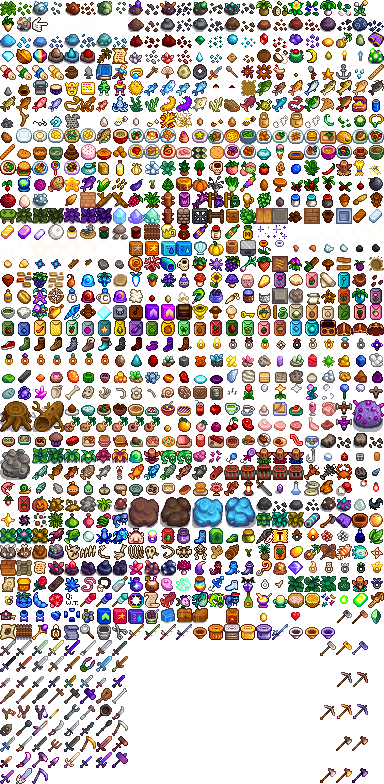
并创建我们的xml文件
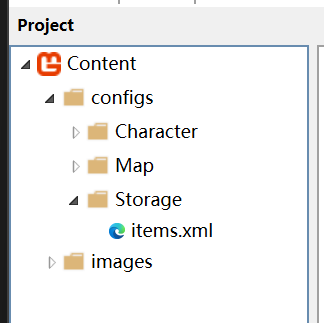
ItemTable.cs
using System;
using System.Collections.Generic;
using System.IO;
using System.Xml;
using System.Xml.Linq;
using Microsoft.Xna.Framework;
using Microsoft.Xna.Framework.Content;
using Microsoft.Xna.Framework.Graphics;
using MonoLibrary;
using MonoLibrary.Graphics;

namespace StardewValley.Stockpile;

public class ItemTable
{
    /// <summary>
    /// 单例模式
    /// </summary>
    private static ItemTable instance;


    /// <summary>
    /// 外部取值
    /// </summary>
    /// <value></value>
    public static ItemTable Instance
    {
        get
        {
            if (instance == null)
            {
                instance = new ItemTable();
            }
            return instance;
        }
    }

    /// <summary>
    /// 构造函数
    /// </summary>
    private ItemTable()
    {
        _itemLibrary = new Dictionary<int, Item>();
        LoadContent(Core.Content, "configs/Storage/items.xml");
    }

    /// <summary>
    /// 字典
    /// </summary>
    private Dictionary<int, Item> _itemLibrary;

    /// <summary>
    /// 取得Item
    /// </summary>
    /// <param name="ID">Item的ID</param>
    /// <returns>Item</returns>
    public Item GetItemDetails(int ID)
    {
        if (_itemLibrary.ContainsKey(ID))
        {
            return _itemLibrary[ID];
        }
        else
        {
            return null;
        }
    }

    /// <summary>
    /// 通过配置文件加载所有Item
    /// </summary>
    /// <param name="content">内容管道</param>
    /// <param name="fileName">文件名</param>
    private void LoadContent(ContentManager content, string fileName)
    {
        string filePath = Path.Combine(content.RootDirectory, fileName);
        using (Stream stream = TitleContainer.OpenStream(filePath))
        {
            using (XmlReader reader = XmlReader.Create(stream))
            {
                XDocument doc = XDocument.Load(reader);
                XElement root = doc.Root;

                string texturePath = root.Element("Texture").Value;
                Texture2D atlas = content.Load<Texture2D>(texturePath);

                var items = root.Elements("Item");

                if (items != null)
                {
                    foreach (var i in items)
                    {
                        Item item = new Item();
                        int ID = int.Parse(i.Attribute("ID")?.Value ?? "0");
                        string name = i.Attribute("Name")?.Value;
                        string enumString = i.Element("ItemType")?.Value;
                        string description = i.Element("Description")?.Value;
                        ItemType type;

                        if (!string.IsNullOrEmpty(enumString) && Enum.TryParse(enumString, true, out type)) {}
                        else type = ItemType.None;

                        var icon = i.Element("Icon");
                        int x = int.Parse(icon.Attribute("x")?.Value ?? "0");
                        int y = int.Parse(icon.Attribute("y")?.Value ?? "0");
                        int width = int.Parse(icon.Attribute("width")?.Value ?? "0");
                        int height = int.Parse(icon.Attribute("height")?.Value ?? "0");
                        Sprite Icon = new Sprite(new TextureRegion(atlas, x, y, width, height));

                        var money = i.Element("Money");
                        int buyMoney = int.Parse(money.Attribute("BuyMoney")?.Value ?? "0");
                        int saleMoney = int.Parse(money.Attribute("SaleMoney")?.Value ?? "0");
                        bool CanPileUp = bool.Parse(i.Element("CanPileUp")?.Value ?? "0");

                        item.ID = ID;
                        item.Name = name;
                        item.Description = description;
                        item.Icon = Icon;
                        item.Type = type;
                        item.SaleMoney = saleMoney;
                        item.BuyMoney = buyMoney;
                        item.CanPileUp = CanPileUp;
                        _itemLibrary.Add(ID, item);
                    }
                }
            }
        }
    }
}
这边给出一份我们的xml示例代码,大家可以自己自己复制走!
items.xml
<?xml version="1.0" encoding="utf-8"?>
<Root>
  <Texture>images/Storage/items</Texture>

  <Item ID="1000" Name="Wood">
    <ItemType>Resources</ItemType>
    <Description>Base resources!</Description>
    <Icon x="64" y="256" width="16" height="16"/>
    <Money BuyMoney="10" SaleMoney="5"/>
    <CanPileUp>true</CanPileUp>
  </Item>

  <Item ID="1001" Name="Stone">
    <ItemType>Resources</ItemType>
    <Description>Base resources!</Description>
    <Icon x="96" y="256" width="16" height="16"/>
    <Money BuyMoney="15" SaleMoney="8"/>
    <CanPileUp>true</CanPileUp>
  </Item>

  <Item ID="1002" Name="NormalSeed">
    <ItemType>Seed</ItemType>
    <Description>Seed</Description>
    <Icon x="256" y="304" width="16" height="16"/>
    <Money BuyMoney="30" SaleMoney="20"/>
    <CanPileUp>true</CanPileUp>
  </Item>

  <Item ID="1003" Name="Hoe">
    <ItemType>Hoe</ItemType>
    <Description>Hoe</Description>
    <Icon x="336" y="608" width="16" height="16"/>
    <Money BuyMoney="-1" SaleMoney="-1"/>
    <CanPileUp>false</CanPileUp>
  </Item>

  <Item ID="1004" Name="Axe">
    <ItemType>Axe</ItemType>
    <Description>Axe</Description>
    <Icon x="336" y="735" width="16" height="16"/>
    <Money BuyMoney="-1" SaleMoney="-1"/>
    <CanPileUp>false</CanPileUp>
  </Item>
</Root>
第二部分:存储系统创建
OK,我们暂时完成了一个存储系统的搭建,我们现在需要创建一个存储系统来管理我们的Item那么这个使用API的地方非常少,大家可以非常简单的创建我们的存储系统
InventoryItem 容器子物体
首先我们存储我们的信息可以通过结构体来存储,结构体是不需要new的他会有一个默认值因此我们使用结构体,那么结构体里面只需要两个变量,一个是标识Item的ID另一个是标识数量的Num
InventoryItem.cs
namespace StardewValley.Stockpile;

public struct InventoryItem
{
    public int ItemID;

    public int ItemNum;
}
Inventory容器
我们创建完InventoryItem之后就该创建我们的Inventory的容器了,我们不使用List而是使用原生的数组来处理逻辑,因为我们的List创建时他的数量是空的也不适合我们的逻辑,但是我们的原生宿主是可以提前申请内存空间,因此我们可以使用int[]
Inventory.cs
using System.Reflection.Metadata;

namespace StardewValley.Stockpile;

public class Inventory
{
    public InventoryItem[] InventoryList;

    public int NUM;

    public Inventory(int num)
    {
        NUM = num;
        InventoryList = new InventoryItem[num];
    }

    public bool IsEmpty()
    {
        for (int i = 0; i < NUM; i ++)
        {
            if (InventoryList[i].ItemID != 0)
            {
                return false;
            }
        }
        return true;
    }

    public int CanPileUpSlotIndex(int ID, int Num)
    {
        for (int i = 0; i < NUM; i ++)
        {
            if (InventoryList[i].ItemID == ID &&
                InventoryList[i].ItemNum + Num <= 999)
            {
                return i;
            }
        }
        return -1;
    }

    public int FirstEmptySlotIndex()
    {
        for (int i = 0; i < NUM; i ++)
        {
            if (InventoryList[i].ItemID == 0 || InventoryList[i].ItemNum == 0)
            {
                return i;
            }
        }
        return -1;
    }

    public bool AddItem(int ID, int Num)
    {
        int PileUpIndex = CanPileUpSlotIndex(ID, Num);
        int EmptySlotIndex = FirstEmptySlotIndex();
        bool CanPileUp = ItemTable.Instance.GetItemDetails(ID).CanPileUp;
        if (PileUpIndex != -1 && CanPileUp)
        {
            InventoryItem item = new InventoryItem{ItemID = ID, ItemNum = Num + InventoryList[PileUpIndex].ItemNum};
            InventoryList[PileUpIndex] = item;
            return true;
        }
        if (EmptySlotIndex != -1)
        {
            InventoryItem item = new InventoryItem{ItemID = ID, ItemNum = Num};
            InventoryList[EmptySlotIndex] = item;
            return true;
        }
        return false;
    }

    public bool RemoveItem(int index)
    {
        if (index >= NUM) return false;
        InventoryList[index] = new InventoryItem{ItemID = 0, ItemNum = 0};
        return true;
    }
}
我们创建完我们的Inventory后还需要创建一个InventoryManager以此来管理我们的容器,怎么个管理法?很简单我们使用单例模式来管理我们玩家背包和其他容器,其他的什么容器呢?箱子,NPC物品栏等等之类的
InventoryManager.cs
using System.Collections.Generic;

namespace StardewValley.Stockpile;

public class InventoryManager
{
    private static InventoryManager instance;

    public static InventoryManager Instance
    {
        get
        {
            if (instance == null)
            {
                instance = new InventoryManager();
            }
            return instance;
        }
    }

    private InventoryManager()
    {
        PlayerBag = new Inventory(30);
        ChestInventory = new Dictionary<int, Inventory>();
    }

    public Inventory PlayerBag;

    public Dictionary<int, Inventory> ChestInventory;

    public void CreateChest(int ChestID)
    {
        if (ChestInventory.ContainsKey(ChestID))
            ChestInventory.Add(ChestID, new Inventory(30));
    }

    public void DeleteChestInventory(int ChestID)
    {
        ChestInventory.Remove(ChestID);
    }
}
OK,到目前为止我们已经创建了一整个完整的存储系统,那么我们就可以进行下一步,我们得创建一个玩家UI以此来操控我们的存储系统。
第三部分: 玩家背包UI + 逻辑实现
OK 我们也是成功的创建出了我们的存储系统,我们的UI系统也该创建出来以此来适配我们的存储系统,我们需要将UI 系统解耦出来我们的程序才会规范,后续开发也会更加轻松,我们该怎么做呢?首先我们想使用其他字体,那么这边我推荐使用其他的组件来辅助我们进行开发,其实我们是可以通过我们原生的MonoGame来进行开发的,但是我们需要自己准备我们的字体图片以及自己写配置文件,这个非常的麻烦,当然如果感兴趣的朋友在我的优快云的文章里面有一个讲解我们如何在MonoGame里面创建自己绘制的字体这很有意思对吧,但是我们为了节省项目的开发周期,我们需要下载一个插件
FontStashSharp.MonoGame
怎么下载呢?这个很简单我们在我们VSCode的上方的搜索框搜索 >Nuget 我们就可得到如下放图片的内容
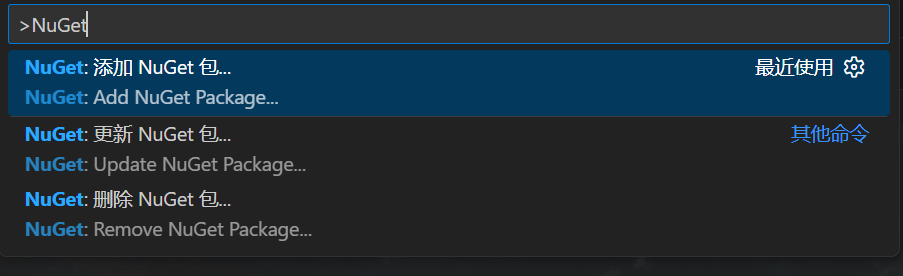
我们添加这个包 FontStashSharp.MonoGame 也就是我们上方的那个包,直接搜索就行,正常来说会直接弹出版本就像这样
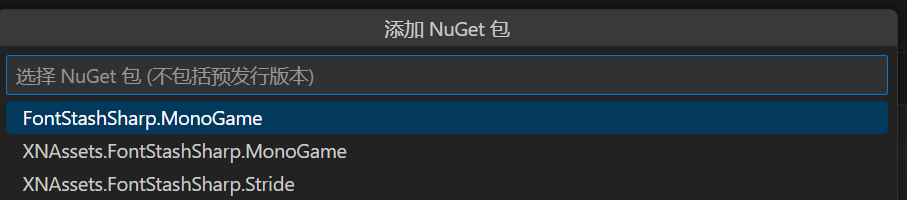
我们现在选择第一个,那么这个时候会跳出来一堆版本号,大家可以随意选择,但是我使用的是1.5.1我建议大家选择和我一样的版本,否则我们的代码可能会有些许不同
OK 然后我们现在先导入一张图片
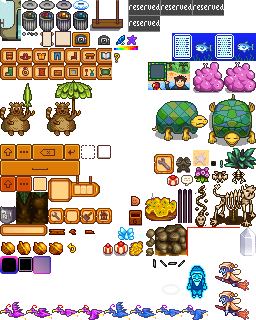
这里我声明一下!我使用的这张图片并不是游戏中和玩家物品栏的按钮的一模一样的图片而是我们在游戏中的其他相似UI替代的,因为我并不是原始开发者,我并不知道我们的InventoryUI是怎么样的,我们只是尽可能地去模仿去实现
那么我们现在先创建一下我们的文件
📁 Stardew
├── 📁 config
├── 📁 .vscode
├── 📁 bin
├── 📁 Content
├── 📁 Library
├── 📁 obj
├── 📁 StardewValley
│ ├── 📁 Physics
│ │ └── 📄 BoxCollider.cs
│ │ └── 📄 CollisionLayer.cs
│ │ └── 📄 CollisionHandler.cs
│ │ └── 📄 RigidBody.cs
│ │ └── 📄 Physics2D.cs
│ ├── 📁 FSM
│ │ └── 📄 StateNode.cs
│ │ └── 📄 StateMachine.cs
│ ├── 📁 Stockpile
│ │ └── 📄 Item.cs
│ │ └── 📄 ItemTable.cs
│ │ └── 📄 Inventory.cs
│ │ └── 📄 InventoryItem.cs
│ │ └── 📄 InventoryManager.cs
│ ├── 📁 Entity
│ │ └── 📁 Character
│ │ │ └── 📁 FarmerFSM
│ │ │ │ └── 📄 FarmerState.cs
│ │ │ │ └── 📄 FarmerIdle.cs
│ │ │ │ └── 📄 FarmerWalk.cs
│ │ │ │ └── 📄 FarmerRun.cs
│ │ │ │ └── 📄 FarmerUseTool.cs
│ │ │ └── 📁 Farmer
│ │ │ │ └── 📄 Pant.cs
│ │ │ │ └── 📄 Shirt.cs
│ │ │ │ └── 📄 FarmerStatus.cs
│ │ │ └── 📄 Character.cs
│ │ │ └── 📄 Farmer.cs
│ │ │ └── 📄 DirectionFace.cs
│ ├── 📁 Scene
│ │ └── 📄 Farm.cs
│ │ └── 📄 GameScene.cs
│ ├── 📁 UI (New)
│ │ └── 📁 GameUI (New)
│ │ │ └── 📄 InventoryUI.cs (New)
│ │ │ └── 📄 BagUI.cs (New)
│ │ │ └── 📄 SlotUI.cs (New)
│ │ └── 📄 UICanva.cs (New)
│ │ └── 📄 UIPanel.cs (New)
│ │ └── 📄 UIState.cs (New)
│ ├── 📁 Utility
│ │ └── 📄 Transform.cs
│ │ └── 📄 EventHandler.cs (New)
├── 📄 app.manifest
├── 📄 Core.cs
├── 📄 GameMain.cs (Change)
├── 📄 Icon.ico
├── 📄 Programs.cs
└── 📄 Stardew.csproj
OK 现在我们给出了我们创建的文件地时候我们需要创建一个UICanva我们地基类,创建这个地目的是为了管理我们地所有UI,比如我们在游玩时我们普通的UI有一个物品栏,还有一个显示时间的UI,那么我们把它算到一个Panel里面,那么其他的我们还可以继续分类,我们就应该像这样不断地开发,我们要做到能解耦就解耦,不要把所有地功能全部耦合到一起,我的项目虽然解耦程度也不是非常高,但是我想给大家传输地就是这个解耦的思想,那么我们先不写我们的UICanva我们险些我们的最下面的类,SlotUI,这个代表我们存储一个Item的格子,这里面要有什么属性呢?ID,NUM以及一些图片,那么我们话不多说直接开干
SlotUI.cs
using FontStashSharp;
using Microsoft.Xna.Framework;
using Microsoft.Xna.Framework.Graphics;
using MonoLibrary;
using MonoLibrary.Graphics;
using MonoLibrary.Input;
using StardewValley.Stockpile;

namespace StardewValley.UI;

public class SlotUI
{
    private Sprite slot_bg;

    private Sprite selected_bg;

    public int ID;

    public int Num;

    private Vector2 position;

    public bool IsClicked = false;

    public bool IsCurrentSlot = false;

    private FontSystem fontSystem;

    public SlotUI(FontSystem fontSystem)
    {
        ID = 0;
        Num = 0;
        Texture2D atlas = Core.Content.Load<Texture2D>("images/UI/Cursors2");
        slot_bg = new Sprite(new TextureRegion(atlas, 32, 176, 16, 16));
        slot_bg.Scale = new Vector2(4f, 4f);
        slot_bg.LayerDepth = 0.9f;

        selected_bg = new Sprite(new TextureRegion(atlas, 96, 144, 16, 16));
        selected_bg.Scale = new Vector2(4f, 4f);
        selected_bg.LayerDepth = 0.9f;

        position = new Vector2(0, 0);
        IsClicked = false;
        this.fontSystem = fontSystem;
        IsCurrentSlot = false;
    }

    public void SetPosition(Vector2 Position)
    {
        position = Position;
    }

    public void Update()
    {
        if (Core.Input.Mouse.WasButtonJustPressed(MouseButton.Left))
        {
            if (Core.Input.Mouse.Position.X >= position.X &&
                Core.Input.Mouse.Position.X <= position.X + 64 &&
                Core.Input.Mouse.Position.Y >= position.Y &&
                Core.Input.Mouse.Position.Y <= position.Y + 64)
            {
                IsClicked = true;
            }
        }
        else
        {
            IsClicked = false;
        }
    }

    public void Draw()
    {
        Item item = ItemTable.Instance.GetItemDetails(ID);
        if (item != null)
        {
            Sprite icon = new Sprite(item.Icon.Region);
            icon.Scale = new Vector2(3f, 3f);
            icon.LayerDepth = 0.91f;
            icon.Draw(Core.SpriteBatch, position + new Vector2(8f, 8f));
        }

        if (IsCurrentSlot) selected_bg.Draw(Core.SpriteBatch, position);
        else slot_bg.Draw(Core.SpriteBatch, position);

        DynamicSpriteFont font = fontSystem.GetFont(30);
        if (Num > 1) Core.SpriteBatch.DrawString(font, $"{Num}", position + new Vector2(48, 48), Color.Black, 0, Vector2.Zero, Vector2.One, 0.92f);
    }
}
这部分代码非常简单,逻辑上根本就不会有歧义,我们只需要给这个ID和NUM我们就可渲染出来我们想要的效果,这个非常简单对吧,没错就是这么简答我们,接下来根据这个创建一个基类Panel
UIPanel.cs
namespace StardewValley.UI;

public abstract class UIPanel
{
    public virtual void Initialize() { LoadConent(); }
    public virtual void LoadConent() {}
    public virtual void Update() {}
    public virtual void Draw() {}
}
写完这个基类之后我们接着进行开发,需要开发什么呢?很简单,我们需要开发一个物品栏一个背包,为什么要这么做呢,因为我们基本所有的沙盒游戏都可以做到按下E键打开我们的背包,这个时候我们的物品栏通常都会被隐藏起来,其实我们是可以实现的,我们可以把它非常两个Panel以此来创建我们的代码
InventoryUI.cs
using System.IO;
using FontStashSharp;
using Microsoft.Xna.Framework;
using StardewValley.Stockpile;
using StardewValley.Utility;

namespace StardewValley.UI;

public class InventoryUI : UIPanel
{
    public int CurrentIndex = -1;

    private FontSystem fontSystem;

    private SlotUI[] slots;

    public InventoryUI()
    {
        Initialize();
    }

    public override void Initialize()
    {
        base.Initialize();
        CurrentIndex = -1;
        EventHandler.RefreshInventory += RefreshInventory;
    }

    public override void LoadConent()
    {
        base.LoadConent();
        fontSystem = new FontSystem();
        fontSystem.AddFont(File.ReadAllBytes("Fonts/font_pixel.ttf"));
        slots = new SlotUI[10];
        for (int i = 0; i < 10; i ++)
        {
            slots[i] = new SlotUI(fontSystem);
            slots[i].SetPosition(new Vector2(320 + (i * 64), 0));
        }
    }

    public override void Update()
    {
        base.Update();
        for (int i = 0; i < 10; i ++)
        {
            slots[i].Update();
            if (slots[i].IsClicked)
            {
                CurrentIndex = i;
                EventHandler.CallChangeCurrentIndex(CurrentIndex);
            }
            if (CurrentIndex == i)
            {
                slots[i].IsCurrentSlot = true;
            }
            else
            {
                slots[i].IsCurrentSlot = false;
            }
        }
    }

    public override void Draw()
    {
        base.Draw();
        for (int i = 0; i < 10; i ++)
        {
            slots[i].Draw();
        }
    }

    private void RefreshInventory()
    {
        for (int i = 0; i < 10; i ++)
        {
            int ID = InventoryManager.Instance.PlayerBag.InventoryList[i].ItemID;
            int Num = InventoryManager.Instance.PlayerBag.InventoryList[i].ItemNum;

            slots[i].ID = ID;
            slots[i].Num = Num;
        }
    }
}
BagUI.cs
using FontStashSharp;
using Microsoft.Xna.Framework;
using StardewValley.Stockpile;
using StardewValley.Utility;
using System.IO;

namespace StardewValley.UI;

public class BagUI : UIPanel
{
    public int CurrentIndex = -1;

    private FontSystem fontSystem;

    private SlotUI[] slots;

    public BagUI()
    {
        Initialize();
    }

    public override void Initialize()
    {
        base.Initialize();
        CurrentIndex = -1;
        EventHandler.RefreshInventory += RefreshInventory;
    }

    public override void LoadConent()
    {
        base.LoadConent();
        fontSystem = new FontSystem();
        fontSystem.AddFont(File.ReadAllBytes("Fonts/font_pixel.ttf"));
        slots = new SlotUI[30];
        for (int i = 0; i < 30; i ++)
        {
            slots[i] = new SlotUI(fontSystem);
            slots[i].SetPosition(new Vector2(320 + (i % 10 * 64), (i / 10 * 64) + 264));
        }
    }

    public override void Update()
    {
        base.Update();
        for (int i = 0; i < 30; i ++)
        {
            slots[i].Update();
            if (slots[i].IsClicked)
            {
                slots[i].IsCurrentSlot = true;
                CurrentIndex = i;
                EventHandler.CallChangeCurrentIndex(CurrentIndex);
            }
            else
            {
                slots[i].IsCurrentSlot = false;
            }
        }
    }

    public override void Draw()
    {
        base.Draw();
        for (int i = 0; i < 30; i ++)
        {
            slots[i].Draw();
        }
    }

    private void RefreshInventory()
    {
        for (int i = 0; i < 30; i ++)
        {
            int ID = InventoryManager.Instance.PlayerBag.InventoryList[i].ItemID;
            int Num = InventoryManager.Instance.PlayerBag.InventoryList[i].ItemNum;

            slots[i].ID = ID;
            slots[i].Num = Num;
        }
    }
}
我们其实可以发现,其实我们这两份的代码其实是没有什么本质上的去别的,我们开发这个东西的时候都是为了实现一个目的,因此我们只是改变了我们的格子的数量和位置,其他的其实我们没有什么变化。那么创建好这个我们就直接创建我们的enum给我们的Panel进行一个分类
UIState.cs
namespace StardewValley.UI;

public enum StateUI
{
    Inventory,
    OpenBag,
}
最后我们完成我们的UICanva的开发这个非常简单,我们只需要在这个基础上进行一个小小的管理就行了
UICanva.cs
using System.Collections.Generic;

namespace StardewValley.UI;

public class UICanva
{
    public StateUI CurrentState;

    public Dictionary<StateUI, UIPanel> panels;

    public UICanva()
    {
        panels = new Dictionary<StateUI, UIPanel>
        {
            {StateUI.Inventory, new InventoryUI()},
            {StateUI.OpenBag, new BagUI()}
        };
    }

    public void Initialize()
    {
        CurrentState = StateUI.Inventory;
    }

    public void Update()
    {
        panels[CurrentState].Update();
    }

    public void Draw()
    {
        panels[CurrentState].Draw();
    }
}
OK,最后我们直接在GameMain中导入我们的代码
GameMain.cs
using Microsoft.Xna.Framework;
using Microsoft.Xna.Framework.Graphics;
using MonoLibrary;
using StardewValley.Physics;
using StardewValley.Scenes;
using StardewValley.UI;
namespace StardewValley;

public class GameMain : Core
{
    public static GameScene CurrentScene;

    public UICanva canva;

    public GameMain() : base("Stardew Valley", 1280, 720, false)
    {

    }

    protected override void Initialize()
    {
        base.Initialize();
        CurrentScene = GameScene.Farm;
        Physics2D.Instance.CurrentScene = CurrentScene;
        ChangeScene(new Farm());
        canva = new UICanva();
        canva.Initialize();
    }

    protected override void LoadContent()
    {

    }
    protected override void Update(GameTime gameTime)
    {
        base.Update(gameTime);
        Physics2D.Instance.Update(gameTime);
        canva.Update();
    }

    protected override void Draw(GameTime gameTime)
    {
        base.Draw(gameTime);
        Core.SpriteBatch.Begin(samplerState: SamplerState.PointClamp, sortMode: SpriteSortMode.FrontToBack);
        canva.Draw();
        Core.SpriteBatch.End();
    }
}
章节结束
OK 我们创建好我们的存储系统了,我们可以试着添加一些Item来创建我们的代码
GameMain.cs
using System;
using Microsoft.Xna.Framework;
using Microsoft.Xna.Framework.Graphics;
using MonoLibrary;
using StardewValley.Physics;
using StardewValley.Scenes;
using StardewValley.Stockpile;
using StardewValley.UI;
namespace StardewValley;

public class GameMain : Core
{
    public static GameScene CurrentScene;

    public UICanva canva;

    public GameMain() : base("Stardew Valley", 1280, 720, false)
    {

    }

    protected override void Initialize()
    {
        base.Initialize();
        CurrentScene = GameScene.Farm;
        Physics2D.Instance.CurrentScene = CurrentScene;
        ChangeScene(new Farm());
        canva = new UICanva();
        canva.Initialize();
        InventoryManager.Instance.PlayerBag.AddItem(1000, 5);
        Utility.EventHandler.CallRefreshInventory();
    }

    protected override void LoadContent()
    {

    }
    protected override void Update(GameTime gameTime)
    {
        base.Update(gameTime);
        Physics2D.Instance.Update(gameTime);
        canva.Update();
    }

    protected override void Draw(GameTime gameTime)
    {
        base.Draw(gameTime);
        Core.SpriteBatch.Begin(samplerState: SamplerState.PointClamp, sortMode: SpriteSortMode.FrontToBack);
        canva.Draw();
        Core.SpriteBatch.End();
    }
}
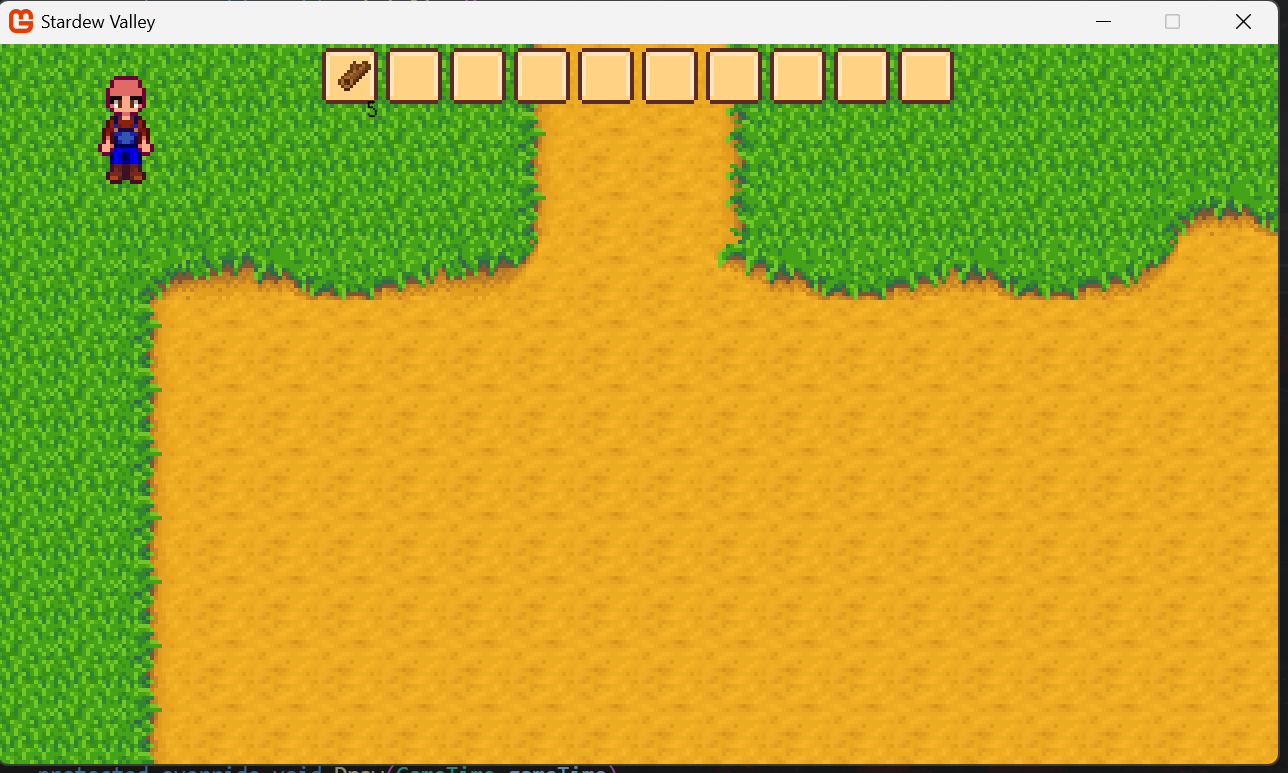
OK,完成了,我们完成了所有的代码,接下来我们还要继续前进!
第六章 实体创建
在我们的游戏中经常会有我们的树木,植物,石头等物体,我们创建这个的时候我们需要创建更多的代码以此来时实现这个效果,
我们该怎么实现呢?那么我们就该完成我们的代码
📁 Stardew
├── 📁 config
├── 📁 .vscode
├── 📁 bin
├── 📁 Content
├── 📁 Library
├── 📁 obj
├── 📁 StardewValley
│ ├── 📁 Physics
│ │ └── 📄 BoxCollider.cs
│ │ └── 📄 CollisionLayer.cs
│ │ └── 📄 CollisionHandler.cs
│ │ └── 📄 RigidBody.cs
│ │ └── 📄 Physics2D.cs
│ ├── 📁 FSM
│ │ └── 📄 StateNode.cs
│ │ └── 📄 StateMachine.cs
│ ├── 📁 Stockpile
│ │ └── 📄 Item.cs
│ │ └── 📄 ItemTable.cs
│ │ └── 📄 Inventory.cs
│ │ └── 📄 InventoryItem.cs
│ │ └── 📄 InventoryManager.cs
│ ├── 📁 Entity
│ │ └── 📁 Objects (New)
│ │ │ └── 📁 Tree (New)
│ │ │ │ └── 📄 Tree.cs (New)
│ │ │ │ └── 📄 TreeState.cs (New)
│ │ │ └── 📁 Stone (New)
│ │ │ │ └── 📄 Stone.cs (New)
│ │ │ │ └── 📄 NormalStone.cs (New)
│ │ │ └── 📄 Object.cs (New)
│ │ │ └── 📄 ObjectManager.cs (New)
│ │ └── 📁 Character
│ │ │ └── 📁 FarmerFSM
│ │ │ │ └── 📄 FarmerState.cs
│ │ │ │ └── 📄 FarmerIdle.cs
│ │ │ │ └── 📄 FarmerWalk.cs
│ │ │ │ └── 📄 FarmerRun.cs
│ │ │ │ └── 📄 FarmerUseTool.cs
│ │ │ └── 📁 Farmer
│ │ │ │ └── 📄 Pant.cs
│ │ │ │ └── 📄 Shirt.cs
│ │ │ │ └── 📄 FarmerStatus.cs
│ │ │ └── 📄 Character.cs
│ │ │ └── 📄 Farmer.cs
│ │ │ └── 📄 DirectionFace.cs
│ ├── 📁 Scene
│ │ └── 📄 Farm.cs
│ │ └── 📄 GameScene.cs
│ ├── 📁 UI
│ │ └── 📁 GameUI
│ │ │ └── 📄 InventoryUI.cs
│ │ │ └── 📄 BagUI.cs
│ │ │ └── 📄 SlotUI.cs
│ │ └── 📄 UICanva.cs
│ │ └── 📄 UIPanel.cs
│ │ └── 📄 UIState.cs
│ ├── 📁 Utility
│ │ └── 📄 Transform.cs
│ │ └── 📄 EventHandler.cs (Change)
├── 📄 app.manifest
├── 📄 Core.cs
├── 📄 GameMain.cs
├── 📄 Icon.ico
├── 📄 Programs.cs
└── 📄 Stardew.csproj
没错我们创建好文件夹,我们就可以创建我们的开发逻辑,首先我们要写一个Object的基类代表我们的实体,无论是我们的树木还是石头,还是植物都继承于这个类,为什么写这个类呢?很简单,我们很容易就会发现这些实体都有一个特点:就是他们都是有行有列的,那么我们要集中管理这些东西就需要他们继承于这个基类,然后我们再管理整个基类我们就可以实现我们整体的逻辑
EventHandler.cs
using System;
using StardewValley.Characters;
namespace StardewValley.Utility;
public static class EventHandler
{
    public static event Action RefreshInventory;

    public static void CallRefreshInventory()
    {
        RefreshInventory?.Invoke();
    }

    public static event Action<int> ChangeCurrentIndex;

    public static void CallChangeCurrentIndex(int Index)
    {
        ChangeCurrentIndex?.Invoke(Index);
    }

    public static event Action<DirectionFace, int, int> CropTree;

    public static void CallCropTree(DirectionFace face, int column, int row)
    {
        CropTree?.Invoke(face, column, row);
    }

    public static event Action<DirectionFace, int, int> BreakStone;

    public static void CallBreakStone(DirectionFace face, int column, int row)
    {
        BreakStone?.Invoke(face, column, row);
    }

    public static event Action AddDay;

    public static void CallAddDay()
    {
        AddDay?.Invoke();
    }
}
Object.cs
using Microsoft.Xna.Framework;
using StardewValley.Utility;

namespace StardewValley.Entity;

public abstract class Object
{
    public Transform transform;

    public int Column;

    public int Row;

    public virtual void Initialize()
    {

    }

    public virtual void LoadConent()
    {

    }

    public virtual void Update(GameTime gameTime)
    {

    }

    public virtual void Draw()
    {

    }
}
创建完基类之后我们再创建一个我们的管理器来管理我们的Object
ObjectManager.cs
using System.Collections.Generic;
using Microsoft.Xna.Framework;
using StardewValley.Scenes;

namespace StardewValley.Entity;

public class ObjectManager
{
    private static ObjectManager instance;

    public static ObjectManager Instance
    {
        get
        {
            if (instance == null)
            {
                instance = new ObjectManager();
            }
            return instance;
        }
    }

    private ObjectManager()
    {
        _objects = new List<Object>();
        _sceneObjects = new Dictionary<GameScene, List<Object>>();

        foreach (GameScene scene in System.Enum.GetValues(typeof(GameScene)))
        {
            _sceneObjects[scene] = new List<Object>();
        }
    }

    private List<Object> _objects;

    private Dictionary<GameScene, List<Object>> _sceneObjects;

    public void AddObject(Object _object, GameScene scene)
    {
        if (!_objects.Contains(_object))
        {
            _objects.Add(_object);
            _sceneObjects[scene].Add(_object);
        }
    }

    public void RemoveObject(Object _object, GameScene scene)
    {
        _objects.Remove(_object);
        _sceneObjects[scene].Remove(_object);
    }

    public void Clear()
    {
        _objects.Clear();
        foreach (GameScene scene in System.Enum.GetValues(typeof(GameScene)))
        {
            _sceneObjects[scene].Clear();
        }
    }

    public void Update(GameTime gameTime)
    {
        foreach (var obj in _sceneObjects[GameMain.CurrentScene])
        {
            obj.Update(gameTime);
        }
    }

    public void Draw()
    {
        foreach (var obj in _sceneObjects[GameMain.CurrentScene])
        {
            obj.Draw();
        }
    }
}
OK,搞定了这下我们所创建的所需要的Object就已经完成了!
树木
树木是游戏中不可或缺的部分,没错正式出于我们Minecraft的知名名言:“想致富,先撸树!”没错我是一个Minecraft玩家,我玩了得有12年了,最早开始玩是幼儿园那会儿,那会儿是我哥哥带我一起玩的,后来又喜欢研究红石,但是再后来因为学业的原因中间有一段时间没玩但是还是会看我的世界的视频放松,上了大学之后有特别喜欢编程,但偶尔也会玩一玩,但是我的重心都放在游戏开发上,这个比红石有意思一点,OK了我们扯远了我们要实现树木就要知道我们树木有几种状态:正常状态,被砍倒状态。来吧我们直接进行我们的开发
首先我们得定义几种我们树木的状态
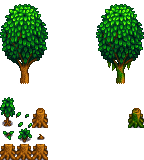
TreeState.cs
namespace StardewValley.Entity;

public enum TreeState
{
    Stump,
    FallDown,
    RightUp
}
那么我们继续我们的开发,我们正确的做法其实是应该把我们Tree作为一个抽象的基类让各种各样的树继承于它,但是我们还需要做其他的东西,所以我们就不把时间浪费在这上面了,
我们直接进行我们的开发
using Microsoft.Xna.Framework;
using Microsoft.Xna.Framework.Graphics;
using MonoLibrary;
using MonoLibrary.Graphics;
using StardewValley.Characters;
using StardewValley.Physics;
using StardewValley.Scenes;
using StardewValley.Utility;

namespace StardewValley.Entity;

public class Tree : Object
{
    private GameScene GameScene;

    private TreeState CurrentState = TreeState.RightUp;

    private Sprite stump;

    private Sprite trunk;

    private Rigidbody rigidbody;

    public int CropNum = 0;

    public Tree(GameScene scene)
    {
        GameScene = scene;
        LoadConent();
        Initialize();
    }

    public override void Initialize()
    {
        base.Initialize();
        CurrentState = TreeState.RightUp;
        CropNum = 0;
        EventHandler.CropTree += BeCrop;
    }

    public override void LoadConent()
    {
        base.LoadConent();
        Texture2D atlas = Core.Content.Load<Texture2D>("images/Entity/tree1_spring");
        stump = new Sprite(new TextureRegion(atlas, 32, 96, 16, 32));
        trunk = new Sprite(new TextureRegion(atlas, 0, 0, 48, 96));
        stump.Scale = new Vector2(4f, 4f);
        trunk.Scale = new Vector2(4f, 4f);
        stump.Origin = new Vector2(0, 16);
        trunk.Origin = new Vector2(16, 80);
        transform = new Utility.Transform(new Vector2(0, 0));
        rigidbody = new Rigidbody(transform, new Vector2(64, 64), CollisionLayer.Obstacle, GameScene);
    }

    public void SetPosition(int Column, int Row)
    {
        this.Column = Column;
        this.Row = Row;
        transform.Position = new Vector2(Column * 64, Row * 64) + new Vector2(32f, 32f);
    }

    private float GetLayerDepth()
    {
        float row = transform.Position.Y / 64f;
        float normalizedRow = row / MAX_ROWS;
        return (normalizedRow * 0.8f) + 0.1f;
    }

    public void BeCrop(DirectionFace face, int Column, int Row)
    {
        if (Column != this.Column || Row != this.Row) return;
        CropNum ++;
        if (CropNum >= 10 && (face == DirectionFace.Left || face == DirectionFace.Up))
        {
            CurrentState = TreeState.FallDownLeft;
        }
        if (CropNum >= 10 && (face == DirectionFace.Right || face == DirectionFace.Down))
        {
            CurrentState = TreeState.FallDownRight;
        }
        if (CurrentState == TreeState.Stump && CropNum >= 15)
        {
            ObjectManager.Instance.RemoveObject(this, GameScene);
        }
    }

    private Vector2 trunkPos;

    private void CropDownAnim()
    {
        if (CurrentState == TreeState.FallDownLeft)
        {
            trunkPos = new Vector2(Column * 64, Row * 64) + new Vector2(16, 12);
            trunk.Origin = new Vector2(20, 83);
            trunk.Rotation -= MathHelper.ToRadians(1);
            if (trunk.Rotation <= MathHelper.ToRadians(-90))
            {
                CurrentState = TreeState.Stump;
            }
        }
        else if (CurrentState == TreeState.FallDownRight)
        {
            trunkPos = new Vector2(Column * 64, Row * 64) + new Vector2(48, 12);
            trunk.Origin = new Vector2(28, 83);
            trunk.Rotation += MathHelper.ToRadians(1);
            if (trunk.Rotation >= MathHelper.ToRadians(90))
            {
                CurrentState = TreeState.Stump;
            }
        }
        else
        {
            trunkPos = new Vector2(Column * 64, Row * 64);
        }
    }

    public override void Draw()
    {
        base.Draw();
        stump.LayerDepth = GetLayerDepth();
        trunk.LayerDepth = stump.LayerDepth + 0.0001f;
        CropDownAnim();
        stump.Draw(Core.SpriteBatch, new Vector2(Column * 64, Row * 64));
        trunk.Draw(Core.SpriteBatch, trunkPos);
    }
}
OK 我们暂时不会实现我们的砍树逻辑,砍树,种植,挖地等逻辑我们都会统一在我们的第二卷的代码实现,我们第二章还会带着大家实现我们搭建第二个场景以及创建NPC的代码我们一起加油吧
石头 && 矿石
对于石头我们就得使用我们上面所说的写一个抽象类继承于我们的石头,以此来创建各种各样的石头,那么我们该怎么办呢?我们先来完成我们的石头代码然后再创建我们的第一个石头类:普通的石头,再我们的Stone代码中我们先把所有石头都应该完成的代码全部创建好,那么我们继承后的代码就不需要再一一实现了,然后我们再声明一个item_pool 来表示我们的卡池,也就是我们的凋落物,因为这个东西是有可能掉出其他东西,大家也可以在砍树的逻辑中实现这个功能,但是我们物品掉落的逻辑不会在这一卷实现,我们会在第二卷实现
Stone.cs
using System.Collections.Generic;
using Microsoft.Xna.Framework;
using MonoLibrary;
using MonoLibrary.Graphics;
using StardewValley.Characters;
using StardewValley.Physics;
using StardewValley.Scenes;
using StardewValley.Utility;

namespace StardewValley.Entity;

public abstract class Stone : Object
{
    public GameScene GameScene;

    public Sprite sprite;

    private Rigidbody rigidbody;

    public Dictionary<int, float> item_pool;

    public int AttackNum = 0;

    public Stone(GameScene scene)
    {
        GameScene = scene;
        LoadConent();
        Initialize();
    }

    public override void Initialize()
    {
        base.Initialize();
        EventHandler.BreakStone += BeBreak;
    }

    public override void LoadConent()
    {
        base.LoadConent();
        transform = new Transform(new Vector2(0, 0));
        rigidbody = new Rigidbody(transform, new Vector2(64f, 64f), CollisionLayer.Obstacle, GameScene);
        LoadStone();
    }

    public void SetPosition(int Column, int Row)
    {
        this.Column = Column;
        this.Row = Row;
        transform.Position = new Vector2(32f, 32f) + new Vector2(Column * 64, Row * 64);
    }

    private float GetLayerDepth()
    {
        float row = transform.Position.Y / 64f;
        float normalizedRow = row / MAX_ROWS;
        return (normalizedRow * 0.8f) + 0.1f;
    }

    public virtual void LoadStone()
    {

    }

    public virtual void BeBreak(DirectionFace face, int Column, int Row)
    {

    }

    public override void Draw()
    {
        base.Draw();
        sprite.LayerDepth = GetLayerDepth();
        sprite.Draw(Core.SpriteBatch, new Vector2(Column * 64, Row * 64));
    }
}
接着我们写第一个我们的普通石头
NormalStone.cs
using System.Collections.Generic;
using Microsoft.Xna.Framework.Graphics;
using MonoLibrary;
using MonoLibrary.Graphics;
using StardewValley.Characters;
using StardewValley.Scenes;

namespace StardewValley.Entity;

public class NormalStone : Stone
{
    public NormalStone(GameScene scene) : base(scene)
    {

    }

    public override void LoadStone()
    {
        base.LoadStone();
        Texture2D atlas = Core.Content.Load<Texture2D>("images/Storage/Items");
        sprite = new Sprite(new TextureRegion(atlas, 288, 288, 16, 16));
        sprite.Scale = new Microsoft.Xna.Framework.Vector2(4f, 4f);
        item_pool = new Dictionary<int, float>()
        {
            {1000, 1f}
        };
    }

    public override void BeBreak(DirectionFace face, int Column, int Row)
    {
        base.BeBreak(face, Column, Row);
        ObjectManager.Instance.RemoveObject(this, GameScene);
    }
}
这个继承的逻辑非常简单,我们只需要创建我们的图片和卡池就行了,非常简单对吧!
章节结束
Farm.cs
using Microsoft.Xna.Framework;
using Microsoft.Xna.Framework.Graphics;
using MonoLibrary;
using MonoLibrary.Graphics;
using MonoLibrary.Scenes;
using StardewValley.Characters;
using StardewValley.Entity;

namespace StardewValley.Scenes;
public class Farm : Scene
{
    private enum GameState
    {
        Playing,
        Paused,
        GameOver
    }
    private GameState CurState;

    private Tilemap ground;

    private RuleTilemap dig_ground;

    private Farmer farmer;

    public override void Initialize()
    {
        base.Initialize();
        CurState = GameState.Playing;
        ground.Scale = new Vector2(4f, 4f);
        ground.LayerDepth = 0;
        dig_ground.Scale = new Vector2(4f, 4f);
        dig_ground.LayerDepth = 0.1f;
        farmer.Initialize();
        farmer.MAX_ROWS = ground.Rows;


        Tree tree = new Tree(GameScene.Farm);
        tree.SetPosition(5, 5);
        tree.MAX_ROWS = ground.Rows;
        NormalStone stone = new NormalStone(GameScene.Farm);
        stone.MAX_ROWS = ground.Rows;
        stone.SetPosition(6, 7);
        ObjectManager.Instance.AddObject(tree, GameScene.Farm);
        ObjectManager.Instance.AddObject(stone, GameScene.Farm);
    }

    public override void LoadContent()
    {
        base.LoadContent();
        ground = Tilemap.FromFile(Core.Content, "configs/Map/farm.xml");
        dig_ground = RuleTilemap.FromFile(Core.Content, "configs/Map/dig_ground.xml");
        farmer = new Farmer();
    }

    public override void Update(GameTime gameTime)
    {
        if (CurState == GameState.GameOver)
        {
            return;
        }
        if (CurState == GameState.Paused)
        {
            return;
        }
        base.Update(gameTime);
        farmer.Update(gameTime);
        ObjectManager.Instance.Update(gameTime);
    }

    public override void Draw(GameTime gameTime)
    {
        base.Draw(gameTime);
        Core.GraphicsDevice.Clear(Color.Black);
        Core.SpriteBatch.Begin(samplerState: SamplerState.PointClamp, sortMode: SpriteSortMode.FrontToBack);
        ground.Draw(Core.SpriteBatch);
        dig_ground.Draw(Core.SpriteBatch);
        farmer.Draw();
        ObjectManager.Instance.Draw();
        Core.SpriteBatch.End();
    }
}
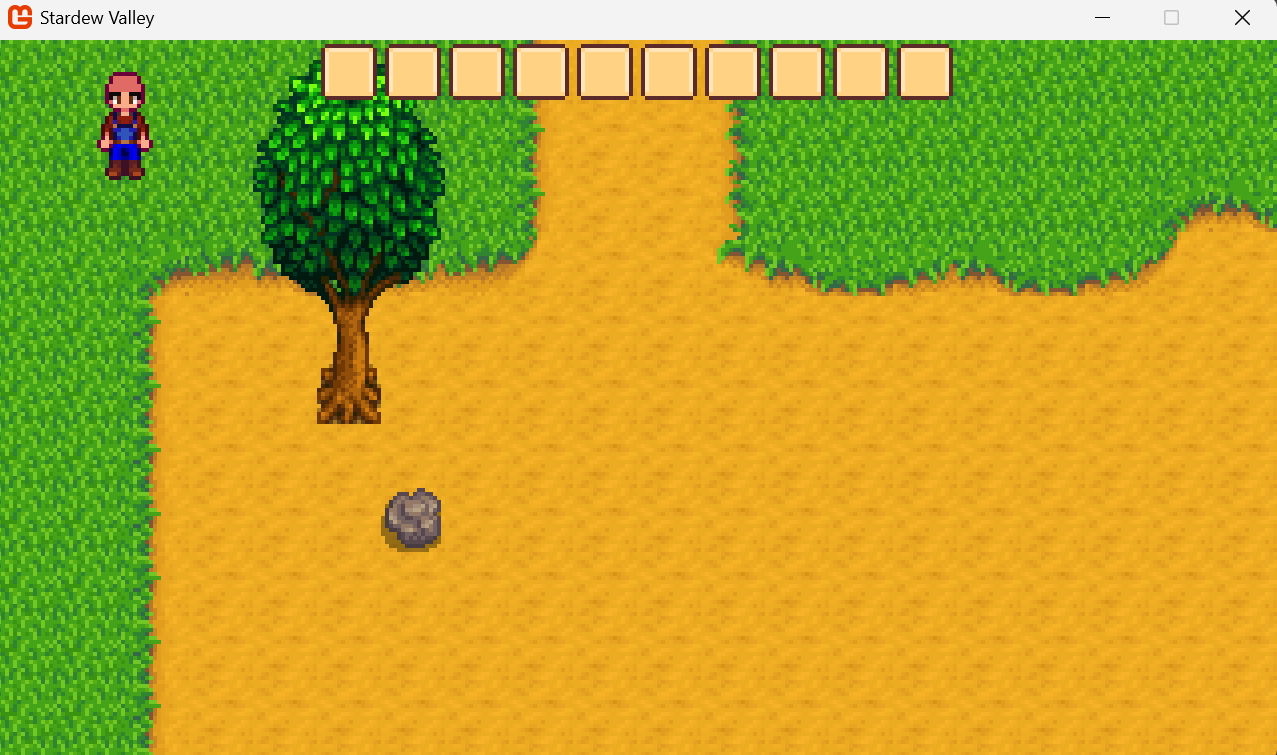
第七章 玩家完善
摄像机跟随
我们在玩游戏时,我们的视角总是跟随着玩家移动的那么要实现这个效果我们就要实现一个CameraController的类来操控我们的玩家摄像头,这部分内容就由我来实现吧!
这个大家随便放位置只要命名空间没错就行
📁 Stardew
├── 📁 config
├── 📁 .vscode
├── 📁 bin
├── 📁 Content
├── 📁 Library
├── 📁 obj
├── 📁 StardewValley
│ ├── 📁 Physics
│ │ └── 📄 BoxCollider.cs
│ │ └── 📄 CollisionLayer.cs
│ │ └── 📄 CollisionHandler.cs
│ │ └── 📄 RigidBody.cs
│ │ └── 📄 Physics2D.cs
│ ├── 📁 FSM
│ │ └── 📄 StateNode.cs
│ │ └── 📄 StateMachine.cs
│ ├── 📁 Stockpile
│ │ └── 📄 Item.cs
│ │ └── 📄 ItemTable.cs
│ │ └── 📄 Inventory.cs
│ │ └── 📄 InventoryItem.cs
│ │ └── 📄 InventoryManager.cs
│ ├── 📁 Entity
│ │ └── 📁 Objects
│ │ │ └── 📁 Tree
│ │ │ │ └── 📄 Tree.cs
│ │ │ │ └── 📄 TreeState.cs
│ │ │ └── 📁 Stone
│ │ │ │ └── 📄 Stone.cs
│ │ │ │ └── 📄 NormalStone.cs
│ │ │ └── 📄 Object.cs
│ │ │ └── 📄 ObjectManager.cs
│ │ └── 📁 Character
│ │ │ └── 📁 FarmerFSM
│ │ │ │ └── 📄 FarmerState.cs
│ │ │ │ └── 📄 FarmerIdle.cs
│ │ │ │ └── 📄 FarmerWalk.cs
│ │ │ │ └── 📄 FarmerRun.cs
│ │ │ │ └── 📄 FarmerUseTool.cs
│ │ │ └── 📁 Farmer
│ │ │ │ └── 📄 Pant.cs
│ │ │ │ └── 📄 Shirt.cs
│ │ │ │ └── 📄 FarmerStatus.cs
│ │ │ └── 📄 Character.cs
│ │ │ └── 📄 Farmer.cs
│ │ │ └── 📄 DirectionFace.cs
│ ├── 📁 Scene
│ │ └── 📄 Farm.cs (Change)
│ │ └── 📄 GameScene.cs
│ ├── 📁 UI
│ │ └── 📁 GameUI
│ │ │ └── 📄 InventoryUI.cs
│ │ │ └── 📄 BagUI.cs
│ │ │ └── 📄 SlotUI.cs
│ │ └── 📄 UICanva.cs
│ │ └── 📄 UIPanel.cs
│ │ └── 📄 UIState.cs
│ ├── 📁 Utility
│ │ └── 📄 Transform.cs
│ │ └── 📄 EventHandler.cs
│ ├── 📄 CameraController.cs (New)
├── 📄 app.manifest
├── 📄 Core.cs
├── 📄 GameMain.cs (Change)
├── 📄 Icon.ico
├── 📄 Programs.cs
└── 📄 Stardew.csproj
GameMain.cs
using System;
using Microsoft.Xna.Framework;
using Microsoft.Xna.Framework.Graphics;
using MonoLibrary;
using StardewValley.Entity;
using StardewValley.Physics;
using StardewValley.Scenes;
using StardewValley.Stockpile;
using StardewValley.UI;
namespace StardewValley;

public class GameMain : Core
{
    public static int WindowWidth;

    public static int WindowHeight;

    public static GameScene CurrentScene;

    public UICanva canva;

    public GameMain() : base("Stardew Valley", 1280, 720, false)
    {
        WindowWidth = 1280;
        WindowHeight = 720;
    }

    protected override void Initialize()
    {
        base.Initialize();
        CurrentScene = GameScene.Farm;
        Physics2D.Instance.CurrentScene = CurrentScene;
        ChangeScene(new Farm());
        canva = new UICanva();
        canva.Initialize();
    }

    protected override void LoadContent()
    {

    }
    protected override void Update(GameTime gameTime)
    {
        base.Update(gameTime);
        Physics2D.Instance.Update(gameTime);

        canva.Update();
    }

    protected override void Draw(GameTime gameTime)
    {
        base.Draw(gameTime);
        SpriteBatch.Begin(samplerState: SamplerState.PointClamp, sortMode: SpriteSortMode.FrontToBack);
        canva.Draw();
        SpriteBatch.End();
    }
}
CameraController.cs
using System;
using Microsoft.Xna.Framework;
using MonoLibrary.View;

namespace StardewValley.Views;

public class CameraController
{
    /// <summary>
    /// 摄像机移动边界
    /// </summary>
    private Rectangle bounds;

    /// <summary>
    /// 摄像机平滑度(0-1),值越小越平滑
    /// </summary>
    private float smoothness = 0.1f;

    /// <summary>
    /// 窗口宽度
    /// </summary>
    private int windowWidth;

    /// <summary>
    /// 窗口高度
    /// </summary>
    private int windowHeight;

    /// <summary>
    /// 构造函数
    /// </summary>
    public CameraController()
    {
        windowWidth = GameMain.WindowWidth;
        windowHeight = GameMain.WindowHeight;
    }

    /// <summary>
    /// 设置摄像机平滑度
    /// </summary>
    /// <param name="smoothness">平滑度(0-1),值越小越平滑</param>
    public void SetSmoothness(float smoothness)
    {
        this.smoothness = MathHelper.Clamp(smoothness, 0.01f, 1f);
    }

    /// <summary>
    /// 设置摄像机边界
    /// </summary>
    /// <param name="bounds">摄像机边界</param>
    public void SetCameraBounds(Rectangle bounds)
    {
        this.bounds = bounds;
    }

    /// <summary>
    /// 取得摄像机平滑度
    /// </summary>
    /// <returns>平滑度</returns>
    public float GetSmoothness() { return smoothness; }

    /// <summary>
    /// 取得摄像机边界
    /// </summary>
    /// <returns>摄像机边界</returns>
    public Rectangle GetBounds() { return bounds; }

    /// <summary>
    /// 更新摄像机位置,且需要与边界产生碰撞
    /// </summary>
    /// <param name="targetPosition">跟随目标</param>
    /// <param name="gameTime">游戏时间刻</param>
    public void UpdateWithBounds(Vector2 targetPosition, GameTime gameTime)
    {
        // 计算目标位置(使目标居中)
        Vector2 desiredPosition = new Vector2(
            targetPosition.X - (windowWidth / 2f),
            targetPosition.Y - (windowHeight / 2f));

        // 应用边界限制
        desiredPosition.X = MathHelper.Clamp(
            desiredPosition.X,
            bounds.Left,
            bounds.Right - windowWidth);

        desiredPosition.Y = MathHelper.Clamp(
            desiredPosition.Y,
            bounds.Top,
            bounds.Bottom - windowHeight);

        // 使用平滑阻尼而不是Lerp
        float deltaTime = (float)gameTime.ElapsedGameTime.TotalSeconds;
        float smoothFactor = 1f - (float)Math.Pow(smoothness, deltaTime * 60f);

        Camera.Instance.CameraPosition = Vector2.Lerp(
            Camera.Instance.CameraPosition,
            desiredPosition,
            smoothFactor);
    }

    /// <summary>
    /// 更新摄像机位置,无视边界
    /// </summary>
    /// <param name="targetPosition">跟随目标</param>
    /// <param name="gameTime">游戏时间刻</param>
    public void UpdateWithoutBounds(Vector2 targetPosition, GameTime gameTime)
    {
        // 计算目标位置(使目标居中)
        Vector2 desiredPosition = new Vector2(
            targetPosition.X - (windowWidth / 2f),
            targetPosition.Y - (windowHeight / 2f));

        // 使用平滑阻尼而不是Lerp
        float deltaTime = (float)gameTime.ElapsedGameTime.TotalSeconds;
        float smoothFactor = 1f - (float)Math.Pow(smoothness, deltaTime * 60f);

        Camera.Instance.CameraPosition = Vector2.Lerp(
            Camera.Instance.CameraPosition,
            desiredPosition,
            smoothFactor);
    }

    /// <summary>
    /// 立即将摄像机移动到目标位置(无平滑)
    /// </summary>
    /// <param name="targetPosition">目标位置</param>
    public void SnapToPosition(Vector2 targetPosition)
    {
        Vector2 desiredPosition = new Vector2(
            targetPosition.X - (windowWidth / 2f),
            targetPosition.Y - (windowHeight / 2f));

        // 应用边界限制
        desiredPosition.X = MathHelper.Clamp(
            desiredPosition.X,
            bounds.Left,
            bounds.Right - windowWidth);

        desiredPosition.Y = MathHelper.Clamp(
            desiredPosition.Y,
            bounds.Top,
            bounds.Bottom - windowHeight);

        Camera.Instance.CameraPosition = desiredPosition;
    }
}
接着我们在我们的Farm场景中改变我们的代码
Farm.cs
using Microsoft.Xna.Framework;
using Microsoft.Xna.Framework.Graphics;
using MonoLibrary;
using MonoLibrary.Graphics;
using MonoLibrary.Scenes;
using StardewValley.Characters;
using StardewValley.Entity;
using StardewValley.Views;

namespace StardewValley.Scenes;
public class Farm : Scene
{
    private enum GameState
    {
        Playing,
        Paused,
        GameOver
    }
    private GameState CurState;

    private Tilemap ground;

    private RuleTilemap dig_ground;

    private Farmer farmer;

    private CameraController controller;

    public override void Initialize()
    {
        base.Initialize();
        CurState = GameState.Playing;
        ground.Scale = new Vector2(4f, 4f);
        ground.LayerDepth = 0;
        dig_ground.Scale = new Vector2(4f, 4f);
        dig_ground.LayerDepth = 0.1f;
        farmer.Initialize();
        farmer.MAX_ROWS = ground.Rows;
        controller.SetCameraBounds(new Rectangle(0, 0, ground.Columns * 64, ground.Rows * 64));

        Tree tree = new Tree(GameScene.Farm);
        tree.SetPosition(5, 5);
        tree.MAX_ROWS = ground.Rows;
        NormalStone stone = new NormalStone(GameScene.Farm);
        stone.MAX_ROWS = ground.Rows;
        stone.SetPosition(6, 7);
        ObjectManager.Instance.AddObject(tree, GameScene.Farm);
        ObjectManager.Instance.AddObject(stone, GameScene.Farm);
    }

    public override void LoadContent()
    {
        base.LoadContent();
        ground = Tilemap.FromFile(Core.Content, "configs/Map/farm.xml");
        dig_ground = RuleTilemap.FromFile(Core.Content, "configs/Map/dig_ground.xml");
        farmer = new Farmer();
        controller = new CameraController();
    }

    public override void Update(GameTime gameTime)
    {
        if (CurState == GameState.GameOver)
        {
            return;
        }
        if (CurState == GameState.Paused)
        {
            return;
        }
        base.Update(gameTime);
        farmer.Update(gameTime);
        ObjectManager.Instance.Update(gameTime);
        controller.UpdateWithBounds(farmer.transform.Position, gameTime);
    }

    public override void Draw(GameTime gameTime)
    {
        base.Draw(gameTime);
        Core.GraphicsDevice.Clear(Color.Black);
        Core.SpriteBatch.Begin(samplerState: SamplerState.PointClamp, sortMode: SpriteSortMode.FrontToBack);
        ground.Draw(Core.SpriteBatch);
        dig_ground.Draw(Core.SpriteBatch);
        farmer.Draw();
        ObjectManager.Instance.Draw();
        Core.SpriteBatch.End();
    }
}
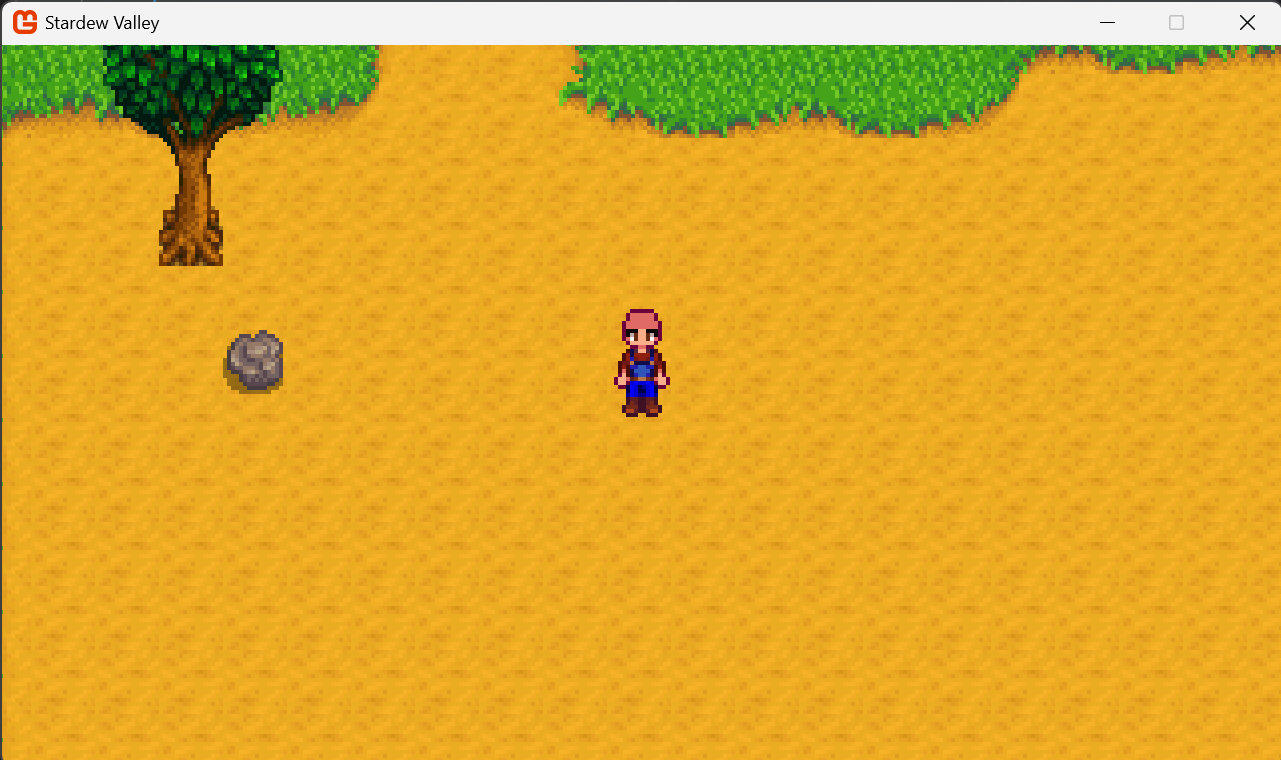
第八章 时间系统搭建
最后一章了,我们要告一段落了,本来的计划时第一卷直接把玩家和场景物品的交互一起做的,但是我们失约了,因为这段时间我一直在写这个东西,导致我没有自己的时间了,因此我打算写完这一章就直接完结我们一起加油吧
📁 Stardew
├── 📁 config
├── 📁 .vscode
├── 📁 bin
├── 📁 Content
├── 📁 Library
├── 📁 obj
├── 📁 StardewValley
│ ├── 📁 Physics
│ │ └── 📄 BoxCollider.cs
│ │ └── 📄 CollisionLayer.cs
│ │ └── 📄 CollisionHandler.cs
│ │ └── 📄 RigidBody.cs
│ │ └── 📄 Physics2D.cs
│ ├── 📁 FSM
│ │ └── 📄 StateNode.cs
│ │ └── 📄 StateMachine.cs
│ ├── 📁 Stockpile
│ │ └── 📄 Item.cs
│ │ └── 📄 ItemTable.cs
│ │ └── 📄 Inventory.cs
│ │ └── 📄 InventoryItem.cs
│ │ └── 📄 InventoryManager.cs
│ ├── 📁 Entity
│ │ └── 📁 Objects
│ │ │ └── 📁 Tree
│ │ │ │ └── 📄 Tree.cs
│ │ │ │ └── 📄 TreeState.cs
│ │ │ └── 📁 Stone
│ │ │ │ └── 📄 Stone.cs
│ │ │ │ └── 📄 NormalStone.cs
│ │ │ └── 📄 Object.cs
│ │ │ └── 📄 ObjectManager.cs
│ │ └── 📁 Character
│ │ │ └── 📁 FarmerFSM
│ │ │ │ └── 📄 FarmerState.cs
│ │ │ │ └── 📄 FarmerIdle.cs
│ │ │ │ └── 📄 FarmerWalk.cs
│ │ │ │ └── 📄 FarmerRun.cs
│ │ │ │ └── 📄 FarmerUseTool.cs
│ │ │ └── 📁 Farmer
│ │ │ │ └── 📄 Pant.cs
│ │ │ │ └── 📄 Shirt.cs
│ │ │ │ └── 📄 FarmerStatus.cs
│ │ │ └── 📄 Character.cs
│ │ │ └── 📄 Farmer.cs
│ │ │ └── 📄 DirectionFace.cs
│ ├── 📁 Scene
│ │ └── 📄 Farm.cs (Change)
│ │ └── 📄 GameScene.cs
│ ├── 📁 Time (New)
│ │ └── 📄 Season.cs (New)
│ │ └── 📄 TimeMessage.cs (New)
│ │ └── 📄 TimeManager.cs (New)
│ ├── 📁 UI
│ │ └── 📁 GameUI
│ │ │ └── 📄 InventoryUI.cs
│ │ │ └── 📄 BagUI.cs
│ │ │ └── 📄 SlotUI.cs
│ │ └── 📄 UICanva.cs
│ │ └── 📄 UIPanel.cs
│ │ └── 📄 UIState.cs
│ ├── 📁 Utility
│ │ └── 📄 Transform.cs
│ │ └── 📄 EventHandler.cs
│ ├── 📄 CameraController.cs (New)
├── 📄 app.manifest
├── 📄 Core.cs
├── 📄 GameMain.cs (Change)
├── 📄 Icon.ico
├── 📄 Programs.cs
└── 📄 Stardew.csproj
首先我们定义季节,这个非常简单我们很容易就能搞定
Season.cs
namespace StardewValley.Time;

public enum Season
{
    Spring,
    Summer,
    Autumn,
    Winter
}
我们在定义一个时间数据,用来记录某一个时刻的时间
TimeMessage.cs
namespace StardewValley.Time;

public class TimeMessage
{
    public Season Season;

    public int Year;

    public int Day;

    public int Hour;

    public int Minute;
}
时间管理,我们需要不断地Update来保持我们时间的运行,这个非常简单,我们之后会不断的进行开发的
TimeManager.cs
using System;
using Microsoft.Xna.Framework;

namespace StardewValley.Time;

public class TimeManager
{
    private static TimeManager instance;

    public static TimeManager Instance
    {
        get
        {
            if (instance == null)
            {
                instance = new TimeManager();
            }
            return instance;
        }
    }

    public TimeMessage CurrentGameTime;

    public float accumulatedSeconds;

    private TimeManager()
    {
        CurrentGameTime = new TimeMessage();
        CurrentGameTime.Day = 1;
        CurrentGameTime.Season = Season.Spring;
        CurrentGameTime.Hour = 6;
        CurrentGameTime.Minute = 0;
        CurrentGameTime.Year = 1;
        accumulatedSeconds = 0f;
    }

    public void Update(GameTime gameTime)
    {
        float elapsedSeconds = (float)gameTime.ElapsedGameTime.TotalSeconds;
        accumulatedSeconds += elapsedSeconds;

        if (accumulatedSeconds >= 15f)
        {
            int secondsToAdd = (int)accumulatedSeconds;
            accumulatedSeconds -= secondsToAdd;

            AddMinutes();
        }
    }

    private void AddMinutes()
    {
        CurrentGameTime.Minute += 10;
        if (CurrentGameTime.Minute >= 60)
        {
            AddHours();
        }
    }

    private void AddHours()
    {
        CurrentGameTime.Hour += 1;
        if (CurrentGameTime.Hour >= 26)
        {
            AddDays();
            Utility.EventHandler.CallAddDay();
        }
    }

    private void AddDays()
    {
        CurrentGameTime.Day += 1;
        CurrentGameTime.Hour = 6;
        CurrentGameTime.Minute = 0;
        if (CurrentGameTime.Day >= 28)
        {
            AddSeason();
        }
    }

    private void AddSeason()
    {
        CurrentGameTime.Hour = 6;
        CurrentGameTime.Minute = 0;
        CurrentGameTime.Day = 1;
        if (CurrentGameTime.Season == Season.Spring)
        {
            CurrentGameTime.Season = Season.Summer;
        }
        if (CurrentGameTime.Season == Season.Summer)
        {
            CurrentGameTime.Season = Season.Autumn;
        }
        if (CurrentGameTime.Season == Season.Autumn)
        {
            CurrentGameTime.Season = Season.Winter;
        }
        if (CurrentGameTime.Season == Season.Winter)
        {
            CurrentGameTime.Season = Season.Spring;
            CurrentGameTime.Year++;
        }
    }
}
最后我们可以在Farm场景中调用TimeManager.Instance.Update(gameTime);
结语
好了家人们,我们的牧场物语游戏开发课终于告一段落了,我们后续会出第二卷的,但是最近我的时间非常紧,我要准备我明年的第一次游戏开发比赛,虽然我之前参加过一次但是那个时候技术还不好而且是线上的,明年的游戏开发比赛是线下的游戏开发比赛,而且最近因为做这个的原因导致我已经有一段时间没有学习新的技术了,但是我觉得我做的东西有意义,这个就足够了,大家做事情的时候,只要觉得自己做的事情有意义,那么他就是对的不需要听别人的意见,我们的游戏开发课会在B站上发布,但是我最近要学习剪辑让我的视频看起来更加的精美,因此我需要不断地学习,我们下次见拜拜!

 481


 扫一扫


 被折叠的 条评论
为什么被折叠?
 到【灌水乐园】发言


