


import json
import os
# create rectangle labels based on polygon labels, and store in a new folder
def create_rectangle_shapes(polygon_shapes):
    rectangle_shapes = []
    for polygon_shape in polygon_shapes:
        # 获取多边形的坐标点
        points = polygon_shape['points']
        # 找到最左上角和最右下角的坐标
        left = min(points, key=lambda x: x[0])[0]
        bottom = min(points, key=lambda x: x[1])[1]
        right = max(points, key=lambda x: x[0])[0]
        top = max(points, key=lambda x: x[1])[1]
        # 创建新的矩形形状
        rectangle_shape = {
            "label": polygon_shape['label'],
            "points": [
                [left, bottom],
                [right, top],
            ],
            "group_id": polygon_shape['group_id'],
            "shape_type": "rectangle",
            "flags": polygon_shape['flags']
        }
        rectangle_shapes.append(rectangle_shape)
    return rectangle_shapes

def main(json_file, target_file):
    # 读取原始JSON文件
    with open(json_file, 'r', encoding='utf-8') as f:
        data = json.load(f)

    # 删除所有shape_type为rectangle的标注
    data['shapes'] = [shape for shape in data['shapes'] if shape['shape_type'] != 'rectangle']

    # 生成新的shape_type为rectangle的标注
    rectangle_shapes = create_rectangle_shapes(data['shapes'])

    # 将新的矩形形状添加到原始数据中
    data['shapes'].extend(rectangle_shapes)

    # 创建输出文件夹
    # output_dir = r'D:\dataset\dataset\1_seg_rect'
    # if not os.path.exists(output_dir):
    #     os.makedirs(output_dir)

    # 保存新的JSON文件
    # with open(os.path.join(output_dir, r'20231016-105404-812_9.json'), 'w') as f:
    with open(target_file, 'w') as f:
        json.dump(data, f, indent=4)

# 运行脚本
if __name__ == "__main__":
    jsonF = []
    newF = []
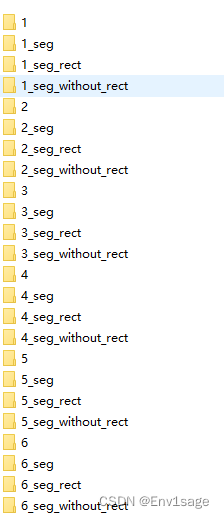
    for i in range(1,7):  # 此处替换文件目录地址
        json_folder = r'D:\dataset\dataset'  # 存放json文件的目录
        new_folder = r"D:\dataset\dataset"  # 存放新json文件的目录
        json_folder += '\\' + str(i) + '_seg_without_rect'
        new_folder += '\\' + str(i) + '_seg_rect'
        if os.path.exists(json_folder):
            jsonF.append(json_folder)
            newF.append(new_folder)
            if not os.path.exists(new_folder):
                os.makedirs(new_folder)
        else:
            print("not found file")
    for i in range(len(jsonF)):
        for filename in os.listdir(jsonF[i]):
            if filename.split(".")[-1]=="json":
                f = os.path.join(jsonF[i], filename)
                o = os.path.join(newF[i], filename)

                main(f,o)
                print(f+" completed")
文件目录结构如图:






 扫一扫
扫一扫


 4652
4652

 被折叠的 条评论
为什么被折叠?
被折叠的 条评论
为什么被折叠?
 到【灌水乐园】发言





