

IDEA 报错Error creating bean with name ‘elasticsearchClient‘,

本文介绍了当IDEA在启动时遇到'Error creating bean with name 'elasticsearchClient''的问题及其解决方案。问题起因可能为IDEA所要求的Elasticsearch版本与实际安装版本不匹配。解决办法是在使用Elasticsearch的微服务启动类中设置system.setProperty,确保版本一致性。

IDEA 报错Error creating bean with name ‘elasticsearchClient’,

问题描述:

由于IDEA需要elasticsearch的版本为6.8.7,于是就安装了6.8.7版本的elasticsearch,结果报错(可以先查看自己安装的版本是否与IDEA中一致)。
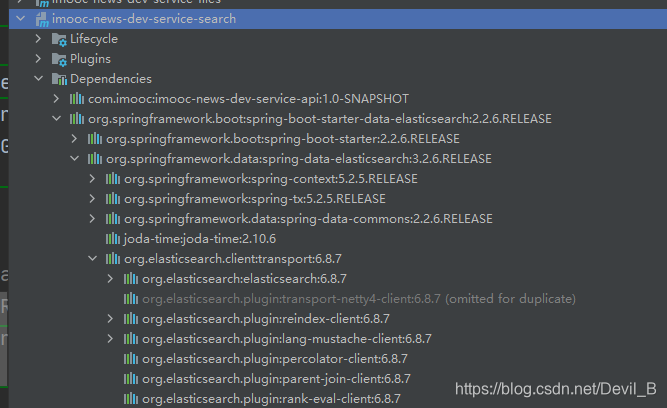
在这里插入图片描述


解决方案:

在你使用到elasticsearch的微服务的启动类中进行system.setProperty配置:

@SpringBootApplication
@MapperScan(basePackages = "com.imooc.article.mapper")
@ComponentScan(
在IntelliJ IDEA中运行时出现 “error creating bean with name shiroconfig” 错误,通常意味着Spring容器在创建 `ShiroConfig` 这个Bean时遇到了问题。以下是一些可能的解决办法: ### 1. 检查依赖是否完整 确保项目的 `pom.xml`(如果是Maven项目)或 `build.gradle`(如果是Gradle项目)中包含了Shiro和Spring集成所需的依赖,并且版本兼容。例如,Maven依赖示例: ```xml <dependency> <groupId>org.apache.shiro</groupId> <artifactId>shiro-spring</artifactId> <version>1.9.1</version> </dependency> ``` ### 2. 检查ShiroConfig类的定义 - **注解是否正确**:确保 `ShiroConfig` 类上使用了正确的Spring注解,如 `@Configuration`。示例代码如下: ```java import org.apache.shiro.spring.web.ShiroFilterFactoryBean; import org.apache.shiro.spring.web.config.DefaultShiroFilterChainDefinition; import org.apache.shiro.spring.web.config.ShiroFilterChainDefinition; import org.springframework.context.annotation.Bean; import org.springframework.context.annotation.Configuration; @Configuration public class ShiroConfig { @Bean public ShiroFilterFactoryBean shiroFilterFactoryBean() { ShiroFilterFactoryBean shiroFilterFactoryBean = new ShiroFilterFactoryBean(); // 配置其他属性 return shiroFilterFactoryBean; } @Bean public ShiroFilterChainDefinition shiroFilterChainDefinition() { DefaultShiroFilterChainDefinition chainDefinition = new DefaultShiroFilterChainDefinition(); // 配置过滤链 return chainDefinition; } } ``` - **依赖注入是否正确**:检查 `ShiroConfig` 类中是否有依赖注入的字段,确保这些依赖的Bean已经正确定义。 ### 3. 检查日志信息 查看完整的错误日志,通常错误日志中会包含更详细的信息,如嵌套异常信息,这有助于定位具体问题。例如,可能是某个依赖的Bean未找到,或者是方法调用出错等。 ### 4. 清理缓存并重启IDEA 有时候IDEA的缓存可能会导致一些问题,可以尝试清理缓存并重启IDEA。具体操作是:`File` -> `Invalidate Caches / Restart`。 ### 5. 检查Spring配置 确保Spring的配置文件(如 `application.properties` 或 `application.yml`)中没有配置错误,特别是与Shiro相关的配置。 ### 6. 检查Shiro的Realm配置 如果 `ShiroConfig` 中配置了自定义的Realm,确保Realm类的定义和配置正确。示例代码如下: ```java import org.apache.shiro.authc.AuthenticationException; import org.apache.shiro.authc.AuthenticationInfo; import org.apache.shiro.authc.AuthenticationToken; import org.apache.shiro.authc.SimpleAuthenticationInfo; import org.apache.shiro.authz.AuthorizationInfo; import org.apache.shiro.authz.SimpleAuthorizationInfo; import org.apache.shiro.realm.AuthorizingRealm; import org.apache.shiro.subject.PrincipalCollection; public class MyRealm extends AuthorizingRealm { @Override protected AuthorizationInfo doGetAuthorizationInfo(PrincipalCollection principals) { SimpleAuthorizationInfo authorizationInfo = new SimpleAuthorizationInfo(); // 配置权限信息 return authorizationInfo; } @Override protected AuthenticationInfo doGetAuthenticationInfo(AuthenticationToken token) throws AuthenticationException { // 配置认证信息 return new SimpleAuthenticationInfo("username", "password", getName()); } } ```
评论 2
添加红包

请填写红包祝福语或标题

红包个数最小为10个

红包金额最低5元

当前余额3.43前往充值 >
需支付:10.00
成就一亿技术人!
领取后你会自动成为博主和红包主的粉丝 规则
hope_wisdom
发出的红包
实付
使用余额支付
点击重新获取
扫码支付
钱包余额 0

抵扣说明:

1.余额是钱包充值的虚拟货币,按照1:1的比例进行支付金额的抵扣。
2.余额无法直接购买下载,可以购买VIP、付费专栏及课程。

余额充值



