


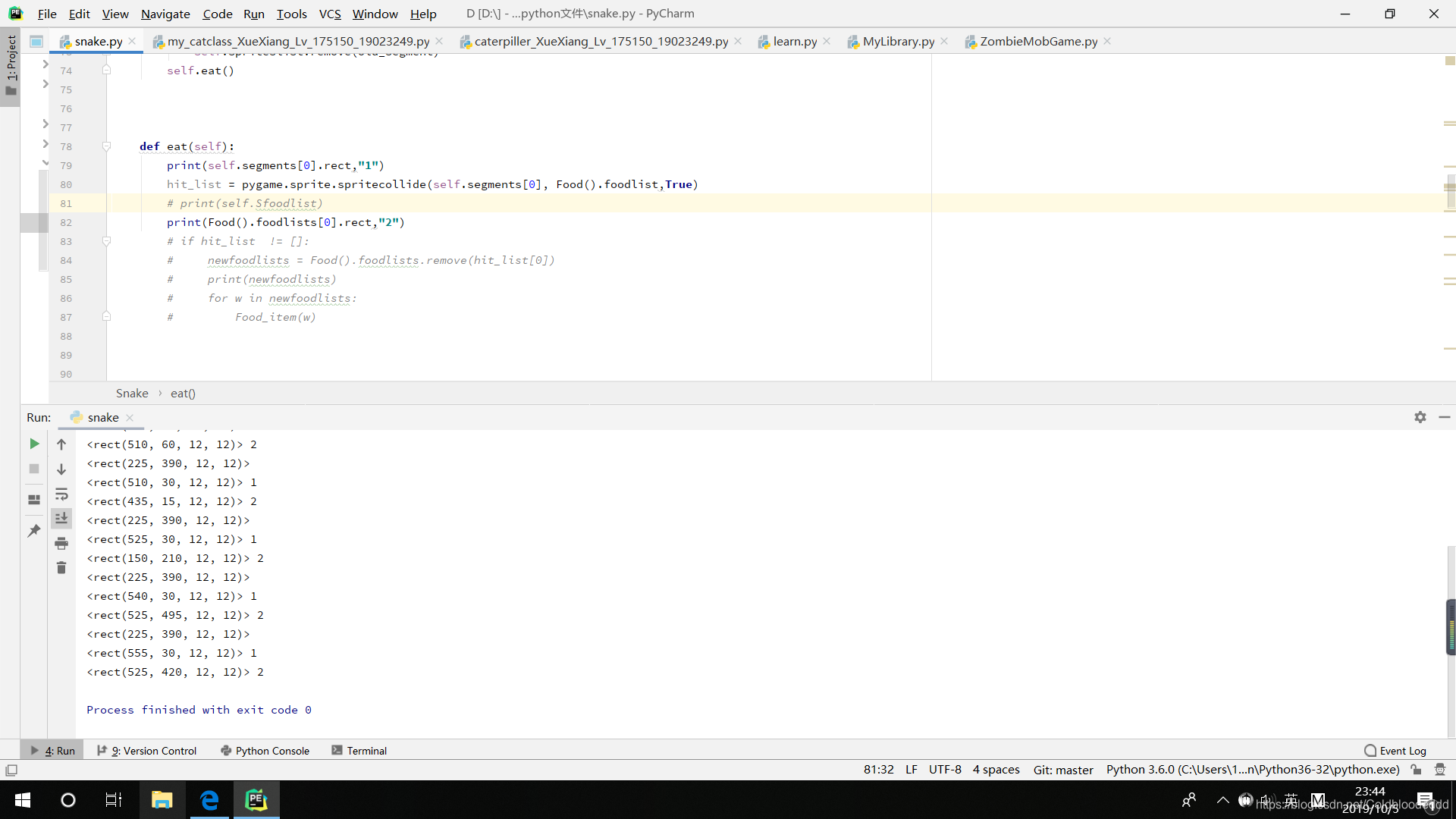
 这是一个关于使用Python的pygame库制作蛇形游戏的模板。文章通过类定义了蛇、蛇段和食物,并设置了游戏窗口大小、颜色、初始速度等参数。作者在代码中遇到一个问题:在同一红色食物方块上,rect.x和rect.y的值不一致,这可能是坐标计算或对象定位的错误。
“”"
Snake Game template, using classes.
Derived from:
Sample Python/Pygame Programs
Simpson College Computer Science
http://programarcadegames.com/
http://simpson.edu/computer-science/
“”"
import pygame
import random
— Globals —
Colors
BLACK = (0, 0, 0)
WHITE = (255, 255, 255)
RED = (255, 0, 0)
GREEN = (0, 255, 0)
Screen size
height = 600
width = 600
Margin between each segment
segment_margin = 3
Set the width and height of each snake segment
segment_width = min(height, width) / 40 - segment_margin
segment_height = min(height, width) / 40 - segment_margin
Set initial speed
x_change = segment_width + segment_margin
y_change = 0
position=[ i for i in range(0, 600, 15)]
class Snake():
“”" Class to represent one snake. “”"
# Constructor
def __init__(self):

    # Food().__init__()
    # Sfoodlists = Food().foodlists
    # Sfoodlist = Food().foodlist

    self.segments = []
    self.spriteslist = pygame.sprite.Group()
    for i in range(15):
        x = (segment_width + segment_margin) * 30 - (segment_width + segment_margin) * i
        y = (segment_height + segment_margin) * 2
        segment = Segment(x, y)
        self.segments.append(segment)
        self.spriteslist.add(segment)

def move(self):
    # Figure out where new segment will be
    x = self.segments[0].rect.x + x_change
    y = self.segments[0].rect.y + y_change

    # Don't move off the screen
    # At the moment a potential move off the screen means nothing happens, but it should end the game
    if 0 <= x <= width - segment_width and 0 <= y <= height - segment_height:

    # Insert new segment into the list
        segment = Segment(x, y)
        self.segments.insert(0, segment)
        self.spriteslist.add(segment)
    # Get rid of last segment of the snake
    # .pop() command removes last item in list
        old_segment = self.segments.pop()
        self.spriteslist.remove(old_segment)
    self.eat()


def eat(self):
    print(self.segments[0].rect,"1")
    hit_list = pygame.sprite.spritecollide(self.segments[0], Food().foodlist,True)
    # print(self.Sfoodlist)
    print(Food().foodlists[0].rect,"2")
    # if hit_list  != []:
    #     newfoodlists = Food().foodlists.remove(hit_list[0])
    #     print(newfoodlists)
    #     for w in newfoodlists:
    #         Food_item(w)
class Segment(pygame.sprite.Sprite):
“”" Class to represent one segment of a snake. “”"
# Constructor
def __init__(self, x, y):
    # Call the parent's constructor
    super().__init__()

    # Set height, width
    self.image = pygame.Surface([segment_width, segment_height])
    self.image.fill(WHITE)

    # Set top-left corner of the bounding rectangle to be the passed-in location.
    self.rect = self.image.get_rect()
    self.rect.x = x
    self.rect.y = y
class Food():
def init(self):
self.foodlists = []
self.foodlist = pygame.sprite.Group()
    for i in range(1):
        x = random.choice([i for i in range(0, 600, 15)])
        y = random.choice([i for i in range(0, 600, 15)])
        fooditem = Food_item(x, y)
        self.foodlists.append(fooditem)
        self.foodlist.add(fooditem)
class Food_item(pygame.sprite.Sprite):
def init(self, fx, fy):
# Call the parent’s constructor
super().init()
# Set height, width
self.image = pygame.Surface([segment_width, segment_height])
self.image.fill(RED)
    # Set top-left corner of the bounding rectangle to be the passed-in location.
    self.rect = self.image.get_rect()
    self.rect.x = fx
    self.rect.y = fy
class Food_item(pygame.sprite.Sprite):
Call this function so the Pygame library can initialize itself
pygame.init()
Create a 600x600 sized screen
screen = pygame.display.set_mode([width, height])
Set the title of the window
pygame.display.set_caption(‘Snake Game’)
Create an initial snake
my_snake = Snake()
food = Food()
print(food.foodlists[0].rect)
S = Segment(10,150)
print(S.rect,“pp”)
clock = pygame.time.Clock()
done = False
while not done:
print(food.foodlists[0].rect)
for event in pygame.event.get():
if event.type == pygame.QUIT:
done = True
    # Set the direction based on the key pressed
    # We want the speed to be enough that we move a full
    # segment, plus the margin.
    if event.type == pygame.KEYDOWN:
        if event.key == pygame.K_LEFT:
            x_change = (segment_width + segment_margin) * -1
            y_change = 0
        if event.key == pygame.K_RIGHT:
            x_change = (segment_width + segment_margin)
            y_change = 0
        if event.key == pygame.K_UP:
            x_change = 0
            y_change = (segment_height + segment_margin) * -1
        if event.key == pygame.K_DOWN:
            x_change = 0
            y_change = (segment_height + segment_margin)
    # hit_list = pygame.sprite.spritecollide(S, f, True)


# move snake one step
my_snake.move()

# -- Draw everything
# Clear screen
screen.fill(BLACK)
my_snake.spriteslist.draw(screen)
food.foodlist.draw(screen)

# Flip screen
pygame.display.flip()

# Pause
clock.tick(5)
pygame.quit()
为什么在同一个红色方点处 rect.x和rect.y的值不同





 扫一扫
扫一扫


 306
306

 被折叠的 条评论
为什么被折叠?
被折叠的 条评论
为什么被折叠?
 到【灌水乐园】发言





