



最近有个需求需要读取目录下的报文进行解析入库,而目录下的报文是不定时写入的,那就需要不断监控目录。java nio 中的WatchService可以实现这个需求,于是对WatchService研究了一番,本文就来详细记录下学习WatchService 的过程。
什么是WatchService
/**
 * A watch service that <em>watches</em> registered objects for changes and
 * events. For example a file manager may use a watch service to monitor a
 * directory for changes so that it can update its display of the list of files
 * when files are created or deleted.
 */
一个监视服务,用于监视已注册对象的更改和事件。例如,文件管理器可以使用监视服务来监视目录的更改,以便在创建或删除文件时更新其文件列表显示。
/* <p> A {@link Watchable} object is registered with a watch service by invoking
* its {@link Watchable#register register} method, returning a {@link WatchKey}
* to represent the registration. When an event for an object is detected the
* key is <em>signalled</em>, and if not currently signalled, it is queued to
* the watch service so that it can be retrieved by consumers that invoke the
* {@link #poll() poll} or {@link #take() take} methods to retrieve keys
* and process events. Once the events have been processed the consumer
* invokes the key's {@link WatchKey#reset reset} method to reset the key which
* allows the key to be signalled and re-queued with further events.
*/
注册与取消监控服务
通过调用Watchable对象的Watchable#register register方法,可以将该对象注册到监视服务,返回一个 WatchKey来表示该注册。当检测到对象的事件时,该键将被标记,如果当前未被标记,则将其排队到监视服务,以便调用监控服务的poll() 或 take() 方法的消费者可以检索键并处理事件。处理完事件后,消费者调用键的 WatchKey#reset 方法来重置键,这允许该键被标记并使用进一步的事件重新排队。
/* <p> Registration with a watch service is cancelled by invoking the key's
* {@link WatchKey#cancel cancel} method. A key that is queued at the time that
* it is cancelled remains in the queue until it is retrieved. Depending on the
* object, a key may be cancelled automatically. For example, suppose a
* directory is watched and the watch service detects that it has been deleted
* or its file system is no longer accessible. When a key is cancelled in this
* manner it is signalled and queued, if not currently signalled. To ensure
* that the consumer is notified the return value from the {@code reset}
* method indicates if the key is valid.
*/
通过调用键的WatchKey#cancel 方法可以取消在监视服务中的注册。在取消时已排队的键将保留在队列中,直到被检索为止。根据对象的不同,键可能会自动取消。例如,假设监视了一个目录,并且监视服务检测到该目录已被删除或其文件系统不再可访问。当以这种方式取消键时,如果当前未被标记,则将其标记并排队。为确保消费者收到通知,reset方法的返回值指示该键是否有效。
多线程使用监控服务
/* <p> A watch service is safe for use by multiple concurrent consumers. To
* ensure that only one consumer processes the events for a particular object at
* any time then care should be taken to ensure that the key's {@code reset}
* method is only invoked after its events have been processed. The {@link
* #close close} method may be invoked at any time to close the service causing
* any threads waiting to retrieve keys, to throw {@code
* ClosedWatchServiceException}.
*/
监视服务可供多个并发消费者安全使用。为确保在任何时候只有一个消费者处理特定对象的事件,
应注意确保仅在处理完其事件后才调用键的reset方法。close 方法可以随时调用以关闭服务,导致任何等待检索键的线程抛出ClosedWatchServiceException。
/* <p> File systems may report events faster than they can be retrieved or
* processed and an implementation may impose an unspecified limit on the number
* of events that it may accumulate. Where an implementation <em>knowingly</em>
* discards events then it arranges for the key's {@link WatchKey#pollEvents
* pollEvents} method to return an element with an event type of {@link
* StandardWatchEventKinds#OVERFLOW OVERFLOW}. This event can be used by the
* consumer as a trigger to re-examine the state of the object.
*/
文件系统报告事件的速度可能快于它们被检索或处理的速度,实现可能会对其可能累积的事件数量施加未指定的限制。当实现明知丢弃事件时,它会安排键的 WatchKey#pollEvents方法返回一个事件类型为StandardWatchEventKinds#OVERFLOW 的元素。消费者可以将此事件用作重新检查对象状态的触发器。
/* <p> When an event is reported to indicate that a file in a watched directory
* has been modified then there is no guarantee that the program (or programs)
* that have modified the file have completed. Care should be taken to coordinate
* access with other programs that may be updating the file.
* The {@link java.nio.channels.FileChannel FileChannel} class defines methods
* to lock regions of a file against access by other programs.
*/
当报告事件表明被监视目录中的文件已被修改时,无法保证修改该文件的程序已完成。应注意与可能正在更新该文件的其他程序协调访问。 java.nio.channels.FileChannel FileChannel类定义了锁定文件区域以防止其他程序访问的方法。
平台依赖性
/* <h2>Platform dependencies</h2>
*
* <p> The implementation that observes events from the file system is intended
* to map directly on to the native file event notification facility where
* available, or to use a primitive mechanism, such as polling, when a native
* facility is not available. Consequently, many of the details on how events
* are detected, their timeliness, and whether their ordering is preserved are
* highly implementation specific. For example, when a file in a watched
* directory is modified then it may result in a single {@link
* StandardWatchEventKinds#ENTRY_MODIFY ENTRY_MODIFY} event in some
* implementations but several events in other implementations. Short-lived
* files (meaning files that are deleted very quickly after they are created)
* may not be detected by primitive implementations that periodically poll the
* file system to detect changes.
*
* <p> If a watched file is not located on a local storage device then it is
* implementation specific if changes to the file can be detected. In particular,
* it is not required that changes to files carried out on remote systems be
* detected.
*/
观察文件系统事件的实现旨在直接映射到本机文件事件通知设施(如果可用),或者在本机设施不可用时使用原始机制(如轮询)。因此,关于如何检测事件、事件的及时性以及是否保持事件顺序的许多细节是高度特定于实现的。例如,当被监视目录中的文件被修改时,在某些实现中可能导致单个
StandardWatchEventKinds#ENTRY_MODIFY 事件,但在其他实现中可能导致多个事件。原始实现通过定期轮询文件系统来检测更改,可能无法检测到短暂存在的文件(指创建后很快被删除的文件)。
如果被监视的文件不在本地存储设备上,则是否可以检测到对该文件的更改是特定于实现的。
特别是,不要求检测在远程系统上对文件进行的更改。
WatchService API使用流程
创建WatchService实例
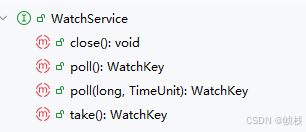
从源码可以看出,WatchService是一个接口,只有四个方法,那么怎么创建WatchService对象?创建WatchService对象需通过调用 java.nio.file.FileSystem 类的 newWatchService() 方法来实现。
WatchService watchService = FileSystems.getDefault().newWatchService();
在上述中,监控服务的注册需要调用Watchable对象的Watchable#register register方法。Watchable 是 Java NIO 文件系统中用于表示可以被监视的对象的核心接口。它允许将对象注册到监视服务中,以便检测文件系统的变化和事件。
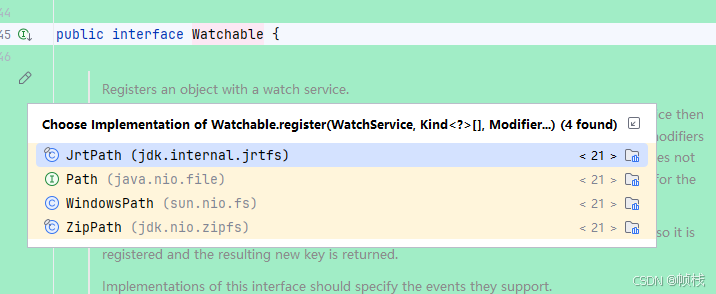
java.nio中Watchable接口的继承者只有java.nio.file.Path接口,所以我们需要通过该接口的 register方法来注册监控服务。该接口是 Java 7 中引入的用于替代传统 java.io.File 类的现代文件路径操作接口
,它提供了更强大、更灵活的文件系统操作能力。具备跨操作系统,自动处理不同系统的路径差异;表示文件或目录的绝对路径和相对路径;支持多线程并行使用等特性。通过传入指定路径创建Path对象。
// 创建Path对象
Path watchDirectory = Paths.get(directoryPath);
// 注册监控事件:文件创建
watchDirectory.register(watchService,StandardWatchEventKinds.ENTRY_CREATE);
StandardWatchEventKinds是一个定义了标准事件类型的工具类,包括以下几种核心事件类型:
- ENTRY_CREATE - 目录条目创建
- ENTRY_DELETE - 目录条目删除
- ENTRY_MODIFY - 目录条目修改
- OVERFLOW - 表示事件可能丢失或丢弃的特殊事件
获取事件
在某个目录上创建并注册了监控服务之后,接下来就是通过监控服务获取目录的事件了,可以调用 poll() 或 take() 方法获取事件。两者主要区别是 poll() 方法立即返回结果,如果没有事件就返回 null; take() 方法如果没有事件,会一直等待直到有事件发生。
WatchKey key = watchService.poll(100, TimeUnit.MILLISECONDS);
WatchKey是WatchService 的核心组件,代表在监视服务中的一个注册,用于跟踪文件系统对象的变化。每个向 WatchService 注册的目录都会返回一个 WatchKey 实例,该实例负责跟踪该目录中发生的事件。关键方法:
- pollEvents():检索并移除所有待处理的事件,返回一个包含所有捕获事件的列表。
- reset():重置键值,使其重新处于就绪状态,继续等待后续事件。
- isValid():检查该键值是否仍然有效,在某些情况下(如目录被删除),键值会自动失效。
if (key != null) {  // 如果有关键事件发生
    for (WatchEvent<?> event : key.pollEvents()) {  // 遍历所有事件
        // 检查事件类型是否为文件创建
        if (event.kind() == StandardWatchEventKinds.ENTRY_CREATE) {
            // 解析事件上下文,获取新创建文件的路径
            Path filePath = watchDirectory.resolve((Path) event.context());
            // ...
        }
    }
    // 重置监控键,使其能够继续接收新事件
    key.reset();
}
WatchKey 的pollEvents()返回一个事件列表List<WatchEvent<?>>,通过WatchEvent对象可以获取事件的类型、事件内容和事件数量。
/**
 * Returns the context for the event.
 *
 * <p> In the case of {@link StandardWatchEventKinds#ENTRY_CREATE ENTRY_CREATE},
 * {@link StandardWatchEventKinds#ENTRY_DELETE ENTRY_DELETE}, and {@link
 * StandardWatchEventKinds#ENTRY_MODIFY ENTRY_MODIFY} events the context is
 * a {@code Path} that is the {@link Path#relativize relative} path between
 * the directory registered with the watch service, and the entry that is
 * created, deleted, or modified.
 *
 * @return  the event context; may be {@code null}
 */
T context();
WatchEvent#context()方法返回事件的上下文信息。对于StandardWatchEventKinds#ENTRY_CREATE 、StandardWatchEventKinds#ENTRY_DELETE 和StandardWatchEventKinds#ENTRY_MODIFY 类型的事件,上下文是一个Path对象,表示在监视服务中注册的目录与所创建、删除或修改的条目之间的Path#relativize 相对路径。例如:
// 基础路径
Path watchDirectory = Paths.get("/home/user");

// 相对路径,创建文件事件返回的内容/order.xml
Path path = (Path) event.context();

// resolve()则将基础路径与相对路径进行拼接,得到/home/user/order.xml
Path filePath = watchDirectory.resolve(path);
监控目录举例
public class WatchServiceTest {
    public static void main(String[] args) throws IOException, InterruptedException {
        WatchService watchService = FileSystems.getDefault().newWatchService();
        String dir = "D:\\log";
        Path watchDir = Paths.get(dir);
        watchDir.register(watchService, StandardWatchEventKinds.ENTRY_CREATE, StandardWatchEventKinds.ENTRY_DELETE, StandardWatchEventKinds.ENTRY_MODIFY);
        while (true) {
            System.out.println("开始监控目录" + dir);
            WatchKey key = watchService.poll(1000, TimeUnit.MILLISECONDS);
            if (key != null) {
                key.pollEvents().forEach(event -> {
                    if (event.kind() == StandardWatchEventKinds.ENTRY_CREATE) {
                        System.out.println("监控到文件创建事件:" + event.context());
                    } else if (event.kind() == StandardWatchEventKinds.ENTRY_DELETE) {
                        System.out.println("监控到文件删除事件:" + event.context());
                    } else if (event.kind() == StandardWatchEventKinds.ENTRY_MODIFY) {
                        System.out.println("监控到文件删除修改:" + event.context());
                    }
                });
                key.reset();
            }
        }
    }
}
运行程序后,往目录中增删改文件,运行结果如下:
开始监控目录D:\log
开始监控目录D:\log
监控到文件创建事件:新建文本文档.txt
开始监控目录D:\log
开始监控目录D:\log
监控到文件删除事件:新建文本文档.txt
监控到文件创建事件:test.txt
开始监控目录D:\log
开始监控目录D:\log
开始监控目录D:\log
监控到文件创建事件:test - 副本.txt
开始监控目录D:\log
监控到文件删除修改:test - 副本.txt
开始监控目录D:\log
监控到文件创建事件:test - 副本 (2).txt
开始监控目录D:\log
监控到文件删除修改:test - 副本 (2).txt
开始监控目录D:\log
监控到文件创建事件:test - 副本 (3).txt
开始监控目录D:\log
监控到文件删除修改:test - 副本 (3).txt
开始监控目录D:\log
监控到文件创建事件:test - 副本 (4).txt
开始监控目录D:\log
监控到文件删除修改:test - 副本 (4).txt
开始监控目录D:\log
开始监控目录D:\log
开始监控目录D:\log
监控到文件删除事件:test - 副本 (4).txt
开始监控目录D:\log
监控到文件删除事件:test - 副本 (3).txt
开始监控目录D:\log
监控到文件删除修改:test.txt
开始监控目录D:\log
监控到文件删除修改:test.txt
开始监控目录D:\log
从运行结果可以验证,事件的返回内容是文件的相对路径。





 扫一扫
扫一扫


 被折叠的 条评论
为什么被折叠?
被折叠的 条评论
为什么被折叠?
 到【灌水乐园】发言





