


很多人第一次看到 AI Agent 自己编辑文件、跑代码、修 bug,还能一直运行下去的时候,都觉得挺神奇。其实远没有想象中那么复杂。这里没什么秘密算法,也没有什么"智能体大脑"这种玄学概念。
AI Agent核心就三件事:循环 + LLM + 工具函数。
如果你会写个 while True 循环?那基本就算成功一半了。
这篇文章会完整展示怎么用 Gemini 3 搭一个真正能用的 Agent:从最基础的 API 调用,到一个能读写文件、理解需求的命令行助手。
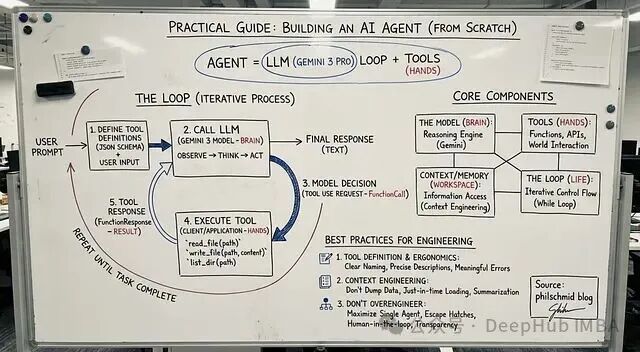
一、Agent 到底是什么
传统程序就是流程图那一套:步骤 A → 步骤 B → 步骤 C → 结束。
而Agent 不一样,它会根据当前状况决定下一步干什么。可以理解成围绕 LLM 搭的一个小系统,比如说:
- 规划任务
- 执行操作
- 根据结果调整
- 循环往复直到搞定
所以不是写死的脚本,更像是个会思考的循环。
不管多复杂的 Agent,都逃不开这四个部分:
1、模型 负责思考
这里用的是 Gemini 3 Pro。它可以分析用户需求,决定接下来该做什么。
2、工具 负责执行
就是一堆函数:读文件、列目录、发邮件、调 API…想加什么加什么。
3、上下文工作记忆
模型当前能看到的所有信息,怎么管理这块内容,业内叫 Context Engineering。
4、循环 运转机制
观察 → 思考 → 行动 → 重复,一直到任务完成。
就这么四块,没别的了。
二、循环的运行逻辑
几乎所有 Agent 都是这个流程:
先把可用的工具描述给模型看,然后把用户请求和工具定义一起发给模型。模型会做决策:要么直接回复,要么调用某个工具并传参数。
但是你要写代码负责在 Python 里执行这个工具。
执行完把结果喂回给 Gemini。
模型拿到新信息后继续判断下一步。
就这样循环,直到模型觉得任务完成了。
下面我们开始写:
第一步:基础聊天机器人
先写个 Gemini 3 API 的简单封装 ,其实就是个能记住对话的类。
from google import genai

from google.genai import types

class Agent:

    def __init__(self, model: str):

        self.model = model

        self.client = genai.Client()

        self.contents = []

    def run(self, contents: str):

        self.contents.append({"role": "user", "parts": [{"text": contents}]})

        response = self.client.models.generate_content(

            model=self.model,

            contents=self.contents

        )

        self.contents.append(response.candidates[0].content)

        return response

agent = Agent(model="gemini-3-pro-preview")

response1 = agent.run(

    "Hello, what are the top 3 cities in Germany to visit? Only return the names."

)

print(response1.text)
上面代码能跑,但是就是个聊天机器人。它啥也干不了,因为没有"手"。
第二步:加入工具函数
工具其实就是 Python 函数 + 一段 JSON schema 描述。描述是给 Gemini 看的,让它知道这个函数能干啥。
这里加三个简单的:
read_file- 读文件write_file- 写文件list_dir- 列目录
先写定义:
read_file_definition = {

    "name": "read_file",

    "description": "Reads a file and returns its contents.",

    "parameters": {

        "type": "object",

        "properties": {

            "file_path": {"type": "string"}

        },

        "required": ["file_path"],

    },

}

list_dir_definition = {

    "name": "list_dir",

    "description": "Lists the files in a directory.",

    "parameters": {

        "type": "object",

        "properties": {

            "directory_path": {"type": "string"}

        },

        "required": ["directory_path"],

    },

}

write_file_definition = {

    "name": "write_file",

    "description": "Writes contents to a file.",

    "parameters": {

        "type": "object",

        "properties": {

            "file_path": {"type": "string"},

            "contents": {"type": "string"},

        },

        "required": ["file_path", "contents"],

    },

}
然后是实际的 Python 实现:
def read_file(file_path: str) -> dict:

    with open(file_path, "r") as f:

        return f.read()

def write_file(file_path: str, contents: str) -> bool:

    with open(file_path, "w") as f:

        f.write(contents)

    return True

def list_dir(directory_path: str) -> list[str]:

    return os.listdir(directory_path)
打包一下就搞定了:
file_tools = {

    "read_file": {"definition": read_file_definition, "function": read_file},

    "write_file": {"definition": write_file_definition, "function": write_file},

    "list_dir": {"definition": list_dir_definition, "function": list_dir},

}
第三步:真正的 Agent
现在把 Agent 类扩展一下,让它能:
- 识别工具调用
- 在 Python 里执行对应的函数
- 把结果传回 Gemini
- 继续循环直到完成
class Agent:

    def __init__(self, model: str, tools: dict,

                 system_instruction="You are a helpful assistant."):

        self.model = model

        self.client = genai.Client()

        self.contents = []

        self.tools = tools

        self.system_instruction = system_instruction

    def run(self, contents):

        # Add user input to history

        if isinstance(contents, list):

            self.contents.append({"role": "user", "parts": contents})

        else:

            self.contents.append({"role": "user", "parts": [{"text": contents}]})

        config = types.GenerateContentConfig(

            system_instruction=self.system_instruction,

            tools=[types.Tool(

                function_declarations=[

                    tool["definition"] for tool in self.tools.values()

                ]

            )],

        )

        response = self.client.models.generate_content(

            model=self.model,

            contents=self.contents,

            config=config

        )

        # Save model output

        self.contents.append(response.candidates[0].content)

        # If model wants to call tools

        if response.function_calls:

            functions_response_parts = []

            for tool_call in response.function_calls:

                print(f"[Function Call] {tool_call}")

                if tool_call.name in self.tools:

                    result = {"result": self.tools[tool_call.name]["function"](**tool_call.args)}

                else:

                    result = {"error": "Tool not found"}

                print(f"[Function Response] {result}")

                functions_response_parts.append(

                    {"functionResponse": {"name": tool_call.name, "response": result}}

                )

            # Feed tool results back to the model

            return self.run(functions_response_parts)

        return response
这样就可以跑一下试试了:
agent = Agent(

    model="gemini-3-pro-preview",

    tools=file_tools,

    system_instruction="You are a helpful Coding Assistant. Respond like Linus Torvalds."

)

response = agent.run("Can you list my files in the current directory?")

print(response.text)
如果没问题,Gemini 会调工具,拿到结果,然后给出最终回复。
到这一步,一个能用的 Agent 就搭好了。
第四步:包装成命令行工具
最后我们在再套个输入循环就行:
agent = Agent(

    model="gemini-3-pro-preview",

    tools=file_tools,

    system_instruction="You are a helpful Coding Assistant. Respond like Linus Torvalds."

)

print("Agent ready. Type something (or 'exit').")

while True:

    user_input = input("You: ")

    if user_input.lower() in ['exit', 'quit']:

        break

    response = agent.run(user_input)

    print("Linus:", response.text, "\n")
代码很少但是效果已经相当不错了。
总结
搭 Agent 一开始看着挺唬人,但理解了结构之后,会发现简单得有点无聊。往简单了说,它就是个循环。一个里面跑着聪明模型的循环。明白这点之后,你就能造出看起来"有生命"的 Agent 了。
如果想继续扩展的话,可以加这些:
网络搜索、数据库查询、执行 shell 命令、调用云服务、长期记忆、工作流编排、任务调度、多步规划…
但不管怎么加,底层还是那个简单结构:
观察 → 思考 → 行动 → 重复
这就是现代 Agent 的核心。
那么,如何系统的去学习大模型LLM?
作为一名深耕行业的资深大模型算法工程师,我经常会收到一些评论和私信,我是小白,学习大模型该从哪里入手呢?我自学没有方向怎么办?这个地方我不会啊。如果你也有类似的经历,一定要继续看下去!这些问题啊,也不是三言两语啊就能讲明白的。
所以我综合了大模型的所有知识点,给大家带来一套全网最全最细的大模型零基础教程。在做这套教程之前呢,我就曾放空大脑,以一个大模型小白的角度去重新解析它,采用基础知识和实战项目相结合的教学方式,历时3个月,终于完成了这样的课程,让你真正体会到什么是每一秒都在疯狂输出知识点。
由于篇幅有限,⚡️ 朋友们如果有需要全套 《2025全新制作的大模型全套资料》,扫码获取~
👉大模型学习指南+路线汇总👈
我们这套大模型资料呢,会从基础篇、进阶篇和项目实战篇等三大方面来讲解。

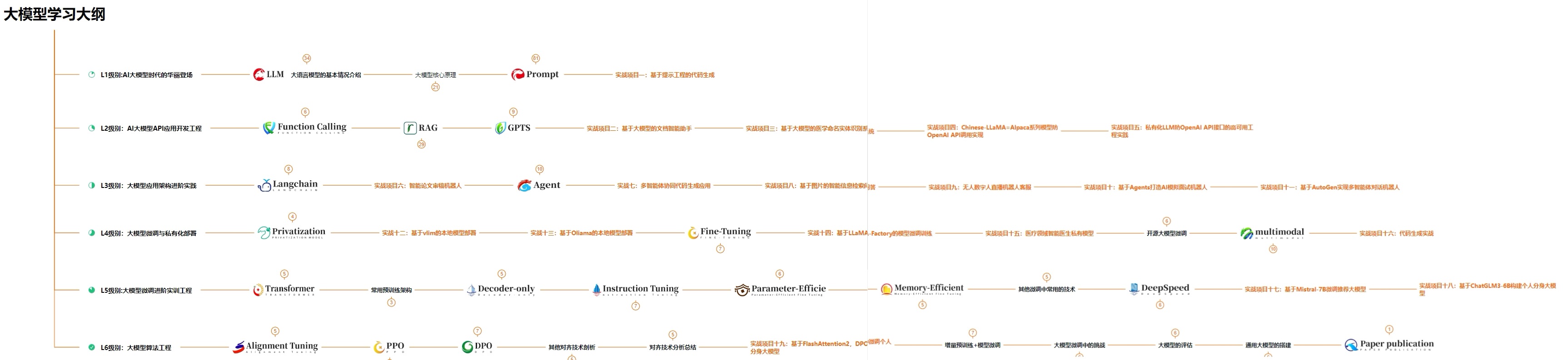
👉①.基础篇👈
基础篇里面包括了Python快速入门、AI开发环境搭建及提示词工程,带你学习大模型核心原理、prompt使用技巧、Transformer架构和预训练、SFT、RLHF等一些基础概念,用最易懂的方式带你入门大模型。

👉②.进阶篇👈
接下来是进阶篇,你将掌握RAG、Agent、Langchain、大模型微调和私有化部署,学习如何构建外挂知识库并和自己的企业相结合,学习如何使用langchain框架提高开发效率和代码质量、学习如何选择合适的基座模型并进行数据集的收集预处理以及具体的模型微调等等。

👉③.实战篇👈
实战篇会手把手带着大家练习企业级的落地项目(已脱敏),比如RAG医疗问答系统、Agent智能电商客服系统、数字人项目实战、教育行业智能助教等等,从而帮助大家更好的应对大模型时代的挑战。

👉④.福利篇👈
最后呢,会给大家一个小福利,课程视频中的所有素材,有搭建AI开发环境资料包,还有学习计划表,几十上百G素材、电子书和课件等等,只要你能想到的素材,我这里几乎都有。我已经全部上传到优快云,朋友们如果需要可以微信扫描下方优快云官方认证二维码免费领取【保证100%免费】
相信我,这套大模型系统教程将会是全网最齐全 最易懂的小白专用课!!





 扫一扫
扫一扫


 2822
2822

 被折叠的 条评论
为什么被折叠?
被折叠的 条评论
为什么被折叠?
 到【灌水乐园】发言





