


 本文详细介绍了如何使用FFMPEG库进行桌面截屏并保存为MP4文件的过程,包括初始化、截屏设置、编码器信息获取、码流信息设置以及视频数据的获取和保存。通过FFmpeg的gdigrab设备捕获桌面图像,经过解码、编码等步骤,最终成功保存为MP4格式。
1. 概述
本文将介绍如何利用FFMPEG对桌面进行截屏,并保存成MP4的格式。
2. 基本工作流程
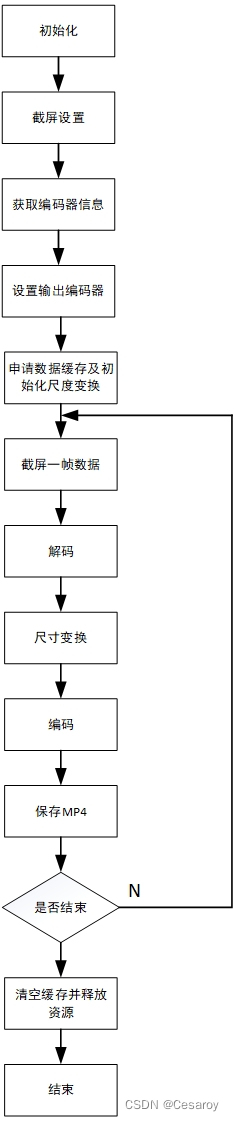
初始化:利用函数avformat_network_init(); 和avdevice_register_all();完成FFMPEG的初始化,其中avformat_network_init()完成网络库的全局初始化,avdevice_register_all()用于注册输入/输出设备;
截屏设置:
AVInputFormat *pInputFormat = av_find_input_format("gdigrab");用于寻找的gdigrab输入设备。gdigrab是FFmpeg专门用于抓取Windows桌面图像的设备。
avformat_open_input(&pInputFormatContext, "desktop", pInputFormat, &options);用于打开指定的视频流。
pInputFormatContext:用户提供的指针,类型为AVFormatContext,可以事先通过avformat_alloc_context()进行分配。
"desktop": 提供一个可打开的流。可以是本地文件,rtmp协议、rtp协议指定的流地址,这里为“desktop”,表示对整个桌面进行截屏。
pInputFormat:如果该值不为NULL,则会强制使用该值作为输入流格式,否则将会进行自动检测。在前面,程序前面已经分配AVInputFormat *pInputFormat = av_find_input_format("gdigrab");option包含AVFormatContext和demuxer私有选项的字典。
获取编码器信息:该步骤主要为了打开相应的解码器,用于对截屏的数据进行解码;
该步骤从开始到结束主要涉及的函数如下
avformat_find_stream_info(pInputFormatContext, 0);获取码流信息。例如帧率、视频宽高等;
videoStreamIndex = av_find_best_stream(pInputFormatContext, AVMEDIA_TYPE_VIDEO, -1, -1, &pInputCodec, 0);获取对应的数据流索引;
pInputCodec = avcodec_find_decoder(videoStream->codecpar->codec_id);获取对应的编码器;
ffret = avcodec_parameters_to_context(pInputCodecContex, videoStream->codecpar);从videoStream中拷贝编码器信息到pInputCodecContex中;
fret = avcodec_open2(pInputCodecContex, pInputCodec, nullptr);打开相应的编码器;
设置输出的编码器:
avformat_alloc_output_context2(&pOutputFormatContext, NULL, NULL, filename_out);在编码前需要通过这个函数申请到一个AVFormatContext
p_outstream = avformat_new_stream(pOutputFormatContext, NULL); 为这个新申请到的AVFormatContext分配一个新的stream
pOutCodec = avcodec_find_encoder(codec_id);查找一个编码器
pOutCodecContext = avcodec_alloc_context3(pOutCodec);配置编码器
以下是编码器的设置信息,从字面的上的意义不难理解,在这里不赘述
	pOutCodecContext->pix_fmt = AV_PIX_FMT_YUV422P;
	//size
	pOutCodecContext->width = pInputCodecContex->width;
	pOutCodecContext->height = pInputCodecContex->height;
	//目标码率
	pOutCodecContext->bit_rate = 4000000;
	//每10帧插入一个I帧,I帧越小视频越小
	pOutCodecContext->gop_size = 10;
	//Optional Param B帧
	pOutCodecContext->max_b_frames = 1;  //设置B帧为0,则DTS与PTS一致
	pOutCodecContext->time_base.num = 1;
	pOutCodecContext->time_base.den = 25;
	pOutCodecContext->framerate.num = 25;
	pOutCodecContext->framerate.den = 1;
avcodec_open2(pOutCodecContext, pOutCodec, nullptr) 打开解码器
申请数据内存及初始化尺度变换影
申请数据内存代码如下
	pFrame = av_frame_alloc();
	pFrameYUV = av_frame_alloc();//为转换来申请一帧的内存(把原始帧->YUV)

	pFrameYUV->format = AV_PIX_FMT_YUV422P;
	pFrameYUV->width = pInputCodecContex->width;
	pFrameYUV->height = pInputCodecContex->height;

	pFrame->format = pInputCodecContex->pix_fmt;
	pFrame->width = pInputCodecContex->width;
	pFrame->height = pInputCodecContex->height;
	if (av_frame_get_buffer(pFrame, 1) < 0) {
		qDebug() << "Failed: av_frame_get_buffer." << endl;
		return false;
	}

	uint8_t* out_buffer = (uint8_t*)av_malloc(av_image_get_buffer_size(AV_PIX_FMT_YUV422P, pInputCodecContex->width, pInputCodecContex->height, 1));

	if (av_image_fill_arrays(pFrameYUV->data, pFrameYUV->linesize, out_buffer, AV_PIX_FMT_YUV422P, pInputCodecContex->width, pInputCodecContex->height, 1) < 0) {
		qDebug() << "Failed: av_image_fill_arrays\n" << endl;
		return false;
	}
其中pFrame是用于存放截屏后解码出来的数据,pFrameYUV用于存储pFrame经尺度变换后的原始数据;
av_frame_get_buffer用于获取存储空间;
av_image_fill_arrays用于将pFrameYUV和申请到的内存进行关联;
img_convert_ctx = sws_getContext(pInputCodecContex->width, pInputCodecContex->height, pInputCodecContex->pix_fmt, pInputCodecContex->width, pInputCodecContex->height, AV_PIX_FMT_YUV422P, SWS_BICUBIC, NULL, NULL, NULL);用于定义获取视频和存储视频的尺寸变换关系,并返回结构件img_convert_ctx。
到这里,关于输入视频及其解码器,输出视频及其编码器,还有两者相关联的尺寸变换关系,内存空间都已经设置完成,实现真正实现视频的获取及保存。
视频获取及保存
av_read_frame(pInputFormatContext, packet)从输入流中获取视频,并保存到packet中。
avcodec_send_packet(pInputCodecContex, packet);,avcodec_receive_frame(pInputCodecContex, pFrame);利用这两个函数,实现数据解码,解码的结果保存在pFrame中。
sws_scale(img_convert_ctx, (const unsigned char* const*)pFrame->data, pFrame->linesize, 0, pInputCodecContex->height, pFrameYUV->data, pFrameYUV->linesize);对视频数据进行尺度变换,并将结果保存在pFrameYUV中。
avcodec_send_frame(pOutCodecContext, pFrameYUV),avcodec_receive_packet(pOutCodecContext, pkt),这两个函数实现数据的重新编码,编码后的数据保存在pkt中。
ffret = avformat_write_header(pOutputFormatContext, NULL);,ret = av_interleaved_write_frame(pOutputFormatContext, pkt);,av_write_trailer(pOutputFormatContext);三个函数实现视频数据的保存。
至此,视频数据完成了保存。程序结束时,再将申请的资源进行释放即完成全部工作。
3. 结束
本文的完整代码可以从这里下载。





 扫一扫
扫一扫


 1733
1733

 被折叠的 条评论
为什么被折叠?
被折叠的 条评论
为什么被折叠?
 到【灌水乐园】发言





